

G'day.
I've just returned from work and booted my home computer, to find out my Windows 7 believes it self not to be activated. These are the pop-ups presented to me as shown below, as well as the MGADIAG report at the time:
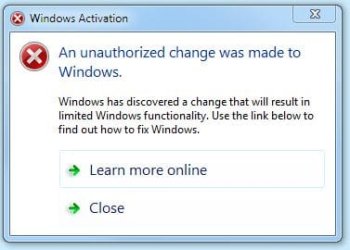
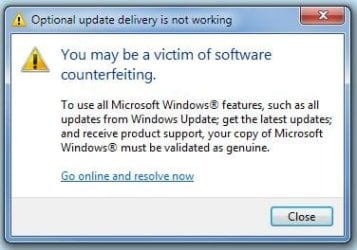
I re-activated on-line with the original product key and happily everything is now OK.
The only changes I made to my system were to add the path to the 7zip command line executable in the PATH environement varaible so as to access 7za.exe from a cmd window. SFC reports no violations. Could editing the PATH environment variable have caused this issue?
Regards,
Golden
I've just returned from work and booted my home computer, to find out my Windows 7 believes it self not to be activated. These are the pop-ups presented to me as shown below, as well as the MGADIAG report at the time:
Code:
Diagnostic Report (1.9.0027.0):
-----------------------------------------
Windows Validation Data-->

Validation Code: 50
Cached Online Validation Code: N/A, hr = 0xc004f012
Windows Product Key: *****-*****-*****-*****-BF27K
Windows Product Key Hash: YHY1WXsmUUgAIYpIntrweGWUAOY=
Windows Product ID: 00426-967-4518656-85850
Windows Product ID Type: 5
Windows License Type: Retail
Windows OS version: 6.1.7601.2.00010100.1.0.001
ID: {4551D82F-3B48-4147-B370-B7DB4BEE41E8}(3)
Is Admin: Yes
TestCab: 0x0
LegitcheckControl ActiveX: Registered, 1.9.42.0
Signed By: Microsoft
Product Name: Windows 7 Ultimate
Architecture: 0x00000009
Build lab: 7601.win7sp1_gdr.120305-1505
TTS Error: T:20120417183410377-
Validation Diagnostic:
Resolution Status: N/A

Vista WgaER Data-->
ThreatID(s): N/A, hr = 0x80070002
Version: N/A, hr = 0x80070002

Windows XP Notifications Data-->
Cached Result: N/A, hr = 0x80070002
File Exists: No
Version: N/A, hr = 0x80070002
WgaTray.exe Signed By: N/A, hr = 0x80070002
WgaLogon.dll Signed By: N/A, hr = 0x80070002

OGA Notifications Data-->
Cached Result: N/A, hr = 0x80070002
Version: N/A, hr = 0x80070002
OGAExec.exe Signed By: N/A, hr = 0x80070002
OGAAddin.dll Signed By: N/A, hr = 0x80070002

OGA Data-->
Office Status: 109 N/A
OGA Version: N/A, 0x80070002
Signed By: N/A, hr = 0x80070002
Office Diagnostics:  025D1FF3-364-80041010_025D1FF3-229-80041010_025D1FF3-230-1_025D1FF3-517-80040154_025D1FF3-237-80040154_025D1FF3-238-2_025D1FF3-244-80070002_025D1FF3-258-3

Browser Data-->
Proxy settings: N/A
User Agent: Mozilla/4.0 (compatible; MSIE 8.0; Win32)
Default Browser: C:\Program Files (x86)\Mozilla Firefox\firefox.exe
Download signed ActiveX controls: Prompt
Download unsigned ActiveX controls: Disabled
Run ActiveX controls and plug-ins: Allowed
Initialize and script ActiveX controls not marked as safe: Disabled
Allow scripting of Internet Explorer Webbrowser control: Disabled
Active scripting: Allowed
Script ActiveX controls marked as safe for scripting: Allowed

File Scan Data-->

Other data-->
Office Details:  <GenuineResults><MachineData><UGUID>{4551D82F-3B48-4147-B370-B7DB4BEE41E8}</UGUID><Version>1.9.0027.0</Version><OS>6.1.7601.2.00010100.1.0.001</OS><Architecture>x64</Architecture><PKey>*****-*****-*****-*****-BF27K</PKey><PID>00426-967-4518656-85850</PID><PIDType>5</PIDType><SID>S-1-5-21-529546221-1445753059-3880572656</SID><SYSTEM><Manufacturer>Gigabyte  Technology Co.,  Ltd.</Manufacturer><Model>P55A-UD3R</Model></SYSTEM><BIOS><Manufacturer>Award  Software International,  Inc.</Manufacturer><Version>F13</Version><SMBIOSVersion  major="2"  minor="4"/><Date>20100917000000.000000+000</Date></BIOS><HWID>BB3A3407018400FE</HWID><UserLCID>0C09</UserLCID><SystemLCID>0409</SystemLCID><TimeZone>Cen.  Australia Standard  Time(GMT+09:30)</TimeZone><iJoin>0</iJoin><SBID><stat>3</stat><msppid></msppid><name></name><model></model></SBID><OEM/><GANotification/></MachineData><Software><Office><Result>109</Result><Products/><Applications/></Office></Software></GenuineResults>

Spsys.log Content:  U1BMRwEAAAAAAQAACAAAAKQkAAAAAAAAYWECAID6//+//lINeRzNAWbXGpOihAOpMHzDmWxsjuoFbuq6gIf6Gb/lMWqKOvt3Poe4x2MKjrJ+GXwN51LGPjOQ1ifb1stzrqx+w3WNaAwzkNYn29bLc66sfsN1jWgMM5DWJ9vWy3OurH7DdY1oDDOQ1ifb1stzrqx+w3WNaAwzkNYn29bLc66sfsN1jWgMM5DWJ9vWy3OurH7DdY1oDDOQ1ifb1stzrqx+w3WNaAwzkNYn29bLc66sfsN1jWgMM5DWJ9vWy3OurH7DdY1oDDOQ1ifb1stzrqx+w3WNaAwzkNYn29bLc66sfsN1jWgMM5DWJ9vWy3OurH7DdY1oDDOQ1ifb1stzrqx+w3WNaAx4dZsxs/sxaQSZh6DCEuBHwMasBzr3aVH9XFLy9U5TDlgHQx5Xke3mGe3jBdy09igzkNYn29bLc66sfsN1jWgMM5DWJ9vWy3OurH7DdY1oDDOQ1ifb1stzrqx+w3WNaAwzkNYn29bLc66sfsN1jWgMM5DWJ9vWy3OurH7DdY1oDDOQ1ifb1stzrqx+w3WNaAwzkNYn29bLc66sfsN1jWgMM5DWJ9vWy3OurH7DdY1oDDOQ1ifb1stzrqx+w3WNaAwzkNYn29bLc66sfsN1jWgMM5DWJ9vWy3OurH7DdY1oDDOQ1ifb1stzrqx+w3WNaAwzkNYn29bLc66sfsN1jWgM

Licensing Data-->
Software licensing service version: 6.1.7601.17514
Error: product key not found.

Windows Activation Technologies-->
HrOffline: 0x00000000
HrOnline: 0x00000000
HealthStatus: 0x0000000000000000
Event Time Stamp: 3:16:2012 19:15
ActiveX: Registered, Version: 7.1.7600.16395
Admin Service: Registered, Version: 7.1.7600.16395
HealthStatus Bitmask Output:


HWID Data-->
HWID Hash Current: OgAAAAAABgABAAEAAgABAAAAAwABAAEAHKK42Zyf+gGSPHTEwtIoC/YP6GHQHHyHkOFAqXKKvkF2Vg==

OEM Activation 1.0 Data-->
N/A

OEM Activation 2.0 Data-->
BIOS valid for OA 2.0: yes, but no SLIC table
Windows marker version: N/A
OEMID and OEMTableID Consistent: N/A
BIOS Information:
  ACPI Table Name    OEMID Value    OEMTableID Value
  APIC            GBT           GBTUACPI
  FACP            GBT           GBTUACPI
  HPET            GBT           GBTUACPI
  MCFG            GBT           GBTUACPI
  EUDS            GBT
  TAMG            GBT           GBT   B0
SSDT INTEL PPM RCMThe only changes I made to my system were to add the path to the 7zip command line executable in the PATH environement varaible so as to access 7za.exe from a cmd window. SFC reports no violations. Could editing the PATH environment variable have caused this issue?
Regards,
Golden
Last edited:
My Computer
At a glance
Windows 10 Pro x64 ; Xubuntu x64Intel i7 860 @ 2.80 GHz O/C'ed to 4.0GHz16GB Corsair Vengance DDR3 @ 661 MHz Dual Cha...EVGA NVidia GTX 560 1024MB
- Computer type
- PC/Desktop
- Computer Manufacturer/Model Number
- Golden Mk. I.4
- OS
- Windows 10 Pro x64 ; Xubuntu x64
- CPU
- Intel i7 860 @ 2.80 GHz O/C'ed to 4.0GHz
- Motherboard
- Gigabyte P55A-UD3R Rev.1. Award BIOS F13
- Memory
- 16GB Corsair Vengance DDR3 @ 661 MHz Dual Channel (9-9-9-24)
- Graphics Card(s)
- EVGA NVidia GTX 560 1024MB
- Sound Card
- Realtek Integrated
- Monitor(s) Displays
- Dual Samsung SyncMaster 2494HS
- Screen Resolution
- 1920*1080 and 1920*1080
- Hard Drives
- 1*Samsung 840 EVO 120GB SSD;
1*OCZ Vertex 2 60GB SSD;
2*Samsung F3 SpinPoint 1TB in RAID0;
1*Samsung F1 SpinPoint 1TB;
2*Western Digital 1TB External USB 3.0
1*Western Digital 500GB External USB 3.0
1*Seagate 500GB External USB 2.0
- PSU
- Thermaltake ToughPower QFan 750W
- Case
- Thermaltake Element S VK60001W2Z
- Cooling
- Corsair H60 Water Cooling, 2*230mm and 2*80mm case fans
- Keyboard
- Logitech G110
- Mouse
- Logitech MX518


