windows 7 compared to XP Pro

I'm a big linux guy, and have always been used to how fast it is. while 7 IS faster than "xp" and "vista", my linux distro is still faster for me to game (even though FPS is lower), do office work, and browse the net.

I'm not about to do a "fresh install". I only use 7 to play 2 games.

Again, you've done something wrong.
Yep, I installed 7 and let it do it's updates. Did something wrong? Nope.

I've got 2 pc's, one is a phenom II tri core, the other is a phenom quad, and both have same HDD's, 4 GB ram and 7 ultimate 64 bit, both are darn near the same in "speed".

Still hunting for benchmarks that are based on RTM and later... I found ONE, but it was of both in beta. Have yet to find a detailed one for official "final" releases. I did find a few by windows guys, but all they included was FPS in gaming, which is a no brainer that 7 is going to beat it senseless there.
 
Last edited:

My Computer My Computer

OS
Ubuntu 10.10 64bit, Windows 7 Ultimate 64bit
CPU
AMD Phenom II X6 1090T
Motherboard
ASUS M3A79-T Deluxe
Memory
OCZ 4GB
Graphics Card(s)
GTX 275 OC
Sound Card
SoundMax
Monitor(s) Displays
Asus 23"
PSU
CM RS-650
Case
CM Storm Scout
Cooling
CM GeminII S
As someone who is moving from XP SP3 to 7 because I have no choice (my main laptop's screen stopped working and I'm using an external monitor till my new laptop arrives) I hope you guys are right about 7 being at least as good as XP.

But, it seems you all ignore one of the main problems and expenses with upgrading to 7 or any new OS: having to update a bunch of software and utilities that worked with XP but may not work correctly with 7. That is where my main concern lies and I am trying to get as prepared as I can to minimize these surprises plus the time wasted to re-install and re-customize the apps that will work on 7.

Just my 2 cents.
 

My Computer My Computer

OS
Windows 7
... it detects "ALL" of my hardware without having to install any 3rd party drivers....and the list goes on and on.

... never ran into a situation where I had to install drivers from anyone but the manufacture of the hardware I installed.

And since I know how to make custom install disc, thus have the option to slip-stream the drivers into the installation...
 

My Computer My Computer

Computer Manufacturer/Model Number
Custom builds... I build my own.
OS
Windows 7 Ultimate x86 & x64
CPU
Core i7-860, AMD Phenom II X4 955, AMD Athlon II X2 250
Motherboard
ASUS
Memory
Kingston HyperX
Graphics Card(s)
EVGA GeForce 9800 GTX, SAPPHIRE Radeon HD 5870
Sound Card
HT | OMEGA
Monitor(s) Displays
LCD
Hard Drives
Western Digital
PSU
OCZ Technology
Case
COOLER MASTER Storm Sniper, Storm Scout, Antec Skeleton
Internet Speed
DSL
IMHO. The arguments that XP is to old, to ugly, being the reason to upgrade to 7 is weak at best.

"To Old" To do what exactly? Surf the net? check e-mail? Word processing? Play Games? The majority of what average user want to do with their computer, can be done with any of the windows OS dating back windows 9x.

"To Ugly" means you -more then likely- never skinned your interface.

So far the only advantage that I've seen with windows 7 over xp is stability. Don't get me started with win7 control panel.... :mad:
 

My Computer My Computer

Computer Manufacturer/Model Number
Custom builds... I build my own.
OS
Windows 7 Ultimate x86 & x64
CPU
Core i7-860, AMD Phenom II X4 955, AMD Athlon II X2 250
Motherboard
ASUS
Memory
Kingston HyperX
Graphics Card(s)
EVGA GeForce 9800 GTX, SAPPHIRE Radeon HD 5870
Sound Card
HT | OMEGA
Monitor(s) Displays
LCD
Hard Drives
Western Digital
PSU
OCZ Technology
Case
COOLER MASTER Storm Sniper, Storm Scout, Antec Skeleton
Internet Speed
DSL
As someone who is moving from XP SP3 to 7 because I have no choice (my main laptop's screen stopped working and I'm using an external monitor till my new laptop arrives) I hope you guys are right about 7 being at least as good as XP.

But, it seems you all ignore one of the main problems and expenses with upgrading to 7 or any new OS: having to update a bunch of software and utilities that worked with XP but may not work correctly with 7. That is where my main concern lies and I am trying to get as prepared as I can to minimize these surprises plus the time wasted to re-install and re-customize the apps that will work on 7.

Just my 2 cents.

I think you'll be pleasantly surprised.

The installer is nearly driver-complete, with newer added during install if you keep connected to internet, and via Windows Updates.

Unlike XP/Vista, MS sponsored the WHQL partnership with all manufacturers to build Win7 drivers, so they have them first.

They also leveraged their support to encourage manufacturers not to hold out on new drivers for older hardware as in Vista.

Those accustomed to XP installs who import their chipset should check first because it's likely the installer has better.

Also compatibility in Win7 is amazing, with most XP and almost all Vista programs running straight away. For others you can usually find a Compatibility mode on the .exe Properties tab or by following the Compatibility Wizard which pops up saying "This program may not have installed correctly."

Post any problems here with exact issue in title to get them worked through.
 
... XP is too Ugly ...
Beauty is only monitor deep.
Anybody got any Dumb Blond Jokes ??
 

My Computer My Computer

Computer Manufacturer/Model Number
HP d4996t (upgraded)
OS
XP MCE .... XP Pro 64 .... W7 U x64
CPU
E6750, 2.67GHz C2D
Memory
4GB, PC2 6400
Graphics Card(s)
GeForce 9400GT
Monitor(s) Displays
Twin Samsung 2443BWT
Screen Resolution
1920x1200
Hard Drives
Many .. 3 Installed
PSU
460W
Internet Speed
Cable
I love the search bar, how I can search for words that are mentioned inside a text file for example, if I'm looking for a song I don't have to scroll through deep folders with music, I can just search the name and have it at a seconds notice.

The taskbar is MUCH better, allowing to keep things more organized and simpler to use.

It takes care of my internet connection so much better, this is on my laptop and where I change internet connections daily, prior to W7 I had to connect manually, it does things for me now.

It finds all drivers instantly, the plug-n-play is amazing.

It's much more organized and easier to use.

It takes care of so many small things that help make life easier.

It does have a fresh new design which looks good, and it's just much simpler and easier to use...

To me xp vs w7 is a no brainer in which is better, but of course XP is enough for browsing and just doing stuff like that. Sure a 15 year old car might drive great but the ride is so much more comfy in a new car
 

My Computer My Computer

OS
Windows 7 Ultimate - Laptop / Stationary PC
CPU
Amd 64 Turion 2x 2.0~ / Amd 3400+ 2.4~
Memory
2048mb / 1024mb
Graphics Card(s)
128mb intergrated / 256 dedicated
Screen Resolution
1200x800 /
Internet Speed
100/10 optic fibre
Sure a 15 year old car might drive great but the ride is so much more comfy in a new car

... only if that 15 year car wasn't maintained and/or overhauled every once in a while...
 

My Computer My Computer

Computer Manufacturer/Model Number
Custom builds... I build my own.
OS
Windows 7 Ultimate x86 & x64
CPU
Core i7-860, AMD Phenom II X4 955, AMD Athlon II X2 250
Motherboard
ASUS
Memory
Kingston HyperX
Graphics Card(s)
EVGA GeForce 9800 GTX, SAPPHIRE Radeon HD 5870
Sound Card
HT | OMEGA
Monitor(s) Displays
LCD
Hard Drives
Western Digital
PSU
OCZ Technology
Case
COOLER MASTER Storm Sniper, Storm Scout, Antec Skeleton
Internet Speed
DSL
Sure a 15 year old car might drive great but the ride is so much more comfy in a new car

... only if that 15 year car wasn't maintained and/or overhauled every once in a while...

Well the new one would always run smoother and have a more comfortable interior (which is where you are at all times).

But cars aside, sure XP is capable of doing everything I need, but WIN7 does everything easier, faster and smoother. Sure it's not essential for functioning but it is better. Nobody is forcing anyone to upgrade.
 

My Computer My Computer

OS
Windows 7 Ultimate - Laptop / Stationary PC
CPU
Amd 64 Turion 2x 2.0~ / Amd 3400+ 2.4~
Memory
2048mb / 1024mb
Graphics Card(s)
128mb intergrated / 256 dedicated
Screen Resolution
1200x800 /
Internet Speed
100/10 optic fibre
I am using windows 7 now. It is great, no doubt. Previously I tried vista for a few days, but I found it making my system slow and easily crash-able. So I bounced back to xp and weighted for 7 to release. In windows 7, only one thing I found less attractive than xp that it is not so easy to customize. In xp, I used windowblinds, iconpackager, styler, and many apps to make it over at will, but the versions of windowblinds and iconpackager I have dont work in 7. Styler is not applicable in 7 at all. so I found xp is easily customizable.

Still I dont want to back to xp because it is old, needs a lot of drivers and codecs to run properly, and most important thing is that it lacks aero. In my openion, if xp comes with aero, it would be great. But the greatest option would be xp with aero and cover flow.

Edit: I found 7 (versions higher than home basic) backward from xp coz it doesnt run in all systems. To have aero, you need a graphics card or onboard graphics, wherw xp can be installed in almost all machines.
 

My Computer My Computer

Computer type
PC/Desktop
Computer Manufacturer/Model Number
Self Assembled
OS
Microsoft Windows 10 Pro Insider Preview 64-bit
CPU
Intel(R) Core(TM) i3-4130 CPU @ 3.40GHz
Motherboard
Gigabyte Technology Co., Ltd. B85M-D3H
Memory
Corsair Vengence 4GB x2 (8.00GB Dual-Channel DDR3 @ 798MHz)
Graphics Card(s)
2047MB GeForce GTS 450 (ZOTAC International)
Sound Card
Onboard (Realtek High Definition Audio)
Monitor(s) Displays
LG Flatron E2040T
Screen Resolution
1600x900
Hard Drives
Western Digital 1 TB
Seagate 500 GB
PSU
Corsair VS550
Case
Cooler Master K380
Cooling
Cooler Master Seidon 120V Plus
Keyboard
Logitech MK260r
Mouse
Logitech MK260r
Internet Speed
PMPL Broadband
Antivirus
Windows Defender + MBAM
Browser
Firefox
Other Info
Dell Studio 15" Laptop
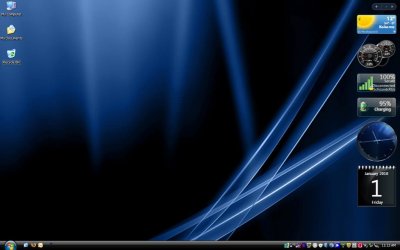
Anybody know what operating system this is ???
 

Attachments

  • Desktop.jpg
    Desktop.jpg
    27.8 KB · Views: 15

My Computer My Computer

Computer Manufacturer/Model Number
HP d4996t (upgraded)
OS
XP MCE .... XP Pro 64 .... W7 U x64
CPU
E6750, 2.67GHz C2D
Memory
4GB, PC2 6400
Graphics Card(s)
GeForce 9400GT
Monitor(s) Displays
Twin Samsung 2443BWT
Screen Resolution
1920x1200
Hard Drives
Many .. 3 Installed
PSU
460W
Internet Speed
Cable
Anybody know what operating system this is ???

This is windows xp black edition. A modded version of xp with a windowblinds theme (perhaps invi pro) and thoojse sidebar (a vista sidebar clone). It flows here and there in file sharing sites, and contains a lot of spywares. So my suggestion, dont show any interest on it.
The wallpaper is hal walpaper (from the film space odessy).
 

My Computer My Computer

Computer type
PC/Desktop
Computer Manufacturer/Model Number
Self Assembled
OS
Microsoft Windows 10 Pro Insider Preview 64-bit
CPU
Intel(R) Core(TM) i3-4130 CPU @ 3.40GHz
Motherboard
Gigabyte Technology Co., Ltd. B85M-D3H
Memory
Corsair Vengence 4GB x2 (8.00GB Dual-Channel DDR3 @ 798MHz)
Graphics Card(s)
2047MB GeForce GTS 450 (ZOTAC International)
Sound Card
Onboard (Realtek High Definition Audio)
Monitor(s) Displays
LG Flatron E2040T
Screen Resolution
1600x900
Hard Drives
Western Digital 1 TB
Seagate 500 GB
PSU
Corsair VS550
Case
Cooler Master K380
Cooling
Cooler Master Seidon 120V Plus
Keyboard
Logitech MK260r
Mouse
Logitech MK260r
Internet Speed
PMPL Broadband
Antivirus
Windows Defender + MBAM
Browser
Firefox
Other Info
Dell Studio 15" Laptop
You almost won a prise ... It's XP Pro 64 ... Attached is XP Pro 32.
The only thing I'm missing in XP is DX10.

Since W7 Beta .. I've been trying to put missing XP tools back in W7 so I can use it.
I think it's easier to make XP look like W7 .. and add the Toys n Gadgets ..
Than Add the good tools back in W7.

I don't do Themes .. So I had to Email my Neighbor for these Screen Shots ..
If there was any spyware in it .. He would Know it.
 

Attachments

  • XP32Pro.jpg
    XP32Pro.jpg
    43.9 KB · Views: 8

My Computer My Computer

Computer Manufacturer/Model Number
HP d4996t (upgraded)
OS
XP MCE .... XP Pro 64 .... W7 U x64
CPU
E6750, 2.67GHz C2D
Memory
4GB, PC2 6400
Graphics Card(s)
GeForce 9400GT
Monitor(s) Displays
Twin Samsung 2443BWT
Screen Resolution
1920x1200
Hard Drives
Many .. 3 Installed
PSU
460W
Internet Speed
Cable
In both the shots, only one visible drawback is system icons. if they are changed to 7 icons, and the system trey is organised, it would be almost difficult to say that "no! its not 7, it is merely a xp. When I used xp, my most favorite game was to make it look like vista or leopard.

But if u only apply themes on genuine microsoft os, and do not use any modded os, there is no risk of spywares.
 

My Computer My Computer

Computer type
PC/Desktop
Computer Manufacturer/Model Number
Self Assembled
OS
Microsoft Windows 10 Pro Insider Preview 64-bit
CPU
Intel(R) Core(TM) i3-4130 CPU @ 3.40GHz
Motherboard
Gigabyte Technology Co., Ltd. B85M-D3H
Memory
Corsair Vengence 4GB x2 (8.00GB Dual-Channel DDR3 @ 798MHz)
Graphics Card(s)
2047MB GeForce GTS 450 (ZOTAC International)
Sound Card
Onboard (Realtek High Definition Audio)
Monitor(s) Displays
LG Flatron E2040T
Screen Resolution
1600x900
Hard Drives
Western Digital 1 TB
Seagate 500 GB
PSU
Corsair VS550
Case
Cooler Master K380
Cooling
Cooler Master Seidon 120V Plus
Keyboard
Logitech MK260r
Mouse
Logitech MK260r
Internet Speed
PMPL Broadband
Antivirus
Windows Defender + MBAM
Browser
Firefox
Other Info
Dell Studio 15" Laptop
Back
Top