
Windows 7 Constant Hard Drive Activity - Computer Slow to Respond

clw2613

New member
Member
Local time
9:12 AM
Messages
35
Note: Originally posted in the General section - reposted here by suggestion

Every time I restart Windows 7 and after logging in, the hard drive light comes on indicating continuing constant disk activity. The hard drive light is on solidly (no blinking). This condition persists for 10 - 15 minutes during which time all applications are extremely slow to respond.

I have tried pausing the search indexer and have also tried pausing my anti-virus software (Kaspersky Internet Security 2013). Neither of these appear to have any effect.

Once the constant hard drive activity has completed, the system operates normally, however I would much prefer to begin using the system soon after startup without having to wait for whatever is causing the hard drive activity to complete..

I have looked at Windows Task Manager and find no applications running other than THX True Studio PC by Creative Systems. Under task Manager processes, "System Idle Process" is shown with 95% - 98% CPU usage.

Many thanks in advance for any suggestions about how to track down what is happening and potentiall fix!

If nothing there can seem to help then you could post in the Performance&Maintenance thread

Also use this tool and post your results SF Diag Tool

Diagnostic file clw2613.zip attached
Thx,
C.
 

Attachments

My Computer My Computer

At a glance

Microsoft Windows 7 Home Premium 64-bit 7601 ...Intel(R) Core(TM) i5 CPU 650 @ 3.20GHz8.00 GBATI Radeon HD 5570
Computer type
PC/Desktop
Computer Manufacturer/Model Number
Gateway
OS
Microsoft Windows 7 Home Premium 64-bit 7601 Multiprocessor Free Service Pack 1
CPU
Intel(R) Core(TM) i5 CPU 650 @ 3.20GHz
Motherboard
Gateway FX6840
Memory
8.00 GB
Graphics Card(s)
ATI Radeon HD 5570
Sound Card
(1) ATI High Definition Audio Device (2) Realtek High Defi
Screen Resolution
1920 x 1080 x 32 bits (4294967296 colors) @ 60 Hz
Hard Drives
(1) ST31000528AS (2) ST31000528AS (3) Generic- Compact Flash USB Device (4) Generic- MicroSD USB Device (5) Generic- MS/MS-Pro/HG USB Device (6) Generic- SD/MMC USB Device (7) Generic- xD-Picture USB Device
Task Manager > Performance tab > Resource Monitor > Disk tab

You should be able to press the READ and WRITE columns to see which process / app is using the disk the most at the time of slowdown

Also running a disk check would be advised, right click HDD icon > properties > tools > error checking > check now > agree to schedule a disk check at next boot

Also things like this disk check software can show any faults with the drive
CrystalDiskInfo - Software - Crystal Dew World

Check Event Log too to see if there is a problem with windows
 

My Computer My Computer

At a glance

Windows 7 SP1 x64Phenom II 965 X4 C3 BE @4GHz4GB G-Skill RipJawsX 2133AMD Sapphire 7870 OC GHz Edition @ 1300MHz
Computer type
PC/Desktop
Computer Manufacturer/Model Number
Custom Build
OS
Windows 7 SP1 x64
CPU
Phenom II 965 X4 C3 BE @4GHz
Motherboard
Crosshair V Formula
Memory
4GB G-Skill RipJawsX 2133
Graphics Card(s)
AMD Sapphire 7870 OC GHz Edition @ 1300MHz
Sound Card
SupremeFX X-Fi 2
Monitor(s) Displays
23" S231HL
Screen Resolution
1920x1080
Hard Drives
2TB Seagate ST200DM
2 x 160GB
PSU
Corsair TX950W
Case
Coolermaster HAF922
Cooling
Tuniq Tower 120 Extreme - Arctic Silver 5
Keyboard
Logitech Wireless
Mouse
Logitech Wireless
Internet Speed
75/17
Antivirus
ESET NOD32
Browser
Firefox
In addition to the above suggestions, try the following please:

1. Click Start
orb.png

2. In the search box, type cmd
3. In the list that appears, right-click on cmd.exe and choose Run as administrator
4. In the command window that opens, type sfc /scannow and hit enter.

Report the output from the cmd window once it finishes.
 

My Computer My Computer

At a glance

Windows 10 Pro x64 ; Xubuntu x64Intel i7 860 @ 2.80 GHz O/C'ed to 4.0GHz16GB Corsair Vengance DDR3 @ 661 MHz Dual Cha...EVGA NVidia GTX 560 1024MB
Computer type
PC/Desktop
Computer Manufacturer/Model Number
Golden Mk. I.4
OS
Windows 10 Pro x64 ; Xubuntu x64
CPU
Intel i7 860 @ 2.80 GHz O/C'ed to 4.0GHz
Motherboard
Gigabyte P55A-UD3R Rev.1. Award BIOS F13
Memory
16GB Corsair Vengance DDR3 @ 661 MHz Dual Channel (9-9-9-24)
Graphics Card(s)
EVGA NVidia GTX 560 1024MB
Sound Card
Realtek Integrated
Monitor(s) Displays
Dual Samsung SyncMaster 2494HS
Screen Resolution
1920*1080 and 1920*1080
Hard Drives
1*Samsung 840 EVO 120GB SSD;
1*OCZ Vertex 2 60GB SSD;
2*Samsung F3 SpinPoint 1TB in RAID0;
1*Samsung F1 SpinPoint 1TB;
2*Western Digital 1TB External USB 3.0
1*Western Digital 500GB External USB 3.0
1*Seagate 500GB External USB 2.0
PSU
Thermaltake ToughPower QFan 750W
Case
Thermaltake Element S VK60001W2Z
Cooling
Corsair H60 Water Cooling, 2*230mm and 2*80mm case fans
Keyboard
Logitech G110
Mouse
Logitech MX518
If this is occurring always at cold startup, or reboot, it's probably your AV scanning.
Many of them are, default, set to scan at bootup.

Trim, indexing, and OS defragging usually happen upon low disk activity.

Temporarily uninstall your AV, reboot and see if that settles it. You can reinstall after the test.
 

My Computer My Computer

At a glance

W7 Home Premium 32bit
Computer Manufacturer/Model Number
8 home-builds from the 80's into 2004
OS
W7 Home Premium 32bit
Ran SFC as per one of the above suggestions -- No Problems reported.

Ran CHKDSK as per one of the suggestions - No problems reported

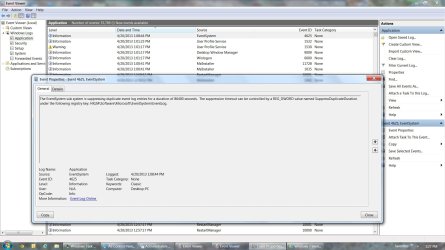
Checked the event logs as suggested. One entry gets my attention! Since I am not really familiar with the event log, attaching screenshots for possible comment.

Attached file Event Log.jpg shows an extraordinary amount of time elapsed between the 17th & 18th line entries.

File Event Log_EventSystem.jpg shows the detailed explanation of the 17th line event.

I have no idea why it should take nearly 7 minutes between the two events - perhaps someone with expertise can explain and/or recommend action.

As previously mentioned, I have tried pausing the AV protection and that appears to have no effect. Further, the problem is a recent one and the AV program has been installed/active for much longer. Since the AV program was an on-line purchase (no installation disk) I'm not real anxious to go through the hassle of uninstalling, then reinstalling unless that proves to be the only viable alternative. I've also noticed via Windows Task Manager that the AVP program (avp.exe) is using a small percentage of the CPU and disk resources at the same time the constant hard drive activity (and application slow-down) exists.

All of the suggestions are appreciated.

Thx,
C.
 

My Computer My Computer

At a glance

Microsoft Windows 7 Home Premium 64-bit 7601 ...Intel(R) Core(TM) i5 CPU 650 @ 3.20GHz8.00 GBATI Radeon HD 5570
Computer type
PC/Desktop
Computer Manufacturer/Model Number
Gateway
OS
Microsoft Windows 7 Home Premium 64-bit 7601 Multiprocessor Free Service Pack 1
CPU
Intel(R) Core(TM) i5 CPU 650 @ 3.20GHz
Motherboard
Gateway FX6840
Memory
8.00 GB
Graphics Card(s)
ATI Radeon HD 5570
Sound Card
(1) ATI High Definition Audio Device (2) Realtek High Defi
Screen Resolution
1920 x 1080 x 32 bits (4294967296 colors) @ 60 Hz
Hard Drives
(1) ST31000528AS (2) ST31000528AS (3) Generic- Compact Flash USB Device (4) Generic- MicroSD USB Device (5) Generic- MS/MS-Pro/HG USB Device (6) Generic- SD/MMC USB Device (7) Generic- xD-Picture USB Device
You forgot to upload the screen capture images ^
 

My Computer My Computer

At a glance

Windows 10 Pro x64 ; Xubuntu x64Intel i7 860 @ 2.80 GHz O/C'ed to 4.0GHz16GB Corsair Vengance DDR3 @ 661 MHz Dual Cha...EVGA NVidia GTX 560 1024MB
Computer type
PC/Desktop
Computer Manufacturer/Model Number
Golden Mk. I.4
OS
Windows 10 Pro x64 ; Xubuntu x64
CPU
Intel i7 860 @ 2.80 GHz O/C'ed to 4.0GHz
Motherboard
Gigabyte P55A-UD3R Rev.1. Award BIOS F13
Memory
16GB Corsair Vengance DDR3 @ 661 MHz Dual Channel (9-9-9-24)
Graphics Card(s)
EVGA NVidia GTX 560 1024MB
Sound Card
Realtek Integrated
Monitor(s) Displays
Dual Samsung SyncMaster 2494HS
Screen Resolution
1920*1080 and 1920*1080
Hard Drives
1*Samsung 840 EVO 120GB SSD;
1*OCZ Vertex 2 60GB SSD;
2*Samsung F3 SpinPoint 1TB in RAID0;
1*Samsung F1 SpinPoint 1TB;
2*Western Digital 1TB External USB 3.0
1*Western Digital 500GB External USB 3.0
1*Seagate 500GB External USB 2.0
PSU
Thermaltake ToughPower QFan 750W
Case
Thermaltake Element S VK60001W2Z
Cooling
Corsair H60 Water Cooling, 2*230mm and 2*80mm case fans
Keyboard
Logitech G110
Mouse
Logitech MX518
Trying again to attach the screen-shots. No idea what I did wrong before.

Event log.jpg
Event Log_EventSystem.jpg

C.
 

Attachments

  • Event Log.jpg
    Event Log.jpg
    196.1 KB · Views: 54
  • Event Log_EventSystem.jpg
    Event Log_EventSystem.jpg
    165.6 KB · Views: 40

My Computer My Computer

At a glance

Microsoft Windows 7 Home Premium 64-bit 7601 ...Intel(R) Core(TM) i5 CPU 650 @ 3.20GHz8.00 GBATI Radeon HD 5570
Computer type
PC/Desktop
Computer Manufacturer/Model Number
Gateway
OS
Microsoft Windows 7 Home Premium 64-bit 7601 Multiprocessor Free Service Pack 1
CPU
Intel(R) Core(TM) i5 CPU 650 @ 3.20GHz
Motherboard
Gateway FX6840
Memory
8.00 GB
Graphics Card(s)
ATI Radeon HD 5570
Sound Card
(1) ATI High Definition Audio Device (2) Realtek High Defi
Screen Resolution
1920 x 1080 x 32 bits (4294967296 colors) @ 60 Hz
Hard Drives
(1) ST31000528AS (2) ST31000528AS (3) Generic- Compact Flash USB Device (4) Generic- MicroSD USB Device (5) Generic- MS/MS-Pro/HG USB Device (6) Generic- SD/MMC USB Device (7) Generic- xD-Picture USB Device
Download and install Soluto

https://www.soluto.com/

When you boot the PC, Soluto times all the applications from startup to Windows desktop to show how long each service/program contributes to the total boot time. It usually presents a table/graph showing this information.

It will also make recommendations about how to shave off some time from the boot - don't follow the recommendations yet, lets first have a look at what it finds.

What anti-virus application are you running? Kaspersky?
 

My Computer My Computer

At a glance

Windows 10 Pro x64 ; Xubuntu x64Intel i7 860 @ 2.80 GHz O/C'ed to 4.0GHz16GB Corsair Vengance DDR3 @ 661 MHz Dual Cha...EVGA NVidia GTX 560 1024MB
Computer type
PC/Desktop
Computer Manufacturer/Model Number
Golden Mk. I.4
OS
Windows 10 Pro x64 ; Xubuntu x64
CPU
Intel i7 860 @ 2.80 GHz O/C'ed to 4.0GHz
Motherboard
Gigabyte P55A-UD3R Rev.1. Award BIOS F13
Memory
16GB Corsair Vengance DDR3 @ 661 MHz Dual Channel (9-9-9-24)
Graphics Card(s)
EVGA NVidia GTX 560 1024MB
Sound Card
Realtek Integrated
Monitor(s) Displays
Dual Samsung SyncMaster 2494HS
Screen Resolution
1920*1080 and 1920*1080
Hard Drives
1*Samsung 840 EVO 120GB SSD;
1*OCZ Vertex 2 60GB SSD;
2*Samsung F3 SpinPoint 1TB in RAID0;
1*Samsung F1 SpinPoint 1TB;
2*Western Digital 1TB External USB 3.0
1*Western Digital 500GB External USB 3.0
1*Seagate 500GB External USB 2.0
PSU
Thermaltake ToughPower QFan 750W
Case
Thermaltake Element S VK60001W2Z
Cooling
Corsair H60 Water Cooling, 2*230mm and 2*80mm case fans
Keyboard
Logitech G110
Mouse
Logitech MX518
Thx - I will do that and report back.

Yes I am running Kaspersky AV. I have tried pausing the AV protection shortly after the desktop appears and it seems to have no effect on the problem. (The AV protection indeed pauses because the AV program puts up a message saying the computer is no longer protected).

Need to mention though that the constant HD activity begins at power-up and continues well past the desktop actually appearing. If I try to launch an application after the desktop has appeared, response is painfully slow until the constant HD activity ceases some minutes later.

Will report back later after I have a chance to install Soluto

C.
 

My Computer My Computer

At a glance

Microsoft Windows 7 Home Premium 64-bit 7601 ...Intel(R) Core(TM) i5 CPU 650 @ 3.20GHz8.00 GBATI Radeon HD 5570
Computer type
PC/Desktop
Computer Manufacturer/Model Number
Gateway
OS
Microsoft Windows 7 Home Premium 64-bit 7601 Multiprocessor Free Service Pack 1
CPU
Intel(R) Core(TM) i5 CPU 650 @ 3.20GHz
Motherboard
Gateway FX6840
Memory
8.00 GB
Graphics Card(s)
ATI Radeon HD 5570
Sound Card
(1) ATI High Definition Audio Device (2) Realtek High Defi
Screen Resolution
1920 x 1080 x 32 bits (4294967296 colors) @ 60 Hz
Hard Drives
(1) ST31000528AS (2) ST31000528AS (3) Generic- Compact Flash USB Device (4) Generic- MicroSD USB Device (5) Generic- MS/MS-Pro/HG USB Device (6) Generic- SD/MMC USB Device (7) Generic- xD-Picture USB Device
Problems Installing Soluto!

Attempted to download/install Soluto as suggested and ran into problems. When I click the Soluto download link I get a pop-up message asking if I want to save installer?token=Jp32YjPt95u23265290. No run option is given! Windows will not accept this as a valid file name. I tried renaming the file and get a message saying the file "couldn't be downloaded".

I will go back to the Soluto website and see if any help is available.

Meanwhile I am going to remove Kaspersky AV from the start-up list, reboot and see if that has any effect on the problem.

C.
 

My Computer My Computer

At a glance

Microsoft Windows 7 Home Premium 64-bit 7601 ...Intel(R) Core(TM) i5 CPU 650 @ 3.20GHz8.00 GBATI Radeon HD 5570
Computer type
PC/Desktop
Computer Manufacturer/Model Number
Gateway
OS
Microsoft Windows 7 Home Premium 64-bit 7601 Multiprocessor Free Service Pack 1
CPU
Intel(R) Core(TM) i5 CPU 650 @ 3.20GHz
Motherboard
Gateway FX6840
Memory
8.00 GB
Graphics Card(s)
ATI Radeon HD 5570
Sound Card
(1) ATI High Definition Audio Device (2) Realtek High Defi
Screen Resolution
1920 x 1080 x 32 bits (4294967296 colors) @ 60 Hz
Hard Drives
(1) ST31000528AS (2) ST31000528AS (3) Generic- Compact Flash USB Device (4) Generic- MicroSD USB Device (5) Generic- MS/MS-Pro/HG USB Device (6) Generic- SD/MMC USB Device (7) Generic- xD-Picture USB Device
Update.

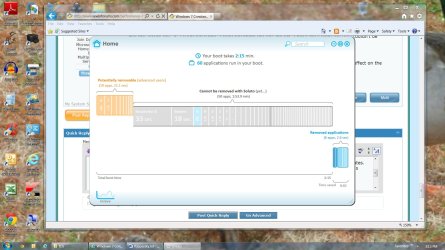
With help from Soluto support, I finally got Soluto installed and restarted the computer.

After the first restart, I looked at the Soluto information and subsequently deleted several startup items (2.56 seconds removed from boot time).

I also temporarily removed Nova backup from the list of applications that run at startup. This removed 0.1 minutes from total boot time. This startup item will be restored for next restart

I then restarted the system and again looked at the Soluto information. Soluto reported a total boot time of 2.15 minutes. However, the continuous hard drive activity and slow response issue continues for several minutes after the desktop is displayed (e.g., boot sequence completed).

The boot time graphical analysis Soluto presents is shown in the attached file. Detail for the individual segments shown can only be seen if you individually click on a displayed segment.

I attempted to temporarily prevent Kaspersky AV from running at startup by deleting/modifying the registry key that causes it to run. I was unable to do so because Windows will not allow that key to be deleted or modified!

I have posted about this same issue on the Kasperky forum but have not yet received a response.

I'm not sure where to go from here --- any further suggestions would be welcomed!

C.
 

Attachments

  • Soluto Boot Time.jpg
    Soluto Boot Time.jpg
    189.7 KB · Views: 18

My Computer My Computer

At a glance

Microsoft Windows 7 Home Premium 64-bit 7601 ...Intel(R) Core(TM) i5 CPU 650 @ 3.20GHz8.00 GBATI Radeon HD 5570
Computer type
PC/Desktop
Computer Manufacturer/Model Number
Gateway
OS
Microsoft Windows 7 Home Premium 64-bit 7601 Multiprocessor Free Service Pack 1
CPU
Intel(R) Core(TM) i5 CPU 650 @ 3.20GHz
Motherboard
Gateway FX6840
Memory
8.00 GB
Graphics Card(s)
ATI Radeon HD 5570
Sound Card
(1) ATI High Definition Audio Device (2) Realtek High Defi
Screen Resolution
1920 x 1080 x 32 bits (4294967296 colors) @ 60 Hz
Hard Drives
(1) ST31000528AS (2) ST31000528AS (3) Generic- Compact Flash USB Device (4) Generic- MicroSD USB Device (5) Generic- MS/MS-Pro/HG USB Device (6) Generic- SD/MMC USB Device (7) Generic- xD-Picture USB Device
You can't temporarily prevent Kaspersky from running.
You have to completely uninstall. Kaspersky labs may have an uninstaller to help with this.

If you then see your problem solved, you have choices to make.
 

My Computer My Computer

At a glance

W7 Home Premium 32bit
Computer Manufacturer/Model Number
8 home-builds from the 80's into 2004
OS
W7 Home Premium 32bit
You can't temporarily prevent Kaspersky from running.
You have to completely uninstall. Kaspersky labs may have an uninstaller to help with this.

If you then see your problem solved, you have choices to make.

Just a FYI - there IS a way to prevent Kaspersky Internet Security from running at startup. Thx to help from the Kaspersky forum I was able to do that! A check of Windows Task Manager confirms that the Kaspersky AV application (AVP.exe) is no longer one of the running processes.

Without Kaspersky Internet Security running at startup, the problem still exists!

Soluto shows that without Kaspersky running an additional 30 seconds is shaved off of boot time, but the problem with constant hard drive activity and slow system response STILL EXISTS!

Any clue where to go from here?

C.
 

My Computer My Computer

At a glance

Microsoft Windows 7 Home Premium 64-bit 7601 ...Intel(R) Core(TM) i5 CPU 650 @ 3.20GHz8.00 GBATI Radeon HD 5570
Computer type
PC/Desktop
Computer Manufacturer/Model Number
Gateway
OS
Microsoft Windows 7 Home Premium 64-bit 7601 Multiprocessor Free Service Pack 1
CPU
Intel(R) Core(TM) i5 CPU 650 @ 3.20GHz
Motherboard
Gateway FX6840
Memory
8.00 GB
Graphics Card(s)
ATI Radeon HD 5570
Sound Card
(1) ATI High Definition Audio Device (2) Realtek High Defi
Screen Resolution
1920 x 1080 x 32 bits (4294967296 colors) @ 60 Hz
Hard Drives
(1) ST31000528AS (2) ST31000528AS (3) Generic- Compact Flash USB Device (4) Generic- MicroSD USB Device (5) Generic- MS/MS-Pro/HG USB Device (6) Generic- SD/MMC USB Device (7) Generic- xD-Picture USB Device
I find that on occasion my windows has a lot of disc activity at start up. I let it do its disc thing and usually within 20 - 30 minutes this stops and all is well. I just let windows do its own house keeping.
 

My Computer My Computer

At a glance

Microsoft Windows 7 Home Premium 64-bit 7601 ...AMD Phenom(tm) II X4 965 Processor8.0 GBNVIDIA GeForce GTX 560 Ti
Computer type
PC/Desktop
Computer Manufacturer/Model Number
Custom Build
OS
Microsoft Windows 7 Home Premium 64-bit 7601 Multiprocessor Free Service Pack 1
CPU
AMD Phenom(tm) II X4 965 Processor
Motherboard
ASUSTeK Computer INC. M4A785-M
Memory
8.0 GB
Graphics Card(s)
NVIDIA GeForce GTX 560 Ti
Sound Card
(1) NVIDIA High Definition Audio (2) NVIDIA High Definitio
Monitor(s) Displays
Samsung SyncMaster T220G
Screen Resolution
1680 x 1050 x 32 bits (4294967296 colors) @ 59 Hz
Hard Drives
WDC WD7500AADS-00M2B0
PSU
650 Watt
Case
Cooler Master HAF XM
Cooling
Air
Keyboard
CompUSA SK-6200
Mouse
Logitech M-510
Internet Speed
Comcast
Antivirus
MSE
Browser
Firefox 27.0 IE 11
Other Info
Belkin Hub To Go F5U706
I find that on occasion my windows has a lot of disc activity at start up. I let it do its disc thing and usually within 20 - 30 minutes this stops and all is well. I just let windows do its own house keeping.

If my problem was just unknown hard drive activity, I would not be overly concerned. However as mentioned originally, during this period of constant hard drive activity, the system is agonizingly slow to respond when trying to run applications --- this includes basic Windows applications such as Windows Explorer.

Having to wait until it has finished the unknown activity to use the system is IMHO not a good alternative!

C.
 

My Computer My Computer

At a glance

Microsoft Windows 7 Home Premium 64-bit 7601 ...Intel(R) Core(TM) i5 CPU 650 @ 3.20GHz8.00 GBATI Radeon HD 5570
Computer type
PC/Desktop
Computer Manufacturer/Model Number
Gateway
OS
Microsoft Windows 7 Home Premium 64-bit 7601 Multiprocessor Free Service Pack 1
CPU
Intel(R) Core(TM) i5 CPU 650 @ 3.20GHz
Motherboard
Gateway FX6840
Memory
8.00 GB
Graphics Card(s)
ATI Radeon HD 5570
Sound Card
(1) ATI High Definition Audio Device (2) Realtek High Defi
Screen Resolution
1920 x 1080 x 32 bits (4294967296 colors) @ 60 Hz
Hard Drives
(1) ST31000528AS (2) ST31000528AS (3) Generic- Compact Flash USB Device (4) Generic- MicroSD USB Device (5) Generic- MS/MS-Pro/HG USB Device (6) Generic- SD/MMC USB Device (7) Generic- xD-Picture USB Device
I'd be pretty concerned about constant HD activity, I'd be backing up critical data ASAP, I suspect HD is having trouble reading some windows files, and you might need a wipe and drop or new HD soon.

Registry and HD been scanned for errors?

Visit the tutorials forum for instructions on what to do.
 

My Computer My Computer

At a glance

Windows 7 Ultimate Retail Box (64-bit install...AMD FX-8350 CPU v1.15 (or 1.0F) BIOS was requ...8G CAS-7 G-Skill DDR3 @1333 (2 fours) [mobo n...Radeon HD 7950 [3 gigs of GDDR5] MSI Twin Fro...
Computer type
PC/Desktop
Computer Manufacturer/Model Number
Self Built Custom
OS
Windows 7 Ultimate Retail Box (64-bit installed) + Service Pack 1
CPU
AMD FX-8350 CPU v1.15 (or 1.0F) BIOS was required!
Motherboard
MSI 890FXA-GD70
Memory
8G CAS-7 G-Skill DDR3 @1333 (2 fours) [mobo nonOC max rec'd]
Graphics Card(s)
Radeon HD 7950 [3 gigs of GDDR5] MSI Twin Frozr model
Sound Card
Realtek High Definition Audio (onboard mobo, ALC-889 chip)
Monitor(s) Displays
2 WS LED Monitors: One LG One Viewsonic
Screen Resolution
1920 by 1080
Hard Drives
SSD for OS: Samsung 840 Pro
SSD for VM and utilities: Adata SX900
7200 RPM SATA HDs for the rest: Hitachi and Seagate
PSU
Corsair TX850 - 850W max, in service since August 2010.
Case
Thermaltake Armor A90
Cooling
Thermaltake Spin Q CPU Cooler, in service since August 2010
Keyboard
Logitech G11
Mouse
Logitech M310 Wireless
Internet Speed
100 Megabit broadband supposedly upgraded from 50 (Cable)
Antivirus
Bitdefender Internet Security 2014 suite
Browser
Pale Moon 64-bit main, also IceDragon, Opera, and Maxthon.
Other Info
CompTIA A+ certified (220-800 series) in July 2013.

My Computer My Computer

At a glance

Windows 10 Pro x64 ; Xubuntu x64Intel i7 860 @ 2.80 GHz O/C'ed to 4.0GHz16GB Corsair Vengance DDR3 @ 661 MHz Dual Cha...EVGA NVidia GTX 560 1024MB
Computer type
PC/Desktop
Computer Manufacturer/Model Number
Golden Mk. I.4
OS
Windows 10 Pro x64 ; Xubuntu x64
CPU
Intel i7 860 @ 2.80 GHz O/C'ed to 4.0GHz
Motherboard
Gigabyte P55A-UD3R Rev.1. Award BIOS F13
Memory
16GB Corsair Vengance DDR3 @ 661 MHz Dual Channel (9-9-9-24)
Graphics Card(s)
EVGA NVidia GTX 560 1024MB
Sound Card
Realtek Integrated
Monitor(s) Displays
Dual Samsung SyncMaster 2494HS
Screen Resolution
1920*1080 and 1920*1080
Hard Drives
1*Samsung 840 EVO 120GB SSD;
1*OCZ Vertex 2 60GB SSD;
2*Samsung F3 SpinPoint 1TB in RAID0;
1*Samsung F1 SpinPoint 1TB;
2*Western Digital 1TB External USB 3.0
1*Western Digital 500GB External USB 3.0
1*Seagate 500GB External USB 2.0
PSU
Thermaltake ToughPower QFan 750W
Case
Thermaltake Element S VK60001W2Z
Cooling
Corsair H60 Water Cooling, 2*230mm and 2*80mm case fans
Keyboard
Logitech G110
Mouse
Logitech MX518
I'd be pretty concerned about constant HD activity, I'd be backing up critical data ASAP, I suspect HD is having trouble reading some windows files, and you might need a wipe and drop or new HD soon.

Registry and HD been scanned for errors?

Visit the tutorials forum for instructions on what to do.

CHKDSK has been run - no problems found.

Registry scan done with CCleaner - no problems found.

C.
 

My Computer My Computer

At a glance

Microsoft Windows 7 Home Premium 64-bit 7601 ...Intel(R) Core(TM) i5 CPU 650 @ 3.20GHz8.00 GBATI Radeon HD 5570
Computer type
PC/Desktop
Computer Manufacturer/Model Number
Gateway
OS
Microsoft Windows 7 Home Premium 64-bit 7601 Multiprocessor Free Service Pack 1
CPU
Intel(R) Core(TM) i5 CPU 650 @ 3.20GHz
Motherboard
Gateway FX6840
Memory
8.00 GB
Graphics Card(s)
ATI Radeon HD 5570
Sound Card
(1) ATI High Definition Audio Device (2) Realtek High Defi
Screen Resolution
1920 x 1080 x 32 bits (4294967296 colors) @ 60 Hz
Hard Drives
(1) ST31000528AS (2) ST31000528AS (3) Generic- Compact Flash USB Device (4) Generic- MicroSD USB Device (5) Generic- MS/MS-Pro/HG USB Device (6) Generic- SD/MMC USB Device (7) Generic- xD-Picture USB Device
Mmm. I wonder if there are bad sectors being reallocated at boot up?

Have you tried to run this to see the health status of your disk?

CrystalDiskInfo - Software - Crystal Dew World

Will that do something that CHKDSK won't do?

During this investigative process, I've already downloaded/installed several applications recommended by those trying to help. Not really anxious to do more inless some clear benefit will result!

C.
 

My Computer My Computer

At a glance

Microsoft Windows 7 Home Premium 64-bit 7601 ...Intel(R) Core(TM) i5 CPU 650 @ 3.20GHz8.00 GBATI Radeon HD 5570
Computer type
PC/Desktop
Computer Manufacturer/Model Number
Gateway
OS
Microsoft Windows 7 Home Premium 64-bit 7601 Multiprocessor Free Service Pack 1
CPU
Intel(R) Core(TM) i5 CPU 650 @ 3.20GHz
Motherboard
Gateway FX6840
Memory
8.00 GB
Graphics Card(s)
ATI Radeon HD 5570
Sound Card
(1) ATI High Definition Audio Device (2) Realtek High Defi
Screen Resolution
1920 x 1080 x 32 bits (4294967296 colors) @ 60 Hz
Hard Drives
(1) ST31000528AS (2) ST31000528AS (3) Generic- Compact Flash USB Device (4) Generic- MicroSD USB Device (5) Generic- MS/MS-Pro/HG USB Device (6) Generic- SD/MMC USB Device (7) Generic- xD-Picture USB Device
Your Windows update LOG is showing a bunch of these, I wonder if it's related:

2013-04-20 09:05:01:915 548 b1c DnldMgr Regulation: {7971F918-A847-4430-9279-4A52D1EFE18D} - Update B90C9CF1-2039-4116-AD4C-AF246B07509D is "PerUpdate" regulated and can NOT download. Sequence 6502 vs AcceptRate 0.

Looks like might be happening on every boot up?

Turn off automatic Windows Updating and see if issue improves?

Your HD partition with Windows 7, has plenty of free space?

EventApp Text file seems to be crying about Spybot - Search and Destroy, uninstall that and reinstall later.

I swear this Windows 7 install by the wording of internal wording in these logs, maybe thinks it's not a legit install?!?

Have you run hijackthis? Found here:

http://sourceforge.net/projects/hjt/

Just post the log it creates, don't remove anything in there unless you know what you are doing. 8)
 

My Computer My Computer

At a glance

Windows 7 Ultimate Retail Box (64-bit install...AMD FX-8350 CPU v1.15 (or 1.0F) BIOS was requ...8G CAS-7 G-Skill DDR3 @1333 (2 fours) [mobo n...Radeon HD 7950 [3 gigs of GDDR5] MSI Twin Fro...
Computer type
PC/Desktop
Computer Manufacturer/Model Number
Self Built Custom
OS
Windows 7 Ultimate Retail Box (64-bit installed) + Service Pack 1
CPU
AMD FX-8350 CPU v1.15 (or 1.0F) BIOS was required!
Motherboard
MSI 890FXA-GD70
Memory
8G CAS-7 G-Skill DDR3 @1333 (2 fours) [mobo nonOC max rec'd]
Graphics Card(s)
Radeon HD 7950 [3 gigs of GDDR5] MSI Twin Frozr model
Sound Card
Realtek High Definition Audio (onboard mobo, ALC-889 chip)
Monitor(s) Displays
2 WS LED Monitors: One LG One Viewsonic
Screen Resolution
1920 by 1080
Hard Drives
SSD for OS: Samsung 840 Pro
SSD for VM and utilities: Adata SX900
7200 RPM SATA HDs for the rest: Hitachi and Seagate
PSU
Corsair TX850 - 850W max, in service since August 2010.
Case
Thermaltake Armor A90
Cooling
Thermaltake Spin Q CPU Cooler, in service since August 2010
Keyboard
Logitech G11
Mouse
Logitech M310 Wireless
Internet Speed
100 Megabit broadband supposedly upgraded from 50 (Cable)
Antivirus
Bitdefender Internet Security 2014 suite
Browser
Pale Moon 64-bit main, also IceDragon, Opera, and Maxthon.
Other Info
CompTIA A+ certified (220-800 series) in July 2013.
Back
Top