Windows 7 crashes when playing sound

IncoherentMoron

New member
Local time
11:01 AM
Messages
7
It's a very annoying problem. If I play any sound (music, videos, games) for about 3 minutes, the system locks up and it makes the most terrible noise, and I have to reset. It runs perfectly in Safe Mode (most likely because Safe Mode doesn't activate the sound hardware), and in standard mode as long as it doesn't play music.

It first happened after I played a game of FEAR 2, I closed the game and the system crashed with a BSoD that disappeared too quickly for me to get any info. I've gotten some "page error in non-paged file" BSoDs, and most recently "driver irql not less or equal than" BSoDs (or something along those lines), but that hasn't happened recently. Usually it just locks up now with the noise.

I'm running Windows 7 on an Asus P5QL-E mobo, Intel C2D E8400 Wolfdale @ 3.00GHz CPU, ATI Radeon HD4850 GPU, 4GB of RAM, and the sound card is the mobo's onboard card.

Any help is greatly appreciated.
 

My Computer

OS
Windows 7
CPU
Intel C2D E8400 Wolfdale @ 3.00GHz
Motherboard
ASUS P5QL-E
Memory
4GB Patriot Viper
Graphics Card(s)
ATI Radeon HD4850
Monitor(s) Displays
22" Samsung SyncMaster T220
Hi IncoherentMoron and welcome to Se7en Forums :party:

This sounds (please forgive the pun) like a driver issue. Download the latest driver from here (you will have to accept the disclaimer): Realtek

You might need to follow the instructions in this Tutorial from our sister site in order to update the driver (this is the method that I use): Device Manager - Install Driver - Vista Forums

Hope this helps.
 

My Computer

Computer type
PC/Desktop
Computer Manufacturer/Model Number
Dwarf Dwf/11/2012 r09/2013
OS
Windows 8.1 Pro RTM x64
CPU
Intel Core-i5-3570K 4-core @ 3.4GHz (Ivy Bridge) (OC 4.4GHz)
Motherboard
ASRock Z77 Extreme4-M
Memory
4 x 4GB DDR3-1600 Corsair Vengeance CMZ8GX3M2A1600C9B (16GB)
Graphics Card(s)
MSI GeForce GTX770 Gaming OC 2GB
Sound Card
Realtek High Definition on board solution (ALC 898)
Monitor(s) Displays
ViewSonic VA1912w Widescreen (VGA)
Screen Resolution
1440x900
Hard Drives
OCZ Agility 3 SSD 120GB SATA III x2 (RAID 0)
Samsung HD501LJ 500GB SATA II x2
Hitachi HDS721010CLA332 1TB SATA II
Iomega 1.5TB Ext USB 2.0
WD 2.0TB Ext USB 3.0
PSU
XFX Pro Series 850W Semi-Modular
Case
Gigabyte IF233
Cooling
1 x 120mm Front Inlet 1 x 120mm Rear Exhaust
Keyboard
Microsoft Comfort Curve Keyboard 3000 (USB)
Mouse
Microsoft Comfort Mouse 3000 for Business (USB)
Internet Speed
NetGear DG834Gv3 ADSL Modem/Router (Ethernet) ~4.0 Mb/s (O2)
Antivirus
Avast! 8.0.1497
Browser
IE 11
Other Info
Optical Drive: HL-DT-ST BD-RE BH10LS30 SATA Bluray
Lexmark S305 Printer/Scanner/Copier (USB)
WEI Score: 8.1/8.1/8.5/8.5/8.25
Asus Eee PC 1011PX Netbook (Windows 7 x86 Starter)
Hey IncoherentMoron


It could also be a graphics driver issue, and not a sound card one...

Have you downloaded the graphics driver updates from Windows Update?
The above is highly recommended, instead of downloading Vista version drivers for your graphics card.
 

My Computer

Computer Manufacturer/Model Number
ENIAC
OS
Windows 7 RC 7100 32bit/64bit
CPU
Intel Core2Duo E4500 2.20 GHz
Motherboard
ASUS P5LD2-X/1333
Memory
2x1GB Kinsgston DDR2 800MHz
Graphics Card(s)
Nvidia 8500GT
Sound Card
Onboard High Definition Audio Device
Monitor(s) Displays
Sony Bravia 42"
Case
LINKW 2222
Cooling
Standard Intel
Keyboard
Some cheap one
Mouse
Microsoft Intellimouse something
Internet Speed
24MBps ADSL
I also suspect it's your video card. If Windows Update doesn't work, try getting your drivers from ATI. (Meaning not the install CD)
 

My Computer

Computer Manufacturer/Model Number
Custom Desktop & HP G60-120US
OS
Windows 7 Pro x64 & Win7 Pre x64 / Ubuntu 9.10 Beta
CPU
Q6600 Quad Core 2 - 2.4Ghz
Motherboard
EVGA - 680i SLI
Memory
4GB Kingston DDR2 800
Graphics Card(s)
XFX 8800GT Alpha Dog Ed. X 2 SLI
Sound Card
On Board
Monitor(s) Displays
24"Dell Wide Screen and Gateway 17" Widescreen & HP 15.4"
Screen Resolution
1920 x1200 (Dell) 1440 x 900(Gateway) & 1366x768 (HP Laptop)
Hard Drives
WD 500GB, Seagate 1.5 TB
PSU
Rosewell RX750
Case
Antec 900
Cooling
Zalman 8700
Keyboard
Saitek Cyborg & Logitech wireless
Mouse
Logitech G5 & Logitech wireless
Internet Speed
Cable - 20Mbs/sec DOWN 5Mbs/s UP
I already have the most recent Realtek drivers and most recent ATI drivers, and it still breaks while playing music. Thanks for the suggestions.
 

My Computer

OS
Windows 7
CPU
Intel C2D E8400 Wolfdale @ 3.00GHz
Motherboard
ASUS P5QL-E
Memory
4GB Patriot Viper
Graphics Card(s)
ATI Radeon HD4850
Monitor(s) Displays
22" Samsung SyncMaster T220
Another possibility which has just occured to me - could it possibly be a conflict between your motherboard audio and the audio on your graphics card, seeing that it has its own HD integrated audio controller?
Have you installed ATI HDMI Audio Device from here: Realtek
 

My Computer

Computer type
PC/Desktop
Computer Manufacturer/Model Number
Dwarf Dwf/11/2012 r09/2013
OS
Windows 8.1 Pro RTM x64
CPU
Intel Core-i5-3570K 4-core @ 3.4GHz (Ivy Bridge) (OC 4.4GHz)
Motherboard
ASRock Z77 Extreme4-M
Memory
4 x 4GB DDR3-1600 Corsair Vengeance CMZ8GX3M2A1600C9B (16GB)
Graphics Card(s)
MSI GeForce GTX770 Gaming OC 2GB
Sound Card
Realtek High Definition on board solution (ALC 898)
Monitor(s) Displays
ViewSonic VA1912w Widescreen (VGA)
Screen Resolution
1440x900
Hard Drives
OCZ Agility 3 SSD 120GB SATA III x2 (RAID 0)
Samsung HD501LJ 500GB SATA II x2
Hitachi HDS721010CLA332 1TB SATA II
Iomega 1.5TB Ext USB 2.0
WD 2.0TB Ext USB 3.0
PSU
XFX Pro Series 850W Semi-Modular
Case
Gigabyte IF233
Cooling
1 x 120mm Front Inlet 1 x 120mm Rear Exhaust
Keyboard
Microsoft Comfort Curve Keyboard 3000 (USB)
Mouse
Microsoft Comfort Mouse 3000 for Business (USB)
Internet Speed
NetGear DG834Gv3 ADSL Modem/Router (Ethernet) ~4.0 Mb/s (O2)
Antivirus
Avast! 8.0.1497
Browser
IE 11
Other Info
Optical Drive: HL-DT-ST BD-RE BH10LS30 SATA Bluray
Lexmark S305 Printer/Scanner/Copier (USB)
WEI Score: 8.1/8.1/8.5/8.5/8.25
Asus Eee PC 1011PX Netbook (Windows 7 x86 Starter)
I just tried that, and it's still crashing. I'm worried that it might be a hardware issue or something requiring expensive parts.
 

My Computer

OS
Windows 7
CPU
Intel C2D E8400 Wolfdale @ 3.00GHz
Motherboard
ASUS P5QL-E
Memory
4GB Patriot Viper
Graphics Card(s)
ATI Radeon HD4850
Monitor(s) Displays
22" Samsung SyncMaster T220
I just tried that, and it's still crashing. I'm worried that it might be a hardware issue or something requiring expensive parts.

What music app are you running when it crashes?
 

My Computer

Computer Manufacturer/Model Number
Custom Desktop & HP G60-120US
OS
Windows 7 Pro x64 & Win7 Pre x64 / Ubuntu 9.10 Beta
CPU
Q6600 Quad Core 2 - 2.4Ghz
Motherboard
EVGA - 680i SLI
Memory
4GB Kingston DDR2 800
Graphics Card(s)
XFX 8800GT Alpha Dog Ed. X 2 SLI
Sound Card
On Board
Monitor(s) Displays
24"Dell Wide Screen and Gateway 17" Widescreen & HP 15.4"
Screen Resolution
1920 x1200 (Dell) 1440 x 900(Gateway) & 1366x768 (HP Laptop)
Hard Drives
WD 500GB, Seagate 1.5 TB
PSU
Rosewell RX750
Case
Antec 900
Cooling
Zalman 8700
Keyboard
Saitek Cyborg & Logitech wireless
Mouse
Logitech G5 & Logitech wireless
Internet Speed
Cable - 20Mbs/sec DOWN 5Mbs/s UP
Do you have an alternative graphics card that you can try, preferably one without the integrated audio capability?
 

My Computer

Computer type
PC/Desktop
Computer Manufacturer/Model Number
Dwarf Dwf/11/2012 r09/2013
OS
Windows 8.1 Pro RTM x64
CPU
Intel Core-i5-3570K 4-core @ 3.4GHz (Ivy Bridge) (OC 4.4GHz)
Motherboard
ASRock Z77 Extreme4-M
Memory
4 x 4GB DDR3-1600 Corsair Vengeance CMZ8GX3M2A1600C9B (16GB)
Graphics Card(s)
MSI GeForce GTX770 Gaming OC 2GB
Sound Card
Realtek High Definition on board solution (ALC 898)
Monitor(s) Displays
ViewSonic VA1912w Widescreen (VGA)
Screen Resolution
1440x900
Hard Drives
OCZ Agility 3 SSD 120GB SATA III x2 (RAID 0)
Samsung HD501LJ 500GB SATA II x2
Hitachi HDS721010CLA332 1TB SATA II
Iomega 1.5TB Ext USB 2.0
WD 2.0TB Ext USB 3.0
PSU
XFX Pro Series 850W Semi-Modular
Case
Gigabyte IF233
Cooling
1 x 120mm Front Inlet 1 x 120mm Rear Exhaust
Keyboard
Microsoft Comfort Curve Keyboard 3000 (USB)
Mouse
Microsoft Comfort Mouse 3000 for Business (USB)
Internet Speed
NetGear DG834Gv3 ADSL Modem/Router (Ethernet) ~4.0 Mb/s (O2)
Antivirus
Avast! 8.0.1497
Browser
IE 11
Other Info
Optical Drive: HL-DT-ST BD-RE BH10LS30 SATA Bluray
Lexmark S305 Printer/Scanner/Copier (USB)
WEI Score: 8.1/8.1/8.5/8.5/8.25
Asus Eee PC 1011PX Netbook (Windows 7 x86 Starter)
The music app is foobar2000, but it also crashes if I play Youtube videos or play Audiosurf. I don't have another graphics card.
 

My Computer

OS
Windows 7
CPU
Intel C2D E8400 Wolfdale @ 3.00GHz
Motherboard
ASUS P5QL-E
Memory
4GB Patriot Viper
Graphics Card(s)
ATI Radeon HD4850
Monitor(s) Displays
22" Samsung SyncMaster T220
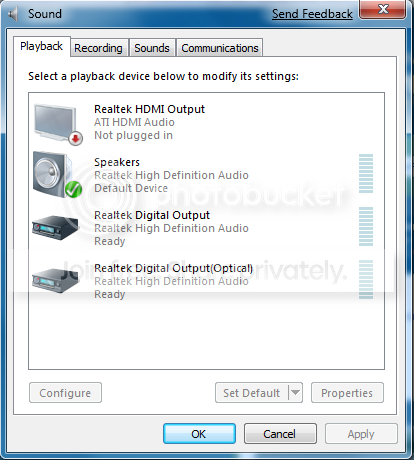
Can you right-click the speaker icon in the system tray and post back an image showing the Playback devices page?
 

My Computer

Computer type
PC/Desktop
Computer Manufacturer/Model Number
Dwarf Dwf/11/2012 r09/2013
OS
Windows 8.1 Pro RTM x64
CPU
Intel Core-i5-3570K 4-core @ 3.4GHz (Ivy Bridge) (OC 4.4GHz)
Motherboard
ASRock Z77 Extreme4-M
Memory
4 x 4GB DDR3-1600 Corsair Vengeance CMZ8GX3M2A1600C9B (16GB)
Graphics Card(s)
MSI GeForce GTX770 Gaming OC 2GB
Sound Card
Realtek High Definition on board solution (ALC 898)
Monitor(s) Displays
ViewSonic VA1912w Widescreen (VGA)
Screen Resolution
1440x900
Hard Drives
OCZ Agility 3 SSD 120GB SATA III x2 (RAID 0)
Samsung HD501LJ 500GB SATA II x2
Hitachi HDS721010CLA332 1TB SATA II
Iomega 1.5TB Ext USB 2.0
WD 2.0TB Ext USB 3.0
PSU
XFX Pro Series 850W Semi-Modular
Case
Gigabyte IF233
Cooling
1 x 120mm Front Inlet 1 x 120mm Rear Exhaust
Keyboard
Microsoft Comfort Curve Keyboard 3000 (USB)
Mouse
Microsoft Comfort Mouse 3000 for Business (USB)
Internet Speed
NetGear DG834Gv3 ADSL Modem/Router (Ethernet) ~4.0 Mb/s (O2)
Antivirus
Avast! 8.0.1497
Browser
IE 11
Other Info
Optical Drive: HL-DT-ST BD-RE BH10LS30 SATA Bluray
Lexmark S305 Printer/Scanner/Copier (USB)
WEI Score: 8.1/8.1/8.5/8.5/8.25
Asus Eee PC 1011PX Netbook (Windows 7 x86 Starter)
sound.png
 

My Computer

OS
Windows 7
CPU
Intel C2D E8400 Wolfdale @ 3.00GHz
Motherboard
ASUS P5QL-E
Memory
4GB Patriot Viper
Graphics Card(s)
ATI Radeon HD4850
Monitor(s) Displays
22" Samsung SyncMaster T220
OK, thanks. Try this. Right-click on Realtek HDMI Output and select Disable and then click OK.
 

My Computer

Computer type
PC/Desktop
Computer Manufacturer/Model Number
Dwarf Dwf/11/2012 r09/2013
OS
Windows 8.1 Pro RTM x64
CPU
Intel Core-i5-3570K 4-core @ 3.4GHz (Ivy Bridge) (OC 4.4GHz)
Motherboard
ASRock Z77 Extreme4-M
Memory
4 x 4GB DDR3-1600 Corsair Vengeance CMZ8GX3M2A1600C9B (16GB)
Graphics Card(s)
MSI GeForce GTX770 Gaming OC 2GB
Sound Card
Realtek High Definition on board solution (ALC 898)
Monitor(s) Displays
ViewSonic VA1912w Widescreen (VGA)
Screen Resolution
1440x900
Hard Drives
OCZ Agility 3 SSD 120GB SATA III x2 (RAID 0)
Samsung HD501LJ 500GB SATA II x2
Hitachi HDS721010CLA332 1TB SATA II
Iomega 1.5TB Ext USB 2.0
WD 2.0TB Ext USB 3.0
PSU
XFX Pro Series 850W Semi-Modular
Case
Gigabyte IF233
Cooling
1 x 120mm Front Inlet 1 x 120mm Rear Exhaust
Keyboard
Microsoft Comfort Curve Keyboard 3000 (USB)
Mouse
Microsoft Comfort Mouse 3000 for Business (USB)
Internet Speed
NetGear DG834Gv3 ADSL Modem/Router (Ethernet) ~4.0 Mb/s (O2)
Antivirus
Avast! 8.0.1497
Browser
IE 11
Other Info
Optical Drive: HL-DT-ST BD-RE BH10LS30 SATA Bluray
Lexmark S305 Printer/Scanner/Copier (USB)
WEI Score: 8.1/8.1/8.5/8.5/8.25
Asus Eee PC 1011PX Netbook (Windows 7 x86 Starter)
No, it still crashed. I even tried it with the Digital Outputs. No dice.

Edit: I went through my Device Manager, and found something called an SM Bus didn't have drivers installed. I installed the drivers, and I managed to get through all of ODB & Buckethead - I Like It Raw and part way through The Fun Lovin' Criminals' We Have All The Time In The World, so I don't know, could I be getting closer to the answer? What does the SM Bus do, and is there a way to perhaps get it working better?

Edit MkII: I tried it again, but it didn't work. When I got back into Safe Mode, I looked at the diagnostic tools section under the help menu. What's a critical error ID 41 mean?
 
Last edited:

My Computer

OS
Windows 7
CPU
Intel C2D E8400 Wolfdale @ 3.00GHz
Motherboard
ASUS P5QL-E
Memory
4GB Patriot Viper
Graphics Card(s)
ATI Radeon HD4850
Monitor(s) Displays
22" Samsung SyncMaster T220
Okay, I think I have found the source of the problem. It is the video card. I reformatted everything, installed Windows XP, and I could play music without it crashing. I installed the drivers for my video card, and it froze again. I installed Kubuntu, and played a whole album in Amarok without it freezing. Is this a problem with my video card, or with the card series in general? If I brought this card back to the store and returned it and got a new one of the same type, would this happen again?

Edit: And now it seems to be playing music just fine in XP. Now I really don't know what's going on.

Edit MkII: Nope, it's still broken. Edit MkIII: Well, I've found the problem, and the problem is now out of my hands. It was the video card, I brought it back to the store I purchased it from to run some tests, they found a fault, and they're returning it to Diamond right now. I should have it (or a new one) back in 3 weeks. Thanks for all your help, guys. You're awesome.
 
Last edited:

My Computer

OS
Windows 7
CPU
Intel C2D E8400 Wolfdale @ 3.00GHz
Motherboard
ASUS P5QL-E
Memory
4GB Patriot Viper
Graphics Card(s)
ATI Radeon HD4850
Monitor(s) Displays
22" Samsung SyncMaster T220
Back
Top