Solved Windows 7 Crashing / PC Shutting Down

mezzy316

New member
Local time
6:51 PM
Messages
66
Okay, a little background... a couple months ago I had issues where the computer was randomly crashing. When I say crashing, I mean it was like someone pulled the plug. Just completely lost power. It would be fine again for a couple days, then do it again. I did the SFC/ SCANNOW and it never found anything wrong. Boot repair never found anything either. Malwarebytes was always clean. Finally, the last time it crashed, I could not get it to boot to the desktop. I started getting BSOD c000021a. HP told me I should do a complete system recovery. I backed up my data and did the system recovery. After several attempts, it finally worked.

Not knowing what was wrong, I tried to be as systematic as possible. I completed all windows updates, as well as driver updates. I slowly added software to make sure there were no issues with the installs (Office, Adobe Reader, Corel, Firefox, etc.). It has been running perfectly for about a month.

Today, I installed iTunes. The only other thing that changed was Firefox updated itself from 27 to 28. Since the iTunes install, it has crashed twice. Each time I was able to reboot and it was fine. In the Event Log, the only ERRORS I could find were the ones saying the system shut down unexpectedly. Not sure how else to mine data out of there.

I did a system restore to put it back the way it was before the iTunes install, and so far so good. Could iTunes really be causing this problem? If so, why, and is there anything I can do about it? I have several iPhones and iPads as well as a lot of music and movies that I need iTunes for.

Thanks for your help!
 

My Computer My Computer

At a glance

Windows 7 64bit
Computer type
PC/Desktop
Computer Manufacturer/Model Number
HP Elite 180t
OS
Windows 7 64bit
Well, it did it again and shut down. I noticed that it did it while I was watching a YouTube video. This morning when it did it I was watching the Olympics online. Not sure if it is a coincidence or not, but I thought it my be video-card related. I have a Radeon HD 4650. I went to AMD and downloaded the newest driver package. Watched a couple of videos without a crash, although I don't know if that's a good test or not.
 

My Computer My Computer

At a glance

Windows 7 64bit
Computer type
PC/Desktop
Computer Manufacturer/Model Number
HP Elite 180t
OS
Windows 7 64bit
Crashed again, and again it was right when I closed a video. Does that automatically mean the video card is bad?
 

My Computer My Computer

At a glance

Windows 7 64bit
Computer type
PC/Desktop
Computer Manufacturer/Model Number
HP Elite 180t
OS
Windows 7 64bit
Ran the Video Card Stress Test that comes with HP (HP Support Assistant). Made it through test 1 of 3, but during test 2 of 3 the computer shut off again.
 

My Computer My Computer

At a glance

Windows 7 64bit
Computer type
PC/Desktop
Computer Manufacturer/Model Number
HP Elite 180t
OS
Windows 7 64bit
This sounds like a problem with your power supply. Does it show any lights after it shuts down? Do you hear any sounds (popping etc.)?
 

My Computer My Computer

At a glance

Windows 7 Professional x64 Service Pack 1AMD Athlon X4 6456GB DDR3 1066Sapphire Radeon HD 5670 512MB GDDR5
Computer type
PC/Desktop
Computer Manufacturer/Model Number
HP Pavilion P7-1010
OS
Windows 7 Professional x64 Service Pack 1
CPU
AMD Athlon X4 645
Motherboard
Foxxcon N-Alvorix RS880
Memory
6GB DDR3 1066
Graphics Card(s)
Sapphire Radeon HD 5670 512MB GDDR5
Sound Card
Realtek Integrated Audio
Monitor(s) Displays
HP 2011x
Screen Resolution
1600x900
Hard Drives
1. Crucial M4 128GB SSD
2. 1TB Seagate Barracuda 7200.12 RPM
3. 1TB Western Digital Caviar Green 5400RPM
PSU
Seasonic S12 II Bronze 380 Watt
Case
HP OEM
Cooling
Coolermaster Heatsink, AVC Case Fan
Keyboard
HP OEM- Made by Chicony
Mouse
HP OEM- Made by Logitech
Internet Speed
20MBit Down/4 Up
Antivirus
Microsoft Security Essentials
Browser
Internet Explorer 10
Also, when was the last time your computer was cleaned?
 

My Computer My Computer

At a glance

Windows 7 Professional x64 Service Pack 1AMD Athlon X4 6456GB DDR3 1066Sapphire Radeon HD 5670 512MB GDDR5
Computer type
PC/Desktop
Computer Manufacturer/Model Number
HP Pavilion P7-1010
OS
Windows 7 Professional x64 Service Pack 1
CPU
AMD Athlon X4 645
Motherboard
Foxxcon N-Alvorix RS880
Memory
6GB DDR3 1066
Graphics Card(s)
Sapphire Radeon HD 5670 512MB GDDR5
Sound Card
Realtek Integrated Audio
Monitor(s) Displays
HP 2011x
Screen Resolution
1600x900
Hard Drives
1. Crucial M4 128GB SSD
2. 1TB Seagate Barracuda 7200.12 RPM
3. 1TB Western Digital Caviar Green 5400RPM
PSU
Seasonic S12 II Bronze 380 Watt
Case
HP OEM
Cooling
Coolermaster Heatsink, AVC Case Fan
Keyboard
HP OEM- Made by Chicony
Mouse
HP OEM- Made by Logitech
Internet Speed
20MBit Down/4 Up
Antivirus
Microsoft Security Essentials
Browser
Internet Explorer 10
No sounds at all. No lights, just goes dark.

I cleaned it last month when I was getting the BSODs. Thought it may have been overheating.
 

My Computer My Computer

At a glance

Windows 7 64bit
Computer type
PC/Desktop
Computer Manufacturer/Model Number
HP Elite 180t
OS
Windows 7 64bit
I agree with windude99. It sound like the power supply. Do you have access to another power supply that you can use for a few days to test the system and see if it keeps shutting down?
 

My Computer My Computer

At a glance

Win 7 Pro x64/Win 10 Pro x64 dual bootAMD FX 8350 Vishera @ 420016 GB Mushkin Blackline DDR3-2400 @ 1866 (9-1...XFX Radeon R9 280 Double D Black Edition
Computer type
PC/Desktop
Computer Manufacturer/Model Number
Mellon Labs (custom build)
OS
Win 7 Pro x64/Win 10 Pro x64 dual boot
CPU
AMD FX 8350 Vishera @ 4200
Motherboard
ASUS M5A97 R2.0
Memory
16 GB Mushkin Blackline DDR3-2400 @ 1866 (9-10-10-10-31)
Graphics Card(s)
XFX Radeon R9 280 Double D Black Edition
Sound Card
Realtek HD Audio on MB. Sounds great.
Monitor(s) Displays
Acer 24", Acer 22"
Screen Resolution
3840 x 1080
Hard Drives
1 x Mushkin Chronos 120 GB SSD (Win 10)
1 x Samsung 850 EVO 250 GB SSD (Win 7)
1 x WD 1TB SATA Blue
1 x WD 1TB SATA Green
PSU
Corsair TX-750
Case
CoolerMaster HAF 912+
Cooling
Coolermaster Seidon 240M Liquid AIO. 6 case fans
Keyboard
Logitech G710+
Mouse
Logitech G500s
Internet Speed
Much better since I got fiber, but still way overpriced.
Antivirus
MSE, Malware Bytes for scanning
Browser
Firefox
Other Info
Corsair VOID USB headphones.

A Mellon Labs X-1 - LCD Smartie driven system status display.

Brought to you by the letter E
No sounds at all. No lights, just goes dark.

I cleaned it last month when I was getting the BSODs. Thought it may have been overheating.
Did you clean it with a vacuum or compressed air? Compressed Air can get more dust out in my experience. If you decide to use compressed air, be sure to hold the can upright to avoid any liquid being sprayed into your computer. Also, blow a little bit of the compressed air into an open area away from the computer before you start cleaning it.
 

My Computer My Computer

At a glance

Windows 7 Professional x64 Service Pack 1AMD Athlon X4 6456GB DDR3 1066Sapphire Radeon HD 5670 512MB GDDR5
Computer type
PC/Desktop
Computer Manufacturer/Model Number
HP Pavilion P7-1010
OS
Windows 7 Professional x64 Service Pack 1
CPU
AMD Athlon X4 645
Motherboard
Foxxcon N-Alvorix RS880
Memory
6GB DDR3 1066
Graphics Card(s)
Sapphire Radeon HD 5670 512MB GDDR5
Sound Card
Realtek Integrated Audio
Monitor(s) Displays
HP 2011x
Screen Resolution
1600x900
Hard Drives
1. Crucial M4 128GB SSD
2. 1TB Seagate Barracuda 7200.12 RPM
3. 1TB Western Digital Caviar Green 5400RPM
PSU
Seasonic S12 II Bronze 380 Watt
Case
HP OEM
Cooling
Coolermaster Heatsink, AVC Case Fan
Keyboard
HP OEM- Made by Chicony
Mouse
HP OEM- Made by Logitech
Internet Speed
20MBit Down/4 Up
Antivirus
Microsoft Security Essentials
Browser
Internet Explorer 10
I cleaned it with a vacuum.

I do not have another power supply. I would have to buy one.

To clarify on the sounds.....it doesn't make any noises when it shuts off, but i do hear some random hisses and pops here and there coming through the speakers when it's on.

One question, why would the power supply only fail when watching a video?
 
Last edited:

My Computer My Computer

At a glance

Windows 7 64bit
Computer type
PC/Desktop
Computer Manufacturer/Model Number
HP Elite 180t
OS
Windows 7 64bit
I cleaned it with a vacuum.

I do not have another power supply. I would have to buy one.

To clarify on the sounds.....it doesn't make any noises when it shuts off, but i do hear some random hisses and pops here and there coming through the speakers when it's on.

One question, why would the power supply only fail when watching a video?
The power supply might have a problem (like bad capacitors) where when the computer is under load, it will become ustable and shut off. Also, you should try cleaning your computer with compressed air. Be sure to follow the advice that I put in my previous post.
 

My Computer My Computer

At a glance

Windows 7 Professional x64 Service Pack 1AMD Athlon X4 6456GB DDR3 1066Sapphire Radeon HD 5670 512MB GDDR5
Computer type
PC/Desktop
Computer Manufacturer/Model Number
HP Pavilion P7-1010
OS
Windows 7 Professional x64 Service Pack 1
CPU
AMD Athlon X4 645
Motherboard
Foxxcon N-Alvorix RS880
Memory
6GB DDR3 1066
Graphics Card(s)
Sapphire Radeon HD 5670 512MB GDDR5
Sound Card
Realtek Integrated Audio
Monitor(s) Displays
HP 2011x
Screen Resolution
1600x900
Hard Drives
1. Crucial M4 128GB SSD
2. 1TB Seagate Barracuda 7200.12 RPM
3. 1TB Western Digital Caviar Green 5400RPM
PSU
Seasonic S12 II Bronze 380 Watt
Case
HP OEM
Cooling
Coolermaster Heatsink, AVC Case Fan
Keyboard
HP OEM- Made by Chicony
Mouse
HP OEM- Made by Logitech
Internet Speed
20MBit Down/4 Up
Antivirus
Microsoft Security Essentials
Browser
Internet Explorer 10
Bought a can of compressed air a cleaned it out following your instructions. My wife was using the computer, and about 30-60 seconds after she watched a video, it lost power again. Time to get a new power supply?
 

My Computer My Computer

At a glance

Windows 7 64bit
Computer type
PC/Desktop
Computer Manufacturer/Model Number
HP Elite 180t
OS
Windows 7 64bit
Bought a can of compressed air a cleaned it out following your instructions. My wife was using the computer, and about 30-60 seconds after she watched a video, it lost power again. Time to get a new power supply?
It sounds like it's time, yes. Look for a good brand, like Corsair, Antec, or SeaSonic. You may need to get a specially sized supply, depending on your case dimensions. I would measure the dimensions of your supply and compare those to the one you want to buy. HP often does funny things with their builds.
 

My Computer My Computer

At a glance

Win 7 Pro x64/Win 10 Pro x64 dual bootAMD FX 8350 Vishera @ 420016 GB Mushkin Blackline DDR3-2400 @ 1866 (9-1...XFX Radeon R9 280 Double D Black Edition
Computer type
PC/Desktop
Computer Manufacturer/Model Number
Mellon Labs (custom build)
OS
Win 7 Pro x64/Win 10 Pro x64 dual boot
CPU
AMD FX 8350 Vishera @ 4200
Motherboard
ASUS M5A97 R2.0
Memory
16 GB Mushkin Blackline DDR3-2400 @ 1866 (9-10-10-10-31)
Graphics Card(s)
XFX Radeon R9 280 Double D Black Edition
Sound Card
Realtek HD Audio on MB. Sounds great.
Monitor(s) Displays
Acer 24", Acer 22"
Screen Resolution
3840 x 1080
Hard Drives
1 x Mushkin Chronos 120 GB SSD (Win 10)
1 x Samsung 850 EVO 250 GB SSD (Win 7)
1 x WD 1TB SATA Blue
1 x WD 1TB SATA Green
PSU
Corsair TX-750
Case
CoolerMaster HAF 912+
Cooling
Coolermaster Seidon 240M Liquid AIO. 6 case fans
Keyboard
Logitech G710+
Mouse
Logitech G500s
Internet Speed
Much better since I got fiber, but still way overpriced.
Antivirus
MSE, Malware Bytes for scanning
Browser
Firefox
Other Info
Corsair VOID USB headphones.

A Mellon Labs X-1 - LCD Smartie driven system status display.

Brought to you by the letter E

My Computer My Computer

At a glance

Windows 7 64bit
Computer type
PC/Desktop
Computer Manufacturer/Model Number
HP Elite 180t
OS
Windows 7 64bit
Looks like a good one, and I hope it solves the problem, too.
 

My Computer My Computer

At a glance

Win 7 Pro x64/Win 10 Pro x64 dual bootAMD FX 8350 Vishera @ 420016 GB Mushkin Blackline DDR3-2400 @ 1866 (9-1...XFX Radeon R9 280 Double D Black Edition
Computer type
PC/Desktop
Computer Manufacturer/Model Number
Mellon Labs (custom build)
OS
Win 7 Pro x64/Win 10 Pro x64 dual boot
CPU
AMD FX 8350 Vishera @ 4200
Motherboard
ASUS M5A97 R2.0
Memory
16 GB Mushkin Blackline DDR3-2400 @ 1866 (9-10-10-10-31)
Graphics Card(s)
XFX Radeon R9 280 Double D Black Edition
Sound Card
Realtek HD Audio on MB. Sounds great.
Monitor(s) Displays
Acer 24", Acer 22"
Screen Resolution
3840 x 1080
Hard Drives
1 x Mushkin Chronos 120 GB SSD (Win 10)
1 x Samsung 850 EVO 250 GB SSD (Win 7)
1 x WD 1TB SATA Blue
1 x WD 1TB SATA Green
PSU
Corsair TX-750
Case
CoolerMaster HAF 912+
Cooling
Coolermaster Seidon 240M Liquid AIO. 6 case fans
Keyboard
Logitech G710+
Mouse
Logitech G500s
Internet Speed
Much better since I got fiber, but still way overpriced.
Antivirus
MSE, Malware Bytes for scanning
Browser
Firefox
Other Info
Corsair VOID USB headphones.

A Mellon Labs X-1 - LCD Smartie driven system status display.

Brought to you by the letter E
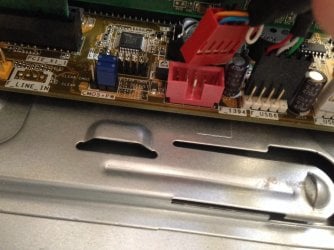
So I'm swapping out the power supply and as I'm doing it I notice that this red cable isn't plugged into this red port. Is it supposed to be? It was sitting right there, just not plugged in. I don't know what it is. image.jpg
 

My Computer My Computer

At a glance

Windows 7 64bit
Computer type
PC/Desktop
Computer Manufacturer/Model Number
HP Elite 180t
OS
Windows 7 64bit
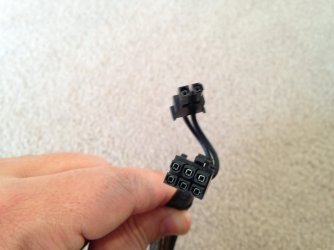
Now I have another problem. There is a port labeled ATX_CPU that HP's site shows is for the motherboard fan. That is the pic showing the 4 pin port and connector. This Corsair does not have a connector like that. It has two 6 pin connectors that each also have a 2 pin connector coming off of them. Can I use those?image.jpg
 

My Computer My Computer

At a glance

Windows 7 64bit
Computer type
PC/Desktop
Computer Manufacturer/Model Number
HP Elite 180t
OS
Windows 7 64bit
Here are the Corsair plugs. image.jpg
 

My Computer My Computer

At a glance

Windows 7 64bit
Computer type
PC/Desktop
Computer Manufacturer/Model Number
HP Elite 180t
OS
Windows 7 64bit
Sorry for all the posts......just found out online that the 8-pin CPU connector can be broken apart into two 4-pin connectors. That should do the trick I think.
 

My Computer My Computer

At a glance

Windows 7 64bit
Computer type
PC/Desktop
Computer Manufacturer/Model Number
HP Elite 180t
OS
Windows 7 64bit
Well, I got the new power supply installed and it seems to be working fine. However, I launched a youtube video, and after about 15-20 minutes of play, the pc shut down. Guess I just blew $70 on a power supply. Now what?
 

My Computer My Computer

At a glance

Windows 7 64bit
Computer type
PC/Desktop
Computer Manufacturer/Model Number
HP Elite 180t
OS
Windows 7 64bit
Back
Top