
Windows 7 crashing

Razgriz panavia

New member
Local time
11:30 PM
Messages
24
Location
Broadstairs
Hi, didn't know where to put this but I have a problem, Windows 7 tends to crash at the moment I think it's something to do with winamp and the automatic scans with AVG but I'm not entirely sure. I have had times before when I've had winamp running and tried initiating a scan on a portable drive and then it would lock up and restart. I've turned automatic restarts off now but whether I'll get a code or just get stuck on a black screen I don't know. What usually happens is the screen goes black, the music gets stuck and I end up holding the power button or letting it restart itself. It's getting very annoying now, as I'm losing drawings which I spent loadsa time on but haven't saved lol.

I got a fault log from event viewer, it's different from the rest as the first two bug fix strings are not 0x0

Log Name: System
Source: Microsoft-Windows-Kernel-Power
Date: 13/07/2009 12:17:15
Event ID: 41
Task Category: (63)
Level: Critical
Keywords: (2)
User: SYSTEM
Computer: Razgriz-Hangar
Description:
The system has rebooted without cleanly shutting down first. This error could be caused if the system stopped responding, crashed, or lost power unexpectedly.
Event Xml:
<Event xmlns="http://schemas.microsoft.com/win/2004/08/events/event">
<System>
<Provider Name="Microsoft-Windows-Kernel-Power" Guid="{331C3B3A-2005-44C2-AC5E-77220C37D6B4}" />
<EventID>41</EventID>
<Version>2</Version>
<Level>1</Level>
<Task>63</Task>
<Opcode>0</Opcode>
<Keywords>0x8000000000000002</Keywords>
<TimeCreated SystemTime="2009-07-13T11:17:15.755200000Z" />
<EventRecordID>13893</EventRecordID>
<Correlation />
<Execution ProcessID="4" ThreadID="8" />
<Channel>System</Channel>
<Computer>Razgriz-Hangar</Computer>
<Security UserID="S-1-5-18" />
</System>
<EventData>
<Data Name="BugcheckCode">26</Data>
<Data Name="BugcheckParameter1">0x41287</Data>
<Data Name="BugcheckParameter2">0xd0a0d33</Data>
<Data Name="BugcheckParameter3">0x0</Data>
<Data Name="BugcheckParameter4">0x0</Data>
<Data Name="SleepInProgress">false</Data>
<Data Name="PowerButtonTimestamp">0</Data>
</EventData>
</Event>
 

My Computer

Computer Manufacturer/Model Number
Acer Aspire 7520
OS
Windows 7 64bit/Ubuntu 10.04 32bit/Linux Mint 9 64bit
CPU
AMD Athlon 64 X2 Dual Core TK-55 (1.8GHz, 2x 256KB L2 Cache)
Motherboard
MBAJ702003
Memory
2.5GB DDR2 SoDIMM
Graphics Card(s)
Nvidia GeForce 7000M/nForce 610M chipset 384MB
Sound Card
Realtek
Monitor(s) Displays
17" WXGA+ Acer CrystalBrite LCD
Screen Resolution
1440 x 900 32bit
Hard Drives
250GB HDD internal, 160GB IDE external
Internet Speed
54Mbps (802.11g)/ Tiscali 3Mbps lease
Are you doing this on your laptop? If so do you have it connected up to the mains supply or are you using the laptops battery?
 

My Computer

Computer Manufacturer/Model Number
self built
OS
Windows 7 Professional 64-bit
CPU
Intel E8400 3GHz
Motherboard
Intel DX48BT2
Memory
Kingston PC3-10700H 4Gb
Graphics Card(s)
XFX Radeon HD 5850 BlackEd.
Sound Card
Asus Xonar DG
Monitor(s) Displays
2x Samsung SM-T220HD 22"
Screen Resolution
1680x1050 on two monitors
Hard Drives
OCZ Vertex 2 120gb 3.5" (OS)
Seagate Momentus XT 500gb
Samsung F3 1Tb (games)
2x Samsung F1 1Tb
PSU
Thermaltake ToughPower 850w
Case
Thermaltake Armor
Cooling
Scythe Mugen II
Keyboard
Microsoft Comfort Curve USB
Mouse
Razer Diamondback 3G
Internet Speed
8128/443
If you own a Seagate HDD with one of these model #'s, go to Seagate and get a Firmware update that may fix this
ST3500320AS, ST3500620AS, ST3500820AS, ST3640330AS, ST3640530AS, ST3750330AS, ST3750630AS, ST31000340AS (firmwares affected: AD14, SD15, SD16, SD17, SD18, SD19, SD81)

http://seagate.custkb.com/seagate/c...tLanguage=selfservice&DocId=207951&NewLang=en

If that's not the case here, that error most often points to a hardware related problem.
 

My Computer

Computer Manufacturer/Model Number
Personal Build
OS
Vista Ult 64bit - Windows 7 Ult 7264 64bit
CPU
Intel Core 2 Duo E6750
Motherboard
Asus Commando
Memory
4 G's Crucial Ballistix Tracer
Graphics Card(s)
BFG Nvidia 8800 GTS 340
Sound Card
Creative Sound Blaster X-FI Platinum FATAL1TY
Monitor(s) Displays
2-22" HP W2207 LCD
Screen Resolution
1920 x 1080
Hard Drives
3 x 500G WD Caviar SATA II
PSU
Enermax Noise Taker II 600W
Case
NZXT Lexa Classic (dual doored & windowed)
Cooling
Zalman 9700 CPU cooler - 4 x 120mm, 1 x 90mm fans
Keyboard
Logitech MX 5500
Mouse
Logitech MX Revolution
Internet Speed
Blazing...
Do you use the Hibernation (sleep) mode often? Does you PC shuts down to standby when you do not use it for 30 mins or so?
Perhaps it has something to do with hardware drivers and hibernation mode. When you reactivate your PC and the OS (or some program like AVG) wants to access certain drivers or USB devices, it crashes.
Try editing your energy options and turn off hibernation mode. Perhaps it will help...
 

My Computer

OS
Windows 7 RC1
CPU
Intel Core Quad Q8200 @ 2,6 Ghz
Motherboard
Gigabyte EP35 DS3
Memory
Corsair 2x 2GB
Graphics Card(s)
Sapphire Radeon HD 4870
Sound Card
OnBoard Realtek
Monitor(s) Displays
Philips 220XW
Hard Drives
Samsung Spinpoint 640 GB
Hitachi Deskstar 500 GB
Case
Sharkoon Rebel 12 black
The last time it happened, the laptop was plugged in and had been on for about 4 to 5 hrs. I have modified the settings before and disabled the hibernate settings as they create huge files. The bit about the seagate hard drives is interesting, I have a 320GB harddrive, though I can't remeber the make, I have replaced my Hitachi one after it failed, so it's not the manufactorers hard drive. About installing firmwares, could you link me to some tutorials as to how to do it, as it sounds like something similar to flashing files like installing new bios. Thanks for the comments.
 

My Computer

Computer Manufacturer/Model Number
Acer Aspire 7520
OS
Windows 7 64bit/Ubuntu 10.04 32bit/Linux Mint 9 64bit
CPU
AMD Athlon 64 X2 Dual Core TK-55 (1.8GHz, 2x 256KB L2 Cache)
Motherboard
MBAJ702003
Memory
2.5GB DDR2 SoDIMM
Graphics Card(s)
Nvidia GeForce 7000M/nForce 610M chipset 384MB
Sound Card
Realtek
Monitor(s) Displays
17" WXGA+ Acer CrystalBrite LCD
Screen Resolution
1440 x 900 32bit
Hard Drives
250GB HDD internal, 160GB IDE external
Internet Speed
54Mbps (802.11g)/ Tiscali 3Mbps lease
bsod

The last time it happened, the laptop was plugged in and had been on for about 4 to 5 hrs. I have modified the settings before and disabled the hibernate settings as they create huge files. The bit about the seagate hard drives is interesting, I have a 320GB harddrive, though I can't remeber the make, I have replaced my Hitachi one after it failed, so it's not the manufactorers hard drive. About installing firmwares, could you link me to some tutorials as to how to do it, as it sounds like something similar to flashing files like installing new bios. Thanks for the comments.

Hi and welcome to sevenforums

Thanks for filling in your systems specs.

I have 2 things for you to do. First go into event viewer (type event viewer in seaarch) and see if there are any errors listed there. If you could you snip (type snipping tool in search) and upload the results. Second could you go into c:\windows\minidump (where the crash records are kept) and zip and upload the last file. If it isn't in minidump you can search for *.dmp.

Thanks in advance

Ken
 

My Computer

Computer Manufacturer/Model Number
HP Pavillion dv-7 1005 Tx
OS
Win 8 Release candidate 8400
CPU
[email protected]
Memory
4 gigs
Graphics Card(s)
Nvidia 9600M
Sound Card
HD built-in
Monitor(s) Displays
17" Wxga
Screen Resolution
1440x900
Cooling
none
Internet Speed
45Mb down 5Mb up
OK heres a snippit from Event log 41 - Kernel power

Log Name: System
Source: Microsoft-Windows-Kernel-Power
Date: 16/07/2009 13:36:43
Event ID: 41
Task Category: (63)
Level: Critical
Keywords: (2)
User: SYSTEM
Computer: Razgriz-Hangar
Description:
The system has rebooted without cleanly shutting down first. This error could be caused if the system stopped responding, crashed, or lost power unexpectedly.
Event Xml:
<Event xmlns="http://schemas.microsoft.com/win/2004/08/events/event">
<System>
<Provider Name="Microsoft-Windows-Kernel-Power" Guid="{331C3B3A-2005-44C2-AC5E-77220C37D6B4}" />
<EventID>41</EventID>
<Version>2</Version>
<Level>1</Level>
<Task>63</Task>
<Opcode>0</Opcode>
<Keywords>0x8000000000000002</Keywords>
<TimeCreated SystemTime="2009-07-16T12:36:43.619600000Z" />
<EventRecordID>15284</EventRecordID>
<Correlation />
<Execution ProcessID="4" ThreadID="8" />
<Channel>System</Channel>
<Computer>Razgriz-Hangar</Computer>
<Security UserID="S-1-5-18" />
</System>
<EventData>
<Data Name="BugcheckCode">254</Data>
<Data Name="BugcheckParameter1">0x5</Data>
<Data Name="BugcheckParameter2">0x85e0d0e0</Data>
<Data Name="BugcheckParameter3">0x10de055e</Data>
<Data Name="BugcheckParameter4">0x85e03ce0</Data>
<Data Name="SleepInProgress">false</Data>
<Data Name="PowerButtonTimestamp">0</Data>
</EventData>
</Event>

Another Bugcheck log was created

Log Name: System
Source: Microsoft-Windows-WER-SystemErrorReporting
Date: 16/07/2009 13:37:12
Event ID: 1001
Task Category: None
Level: Error
Keywords: Classic
User: N/A
Computer: Razgriz-Hangar
Description:
The computer has rebooted from a bugcheck. The bugcheck was: 0x000000fe (0x00000005, 0x85e0d0e0, 0x10de055e, 0x85e03ce0). A dump was saved in: C:\Windows\MEMORY.DMP. Report Id: 071609-30841-01.
Event Xml:
<Event xmlns="http://schemas.microsoft.com/win/2004/08/events/event">
<System>
<Provider Name="Microsoft-Windows-WER-SystemErrorReporting" Guid="{ABCE23E7-DE45-4366-8631-84FA6C525952}" EventSourceName="BugCheck" />
<EventID Qualifiers="16384">1001</EventID>
<Version>0</Version>
<Level>2</Level>
<Task>0</Task>
<Opcode>0</Opcode>
<Keywords>0x80000000000000</Keywords>
<TimeCreated SystemTime="2009-07-16T12:37:12.000000000Z" />
<EventRecordID>15283</EventRecordID>
<Correlation />
<Execution ProcessID="0" ThreadID="0" />
<Channel>System</Channel>
<Computer>Razgriz-Hangar</Computer>
<Security />
</System>
<EventData>
<Data Name="param1">0x000000fe (0x00000005, 0x85e0d0e0, 0x10de055e, 0x85e03ce0)</Data>
<Data Name="param2">C:\Windows\MEMORY.DMP</Data>
<Data Name="param3">071609-30841-01</Data>
</EventData>
</Event>

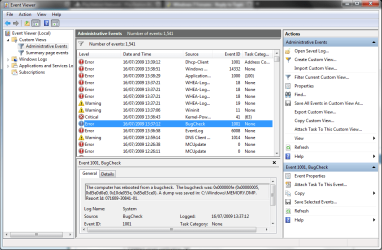
Hope that helps.....Minidumps are included in the zip file, a screenshot showing the number of errors in event viewer has also been uploaded.
 

Attachments

  • Capture.PNG
    Capture.PNG
    41.8 KB · Views: 245

My Computer

Computer Manufacturer/Model Number
Acer Aspire 7520
OS
Windows 7 64bit/Ubuntu 10.04 32bit/Linux Mint 9 64bit
CPU
AMD Athlon 64 X2 Dual Core TK-55 (1.8GHz, 2x 256KB L2 Cache)
Motherboard
MBAJ702003
Memory
2.5GB DDR2 SoDIMM
Graphics Card(s)
Nvidia GeForce 7000M/nForce 610M chipset 384MB
Sound Card
Realtek
Monitor(s) Displays
17" WXGA+ Acer CrystalBrite LCD
Screen Resolution
1440 x 900 32bit
Hard Drives
250GB HDD internal, 160GB IDE external
Internet Speed
54Mbps (802.11g)/ Tiscali 3Mbps lease
Back
Top