Windows 7 cuts my RAM

Just humor us... this is an easy test to perform, if you decide not to, then I wish you luck with your problem..
 

My Computer My Computer

Computer type
PC/Desktop
Computer Manufacturer/Model Number
LENOVO K450 @3.0GHZ
OS
64-bit Windows 8.1 Pro
CPU
Core(TM) i5 CPU 4330 Haswell @ 3.20GHz
Motherboard
LENOVO
Memory
12.00 GB
Graphics Card(s)
Intel(R) HD Graphics
Sound Card
Intel HD integtrated
Monitor(s) Displays
HP 25' ISP Monitor
Screen Resolution
1900/1020
Hard Drives
(1) ST1000DM003-1CH162 (2) Generic STORAGE DEVICE USB Device (3) Generic STORAGE DEVICE USB Device
Internet Speed
100mb down/10mb up
have you run memtest86 to see if there are any errors?? You should run this test for several hours...

no, I didn't, since I have no idea what it is or where I can find it at.
 

My Computer My Computer

OS
Window 7 Ultra 32 bit
CPU
Intel Pentium D 820 2.80GHz
Motherboard
Gigabyte 8VM800PMD-775
Memory
2GB (but Win7 reads as 1)
Graphics Card(s)
Onboard
Sound Card
Onboard
Monitor(s) Displays
CRT
Screen Resolution
1024x768
Hard Drives
Cavalier Green 500GB by WD
Internet Speed
7Mb down and 700Kb up.
ok... I just got back home, and I'm going to boot with only 0.5GB of RAM.
do I need to check out something in particular?
 

My Computer My Computer

OS
Window 7 Ultra 32 bit
CPU
Intel Pentium D 820 2.80GHz
Motherboard
Gigabyte 8VM800PMD-775
Memory
2GB (but Win7 reads as 1)
Graphics Card(s)
Onboard
Sound Card
Onboard
Monitor(s) Displays
CRT
Screen Resolution
1024x768
Hard Drives
Cavalier Green 500GB by WD
Internet Speed
7Mb down and 700Kb up.
This is a utility to test your memory .. get it -=> here
 

My Computer My Computer

Computer type
PC/Desktop
Computer Manufacturer/Model Number
LENOVO K450 @3.0GHZ
OS
64-bit Windows 8.1 Pro
CPU
Core(TM) i5 CPU 4330 Haswell @ 3.20GHz
Motherboard
LENOVO
Memory
12.00 GB
Graphics Card(s)
Intel(R) HD Graphics
Sound Card
Intel HD integtrated
Monitor(s) Displays
HP 25' ISP Monitor
Screen Resolution
1900/1020
Hard Drives
(1) ST1000DM003-1CH162 (2) Generic STORAGE DEVICE USB Device (3) Generic STORAGE DEVICE USB Device
Internet Speed
100mb down/10mb up
ok... I just got back home, and I'm going to boot with only 0.5GB of RAM.
do I need to check out something in particular?

no... just perform the tests suggested...
 

My Computer My Computer

Computer type
PC/Desktop
Computer Manufacturer/Model Number
LENOVO K450 @3.0GHZ
OS
64-bit Windows 8.1 Pro
CPU
Core(TM) i5 CPU 4330 Haswell @ 3.20GHz
Motherboard
LENOVO
Memory
12.00 GB
Graphics Card(s)
Intel(R) HD Graphics
Sound Card
Intel HD integtrated
Monitor(s) Displays
HP 25' ISP Monitor
Screen Resolution
1900/1020
Hard Drives
(1) ST1000DM003-1CH162 (2) Generic STORAGE DEVICE USB Device (3) Generic STORAGE DEVICE USB Device
Internet Speed
100mb down/10mb up
This is a utility to test your memory .. get it -=> here

It's an .iso file...
Do I need to boot with it, or can I run it under DaemonTools?
 

My Computer My Computer

OS
Window 7 Ultra 32 bit
CPU
Intel Pentium D 820 2.80GHz
Motherboard
Gigabyte 8VM800PMD-775
Memory
2GB (but Win7 reads as 1)
Graphics Card(s)
Onboard
Sound Card
Onboard
Monitor(s) Displays
CRT
Screen Resolution
1024x768
Hard Drives
Cavalier Green 500GB by WD
Internet Speed
7Mb down and 700Kb up.
You need to first burn it as an image file, then boot from it and let it run..
 

My Computer My Computer

Computer type
PC/Desktop
Computer Manufacturer/Model Number
LENOVO K450 @3.0GHZ
OS
64-bit Windows 8.1 Pro
CPU
Core(TM) i5 CPU 4330 Haswell @ 3.20GHz
Motherboard
LENOVO
Memory
12.00 GB
Graphics Card(s)
Intel(R) HD Graphics
Sound Card
Intel HD integtrated
Monitor(s) Displays
HP 25' ISP Monitor
Screen Resolution
1900/1020
Hard Drives
(1) ST1000DM003-1CH162 (2) Generic STORAGE DEVICE USB Device (3) Generic STORAGE DEVICE USB Device
Internet Speed
100mb down/10mb up
You need to first burn it as an image file, then boot from it and let it run..

Yeah, I figured it out.
So I'm going to boot with that with all the RAM installed, and then if no results, I'll boot normally with 0.5GB. Is that ok?
 

My Computer My Computer

OS
Window 7 Ultra 32 bit
CPU
Intel Pentium D 820 2.80GHz
Motherboard
Gigabyte 8VM800PMD-775
Memory
2GB (but Win7 reads as 1)
Graphics Card(s)
Onboard
Sound Card
Onboard
Monitor(s) Displays
CRT
Screen Resolution
1024x768
Hard Drives
Cavalier Green 500GB by WD
Internet Speed
7Mb down and 700Kb up.
Sounds like a plan!! ;)

Keep in mind that you will need to run the test for several hours, preferably overnight, for accurate results.. you may want to try the boot test first..
 

My Computer My Computer

Computer type
PC/Desktop
Computer Manufacturer/Model Number
LENOVO K450 @3.0GHZ
OS
64-bit Windows 8.1 Pro
CPU
Core(TM) i5 CPU 4330 Haswell @ 3.20GHz
Motherboard
LENOVO
Memory
12.00 GB
Graphics Card(s)
Intel(R) HD Graphics
Sound Card
Intel HD integtrated
Monitor(s) Displays
HP 25' ISP Monitor
Screen Resolution
1900/1020
Hard Drives
(1) ST1000DM003-1CH162 (2) Generic STORAGE DEVICE USB Device (3) Generic STORAGE DEVICE USB Device
Internet Speed
100mb down/10mb up
Sounds like a plan!! ;)

Keep in mind that you will need to run the test for several hours, preferably overnight, for accurate results.. you may want to try the boot test first..

:thumbsup:
 

My Computer My Computer

OS
Window 7 Ultra 32 bit
CPU
Intel Pentium D 820 2.80GHz
Motherboard
Gigabyte 8VM800PMD-775
Memory
2GB (but Win7 reads as 1)
Graphics Card(s)
Onboard
Sound Card
Onboard
Monitor(s) Displays
CRT
Screen Resolution
1024x768
Hard Drives
Cavalier Green 500GB by WD
Internet Speed
7Mb down and 700Kb up.
Progress report:
I booted into MemTest86 and ran the thing for 90 minutes. Finished all the tests twice non-stop with NO errors.

I'm gonna boot now with only 0.5GB RAM... Let's see if it'll work.
 

My Computer My Computer

OS
Window 7 Ultra 32 bit
CPU
Intel Pentium D 820 2.80GHz
Motherboard
Gigabyte 8VM800PMD-775
Memory
2GB (but Win7 reads as 1)
Graphics Card(s)
Onboard
Sound Card
Onboard
Monitor(s) Displays
CRT
Screen Resolution
1024x768
Hard Drives
Cavalier Green 500GB by WD
Internet Speed
7Mb down and 700Kb up.
Progress report #2:
Booted with 0.5GB of RAM and the comp was sooooooooooooooo slow!
Windows detected that it only has 0.5GB, but then it crashed.
I booted again with the 2GB also installed, but I switched the slots again.
Windows still says I have 1.5GB, when I actually have 2.5GB.

Now what?
 

My Computer My Computer

OS
Window 7 Ultra 32 bit
CPU
Intel Pentium D 820 2.80GHz
Motherboard
Gigabyte 8VM800PMD-775
Memory
2GB (but Win7 reads as 1)
Graphics Card(s)
Onboard
Sound Card
Onboard
Monitor(s) Displays
CRT
Screen Resolution
1024x768
Hard Drives
Cavalier Green 500GB by WD
Internet Speed
7Mb down and 700Kb up.
navigate to c:/windows/minidump and zip up the .dmp file and attach it to your next post...
 

My Computer My Computer

Computer type
PC/Desktop
Computer Manufacturer/Model Number
LENOVO K450 @3.0GHZ
OS
64-bit Windows 8.1 Pro
CPU
Core(TM) i5 CPU 4330 Haswell @ 3.20GHz
Motherboard
LENOVO
Memory
12.00 GB
Graphics Card(s)
Intel(R) HD Graphics
Sound Card
Intel HD integtrated
Monitor(s) Displays
HP 25' ISP Monitor
Screen Resolution
1900/1020
Hard Drives
(1) ST1000DM003-1CH162 (2) Generic STORAGE DEVICE USB Device (3) Generic STORAGE DEVICE USB Device
Internet Speed
100mb down/10mb up
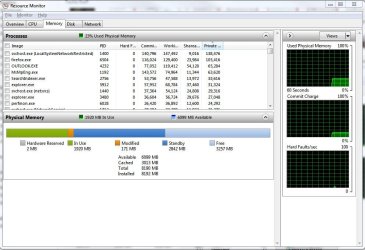
also, to find out how your ram is allocated, go to task manager>performance tab>click resource monitor.
did you at least try this to see exactly how and where your ram is at? i'd think you'd want to know where it is first before you start looking where it is not. cpuz reports one thing and windows another--so the ram is there according to cpuz, you just need to see how windows is using / allocating it, right?.
 

My Computer My Computer

Computer Manufacturer/Model Number
Rig 1
OS
Windows 7 Ultimate x64
CPU
AMD Phenom II X4 940 Black Edition @ 3.4GHz (AM2+)
Motherboard
Gigabyte GA-MA790X-UD4P (AM2+)
Memory
Corsair CM2X4096-8500C5 (4 X 2GB)
Graphics Card(s)
XFX Radeon HD 5770 / Diamond Radeon HD 5770 CrossFireX
Sound Card
Asus Xonar DS (PCI)
Monitor(s) Displays
Samsung SyncMaster 932bw+ (3)
Screen Resolution
4320x900
Hard Drives
OCZ Vertex 2 80 GB - Windows 7 System --
WD Caviar Black 1TB - Music, Movies, Vids, Pics --
WD Caviar Black 640GB - User Profiles & Games --
WD My Book 320GB external
PSU
Corsair CMPSU-750TX
Case
Cooler Master HAF 932
Cooling
Corsair Hydro Series H50
Keyboard
Logitech Desktop Wave
Mouse
Logitech LX8 Laser
Internet Speed
20 down / 2 up
Other Info
LG GGC-H20L Blu-Ray / HDDVD combo --
Hauppauge HVR-1250 --
Silverstone MFP-51 --
Logitech Webcam C600
Progress report #2:
Booted with 0.5GB of RAM and the comp was sooooooooooooooo slow!
Windows detected that it only has 0.5GB, but then it crashed.
I booted again with the 2GB also installed, but I switched the slots again.
Windows still says I have 1.5GB, when I actually have 2.5GB.

Now what?
I would like to see the minidump myself...Windows shouldn't had crashed...
 

My Computer My Computer

Computer Manufacturer/Model Number
Compal JFT02 (Custom Build Laptop)
OS
Windows 7 Home Premium x64 - Mac OS X 10.6.4 x64
CPU
Intel Core 2 Duo T9300 2.5 GHz
Motherboard
JFT02
Memory
4GB Kingston DDR2-800
Graphics Card(s)
NVIDIA Geforce 8600M GT (512MB Model)
Sound Card
Realtek HD Audio
Monitor(s) Displays
WUXGA Standard Laptop Display
Screen Resolution
1680*1050
Hard Drives
Toshiba 320GB 5400RPM Laptop HD
PSU
Standard Laptop Power Supply
Case
Standard Laptop Case
Cooling
Standard Laptop Cooling
Keyboard
Standard Laptop 105 Key-Keyboard
Mouse
Synaptics Touchpad
Internet Speed
Verizion Online DSL 3360/864 kbs (dl/up)
navigate to c:/windows/minidump and zip up the .dmp file and attach it to your next post...

The file is attached

also, to find out how your ram is allocated, go to task manager>performance tab>click resource monitor.
did you at least try this to see exactly how and where your ram is at? i'd think you'd want to know where it is first before you start looking where it is not. cpuz reports one thing and windows another--so the ram is there according to cpuz, you just need to see how windows is using / allocating it, right?.

CPU-Z is just saying which hardware it sees, not if it's working properly or not, and I did what you said... The allocation of RAM is in the amount of 1.5GB, not 2.5.
 

Attachments

My Computer My Computer

OS
Window 7 Ultra 32 bit
CPU
Intel Pentium D 820 2.80GHz
Motherboard
Gigabyte 8VM800PMD-775
Memory
2GB (but Win7 reads as 1)
Graphics Card(s)
Onboard
Sound Card
Onboard
Monitor(s) Displays
CRT
Screen Resolution
1024x768
Hard Drives
Cavalier Green 500GB by WD
Internet Speed
7Mb down and 700Kb up.
ok, when you go to: task manager > performance tab > resource monitor, you have a window that looks like the one below. the information will tell you:
-available ram
-cached ram
-total ram
-installed ram
as well as:
-ram reserved for hardware
-ram in use
-ram modified
-ram in standby
-ram that is free
to find out how your ram is utilized, this will tell you. you may have a certain amount reserved for hardware so your the total available to you will be less than what you have installed. by the way, are you running a 32-bit or 64-bit system?
 

Attachments

  • resources.JPG
    resources.JPG
    91.9 KB · Views: 8

My Computer My Computer

Computer Manufacturer/Model Number
Rig 1
OS
Windows 7 Ultimate x64
CPU
AMD Phenom II X4 940 Black Edition @ 3.4GHz (AM2+)
Motherboard
Gigabyte GA-MA790X-UD4P (AM2+)
Memory
Corsair CM2X4096-8500C5 (4 X 2GB)
Graphics Card(s)
XFX Radeon HD 5770 / Diamond Radeon HD 5770 CrossFireX
Sound Card
Asus Xonar DS (PCI)
Monitor(s) Displays
Samsung SyncMaster 932bw+ (3)
Screen Resolution
4320x900
Hard Drives
OCZ Vertex 2 80 GB - Windows 7 System --
WD Caviar Black 1TB - Music, Movies, Vids, Pics --
WD Caviar Black 640GB - User Profiles & Games --
WD My Book 320GB external
PSU
Corsair CMPSU-750TX
Case
Cooler Master HAF 932
Cooling
Corsair Hydro Series H50
Keyboard
Logitech Desktop Wave
Mouse
Logitech LX8 Laser
Internet Speed
20 down / 2 up
Other Info
LG GGC-H20L Blu-Ray / HDDVD combo --
Hauppauge HVR-1250 --
Silverstone MFP-51 --
Logitech Webcam C600
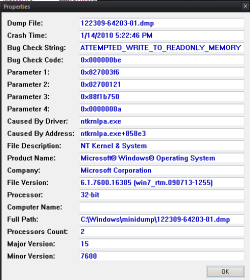
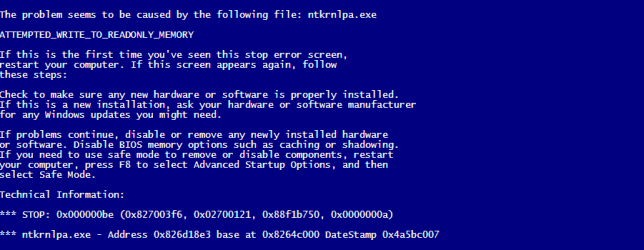
Your .dmp file points to a bad memory module... replace it as soon as possible...

Capture1.PNG Capture.PNG
 

My Computer My Computer

Computer type
PC/Desktop
Computer Manufacturer/Model Number
LENOVO K450 @3.0GHZ
OS
64-bit Windows 8.1 Pro
CPU
Core(TM) i5 CPU 4330 Haswell @ 3.20GHz
Motherboard
LENOVO
Memory
12.00 GB
Graphics Card(s)
Intel(R) HD Graphics
Sound Card
Intel HD integtrated
Monitor(s) Displays
HP 25' ISP Monitor
Screen Resolution
1900/1020
Hard Drives
(1) ST1000DM003-1CH162 (2) Generic STORAGE DEVICE USB Device (3) Generic STORAGE DEVICE USB Device
Internet Speed
100mb down/10mb up

My Computer My Computer

OS
Window 7 Ultra 32 bit
CPU
Intel Pentium D 820 2.80GHz
Motherboard
Gigabyte 8VM800PMD-775
Memory
2GB (but Win7 reads as 1)
Graphics Card(s)
Onboard
Sound Card
Onboard
Monitor(s) Displays
CRT
Screen Resolution
1024x768
Hard Drives
Cavalier Green 500GB by WD
Internet Speed
7Mb down and 700Kb up.
Your .dmp file points to a bad memory module... replace it as soon as possible...

View attachment 47596 View attachment 47597
I figured as much because Windows 7 can boot to 512MB with no issue...

I am glad that this long road has came to a conclusion...it might not be a good conclusion but at least we have pinpointed the problem and the fix isn't too costly
 

My Computer My Computer

Computer Manufacturer/Model Number
Compal JFT02 (Custom Build Laptop)
OS
Windows 7 Home Premium x64 - Mac OS X 10.6.4 x64
CPU
Intel Core 2 Duo T9300 2.5 GHz
Motherboard
JFT02
Memory
4GB Kingston DDR2-800
Graphics Card(s)
NVIDIA Geforce 8600M GT (512MB Model)
Sound Card
Realtek HD Audio
Monitor(s) Displays
WUXGA Standard Laptop Display
Screen Resolution
1680*1050
Hard Drives
Toshiba 320GB 5400RPM Laptop HD
PSU
Standard Laptop Power Supply
Case
Standard Laptop Case
Cooling
Standard Laptop Cooling
Keyboard
Standard Laptop 105 Key-Keyboard
Mouse
Synaptics Touchpad
Internet Speed
Verizion Online DSL 3360/864 kbs (dl/up)
Back
Top