Solved Windows 7 does not boot with 4 ram sticks (16gb)

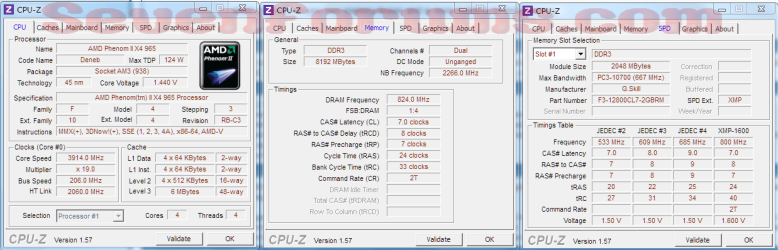
You are welcome. According to your MB manuel, they recommend the ram in the blue dimm slots. Also check the default dram voltage in bios. My AMD board sets default at 1.6. If you use the CPUz program, post a screenshot of the memory tab and the spd tab.
 

My Computers My Computers

  • At a glance

    Windows 11 ProRyzen 9 5900X32GB G Skill DDR4-3600EVGA RTX 3080 FTW 3 Ultra
    Computer type
    PC/Desktop
    Computer Manufacturer/Model Number
    ALWAYS UNDER CONSTRUCTION
    OS
    Windows 11 Pro
    CPU
    Ryzen 9 5900X
    Motherboard
    Asus X570 Crosshair Viii Hero
    Memory
    32GB G Skill DDR4-3600
    Graphics Card(s)
    EVGA RTX 3080 FTW 3 Ultra
    Sound Card
    On Board/Sennheiser PC37X Headset
    Monitor(s) Displays
    3 X Asus 27"
    Screen Resolution
    2560x1440
    Hard Drives
    2 X 1 TB NVME drives
    PSU
    EVGA 850
    Case
    Phanteks Eclipse P400A
    Cooling
    EVGA 280 AIO
    Keyboard
    Logitech G510s/ Logitech G13
    Mouse
    Logitech G502
    Internet Speed
    24/1
    Antivirus
    ESET/MBAM Pro/SAS Pro
    Browser
    Chrome/ Firefox/ Edge
  • At a glance

    Windows 11 ProIntel Ultra 9 288V32 GB LPDDR5X 8533
    Computer type
    Laptop
    System Manufacturer/Model Number
    Dell 16 Plus
    OS
    Windows 11 Pro
    CPU
    Intel Ultra 9 288V
    Memory
    32 GB LPDDR5X 8533
    Monitor(s) Displays
    16" Mini-LED HDR600 Touch 90 Hz
    Screen Resolution
    2560X1600
    Hard Drives
    1 TB NVME

My Computer My Computer

At a glance

Windows 7 Home Premium 64bitAMD Phenom II X6 1090T Black EditionG. SKILL DDR3 4GBx3Integrated
Computer Manufacturer/Model Number
Custom built
OS
Windows 7 Home Premium 64bit
CPU
AMD Phenom II X6 1090T Black Edition
Motherboard
ASUS M5A88-V EVO
Memory
G. SKILL DDR3 4GBx3
Graphics Card(s)
Integrated
Sound Card
Integrated HD Audio
Hard Drives
Seagate 1TB 6Gb/s
PSU
Antec 450 watts
Case
Cooler Master elite
Cooling
2 120mm fans
CPU-Z results

Here are some screen shots of my system.
 

Attachments

  • 2011-06-19_22-21-02_52.jpg
    2011-06-19_22-21-02_52.jpg
    382 KB · Views: 14
  • 2011-06-19_22-21-44_97.jpg
    2011-06-19_22-21-44_97.jpg
    341.8 KB · Views: 14
  • 2011-06-19_22-22-07_474.jpg
    2011-06-19_22-22-07_474.jpg
    381.6 KB · Views: 16
  • 2011-06-20_18-25-06_802.jpg
    2011-06-20_18-25-06_802.jpg
    767.4 KB · Views: 22
  • 2011-06-20_18-25-26_248.jpg
    2011-06-20_18-25-26_248.jpg
    729 KB · Views: 12

My Computer My Computer

At a glance

Windows 7 Home Premium 64bitAMD Phenom II X6 1090T Black EditionG. SKILL DDR3 4GBx3Integrated
Computer Manufacturer/Model Number
Custom built
OS
Windows 7 Home Premium 64bit
CPU
AMD Phenom II X6 1090T Black Edition
Motherboard
ASUS M5A88-V EVO
Memory
G. SKILL DDR3 4GBx3
Graphics Card(s)
Integrated
Sound Card
Integrated HD Audio
Hard Drives
Seagate 1TB 6Gb/s
PSU
Antec 450 watts
Case
Cooler Master elite
Cooling
2 120mm fans
some more
 

Attachments

  • 2011-06-20_18-25-47_364.jpg
    2011-06-20_18-25-47_364.jpg
    637.2 KB · Views: 7
  • 2011-06-20_18-26-02_762.jpg
    2011-06-20_18-26-02_762.jpg
    722.5 KB · Views: 14

My Computer My Computer

At a glance

Windows 7 Home Premium 64bitAMD Phenom II X6 1090T Black EditionG. SKILL DDR3 4GBx3Integrated
Computer Manufacturer/Model Number
Custom built
OS
Windows 7 Home Premium 64bit
CPU
AMD Phenom II X6 1090T Black Edition
Motherboard
ASUS M5A88-V EVO
Memory
G. SKILL DDR3 4GBx3
Graphics Card(s)
Integrated
Sound Card
Integrated HD Audio
Hard Drives
Seagate 1TB 6Gb/s
PSU
Antec 450 watts
Case
Cooler Master elite
Cooling
2 120mm fans
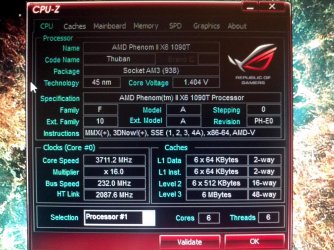
here's a recent report from CPU-Z
 

Attachments

My Computer My Computer

At a glance

Windows 7 Home Premium 64bitAMD Phenom II X6 1090T Black EditionG. SKILL DDR3 4GBx3Integrated
Computer Manufacturer/Model Number
Custom built
OS
Windows 7 Home Premium 64bit
CPU
AMD Phenom II X6 1090T Black Edition
Motherboard
ASUS M5A88-V EVO
Memory
G. SKILL DDR3 4GBx3
Graphics Card(s)
Integrated
Sound Card
Integrated HD Audio
Hard Drives
Seagate 1TB 6Gb/s
PSU
Antec 450 watts
Case
Cooler Master elite
Cooling
2 120mm fans
It looks like you are overclocking your CPU. The stock speed is 3200 and you are running at 3700. Set it back to stock and it may just run right.

Jim :geek:
 

My Computer My Computer

At a glance

Windows 8.1 Pro w/Media Center 64bit, Windows...Phenom II X6 1100TCrucial Balistic 8gb DDR3-1866 CL9MSI R6850 Cyclone IGD5 PE
Computer type
PC/Desktop
Computer Manufacturer/Model Number
Home Built
OS
Windows 8.1 Pro w/Media Center 64bit, Windows 7 HP 64bit
CPU
Phenom II X6 1100T
Motherboard
ASUS M5A99X EVO
Memory
Crucial Balistic 8gb DDR3-1866 CL9
Graphics Card(s)
MSI R6850 Cyclone IGD5 PE
Sound Card
On Board
Monitor(s) Displays
ASUS VE258Q 25" LED with DVI-HDMI-DisplayPort
Screen Resolution
1920 x 1080
Hard Drives
Two WD Cavier Black 2TB Sata III, WD My Book Essential 2TB USB 3.0
PSU
Seasonic X650 80 Plus GOLD Modular
Case
Corsair 400R
Cooling
Antec Kuhler H2O 620, Two 120mm and four 140mm
Keyboard
Logitech K120
Mouse
Logitech Marble Mouse USB, Logitech Precision Game Pad
Internet Speed
15MB
Antivirus
Norton IS 2013, Malwarebytes Pro Beta 2
Browser
IE-11, FF-27
Other Info
APC UPS ES 750, Netgear WNR3500L Gigabit & Wireless N Router with SamKnows Test Program, Motorola SB6120 Gigabit Cable Modem. Brother HL-2170W Laser Printer, Epson V300 Scanner
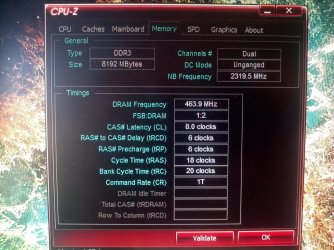
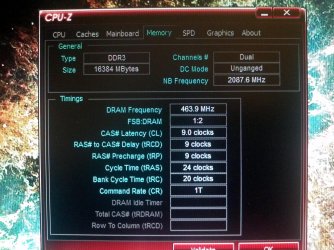
did you set the timings on the ram? you are running 1333 1.5V 9-9-9-24.
 

My Computers My Computers

  • At a glance

    Windows 11 ProRyzen 9 5900X32GB G Skill DDR4-3600EVGA RTX 3080 FTW 3 Ultra
    Computer type
    PC/Desktop
    Computer Manufacturer/Model Number
    ALWAYS UNDER CONSTRUCTION
    OS
    Windows 11 Pro
    CPU
    Ryzen 9 5900X
    Motherboard
    Asus X570 Crosshair Viii Hero
    Memory
    32GB G Skill DDR4-3600
    Graphics Card(s)
    EVGA RTX 3080 FTW 3 Ultra
    Sound Card
    On Board/Sennheiser PC37X Headset
    Monitor(s) Displays
    3 X Asus 27"
    Screen Resolution
    2560x1440
    Hard Drives
    2 X 1 TB NVME drives
    PSU
    EVGA 850
    Case
    Phanteks Eclipse P400A
    Cooling
    EVGA 280 AIO
    Keyboard
    Logitech G510s/ Logitech G13
    Mouse
    Logitech G502
    Internet Speed
    24/1
    Antivirus
    ESET/MBAM Pro/SAS Pro
    Browser
    Chrome/ Firefox/ Edge
  • At a glance

    Windows 11 ProIntel Ultra 9 288V32 GB LPDDR5X 8533
    Computer type
    Laptop
    System Manufacturer/Model Number
    Dell 16 Plus
    OS
    Windows 11 Pro
    CPU
    Intel Ultra 9 288V
    Memory
    32 GB LPDDR5X 8533
    Monitor(s) Displays
    16" Mini-LED HDR600 Touch 90 Hz
    Screen Resolution
    2560X1600
    Hard Drives
    1 TB NVME
Pooch: yeah I followed your advice and I've been using MemOK, but when MemOK finishes its thing and I try to save the settings the BIOS doesn't boot. I will take some more pictures of the screens.

I am not sure why this is maybe its the bad stick messing it up, "afterthought" It maybe that using MemOK save the settings automatically its something else you could check.

I left 2 ram sticks inthere, i will try MemOK when I get home and see what happens. I loaded the BIOS default settings (I updated the bios) and everything is working now.
I'm sending back the bad ram stick and hopefully when I get the new ones the system will work with them.

Ok I am interested to know if the saved BIOS works with good RAM.
Good that it is working, I hope your new RAM lives up to your expectations as well.

Here's something very interesting about AMD AM3 CPU's and RAM speeds:
VERY IMPORTANT INFORMATION REGARDING AMD AM3 CPU's and RAM SPEEDS
This should not have any bearing on your problem :)


According to your last CPU-Z picture, you are running in unganged mode it would be better to check your handbook and insert the RAM in the recommended slots so that you run in ganged mode. You may possibly have a BIOS setting where you can change this setting, I am not certain but it was definitely on the older AM boards
 
Last edited:

My Computer My Computer

At a glance

Windows 7 Ultimate x64Intel Core i7-2600K16 GB G Skill F3-10666 CL9D-4GBRLATI Radeon HD 6870
Computer Manufacturer/Model Number
Something I threw together
OS
Windows 7 Ultimate x64
CPU
Intel Core i7-2600K
Motherboard
Asus P8P67
Memory
16 GB G Skill F3-10666 CL9D-4GBRL
Graphics Card(s)
ATI Radeon HD 6870
Sound Card
ATI Radeon HDMI / Realtek ALC892
Monitor(s) Displays
2 x 22" standard monitors / LG32LC56v TV to watch films
Screen Resolution
1920 x1080
Hard Drives
2 x OCZ Vertex2 111.79GB
3 x Samsung103SJ
1 x Samsung103UJ
1 x WD3200BEVT
1 x Hitachi5K320-160
PSU
Thermaltake Toughpower Cable Management 750W
Case
Antec 300
Cooling
Noctua NH-U12P SE2 and 5 120mm Case fans
Keyboard
Microsoft Comfort Curve Keyboard 2000
Mouse
Hama M3110 / Logitech M305
Internet Speed
16000
Other Info
I have also used Fedora, Suse, Ubuntu Linux
And all other Windows from 95 to date except ME
It looks like you are overclocking your CPU. The stock speed is 3200 and you are running at 3700. Set it back to stock and it may just run right.

Jim :geek:
This is strange according to the BIOS pictures the CPU is running normally :shock:
 

My Computer My Computer

At a glance

Windows 7 Ultimate x64Intel Core i7-2600K16 GB G Skill F3-10666 CL9D-4GBRLATI Radeon HD 6870
Computer Manufacturer/Model Number
Something I threw together
OS
Windows 7 Ultimate x64
CPU
Intel Core i7-2600K
Motherboard
Asus P8P67
Memory
16 GB G Skill F3-10666 CL9D-4GBRL
Graphics Card(s)
ATI Radeon HD 6870
Sound Card
ATI Radeon HDMI / Realtek ALC892
Monitor(s) Displays
2 x 22" standard monitors / LG32LC56v TV to watch films
Screen Resolution
1920 x1080
Hard Drives
2 x OCZ Vertex2 111.79GB
3 x Samsung103SJ
1 x Samsung103UJ
1 x WD3200BEVT
1 x Hitachi5K320-160
PSU
Thermaltake Toughpower Cable Management 750W
Case
Antec 300
Cooling
Noctua NH-U12P SE2 and 5 120mm Case fans
Keyboard
Microsoft Comfort Curve Keyboard 2000
Mouse
Hama M3110 / Logitech M305
Internet Speed
16000
Other Info
I have also used Fedora, Suse, Ubuntu Linux
And all other Windows from 95 to date except ME
The BIOS picks its information from that stored on the chip, and displays the rated value. CPUID, on the other hand, reads the same data but displays the current dynamic frequency of the CPU.

As regards ganged/unganged mode, he is better off using unganged mode as he will get better performance that way. This is due to the Phenom processors having 2 memory controllers, 1 for each channel. If you check my specs, you will see that, although my motherboard supports ganged/unganged memory operation, I am running in ganged mode because my CPU only has a single memory controller.
 

My Computer My Computer

At a glance

Windows 8.1 Pro RTM x64Intel Core-i5-3570K 4-core @ 3.4GHz (Ivy Brid...4 x 4GB DDR3-1600 Corsair Vengeance CMZ8GX3M2...MSI GeForce GTX770 Gaming OC 2GB
Computer type
PC/Desktop
Computer Manufacturer/Model Number
Dwarf Dwf/11/2012 r09/2013
OS
Windows 8.1 Pro RTM x64
CPU
Intel Core-i5-3570K 4-core @ 3.4GHz (Ivy Bridge) (OC 4.4GHz)
Motherboard
ASRock Z77 Extreme4-M
Memory
4 x 4GB DDR3-1600 Corsair Vengeance CMZ8GX3M2A1600C9B (16GB)
Graphics Card(s)
MSI GeForce GTX770 Gaming OC 2GB
Sound Card
Realtek High Definition on board solution (ALC 898)
Monitor(s) Displays
ViewSonic VA1912w Widescreen (VGA)
Screen Resolution
1440x900
Hard Drives
OCZ Agility 3 SSD 120GB SATA III x2 (RAID 0)
Samsung HD501LJ 500GB SATA II x2
Hitachi HDS721010CLA332 1TB SATA II
Iomega 1.5TB Ext USB 2.0
WD 2.0TB Ext USB 3.0
PSU
XFX Pro Series 850W Semi-Modular
Case
Gigabyte IF233
Cooling
1 x 120mm Front Inlet 1 x 120mm Rear Exhaust
Keyboard
Microsoft Comfort Curve Keyboard 3000 (USB)
Mouse
Microsoft Comfort Mouse 3000 for Business (USB)
Internet Speed
NetGear DG834Gv3 ADSL Modem/Router (Ethernet) ~4.0 Mb/s (O2)
Antivirus
Avast! 8.0.1497
Browser
IE 11
Other Info
Optical Drive: HL-DT-ST BD-RE BH10LS30 SATA Bluray
Lexmark S305 Printer/Scanner/Copier (USB)
WEI Score: 8.1/8.1/8.5/8.5/8.25
Asus Eee PC 1011PX Netbook (Windows 7 x86 Starter)
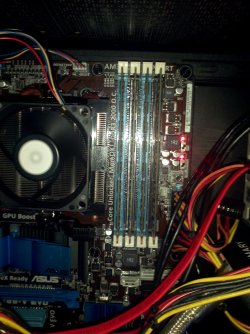
I left 2 ram sticks in the blue slots where the manual recommends.
I will install the other 2 when I get them back. Yes I changed the timming to 9-9-9-24 for system stability.
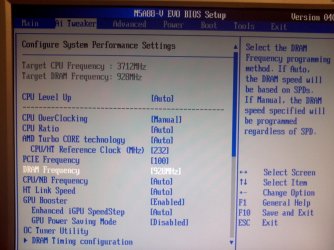
Last time I checked the ram was running at 928MHz. I tried to upload some more pics but I couldn't (missing security token).
The normal speed of the cpu is 3.2MHz, if it's running at 3.7MHz is because od the overclocking features that the motherboard and bios have applied.
The system runs ok for now. Thanks for your help.
 

My Computer My Computer

At a glance

Windows 7 Home Premium 64bitAMD Phenom II X6 1090T Black EditionG. SKILL DDR3 4GBx3Integrated
Computer Manufacturer/Model Number
Custom built
OS
Windows 7 Home Premium 64bit
CPU
AMD Phenom II X6 1090T Black Edition
Motherboard
ASUS M5A88-V EVO
Memory
G. SKILL DDR3 4GBx3
Graphics Card(s)
Integrated
Sound Card
Integrated HD Audio
Hard Drives
Seagate 1TB 6Gb/s
PSU
Antec 450 watts
Case
Cooler Master elite
Cooling
2 120mm fans
1333 ram in dual channel should be running at 667. Frequency divided by 2 (dual chanel). Make sure you FSB is at 200 (that should be default I believe) and dram/fsb ratio is on auto. If you want to OC, you can. But you need to stabalize it at stock speeds first.
 

My Computers My Computers

  • At a glance

    Windows 11 ProRyzen 9 5900X32GB G Skill DDR4-3600EVGA RTX 3080 FTW 3 Ultra
    Computer type
    PC/Desktop
    Computer Manufacturer/Model Number
    ALWAYS UNDER CONSTRUCTION
    OS
    Windows 11 Pro
    CPU
    Ryzen 9 5900X
    Motherboard
    Asus X570 Crosshair Viii Hero
    Memory
    32GB G Skill DDR4-3600
    Graphics Card(s)
    EVGA RTX 3080 FTW 3 Ultra
    Sound Card
    On Board/Sennheiser PC37X Headset
    Monitor(s) Displays
    3 X Asus 27"
    Screen Resolution
    2560x1440
    Hard Drives
    2 X 1 TB NVME drives
    PSU
    EVGA 850
    Case
    Phanteks Eclipse P400A
    Cooling
    EVGA 280 AIO
    Keyboard
    Logitech G510s/ Logitech G13
    Mouse
    Logitech G502
    Internet Speed
    24/1
    Antivirus
    ESET/MBAM Pro/SAS Pro
    Browser
    Chrome/ Firefox/ Edge
  • At a glance

    Windows 11 ProIntel Ultra 9 288V32 GB LPDDR5X 8533
    Computer type
    Laptop
    System Manufacturer/Model Number
    Dell 16 Plus
    OS
    Windows 11 Pro
    CPU
    Intel Ultra 9 288V
    Memory
    32 GB LPDDR5X 8533
    Monitor(s) Displays
    16" Mini-LED HDR600 Touch 90 Hz
    Screen Resolution
    2560X1600
    Hard Drives
    1 TB NVME
As regards ganged/unganged mode, he is better off using unganged mode as he will get better performance that way. This is due to the Phenom processors having 2 memory controllers, 1 for each channel. If you check my specs, you will see that, although my motherboard supports ganged/unganged memory operation, I am running in ganged mode because my CPU only has a single memory controller.


Phenoms have 2 memory controllers. Ganged mode combines them into a single 128bit controller Unganged mode uses the controllers separately 2x64bit.

128bit mode gives the CPU a massive memory band width and when handling a single application results in higher performance.

64bit mode gives you two memory buses and is more suitable to multi tasking

Everyone to his own but IMHO in normal use or gaming Ganged mode is faster.
 

My Computer My Computer

At a glance

Windows 7 Ultimate x64Intel Core i7-2600K16 GB G Skill F3-10666 CL9D-4GBRLATI Radeon HD 6870
Computer Manufacturer/Model Number
Something I threw together
OS
Windows 7 Ultimate x64
CPU
Intel Core i7-2600K
Motherboard
Asus P8P67
Memory
16 GB G Skill F3-10666 CL9D-4GBRL
Graphics Card(s)
ATI Radeon HD 6870
Sound Card
ATI Radeon HDMI / Realtek ALC892
Monitor(s) Displays
2 x 22" standard monitors / LG32LC56v TV to watch films
Screen Resolution
1920 x1080
Hard Drives
2 x OCZ Vertex2 111.79GB
3 x Samsung103SJ
1 x Samsung103UJ
1 x WD3200BEVT
1 x Hitachi5K320-160
PSU
Thermaltake Toughpower Cable Management 750W
Case
Antec 300
Cooling
Noctua NH-U12P SE2 and 5 120mm Case fans
Keyboard
Microsoft Comfort Curve Keyboard 2000
Mouse
Hama M3110 / Logitech M305
Internet Speed
16000
Other Info
I have also used Fedora, Suse, Ubuntu Linux
And all other Windows from 95 to date except ME
Last time I checked the ram was running at 928MHz. I tried to upload some more pics

Yes I have just seen it in your CPU-Z that you posted before, something is still not right. confirm that you have manually entered 1333MHz.
and confirm that you are no longer using the MemOK function
 

My Computer My Computer

At a glance

Windows 7 Ultimate x64Intel Core i7-2600K16 GB G Skill F3-10666 CL9D-4GBRLATI Radeon HD 6870
Computer Manufacturer/Model Number
Something I threw together
OS
Windows 7 Ultimate x64
CPU
Intel Core i7-2600K
Motherboard
Asus P8P67
Memory
16 GB G Skill F3-10666 CL9D-4GBRL
Graphics Card(s)
ATI Radeon HD 6870
Sound Card
ATI Radeon HDMI / Realtek ALC892
Monitor(s) Displays
2 x 22" standard monitors / LG32LC56v TV to watch films
Screen Resolution
1920 x1080
Hard Drives
2 x OCZ Vertex2 111.79GB
3 x Samsung103SJ
1 x Samsung103UJ
1 x WD3200BEVT
1 x Hitachi5K320-160
PSU
Thermaltake Toughpower Cable Management 750W
Case
Antec 300
Cooling
Noctua NH-U12P SE2 and 5 120mm Case fans
Keyboard
Microsoft Comfort Curve Keyboard 2000
Mouse
Hama M3110 / Logitech M305
Internet Speed
16000
Other Info
I have also used Fedora, Suse, Ubuntu Linux
And all other Windows from 95 to date except ME
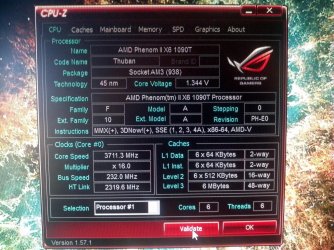
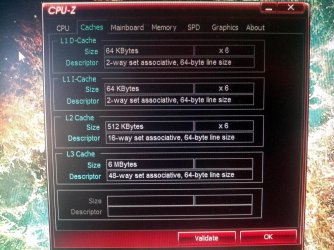
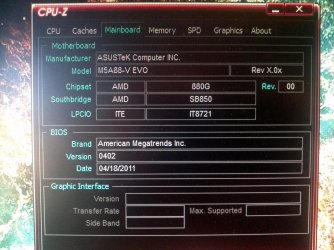
This is the latest CPU-z result (copied from the previous report):
cpu running at 3.7MHz and ram at 928MHz 9-9-9-24. This is what I'll do tonight: set everything to auto, then use MemOk, then set the settings manually. I will post results for every setting. How do you "gang" the ram?

Processor 1 ID = 0
Number of cores 6 (max 6)
Number of threads 6 (max 6)
Name AMD Phenom II X6 1090T
Codename Thuban
Specification AMD Phenom(tm) II X6 1090T Processor
Package Socket AM3 (938)
CPUID F.A.0
Extended CPUID 10.A
Core Stepping PH-E0
Technology 45 nm
TDP Limit 126 Watts
Core Speed 3711.0 MHz
Multiplier x FSB 16.0 x 231.9 MHz
HT Link speed 2087.5 MHz
Stock frequency 3200 MHz

Chipset
-------------------------------------------------------------------------
Northbridge AMD 880G rev. 00
Southbridge AMD SB850 rev. 40
Memory Type DDR3
Memory Size 8192 MBytes
Channels Dual, (Unganged)
Memory Frequency 463.9 MHz (1:2)
CAS# latency (CL) 9.0
RAS# to CAS# delay (tRCD) 9
RAS# Precharge (tRP) 9
Cycle Time (tRAS) 24
Bank Cycle Time (tRC) 20
Command Rate (CR) 1T
Uncore Frequency 2087.5 MHz
 

My Computer My Computer

At a glance

Windows 7 Home Premium 64bitAMD Phenom II X6 1090T Black EditionG. SKILL DDR3 4GBx3Integrated
Computer Manufacturer/Model Number
Custom built
OS
Windows 7 Home Premium 64bit
CPU
AMD Phenom II X6 1090T Black Edition
Motherboard
ASUS M5A88-V EVO
Memory
G. SKILL DDR3 4GBx3
Graphics Card(s)
Integrated
Sound Card
Integrated HD Audio
Hard Drives
Seagate 1TB 6Gb/s
PSU
Antec 450 watts
Case
Cooler Master elite
Cooling
2 120mm fans
There should be no need to use MemOK any more as your RAM is working, just set everything to auto.
There should be a setting in the BIOS if not it happens automatically. Try the RAM ganged if it doesn't work for you and you think it is slower you can always set it back again.
 

My Computer My Computer

At a glance

Windows 7 Ultimate x64Intel Core i7-2600K16 GB G Skill F3-10666 CL9D-4GBRLATI Radeon HD 6870
Computer Manufacturer/Model Number
Something I threw together
OS
Windows 7 Ultimate x64
CPU
Intel Core i7-2600K
Motherboard
Asus P8P67
Memory
16 GB G Skill F3-10666 CL9D-4GBRL
Graphics Card(s)
ATI Radeon HD 6870
Sound Card
ATI Radeon HDMI / Realtek ALC892
Monitor(s) Displays
2 x 22" standard monitors / LG32LC56v TV to watch films
Screen Resolution
1920 x1080
Hard Drives
2 x OCZ Vertex2 111.79GB
3 x Samsung103SJ
1 x Samsung103UJ
1 x WD3200BEVT
1 x Hitachi5K320-160
PSU
Thermaltake Toughpower Cable Management 750W
Case
Antec 300
Cooling
Noctua NH-U12P SE2 and 5 120mm Case fans
Keyboard
Microsoft Comfort Curve Keyboard 2000
Mouse
Hama M3110 / Logitech M305
Internet Speed
16000
Other Info
I have also used Fedora, Suse, Ubuntu Linux
And all other Windows from 95 to date except ME
new pictures

OK I got the other 2 memory sticks installed (4Gbx2) and no problems so far :D
Now my system has 16Gb of RAM :cool:
I didn't use MemOk since all 4 sticks are identical and that feature is to make mismatch sticks to work together.
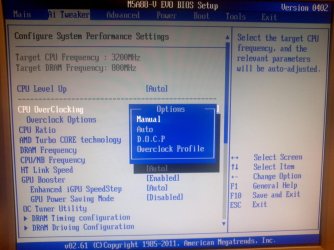
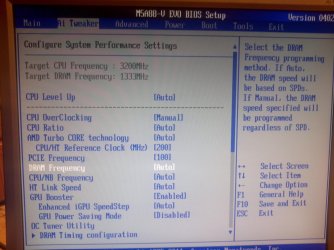
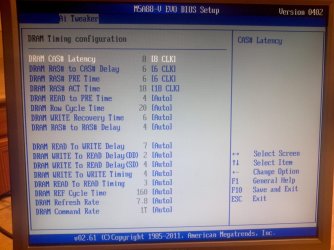
The pictures show the current settings of my pc and bios.
Let me know if you think I should change something :huh:
 

Attachments

  • 2011-06-24_13-57-47_461.jpg
    2011-06-24_13-57-47_461.jpg
    394.2 KB · Views: 28
  • 2011-06-24_14-00-25_793.jpg
    2011-06-24_14-00-25_793.jpg
    652.6 KB · Views: 15
  • 2011-06-24_14-00-43_102.jpg
    2011-06-24_14-00-43_102.jpg
    721.4 KB · Views: 15
  • 2011-06-24_16-12-05_761.jpg
    2011-06-24_16-12-05_761.jpg
    542.8 KB · Views: 22
  • 2011-06-24_16-15-08_48.jpg
    2011-06-24_16-15-08_48.jpg
    478.6 KB · Views: 11

My Computer My Computer

At a glance

Windows 7 Home Premium 64bitAMD Phenom II X6 1090T Black EditionG. SKILL DDR3 4GBx3Integrated
Computer Manufacturer/Model Number
Custom built
OS
Windows 7 Home Premium 64bit
CPU
AMD Phenom II X6 1090T Black Edition
Motherboard
ASUS M5A88-V EVO
Memory
G. SKILL DDR3 4GBx3
Graphics Card(s)
Integrated
Sound Card
Integrated HD Audio
Hard Drives
Seagate 1TB 6Gb/s
PSU
Antec 450 watts
Case
Cooler Master elite
Cooling
2 120mm fans
I'm not familiar with your BIOS, but your memory frequency should be much higher than 928Mhz, as Pooch said, 1333 at least. I got my DDR3 running at 1648Mhz on an AMD board.
CPU z.PNG

You have some DRAM settings at Auto, set them to manual and see what settings become available. Check with your RAM maker's site for advice. I have GSkill and they emailed me some settings to make.:)
 

My Computer My Computer

At a glance

Windows 7 Ultimate X64 SP1Intel i5-2550K, Differing ~4.4-4.8GHz No buil...16GB G.Skill Sniper 1866MHz @ 2133MHz 2x8GBASUS GTX650TIB-DC2OC-2GD5, (650TI Boost)
Computer type
PC/Desktop
Computer Manufacturer/Model Number
Home Built Desktop By DataTech
OS
Windows 7 Ultimate X64 SP1
CPU
Intel i5-2550K, Differing ~4.4-4.8GHz No built in GPU
Motherboard
ASUS P8Z68-V PRO/GEN3
Memory
16GB G.Skill Sniper 1866MHz @ 2133MHz 2x8GB
Graphics Card(s)
ASUS GTX650TIB-DC2OC-2GD5, (650TI Boost)
Sound Card
Onboard Realtek 5-1
Monitor(s) Displays
Samsung P2570HD
Screen Resolution
1920x1080
Hard Drives
Samsung 840 Pro 256GB SSD for OS, 500GB Seagate Constellation (Enterprise drive) for Data
PSU
Corsair HX650W
Case
Inwin Dragon Rider
Cooling
Hyper 212 EVO w/two Noctua fans, push-pull, @1300 RPM
Keyboard
E-Z Eyes, bright yellow keys with large characters
Mouse
steelseries SENSEI Laser Pro Gaming
Internet Speed
48-51Mbs Mbs down, 11 Mbs up Xfinity Cable
Antivirus
Norton Internet Security 2013
Browser
IE 10, Opera, Pale Moon if needed
Other Info
4 case fans, LG BluRay-RE, ASUS DVD-RW, Mr. Fusion power supply, 1.21 gigawatts.
Its looking good :) I do not know how you are overclocking but it doesn't seem right, have a look here; Overclocking and Case Mods - Windows 7 Forums That should also help you to get your RAM up to the right speed as your present settings are definitely not right.
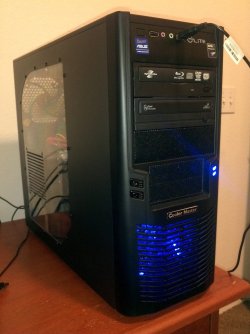
Nice looking Case :thumbsup:
 

My Computer My Computer

At a glance

Windows 7 Ultimate x64Intel Core i7-2600K16 GB G Skill F3-10666 CL9D-4GBRLATI Radeon HD 6870
Computer Manufacturer/Model Number
Something I threw together
OS
Windows 7 Ultimate x64
CPU
Intel Core i7-2600K
Motherboard
Asus P8P67
Memory
16 GB G Skill F3-10666 CL9D-4GBRL
Graphics Card(s)
ATI Radeon HD 6870
Sound Card
ATI Radeon HDMI / Realtek ALC892
Monitor(s) Displays
2 x 22" standard monitors / LG32LC56v TV to watch films
Screen Resolution
1920 x1080
Hard Drives
2 x OCZ Vertex2 111.79GB
3 x Samsung103SJ
1 x Samsung103UJ
1 x WD3200BEVT
1 x Hitachi5K320-160
PSU
Thermaltake Toughpower Cable Management 750W
Case
Antec 300
Cooling
Noctua NH-U12P SE2 and 5 120mm Case fans
Keyboard
Microsoft Comfort Curve Keyboard 2000
Mouse
Hama M3110 / Logitech M305
Internet Speed
16000
Other Info
I have also used Fedora, Suse, Ubuntu Linux
And all other Windows from 95 to date except ME
Check the IMC voltage. From what I recall, K10s have a hard time pushing four DIMMs at high speed.s
 

My Computer My Computer

At a glance

Windows 7 Ultimate x64Intel Core i5 2500K8GB G.SKILL Ripjaws X DDR3 2133nVidia Geforce 9500GT
OS
Windows 7 Ultimate x64
CPU
Intel Core i5 2500K
Motherboard
Gigabyte GA-Z68A-D3-B3
Memory
8GB G.SKILL Ripjaws X DDR3 2133
Graphics Card(s)
nVidia Geforce 9500GT
Monitor(s) Displays
Acer H233H
Screen Resolution
1920x1080
Case
Antec Three Hundred
Back
Top