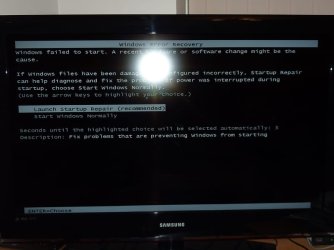
Windows 7 don't start on my Acer Aspire X1300

bobr

New member
Local time
7:24 PM
Messages
11
A friend asked me to help him with this problem: He's got a Acer Aspire X1300 with a Win 7 Professional installed which hangs up at start up.
What can you see is the Windows Logo and "Starting Windows" coming up and then a dark screen and nothing happens.
I've tryied to re-install Win 7 booting from a DVD but it just won't start (never seen something like that before). System Recovery and all other trics from Acer do not work either.
The only solution I can see is to format the partition C somehow...any ideas?

Thanks
Bob R
 

My Computer My Computer

At a glance

Win 7 Professional 32 bit
Computer Manufacturer/Model Number
Acer Aspire X1300
OS
Win 7 Professional 32 bit
Hello bobr, welcome to Seven Forums!


For a partition specific wipe (secure erase) of just the C: partition use Option Three of this tutorial at the link below.

Partition Wizard : Use the Bootable CD


If there's nothing on the entire Hard Disk Drive (HDD) that needs saved, you can use the Windows 7 installer using diskpart to wipe the whole HDD, see this tutorial.

SSD / HDD : Optimize for Windows Reinstallation


If you need to copy out the data first have a look at this third tutorial.

Copy & Paste - in Windows Recovery Console
 

My Computer My Computer

At a glance

W 7 64-bit UltimateIntel Q9550 Yorkfield8GB Dominator 8500C5DATI : XFX 5870
Computer Manufacturer/Model Number
* BFK Customs *
OS
W 7 64-bit Ultimate
CPU
Intel Q9550 Yorkfield
Motherboard
ASUS P5Q Pro
Memory
8GB Dominator 8500C5D
Graphics Card(s)
ATI : XFX 5870
Sound Card
Realtek HD Audio 7-1
Monitor(s) Displays
1x 47" LCD HDMI & 3x 26" LCD HDMI
Screen Resolution
1920x1080P & 1920x1200
Hard Drives
1x 80GB Intel X25-M G2 SSD : 1x 500GB & 1x 640GB WD Caviar Black(s)
PSU
Corsair 620HX
Case
Cooler Master RC-690
Cooling
Tuniq Tower 120, 2x 140mm and 3x 120mm case fans
Keyboard
Microsoft 500
Mouse
Razer Diamondback 3G
Internet Speed
14 Mb/s
Other Info
1x Koutech 3Gb/s SATA HDD Hot Swap Rack
Boot the DVD, select Repair on 2nd screen, accept any offered Repair. If it fails to start, boot back in, click through to Recovery Tools list to run Startup Repair up to 3 separate times with reboots: http://www.sevenforums.com/tutorials/681-startup-repair.html?ltr=S

If this fails, make sure the 100mb System Rserved or Win7 partition itself are marked Active: http://www.sevenforums.com/tutorials/71432-partition-mark-active.html

Next test the RAM with memtest86 CD for 5-6 passes.

Then test the HD using maker's diag/repair full CD scan: http://www.tacktech.com/display.cfm?ttid=287

You can copy out files with DVD using this method: http://www.sevenforums.com/tutorials/93347-copy-paste-windows-recovery-console.html

Then wipe the HD to clean reinstall: http://www.sevenforums.com/installation-setup/125874-re-install-windows-7-a.html#post1086729
 
Hello bobr, welcome to Seven Forums!


For a partition specific wipe (secure erase) of just the C: partition use Option Three of this tutorial at the link below.

Partition Wizard : Use the Bootable CD

The utility starts then when asks for the screen resolution, at the end of the countdown it restarts the PC and start again...I cannot get past the point when it countdown for the screen resolution.
 

My Computer My Computer

At a glance

Win 7 Professional 32 bit
Computer Manufacturer/Model Number
Acer Aspire X1300
OS
Win 7 Professional 32 bit
Boot the DVD, select Repair on 2nd screen, accept any offered Repair. If it fails to start, boot back in, click through to Recovery Tools list to run Startup Repair up to 3 separate times with reboots: http://www.sevenforums.com/tutorials/681-startup-repair.html?ltr=S

If this fails, make sure the 100mb System Rserved or Win7 partition itself are marked Active: http://www.sevenforums.com/tutorials/71432-partition-mark-active.html

Next test the RAM with memtest86 CD for 5-6 passes.

Then test the HD using maker's diag/repair full CD scan: Hard Drive Diagnostics Tools and Utilities (Storage) - TACKtech Corp.

You can copy out files with DVD using this method: http://www.sevenforums.com/tutorials/93347-copy-paste-windows-recovery-console.html

Then wipe the HD to clean reinstall: http://www.sevenforums.com/installation-setup/125874-re-install-windows-7-a.html#post1086729

I'm not getting to the screen when it asks for system recovery (or startup recovery). The computer just gets blackgreish screen and that's all...
 

My Computer My Computer

At a glance

Win 7 Professional 32 bit
Computer Manufacturer/Model Number
Acer Aspire X1300
OS
Win 7 Professional 32 bit
Test the HD and RAM to see if you have failing/failed hardware. In addition to memtest86 and maker's diag/repair CD scans linked in my prior post, run http://www.sevenforums.com/tutorials/433-disk-check.html from DVD Command Line by pressing Shift + F10 at first screen.

What happens when you try to boot the Win7 DVD? Can you get to the first screen to press Shift + F10 to open a Command Line to wipe the HD: http://www.sevenforums.com/tutorials/91339-ssd-hdd-optimize-windows-reinstallation.html

Try also to Select 1 for screen resolution before PW CD times out. PW should autostart to avoid needing to boot it, then once it wipes the HD the Installation DVD should autostart.

What happens if you press Alt + F10 to try to boot Acer Factory Recovery?
 
Last edited:
I'm on this right now and I try to make it work.
I'm going to answer your questions as I go along the way

One more question: when you say "first screen" which screen do you mean?
 

My Computer My Computer

At a glance

Win 7 Professional 32 bit
Computer Manufacturer/Model Number
Acer Aspire X1300
OS
Win 7 Professional 32 bit
When I press Alt+F10 the computer ask me to choose to boot Windows normally or Startup Repair (recommneded). I'm not getting anywhere from here...
 

My Computer My Computer

At a glance

Win 7 Professional 32 bit
Computer Manufacturer/Model Number
Acer Aspire X1300
OS
Win 7 Professional 32 bit
this is the screen I'm getting and from there nowhere shift_F10 or alt_F10.jpg
 

My Computer My Computer

At a glance

Win 7 Professional 32 bit
Computer Manufacturer/Model Number
Acer Aspire X1300
OS
Win 7 Professional 32 bit
If this is the Start Screen then I'm not getting there...
 

My Computer My Computer

At a glance

Win 7 Professional 32 bit
Computer Manufacturer/Model Number
Acer Aspire X1300
OS
Win 7 Professional 32 bit
I wouldn't format anything at this stage. Don't damage the recovery partition.

Yes for ACER it's alt F10 not shift F10.
The trick is try either
(1) keep alt F10 continuously depressed
(2) repeated pressing of alt F10 but you must release both the alt and F10 keys between presses.

otherwise you get the screen you have shown.
What you should see is
- the Windows loading bar at the bottom of screen
- Starting Windows splash screen
- Acer eRecovery screen
 

My Computer My Computer

At a glance

Windows 7x64 Home Premium SP1Intel i7 2600kG.Skill Ripjaws (DDR3-1600) 2x4GBNvidia GeForce GTS 450; Intel HD Graphics 300...
Computer type
PC/Desktop
Computer Manufacturer/Model Number
Own build
OS
Windows 7x64 Home Premium SP1
CPU
Intel i7 2600k
Motherboard
ASUS P8Z68 Deluxe
Memory
G.Skill Ripjaws (DDR3-1600) 2x4GB
Graphics Card(s)
Nvidia GeForce GTS 450; Intel HD Graphics 3000(GT2+)
Monitor(s) Displays
Dell Ultrasharp IPS panel U2311H, Samsung SyncMaster P2350
Screen Resolution
1920x1080
Hard Drives
Samsung 850 Pro SSD 256GB, Samsung SSD 840 120GB, Seagates 1TB Barracuda ST31000528AS x2
PSU
Seasonic M12II 520W
Case
Lian Li Lancool PC-K60
Cooling
Case: 1x120mm, 3x140mm CPU: Hyper 212+
Keyboard
Logitech MK520 (wireless)
Mouse
Logitech MK520
Internet Speed
6-7 Mbps
Antivirus
Norton Security Premium, Malwarebytes on 2 (MSE on 3rd PC)
Browser
FireFox
Other Info
Audio: Logitech Z523 2.1
It just don't get there. Alt+F10 doesn't work as it should do.
 

My Computer My Computer

At a glance

Win 7 Professional 32 bit
Computer Manufacturer/Model Number
Acer Aspire X1300
OS
Win 7 Professional 32 bit
Are you able to boot the Win7 DVD yet? Once you can boot the DVD, you can copy out your files, wipe the HD using the tutorials I posted earlier.

Once you wipe the HD the Installer will autostart to reinstall Win7.

You can also try wiping the HD by the PW CD which should autostart. Did you try pressing 1 for Screen Resolution? Try burning another PW CD using ImgBurn at 4x speed.

If you cannot get the DVD or CD to boot using the tutorial I posted on how to boot from disk, then try writing the Win7 DVD ISO to flash stick using UltraISO trial version: Open ISO on File tab, Write Disk Image on Bootable tab, Format, then Write. Boot USB under HD's or USB in BIOS setup or one-time BIOS Boot menu.

Please post back your progress on each of the steps given.
 
Reading through this thread it isn't clear what sort of operating system you have.
(1) Did the computer come preinstalled with Windows and you made factory recovery DVDs or
(2) Do you have Windows installation disks. If so what sort of disk are these.

The last post refers to the "Win 7 DVD". What specific DVD are we talking about??
 

My Computer My Computer

At a glance

Windows 7x64 Home Premium SP1Intel i7 2600kG.Skill Ripjaws (DDR3-1600) 2x4GBNvidia GeForce GTS 450; Intel HD Graphics 300...
Computer type
PC/Desktop
Computer Manufacturer/Model Number
Own build
OS
Windows 7x64 Home Premium SP1
CPU
Intel i7 2600k
Motherboard
ASUS P8Z68 Deluxe
Memory
G.Skill Ripjaws (DDR3-1600) 2x4GB
Graphics Card(s)
Nvidia GeForce GTS 450; Intel HD Graphics 3000(GT2+)
Monitor(s) Displays
Dell Ultrasharp IPS panel U2311H, Samsung SyncMaster P2350
Screen Resolution
1920x1080
Hard Drives
Samsung 850 Pro SSD 256GB, Samsung SSD 840 120GB, Seagates 1TB Barracuda ST31000528AS x2
PSU
Seasonic M12II 520W
Case
Lian Li Lancool PC-K60
Cooling
Case: 1x120mm, 3x140mm CPU: Hyper 212+
Keyboard
Logitech MK520 (wireless)
Mouse
Logitech MK520
Internet Speed
6-7 Mbps
Antivirus
Norton Security Premium, Malwarebytes on 2 (MSE on 3rd PC)
Browser
FireFox
Other Info
Audio: Logitech Z523 2.1
I was referring to the Win7 Installation DVD. What other Win7 DVD is there?

He stated in OP he tried reinstalling Win7 Professional with DVD.

I believe he is not booting the DVD correctly. His screenshot shows Windows Error Recovery which means the DVD was skipped and it's attempting to boot HD again.

This is why I posted the tutorial on how to boot DVD. If DVD drive is set as first to boot in BIOS setup, is there a prompt given to "Press any key to boot from DVD?" If not, burn another DVD at 4x speed.

Is this a DVD you have used successfully before?
 
Last edited:
I was referring to the Win7 Installation DVD. What other Win7 DVD is there?
For me it's a rhetorical question
Given it's an Acer computer, I'm seeking clarification from the OP as per my questions.

The Aspire X1300 came with Vista Home Premium (OEM:SLP) as far as I'm, aware. So I would guess a Win 7 Pro upgrade may have been used.
 
Last edited:

My Computer My Computer

At a glance

Windows 7x64 Home Premium SP1Intel i7 2600kG.Skill Ripjaws (DDR3-1600) 2x4GBNvidia GeForce GTS 450; Intel HD Graphics 300...
Computer type
PC/Desktop
Computer Manufacturer/Model Number
Own build
OS
Windows 7x64 Home Premium SP1
CPU
Intel i7 2600k
Motherboard
ASUS P8Z68 Deluxe
Memory
G.Skill Ripjaws (DDR3-1600) 2x4GB
Graphics Card(s)
Nvidia GeForce GTS 450; Intel HD Graphics 3000(GT2+)
Monitor(s) Displays
Dell Ultrasharp IPS panel U2311H, Samsung SyncMaster P2350
Screen Resolution
1920x1080
Hard Drives
Samsung 850 Pro SSD 256GB, Samsung SSD 840 120GB, Seagates 1TB Barracuda ST31000528AS x2
PSU
Seasonic M12II 520W
Case
Lian Li Lancool PC-K60
Cooling
Case: 1x120mm, 3x140mm CPU: Hyper 212+
Keyboard
Logitech MK520 (wireless)
Mouse
Logitech MK520
Internet Speed
6-7 Mbps
Antivirus
Norton Security Premium, Malwarebytes on 2 (MSE on 3rd PC)
Browser
FireFox
Other Info
Audio: Logitech Z523 2.1
@mjf

That's correct, a Win 7 Pro DVD has been used and it worked before...same DVD
 

My Computer My Computer

At a glance

Win 7 Professional 32 bit
Computer Manufacturer/Model Number
Acer Aspire X1300
OS
Win 7 Professional 32 bit
The only option I've got is to tell my friend to take the compute to the Tech Guys at PC World :(
 

My Computer My Computer

At a glance

Win 7 Professional 32 bit
Computer Manufacturer/Model Number
Acer Aspire X1300
OS
Win 7 Professional 32 bit
Did you try the steps given to attempt to recover or reinstall Win7? We don't know what you have tried if you don't report back on each step, so we can give you others.

It didn't appear you were even booting the DVD, so most of the fixes couldn't be tried.

It isn't necessary to take the machine to the shop if you have someone there who can interact with us on the troubleshooting steps which have been given, asking the necessary questions to get each step completed.
 
Back
Top