Windows 7 dual partition help

dillonster

New member
Local time
1:21 PM
Messages
11
Hello all,

I have Windows 7 64 bit on one of my hard drives.
Randomly it wouldnt boot anymore (got stuck in bios startup, wouldnt boot in safe mode or anything else)

I installed windows 7 32 bit on a different hard drive, and want to know how to repair my older version.

If this is the wrong section i appologize but it seemed like it fit.

Any ideas on where to start or how to fix my issues on the 64 bit hard drvie.
 

My Computer

OS
Windows 7 64 bit

My Computer

Computer Manufacturer/Model Number
Gateway GT5692
OS
Windows 7 Ulti. x64
CPU
AMD Phenom 8450 triple-core 2.10 ghz
Memory
4GB
Graphics Card(s)
ATI Radion HD 3200
Monitor(s) Displays
Gateway FPD1775W
Screen Resolution
1280x720
Hard Drives
465.6613 Gibibytes
I tried going through all of the options it had.

I didnt do anything suspicious to make windows not load on my origional hard drive.

It showed no restore points.

(side note, i forgot that i installed windows 64 bit again. so now i have two instances loaded on different HDD)

Is there like a registry folder, file, or startup file of some sort i can copy from my newly installed version to paste into my old windows file?
 

My Computer

OS
Windows 7 64 bit
I tried going through all of the options it had.

I didnt do anything suspicious to make windows not load on my origional hard drive.

It showed no restore points.

(side note, i forgot that i installed windows 64 bit again. so now i have two instances loaded on different HDD)

Is there like a registry folder, file, or startup file of some sort i can copy from my newly installed version to paste into my old windows file?
Did you try the start up repair 3 times like tutorial says?
 

My Computer

Computer Manufacturer/Model Number
Gateway GT5692
OS
Windows 7 Ulti. x64
CPU
AMD Phenom 8450 triple-core 2.10 ghz
Memory
4GB
Graphics Card(s)
ATI Radion HD 3200
Monitor(s) Displays
Gateway FPD1775W
Screen Resolution
1280x720
Hard Drives
465.6613 Gibibytes
dillonster,
Post a snippet of the output of Disk Management. Be sure to maximize the display before snipping.
 

My Computer

Computer Manufacturer/Model Number
Toshiba Satellite S875D-S7239 laptop
OS
MS Windows 7 Ultimate SP1 64-bit
CPU
AMD A10-4600M
Motherboard
AMD Pumori (Socket FT1)
Memory
6.00 GB Dual-Channel DDR3 @ 798MHz (11-11-12-28)
Graphics Card(s)
AMD Radeon HD 7660G
Sound Card
High Definition Audio Device
Monitor(s) Displays
Generic PnP Monitor (1600x900@60Hz)
Screen Resolution
1600x900@60Hz
Hard Drives
SSD 119GB Corsair CSSD-V128GB2 ATA Device
Keyboard
Standard PS/2 Keyboard
Mouse
HP Wireless Optical Mobile Mouse Model FHA-3410
Internet Speed
What the local pub, local coffee shop offers.
Other Info
Optical Drive:MATSHITA BD-CMB UJ160B ATA Device


Also have an Asus ha1002xp netbook with Win 7 Ultimate installed.
Working and then the weekend. Should be able to get this stuff up by Saturday. Thanks for your help thus far and I'll post asap
 

My Computer

OS
Windows 7 64 bit
Much fun at the work.

Also please run Speccy and use cut and past to fill out your "system spcc" info.
SPECCY- System Information Tool
http://www.piriform.com/speccy

Operating System, CPU and Temp, Ram, Motherboard, Graphics, Hard Drives, Optical Drives, Audio, Peripherals, Network info.
Simply put—this is the best and it’s free!
 

My Computer

Computer Manufacturer/Model Number
Toshiba Satellite S875D-S7239 laptop
OS
MS Windows 7 Ultimate SP1 64-bit
CPU
AMD A10-4600M
Motherboard
AMD Pumori (Socket FT1)
Memory
6.00 GB Dual-Channel DDR3 @ 798MHz (11-11-12-28)
Graphics Card(s)
AMD Radeon HD 7660G
Sound Card
High Definition Audio Device
Monitor(s) Displays
Generic PnP Monitor (1600x900@60Hz)
Screen Resolution
1600x900@60Hz
Hard Drives
SSD 119GB Corsair CSSD-V128GB2 ATA Device
Keyboard
Standard PS/2 Keyboard
Mouse
HP Wireless Optical Mobile Mouse Model FHA-3410
Internet Speed
What the local pub, local coffee shop offers.
Other Info
Optical Drive:MATSHITA BD-CMB UJ160B ATA Device


Also have an Asus ha1002xp netbook with Win 7 Ultimate installed.
Once we see your Disk Management screenshot we can advise more specifically you how to recover your Win7 64 bit. Use Snipping Tool in Start Menu.

Did you install 32 bit on separate HD while the original 64 bit Win7 HD was still plugged in? If so, you should now have a dual boot menu. What happens when you select the older Win7 from menu?

The procedure is to mark the older Win7 active, boot the Win7 DVD Repair console or Repair CD, click through to run Startup Repair up to 3 separate times with reboots until Win7 boots.

If this fails, you'll need to unplug the new Win7 HD to try Startup Repair again up to 3 separate times. Once the old Win7 starts up, plug back in the new Win7 HD and if necessary add it back to Dual Boot menu using EasyBCD 2.0.
 
Hey guys, sorry for the delayed response but here is the info.

Speccy Output

Operating System
MS Windows 7 Ultimate 64-bit
CPU
Intel Core 2 Duo E6750 @ 2.66GHz 45 °C
Conroe 65nm Technology
RAM
4.0GB Dual-Channel DDR2 @ 399MHz (5-5-5-18)
Motherboard
EVGA 122-CK-NF68 (Socket 775)
Graphics
Acer P241W @ 1920x1200
SyncMaster @ 1280x1024
320MB GeForce 8800 GTS (nVidia) 54 °C
Hard Drives
391GB Seagate ST340063 3AS SCSI Disk Device (SCSI)
488GB Seagate ST350063 0AS SCSI Disk Device (SCSI)
Optical Drives
ASUS DVD-E616A3 ATA Device
Audio
High Definition Audio Device


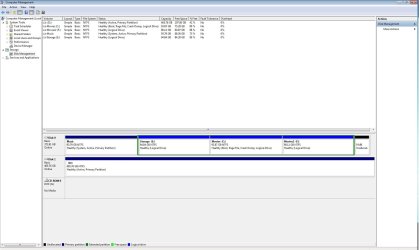
Here is the disk management output.

Disk Management.jpg

I tried the repair, and when it comes up with select your operating system from the list below, it says i have the wrong installation disc inserted. I will be getting the correct one tomorrow, but i can cancel through the menus and get to the repair startup section.

(Ran it 5 times for good measures)

It comes up with an error that it can not detect an operating system on my hard drive.

Thank you in advance for any help you guys might have.

(i can always back all my documents and such up and reformat the hard drive, but i dont want to go through the trouble of drivers and all that stuff.

Let me konw what you guys think
 
Last edited:

My Computer

OS
Windows 7 64 bit

My Computer

Computer Manufacturer/Model Number
Toshiba Satellite S875D-S7239 laptop
OS
MS Windows 7 Ultimate SP1 64-bit
CPU
AMD A10-4600M
Motherboard
AMD Pumori (Socket FT1)
Memory
6.00 GB Dual-Channel DDR3 @ 798MHz (11-11-12-28)
Graphics Card(s)
AMD Radeon HD 7660G
Sound Card
High Definition Audio Device
Monitor(s) Displays
Generic PnP Monitor (1600x900@60Hz)
Screen Resolution
1600x900@60Hz
Hard Drives
SSD 119GB Corsair CSSD-V128GB2 ATA Device
Keyboard
Standard PS/2 Keyboard
Mouse
HP Wireless Optical Mobile Mouse Model FHA-3410
Internet Speed
What the local pub, local coffee shop offers.
Other Info
Optical Drive:MATSHITA BD-CMB UJ160B ATA Device


Also have an Asus ha1002xp netbook with Win 7 Ultimate installed.
The screenshot shows that your System Active MBR has been derailed to the Music data partition. Assuming you have the 64 bit OS plugged into DISK1 now, you would boot the 64 bit DVD Repair Console or Repair CD to mark Music inactive, Mark Win7 active, then run Startup Repair up to 3 separate times with reboots until Win7 starts.

I am guessing (again, since you don't tell us any of this) that you installed 32 bit to another drive because you don't have a 64 bit install DVD to boot its Repair Console to do these repairs. So you need to burn a 64 bit Repair CD after downloading it from here: http://www.sevenforums.com/tutorials/2083-system-repair-disc-create.html

Now boot the 64 bit DVD Repair console or Repair CD, press Shift F10 at first screen, type in Command box:

DISKPART
LIST DISK
SELECT DISK 0 (confirm this is data drive #)
LIST PARTITION
SELECT PARTITION 1 (confirm this is Music partition #)
INACTIVE
SELECT DISK 1 (confirm this is Win7 64 bit HD #)
LIST PARTITION
SELECT PARTITION 1 (confirm this is Win7 partition #)
ACTIVE
EXIT

Now boot back into 64 bit Repair CD or 64 bit DVD Repair console, click through to Recovery Tools list to Run Startup Repair up to 3 separate times with reboots until Win7 starts. http://www.sevenforums.com/tutorials/681-startup-repair.html?ltr=S
 
Last edited:
Ok let me try and answer your questions, and i apologize for missing them.

I actually installed windows 7 64 bit again, so i have two copies.
The first copy is the broken one, which is located on Disc 1. (D drive)
The second copy is on Disk 0 on the "Movies" partition (C drive)
I installed the second copy after my first one broke, and have never seen a "Chose which OS to boot" screen.

I downloaded the repair cd from that link, and when its trying to load windows file, it comes up with an error to unplug any USB devices or any external hard drives etc.
I unplugged everything and it still woundlt load up.

I created a repair CD from the newly installed windows, and went to repair startup like 5 times, and also tried a system restore from files a couple weeks ago that it auto saved during an update.

This didnt work either.

Not sure if this changes what you mentioned about going into the command box, but ill hold off until i hear back from you.

Thank you again and sorry for the long post.
 

My Computer

OS
Windows 7 64 bit
So it is booting into the 64 bit WIn7 you installed on Movies partition? And you have a 64 bit Repair CD which will boot successfully now?

What I would do at this point is unplug DISK0, swap its cable to DISK1 or enter BIOS setup to set DISK1 as first HD to boot (after DVD drive).

Then boot the 64 bit Win7 Repair CD, click through to Recovery Tools list to Run Startup Repair up to 3 separate times with reboots.

Does it find an installation to repair? If not run Startup Repair x3 anyway if it will run.

Next try choosing Command Line from Recov Tools list, type:

bootrec.exe /fixboot
bootrec.exe /fixmbr
Bootsect.exe /nt60 all /force

to see if it gooses an installation to show up, then run Startup Repair w/reboots until it starts.

If this fails and an installation never appears to repair, it is because it is damaged beyond repair. Copy out your files using this: http://www.sevenforums.com/tutorials/93347-copy-paste-windows-recovery-console.html
 
ok just to inform you before i start, you got it all right.

It is loading the windows 64 from the Movies partition.

I do have a working 64 bit repair disc

It is finding the broken windows and letting me get to the startup repair.

I am going to run the repair 3 times with restarts.

Run the command Line option with the above mentioned scripts

Run the repair 3 more times with restarts, then if it doesnt work im done?
 

My Computer

OS
Windows 7 64 bit
Yeah, with DISK0 unplugged so it doesn't interfere

and DISK1 set as first HD to boot in BIOS Setup, after DVD drive.

Do you want to delete the Win7 on DISK0 Movies partition if the other one starts up?

We can deal with it then. Keep us posted.
 
Holy crap I got so excited I thought it was fixed. I can now get to my login like normal (disk 0) is unplugged. But after I login it goes to a black screen and won't load up my desktop.
 

My Computer

OS
Windows 7 64 bit
dillon,
you must complete the complete set of instructions from Greg BEFORE you charge on. You see the results not rigorously and precisely following the entire set of instructions.
 

My Computer

Computer Manufacturer/Model Number
Toshiba Satellite S875D-S7239 laptop
OS
MS Windows 7 Ultimate SP1 64-bit
CPU
AMD A10-4600M
Motherboard
AMD Pumori (Socket FT1)
Memory
6.00 GB Dual-Channel DDR3 @ 798MHz (11-11-12-28)
Graphics Card(s)
AMD Radeon HD 7660G
Sound Card
High Definition Audio Device
Monitor(s) Displays
Generic PnP Monitor (1600x900@60Hz)
Screen Resolution
1600x900@60Hz
Hard Drives
SSD 119GB Corsair CSSD-V128GB2 ATA Device
Keyboard
Standard PS/2 Keyboard
Mouse
HP Wireless Optical Mobile Mouse Model FHA-3410
Internet Speed
What the local pub, local coffee shop offers.
Other Info
Optical Drive:MATSHITA BD-CMB UJ160B ATA Device


Also have an Asus ha1002xp netbook with Win 7 Ultimate installed.
dillon,
you must complete the complete set of instructions from Greg BEFORE you charge on. You see the results not rigorously and precisely following the entire set of instructions.

I followed them completely...

I ran the commands then ran through 3 Startup repairs....

After i loaded it in Safe mode it went through some loading sequence thing ive never seen, restarted and now im $$$$$

Gregrocker and Karlsnooks you guys are amazing.

Not sure how you guys have the knowledge you have, but it blows my mind. I really appreciate you guys taking time to help some random dude over the internet...... BLOWN AWAY

Thank you very much again.

Now that i have my Comp back up and running, is there something i need to run to check if i had/have a virus or anything.... or was this just an episode of windows 7 being fussy.

(also yes now that i have this up and running i would like to uninstall windows 7 from the "Movies" partition of DISK 0)

It also says now in the bottom right corner
"Windows 7
Build 7600
This copy of Windows is not genuine"
 

My Computer

OS
Windows 7 64 bit
Back
Top