Windows 7: Explorer.exe 20% cpu usage when idle

HDL

New member
Local time
3:40 AM
Messages
3
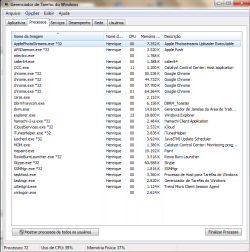
Hello, from time to time my computer get kind of slow and the internet don't work (the internet connection is ok) and when I check the taskbar the explorer.exe using 20% of the CPU even when I'm not using any program. Sometimes it gets normal, but this problem keep hapening. A days ago I had a Malware.packer.gen but it was deleted with Malwarebytes Anti-Malware, it may have some relation? If this is not the right place to this post, just say to me and I will fix it. Thanks!
 

My Computer My Computer

Computer type
PC/Desktop
OS
Windows 7 Home Premium 64 bit

My Computer My Computer

Computer type
PC/Desktop
Computer Manufacturer/Model Number
Self assembled
OS
Windows 10 Home 64Bit
CPU
Intel Core i5 10400 @ 2.90GHz
Motherboard
Intel Corporation DG41WV (PROCESSOR)
Memory
8.00GB Single-Channel Unknown @ 1329MHz (16-20-20-38)
Sound Card
Realtek High Definition Audio
Monitor(s) Displays
DELL E170S
Screen Resolution
1280x1024 pixels
Hard Drives
931GB TOSHIBA DT01ACA100 (SATA)
238GB TEAM TM8PS7256G (SATA SSD)
Case
Nothing Fancy
Cooling
Fans
Keyboard
A4 Tech Co LTD
Mouse
A4 Tech Co Ltd/Logitech
Internet Speed
25 Mbps
I'm really sorry about the delay to aswer. Here is it.
 

Attachments

  • task.png
    task.png
    28.3 KB · Views: 1
  • control.png
    control.png
    23.7 KB · Views: 0

My Computer My Computer

Computer type
PC/Desktop
OS
Windows 7 Home Premium 64 bit

My Computer My Computer

Computer type
PC/Desktop
Computer Manufacturer/Model Number
Self assembled
OS
Windows 10 Home 64Bit
CPU
Intel Core i5 10400 @ 2.90GHz
Motherboard
Intel Corporation DG41WV (PROCESSOR)
Memory
8.00GB Single-Channel Unknown @ 1329MHz (16-20-20-38)
Sound Card
Realtek High Definition Audio
Monitor(s) Displays
DELL E170S
Screen Resolution
1280x1024 pixels
Hard Drives
931GB TOSHIBA DT01ACA100 (SATA)
238GB TEAM TM8PS7256G (SATA SSD)
Case
Nothing Fancy
Cooling
Fans
Keyboard
A4 Tech Co LTD
Mouse
A4 Tech Co Ltd/Logitech
Internet Speed
25 Mbps
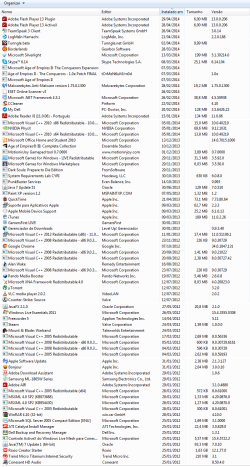
Kaspersky TDSSKiller and ESET online scanner didn't find anything. The caller64.exe seems to be from my samsung printer. Here are the programs. The problem dissapeared for now, but as I said it keep coming back from time to time.
 

Attachments

  • prog.png
    prog.png
    64.8 KB · Views: 3

My Computer My Computer

Computer type
PC/Desktop
OS
Windows 7 Home Premium 64 bit
Well, please keep us posted.
 

My Computer My Computer

Computer type
PC/Desktop
Computer Manufacturer/Model Number
Self assembled
OS
Windows 10 Home 64Bit
CPU
Intel Core i5 10400 @ 2.90GHz
Motherboard
Intel Corporation DG41WV (PROCESSOR)
Memory
8.00GB Single-Channel Unknown @ 1329MHz (16-20-20-38)
Sound Card
Realtek High Definition Audio
Monitor(s) Displays
DELL E170S
Screen Resolution
1280x1024 pixels
Hard Drives
931GB TOSHIBA DT01ACA100 (SATA)
238GB TEAM TM8PS7256G (SATA SSD)
Case
Nothing Fancy
Cooling
Fans
Keyboard
A4 Tech Co LTD
Mouse
A4 Tech Co Ltd/Logitech
Internet Speed
25 Mbps
I think it may be dropbox if you have it, run a sfc scan. I had a similar problem before but it turend out my HDD was bad.
 

My Computer My Computer

OS
Windows 7 Ultimate x64
This happened to me... Try CTRL+ALT+DEL and open task manager and kill all apps, or simply restart the computer to restart all programs (explorer)


emeraldhunter11 A.jpg
{Specialties}
Windows 7 | Windows Vista | Mac OS X | Mac OS 7 | Mac OS 9 | iOS 7 | Vintage Macintosh
 

My Computer My Computer

Computer type
Laptop
Computer Manufacturer/Model Number
Lenovo ThinkPad E431
OS
Windows 7 64 Bit Professional
CPU
Intel Core i3 @2.5 GHz
Memory
4.00 GB
Graphics Card(s)
Intel
Monitor(s) Displays
None
Screen Resolution
1366x768
Hard Drives
1) 282GB
Case
None
Cooling
Fan
Keyboard
A Cheap stock Lenovo one
Mouse
Broken Lenovo trackpad
Internet Speed
7 MBPS (HOME)
Antivirus
Barracuda
Browser
Safari 5
Other Info
Windows Rating: 4.9
Back
Top