Windows 7 Explorer Navigation pane Question

nakedbamboo

New member
Local time
5:49 PM
Messages
13
I am wanting to to the folders into links like in XP so that by clicking the name of the folder it will expand. Windows 7 seems to have gone to a little triangle symbol next to the name for this purpose, but it is annoying spending time trying to hit that small symbol. Is there any way to make the listings into links? Thanks.
 

My Computer

Computer Manufacturer/Model Number
Dell XPS 400
OS
7
Graphics Card(s)
Nvidia 7900 GTX
Sound Card
X-FI
Hello nakedbamboo,

Welcome to 7 Forums.

Try a double click to expand folders.

Hope this helps.

Gary
 

My Computer

Computer Manufacturer/Model Number
Dell XPS420
OS
Vista Ult 64 bit Seven Ult RTM x64
CPU
Intel Core2 Quad Q6600 2.40 gigahertz
Memory
Crucial Ballistix 4x2GB PC2 6400
Graphics Card(s)
NVIDIA GeForce 8600 GTS 256 MB
Sound Card
Creative SB X-Fi audio
Monitor(s) Displays
HP w2207 + HPvs15
Screen Resolution
1680x1050 + 1024x768
Hard Drives
2-WD5000AAKS-500 GB
WD5000AAV-500 GB external
Keyboard
Microsoft Comfort Curve
Mouse
MX Revolution
Other Info
Wacom Intuos 2 Graphics Tablet
Experience Index=5.5
Go to folder options and change the options on the view tab. Experiment to find the right combination for you. That should do it.
 

My Computer

Computer Manufacturer/Model Number
Sony Vaio Z46GDU
OS
Windows 7 Ultimate x86-64
CPU
[email protected] 1066MHz FSB
Motherboard
Sony branded
Memory
6GB DDR3 1066MHz
Graphics Card(s)
9300M GS 256MB Dedicated (Speed) + Intel4500MHD (Stamina)
Sound Card
Realtek HD Audio
Monitor(s) Displays
13.1' WXGA
Screen Resolution
1600x900
Hard Drives
320GB 7200RPM w/ 16MB cache
Internet Speed
1MB/s
I know you can double click them, but that is not really the point. I have gotten used to them acting like internet links with only a single click. To be honest I don't even know where the setting was in XP. Some computers had it active and others didn't. I was never able to find where you could turn that option on. that is why I am wondering if it exists in windows 7 and I just can't find it. It is not in the folder view options which is the most likely place for it. I know it is a small thing, but we're human right? The small things are what bother us the most.:D
 

My Computer

Computer Manufacturer/Model Number
Dell XPS 400
OS
7
Graphics Card(s)
Nvidia 7900 GTX
Sound Card
X-FI
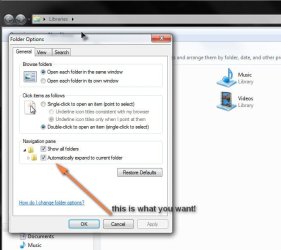
Did you try the settings on the first tab in folder options?
 

My Computer

Computer Manufacturer/Model Number
Sony Vaio Z46GDU
OS
Windows 7 Ultimate x86-64
CPU
[email protected] 1066MHz FSB
Motherboard
Sony branded
Memory
6GB DDR3 1066MHz
Graphics Card(s)
9300M GS 256MB Dedicated (Speed) + Intel4500MHD (Stamina)
Sound Card
Realtek HD Audio
Monitor(s) Displays
13.1' WXGA
Screen Resolution
1600x900
Hard Drives
320GB 7200RPM w/ 16MB cache
Internet Speed
1MB/s
Ok, I figured out what was missing. It is the "Display simple folder view in Explorer's Folder list" option on the Folder viewing options tab. I never looked up what that did before, but I just did and this is what Microsoft's Support page says about it:

"When you click a folder in the Folders pane, it is automatically expanded to show its subfolders."

That is exactly what I am after, but Windows 7 does not have that option. Also Xp had their own symbol thing, it was the plus/minus sign. Windows 7 has just turned that into a triangle. So I am basically looking for something that will accomplish what that feature did in XP.

thanks.
 

My Computer

Computer Manufacturer/Model Number
Dell XPS 400
OS
7
Graphics Card(s)
Nvidia 7900 GTX
Sound Card
X-FI
I know you can double click them, but that is not really the point. I have gotten used to them acting like internet links with only a single click. To be honest I don't even know where the setting was in XP. Some computers had it active and others didn't. I was never able to find where you could turn that option on. that is why I am wondering if it exists in windows 7 and I just can't find it. It is not in the folder view options which is the most likely place for it. I know it is a small thing, but we're human right? The small things are what bother us the most.:D

It's all available!

1.
1-2009-11-13.jpg
2.
2-2009-11-13.jpg
 

My Computer

Computer Manufacturer/Model Number
AMD Athlon 64 3200+, Lenovo G560 i3
OS
Windows 7 Ultimate, Ubuntu
Motherboard
Gigabyte K8T8000
Memory
DDR 2Gb (!)
Graphics Card(s)
6600GT
Monitor(s) Displays
MultiMonitor (2) LCD
Hard Drives
Old Seagate 75
Big Western Digital
Samsung 500Gb pulled out of an external drive and installed
Ext: Maxtor (Firewire), 1Gb Lacie (Samsung)
Mouse
Logitech MX620 Cordless
Isn't a version of that option there in one of the tabs in folder options?
 

My Computer

Computer Manufacturer/Model Number
Sony Vaio Z46GDU
OS
Windows 7 Ultimate x86-64
CPU
[email protected] 1066MHz FSB
Motherboard
Sony branded
Memory
6GB DDR3 1066MHz
Graphics Card(s)
9300M GS 256MB Dedicated (Speed) + Intel4500MHD (Stamina)
Sound Card
Realtek HD Audio
Monitor(s) Displays
13.1' WXGA
Screen Resolution
1600x900
Hard Drives
320GB 7200RPM w/ 16MB cache
Internet Speed
1MB/s
Those options do not work the way I am wanting. The expand to current folder option only expands the tree on the left when you click in a folder on the right. By clicking on the right it makes that the current selection and so expands it on the left. At least that is all it does on my system. I honestly do not even understand how that is a useful thing, but maybe I am doing it wrong. I have that selected and I still don't get expanding folders in the navigation pane unless I double click them or use the triangle symbol beside them. My goal is to be able to click one time on the name of the folder and have it expand in the navigation pane. Has anybody had any luck achieving this?
 

My Computer

Computer Manufacturer/Model Number
Dell XPS 400
OS
7
Graphics Card(s)
Nvidia 7900 GTX
Sound Card
X-FI
Back
Top