windows 7 explorer not responding

rllavane

New member
Local time
10:02 PM
Messages
11
Location
Caracas, Venezuela
Hello all of you at the Forum.
This is my first time here, so I apologize if I am not such an Windows expert.:shock:
Today I open the Windows Explores and it seemed to be working perfectly until I tried to search a file.:huh:
I picked the directory to search for and as I wrote the name, the Windows Explorer the color on the screen became whiter and the little circle stood there and the search did not even began!! :shock:
I tried several times and nothing changed. So I went over the Microsoft Home Page and look for the tools. Nothing seemed to work.
I tried the MSCONFIG, on the General Tab picked Selective Initiate (sorry I translated from Spanish!!), deactivated the Load Initiate Elements (once again, traslated from Spanish); then went to the Services Tab and Disabled all the services. Reinitiated the PC and It did not work: the Explorer worked but when I asked for SEARCH, hanged! :cry:
What can I do?
I recently installed a software name ABBY FINE READER and the rest is the same.
I would like some help from you.
Thanks,
RLLAVANE
 

My Computer

OS
Windows 7 Home Premium 32 bit
Hello, Rllavane. Can i advice you do these:

Update your current video drivers.


Run System File Checker to check your files.

  1. Start
  2. Search CMD in the search box.
  3. Right click>Run as administrator.
  4. Click Continue or Yes
  5. Now that you are on command prompt, type Sfc /scannow and then press enter.
This scan might take some time, so be patient!
This should fix any corrupt files or missing files.

Also, scan your PC for any Viruses or Malware.

Hopefully this work, if not report back and i will try my best to help further!

Bets regards
~
kbkasey
 

My Computer

OS
Windows 7 ultimate 32 bit.
CPU
i5 2500k @ 3.8 ghz
Motherboard
Asrock Fatal1ty performance edition
Memory
8 GB DDR3 1833 mhz corsair
Graphics Card(s)
Radeon HD 6870
Sound Card
N/A
Monitor(s) Displays
Dell g2410 and Belnea
Screen Resolution
1920x1080
Hard Drives
32 GB SSD
320 GB HDD 7200 RPM
PSU
750 watt
Case
N/A
Internet Speed
8 MB
By chance have you been in Services and turned off Indexing? Search will not work without Indexing.
 

My Computer

Computer type
PC/Desktop
Computer Manufacturer/Model Number
Home made Desktop
OS
Windows 10 Pro. 64/ version 1709 Windows 7 Pro/64
CPU
Intel i7-6800K @ 4.3
Motherboard
ASUS X-99 Deluxe II
Memory
Corsair Platinum 16 gig @2400
Graphics Card(s)
EVGA GTX 1070 OC
Monitor(s) Displays
Asus 27" LED LCD/VE278Q
Screen Resolution
1920-1080 or 1280-720 HDMI
Hard Drives
INTEL SSD 730-240 Gb Sata 3.0/
PSU
EVGA Platium 1200W
Case
Phanteks Luxe Tempered Glass 8 fans/ one radiator
Cooling
XSPC/ Water Cooled CPU
Keyboard
Das 4 Professional
Mouse
Logitech M705/MX Anywhere 2-S
Internet Speed
100 mbits
Antivirus
Microsoft Security Essentials/ Malwarebytes Premium 3.0/ SAS
Browser
I.E. 11 default/Firefox/ ISP Time Warner Cable/Spectrum
Other Info
LG BluRay Burner/
Sound system-KLipsch-THX/
Icy Dock ssd Hot Swap bays.
Hello there. Thank you for your answers.
KabKasey:
Firts, all the Video Drivers are up to date (latest) according to Control Panel.
I run the CMD at the Search Box, (I forgot, but I tried that before). The resultas were as follows: WINDOWS RESOURCES PROTECTION DID NOT FIND ANY INTEGRITY INFRACTION. (Translated from Spanish).
I have Microsoft Security Essentials and I have run it twice. None was found.
I also run Malwarebites Anti-Malware software. Nothing was found.
Still, the inconvinient persists.

To Mr. Layback Bear: I did not, by chance, have turned off Indexing when I use the MSCONFIG tool. It it working normally.

Once again, I do not know what to do. :cry::cry::cry:

Yours,
Rllavane
 

My Computer

OS
Windows 7 Home Premium 32 bit

My Computer

Computer type
PC/Desktop
Computer Manufacturer/Model Number
Home made Desktop
OS
Windows 10 Pro. 64/ version 1709 Windows 7 Pro/64
CPU
Intel i7-6800K @ 4.3
Motherboard
ASUS X-99 Deluxe II
Memory
Corsair Platinum 16 gig @2400
Graphics Card(s)
EVGA GTX 1070 OC
Monitor(s) Displays
Asus 27" LED LCD/VE278Q
Screen Resolution
1920-1080 or 1280-720 HDMI
Hard Drives
INTEL SSD 730-240 Gb Sata 3.0/
PSU
EVGA Platium 1200W
Case
Phanteks Luxe Tempered Glass 8 fans/ one radiator
Cooling
XSPC/ Water Cooled CPU
Keyboard
Das 4 Professional
Mouse
Logitech M705/MX Anywhere 2-S
Internet Speed
100 mbits
Antivirus
Microsoft Security Essentials/ Malwarebytes Premium 3.0/ SAS
Browser
I.E. 11 default/Firefox/ ISP Time Warner Cable/Spectrum
Other Info
LG BluRay Burner/
Sound system-KLipsch-THX/
Icy Dock ssd Hot Swap bays.
God evening Mr. Layback Bear.
I did it again and the same results: Nothing appears on the three tests of CMD.
I am the only person who uses the PC and I am the Administrator.
The translation is as close as possibe I just used the word "infractions" instead of "violations", mainly because in Spanish the word that appears is "Infraccion" so I transalated to Infraction. But the meaning is the same.
The fact is that in the three steps, there was no problem. I even run the Only Verify if System Files were corrupted and nothing was wrong.
So, let me know what can I do.
Thanks
Rllavane
 

My Computer

OS
Windows 7 Home Premium 32 bit
I understand the you are the admin. and you have run sfc /scannow and everything was found okay. I'm also understand that you haven't changed Windows Services. I would remove the newly installed (ABBY FINE READER). This is somewhat bothersome. In your post #1
Explorer the color on the screen became whiter and the little circle stood there and the search did not even began!
------------------
If you are using this.

now only.PNG

If it was my computer I would do security scans after removing AFR to make sure their/there isn't any infections. What security programs are you using?
 

My Computer

Computer type
PC/Desktop
Computer Manufacturer/Model Number
Home made Desktop
OS
Windows 10 Pro. 64/ version 1709 Windows 7 Pro/64
CPU
Intel i7-6800K @ 4.3
Motherboard
ASUS X-99 Deluxe II
Memory
Corsair Platinum 16 gig @2400
Graphics Card(s)
EVGA GTX 1070 OC
Monitor(s) Displays
Asus 27" LED LCD/VE278Q
Screen Resolution
1920-1080 or 1280-720 HDMI
Hard Drives
INTEL SSD 730-240 Gb Sata 3.0/
PSU
EVGA Platium 1200W
Case
Phanteks Luxe Tempered Glass 8 fans/ one radiator
Cooling
XSPC/ Water Cooled CPU
Keyboard
Das 4 Professional
Mouse
Logitech M705/MX Anywhere 2-S
Internet Speed
100 mbits
Antivirus
Microsoft Security Essentials/ Malwarebytes Premium 3.0/ SAS
Browser
I.E. 11 default/Firefox/ ISP Time Warner Cable/Spectrum
Other Info
LG BluRay Burner/
Sound system-KLipsch-THX/
Icy Dock ssd Hot Swap bays.
Thanks LayBack Bear.
I have run three times the security scan softwares. I have Microsoft Security Essentials and aldo, I do have Malwarebites Anti-Malware. Neither one of them have found anything wrong.
But I have to tell you something: On september 12, a Doble Accent malware attacked my PC. Thanks to the People of Malwarebites, I erased it completly. But, I do not really know if the Malware remain hidden. The malware name is: Virtool:Win32/Injector.gen!CF
Is it possible that the malware is still in my PC_
Thanks,
RLLAVANE
 

My Computer

OS
Windows 7 Home Premium 32 bit
Any thing is possible. MSE should of picked it up because I believe they had a definition update Aug 29,2012 for this Trojan. Some things you can try.
http://www.sevenforums.com/tutorials/166445-windows-defender-offline.html
Free Online Virus Scanner | ESET
Both are very good.
Did you remove Abby Fine Reader? You can always install it again.
Do you have any restore point? The reason I ask is restore points can hold on to infection.
If it was my computer I would remove all restore points and then run the scans.
 

My Computer

Computer type
PC/Desktop
Computer Manufacturer/Model Number
Home made Desktop
OS
Windows 10 Pro. 64/ version 1709 Windows 7 Pro/64
CPU
Intel i7-6800K @ 4.3
Motherboard
ASUS X-99 Deluxe II
Memory
Corsair Platinum 16 gig @2400
Graphics Card(s)
EVGA GTX 1070 OC
Monitor(s) Displays
Asus 27" LED LCD/VE278Q
Screen Resolution
1920-1080 or 1280-720 HDMI
Hard Drives
INTEL SSD 730-240 Gb Sata 3.0/
PSU
EVGA Platium 1200W
Case
Phanteks Luxe Tempered Glass 8 fans/ one radiator
Cooling
XSPC/ Water Cooled CPU
Keyboard
Das 4 Professional
Mouse
Logitech M705/MX Anywhere 2-S
Internet Speed
100 mbits
Antivirus
Microsoft Security Essentials/ Malwarebytes Premium 3.0/ SAS
Browser
I.E. 11 default/Firefox/ ISP Time Warner Cable/Spectrum
Other Info
LG BluRay Burner/
Sound system-KLipsch-THX/
Icy Dock ssd Hot Swap bays.
Thank you, Layback Bear.
I will try both. In fact, the ESET Free Online Virus Scanner is already running in the back righ now.
I will let you all know.
Once again, thank you.
Rllavane
 

My Computer

OS
Windows 7 Home Premium 32 bit
Mr. Layback Bear, good evening.
I run the ESET Free Online Virus Scanner for almost 5 hours on my PC. It found 10 threats and erased them. To be honest, I open a mail on september and the worm appeared and I tell you that I am quite careful about mail (I habe been using e-mail since 1988).
In order to make me sure, I will run the Windows Defender Offline to release my tension.
I will let you know about the results.
By the way, How do I remove the restore points in my computer? I have to do that ir order to get rid of all threats!!!
Best regards,
Rllavane
 

My Computer

OS
Windows 7 Home Premium 32 bit

My Computer

Computer type
PC/Desktop
Computer Manufacturer/Model Number
Home made Desktop
OS
Windows 10 Pro. 64/ version 1709 Windows 7 Pro/64
CPU
Intel i7-6800K @ 4.3
Motherboard
ASUS X-99 Deluxe II
Memory
Corsair Platinum 16 gig @2400
Graphics Card(s)
EVGA GTX 1070 OC
Monitor(s) Displays
Asus 27" LED LCD/VE278Q
Screen Resolution
1920-1080 or 1280-720 HDMI
Hard Drives
INTEL SSD 730-240 Gb Sata 3.0/
PSU
EVGA Platium 1200W
Case
Phanteks Luxe Tempered Glass 8 fans/ one radiator
Cooling
XSPC/ Water Cooled CPU
Keyboard
Das 4 Professional
Mouse
Logitech M705/MX Anywhere 2-S
Internet Speed
100 mbits
Antivirus
Microsoft Security Essentials/ Malwarebytes Premium 3.0/ SAS
Browser
I.E. 11 default/Firefox/ ISP Time Warner Cable/Spectrum
Other Info
LG BluRay Burner/
Sound system-KLipsch-THX/
Icy Dock ssd Hot Swap bays.
Thank you Layback Bear.
I run both ESET and Windows Defender. The first found 10 threats and the second none.
Questions: Do I have to run the CMD test again before I erase the System Restore Points?
I aksked you that, because I still have the problem with Windows Explorer :eek:
RLLAVANE
 

My Computer

OS
Windows 7 Home Premium 32 bit
You can do it any order you care to do. Here is the way I would do it.
1. Remove restore points
2. Run sfc /scannow. Many times it will fix Windows Explorer. Your infections could have and most likely did muck up Windows 7 System Files. Their/there is stronger medicine if needed. Hopefully not needed.
http://www.sevenforums.com/tutorials/1538-sfc-scannow-command-system-file-checker.html
3. http://www.sevenforums.com/tutorials/3413-repair-install.html
4. http://www.sevenforums.com/tutorials/219487-clean-reinstall-factory-oem-windows-7-a.html
When your computer is the way it should be is when I would create a new restore point and if you care to a new backup.
PS If you have any questions on my sequence please ask.
 

My Computer

Computer type
PC/Desktop
Computer Manufacturer/Model Number
Home made Desktop
OS
Windows 10 Pro. 64/ version 1709 Windows 7 Pro/64
CPU
Intel i7-6800K @ 4.3
Motherboard
ASUS X-99 Deluxe II
Memory
Corsair Platinum 16 gig @2400
Graphics Card(s)
EVGA GTX 1070 OC
Monitor(s) Displays
Asus 27" LED LCD/VE278Q
Screen Resolution
1920-1080 or 1280-720 HDMI
Hard Drives
INTEL SSD 730-240 Gb Sata 3.0/
PSU
EVGA Platium 1200W
Case
Phanteks Luxe Tempered Glass 8 fans/ one radiator
Cooling
XSPC/ Water Cooled CPU
Keyboard
Das 4 Professional
Mouse
Logitech M705/MX Anywhere 2-S
Internet Speed
100 mbits
Antivirus
Microsoft Security Essentials/ Malwarebytes Premium 3.0/ SAS
Browser
I.E. 11 default/Firefox/ ISP Time Warner Cable/Spectrum
Other Info
LG BluRay Burner/
Sound system-KLipsch-THX/
Icy Dock ssd Hot Swap bays.
Thanks again Layback Bear...
I did remove all restore points.
Questions:
How "many times" is enough for running sfc/ scannow?
I will run them five times each. First sfc/ Scannow and then the sfc/veriryonly.
I hope it will help. So far, the only inconvinient is the Windows Explorer! :huh:

Rllavane
 

My Computer

OS
Windows 7 Home Premium 32 bit
There are several repairs in our Tutorials.
Tutorial search - Windows 7 Forums
Could you post a picture of yours looks like and explain what it doesn't do. It might help us.
w. explorer 10 18.PNG

Five times using sfc /scannow is enough.
If I can't figure it out I will ask for help. We will get you fixed one way or the other.
 

My Computer

Computer type
PC/Desktop
Computer Manufacturer/Model Number
Home made Desktop
OS
Windows 10 Pro. 64/ version 1709 Windows 7 Pro/64
CPU
Intel i7-6800K @ 4.3
Motherboard
ASUS X-99 Deluxe II
Memory
Corsair Platinum 16 gig @2400
Graphics Card(s)
EVGA GTX 1070 OC
Monitor(s) Displays
Asus 27" LED LCD/VE278Q
Screen Resolution
1920-1080 or 1280-720 HDMI
Hard Drives
INTEL SSD 730-240 Gb Sata 3.0/
PSU
EVGA Platium 1200W
Case
Phanteks Luxe Tempered Glass 8 fans/ one radiator
Cooling
XSPC/ Water Cooled CPU
Keyboard
Das 4 Professional
Mouse
Logitech M705/MX Anywhere 2-S
Internet Speed
100 mbits
Antivirus
Microsoft Security Essentials/ Malwarebytes Premium 3.0/ SAS
Browser
I.E. 11 default/Firefox/ ISP Time Warner Cable/Spectrum
Other Info
LG BluRay Burner/
Sound system-KLipsch-THX/
Icy Dock ssd Hot Swap bays.
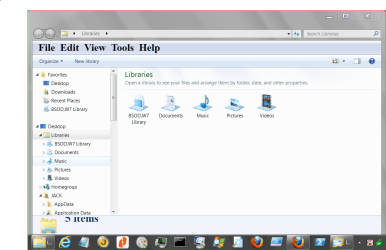
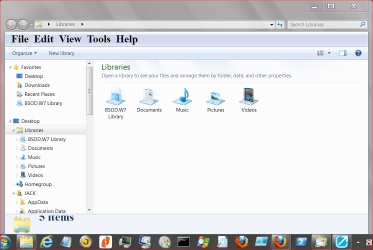
Windows Explorer does not work

Layback Bear, good afternoon.

This is the picture of what is happening (as a file attached). Look at the top that says, (in Spanish):
*.doc Search Results in My Documents (Not Responding)
The screen looks whiter, because it becomes that a way.
I can not search any file at all! :huh:

I will run the sfc/ sacnnow five times to see what happens.

I will let you know.
Thanks again

Here is the Screen Captured:
 

Attachments

My Computer

OS
Windows 7 Home Premium 32 bit
Last edited:

My Computer

Computer type
PC/Desktop
Computer Manufacturer/Model Number
Home made Desktop
OS
Windows 10 Pro. 64/ version 1709 Windows 7 Pro/64
CPU
Intel i7-6800K @ 4.3
Motherboard
ASUS X-99 Deluxe II
Memory
Corsair Platinum 16 gig @2400
Graphics Card(s)
EVGA GTX 1070 OC
Monitor(s) Displays
Asus 27" LED LCD/VE278Q
Screen Resolution
1920-1080 or 1280-720 HDMI
Hard Drives
INTEL SSD 730-240 Gb Sata 3.0/
PSU
EVGA Platium 1200W
Case
Phanteks Luxe Tempered Glass 8 fans/ one radiator
Cooling
XSPC/ Water Cooled CPU
Keyboard
Das 4 Professional
Mouse
Logitech M705/MX Anywhere 2-S
Internet Speed
100 mbits
Antivirus
Microsoft Security Essentials/ Malwarebytes Premium 3.0/ SAS
Browser
I.E. 11 default/Firefox/ ISP Time Warner Cable/Spectrum
Other Info
LG BluRay Burner/
Sound system-KLipsch-THX/
Icy Dock ssd Hot Swap bays.
Thank you Layback Bear.
Yes I did run sfc/scannow five times. Every time took about 5 minutes or so. An everytime, nothing seemed to be wrong.
I found a software named FileSearchEX, just for searching files and mainly because the Windows Explorer works until you try to search something...:(
I will be waiting for you.
Anyhow, I have a doubt: What is Orb? :confused:
Best regards,
Rllavane
 

My Computer

OS
Windows 7 Home Premium 32 bit
The Start Orb is the round circle in the lower left on the Taskbar with the Windows Flag. This is another good thing. Type in the Search for Programs and Files.
NOW.PNG
----------------
Well it still smells like indexing isn't working. Read through this. You can set things to default.
---------------
http://www.sevenforums.com/tutorials/36599-search-windows-7-a.html
---------------
http://www.sevenforums.com/tutorials/129437-windows-search-configure-use.html
---------------
Just a though. Make sure you are searching in the same language your computer is set at.
Document = documentar
I really don't know if that matters when you do doc only but it's worth a try. Do a search using documentar and document.
I'm running out of ideas.
 
Last edited:

My Computer

Computer type
PC/Desktop
Computer Manufacturer/Model Number
Home made Desktop
OS
Windows 10 Pro. 64/ version 1709 Windows 7 Pro/64
CPU
Intel i7-6800K @ 4.3
Motherboard
ASUS X-99 Deluxe II
Memory
Corsair Platinum 16 gig @2400
Graphics Card(s)
EVGA GTX 1070 OC
Monitor(s) Displays
Asus 27" LED LCD/VE278Q
Screen Resolution
1920-1080 or 1280-720 HDMI
Hard Drives
INTEL SSD 730-240 Gb Sata 3.0/
PSU
EVGA Platium 1200W
Case
Phanteks Luxe Tempered Glass 8 fans/ one radiator
Cooling
XSPC/ Water Cooled CPU
Keyboard
Das 4 Professional
Mouse
Logitech M705/MX Anywhere 2-S
Internet Speed
100 mbits
Antivirus
Microsoft Security Essentials/ Malwarebytes Premium 3.0/ SAS
Browser
I.E. 11 default/Firefox/ ISP Time Warner Cable/Spectrum
Other Info
LG BluRay Burner/
Sound system-KLipsch-THX/
Icy Dock ssd Hot Swap bays.
Back
Top