
Windows 7 fax and scan

johndarne

New member
Local time
5:22 PM
Messages
4
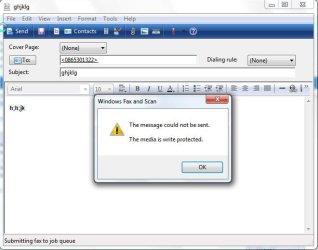
Started yesterday when I am using Window 7 fax and scan program, when I try to send a fax I get the error box with a message "The message could not be sent. The media is write protected."
I have checked permissions and security, but cannot find anything wrong. PLEASE HELP.
I should add that i have re-stalled my scanner software. Would this have anything to do with it?
John Darne
 

Attachments
  • Snap1.jpg
    Snap1.jpg
    34.8 KB · Views: 12

My Computer My Computer

At a glance

Windows 7 ProfessionalIntel Pentium 4 CPU 3.2 GHz2 GbPowerColor 9550
Computer Manufacturer/Model Number
Asus P4C800 Deluxe
OS
Windows 7 Professional
CPU
Intel Pentium 4 CPU 3.2 GHz
Motherboard
Asus P4C800 Deluxe
Memory
2 Gb
Graphics Card(s)
PowerColor 9550
Monitor(s) Displays
Acer AL1717 LCD
Hard Drives
Maxtor STM380211AS ATA Device
ST3160023A ATA Device

My Computer My Computer

At a glance

Win 7 Pro 64-bitIntel i5 2.4 Ghz8GB DDR3Intel HD 3000
Computer type
Laptop
Computer Manufacturer/Model Number
Sony Vaio VPCEB47GM Laptop
OS
Win 7 Pro 64-bit
CPU
Intel i5 2.4 Ghz
Memory
8GB DDR3
Graphics Card(s)
Intel HD 3000
Sound Card
IDT High Definition
Monitor(s) Displays
15.6 WGXA Anti-Glare LED
Screen Resolution
1280x800
Hard Drives
640Gb 7200rpm
Antivirus
MSE
Browser
Opera (primary) with IE9 backup
Here's a workaround I sometimes use. This may be helpful if you don't have many "write protected files". Open the atachement and maximize it on you monitor. Open the "Snipping Tool" program and use the "Rectangular Snip" capability to circumscribe and select the image area you need to include in the Fax message that you send. Open MSPaint, copy and paste the "Snipping Tool" image onto MSPaint window. Select File>SaveAs>Other Fomats>Save as Type:>TIFF (*.tif;*tiff) and name it something meaningful and save it. Open your Fax and Scan window and atach the .tif image you just created and send it.
 

My Computer My Computer

At a glance

Windows 7 Ultimate 64-bit8GBATI
Computer Manufacturer/Model Number
HP dc5850
OS
Windows 7 Ultimate 64-bit
Memory
8GB
Graphics Card(s)
ATI
Monitor(s) Displays
I-Inc, Acer, ViewSonic
Screen Resolution
1920x1200, 1920x1200, and 1920x1080
Keyboard
HP KB-0316
Mouse
Logitec Trackball
I've got a similar problem with Fax and Scan with my Windows 7 Ultimate. I just finished composing a fax that had 4 jpeg attachments. When I try to send it, I get: "Windows can't fax or preview the attached file type.Try installing a program that allows you to print .tif files, save the attached file as a .tif file and try again." Windows Picture Gallery opens tif files with no problems, why would I need to convert this to a tif file anyways? I'm getting pissed!
 

My Computer My Computer

At a glance

Windows 7 Ultimate x64Intel i7 8608 GBNividia GE Force GT220
Computer Manufacturer/Model Number
Home Built
OS
Windows 7 Ultimate x64
CPU
Intel i7 860
Motherboard
Gigabyte GA-P55A-UD4P
Memory
8 GB
Graphics Card(s)
Nividia GE Force GT220
Sound Card
Built in
Monitor(s) Displays
Dell 23" Touch Screen
Hard Drives
Maxtor 6B200M0
Maxtor 6Y120L0
Seagate ST31000528AS
PSU
600W
Case
Aero Cool
Cooling
Cooler Master HP6-00002-N1-GP
Back
Top