Windows 7 File Explorer Nagging Issue

Ghost1951

New member
Local time
3:23 PM
Messages
5
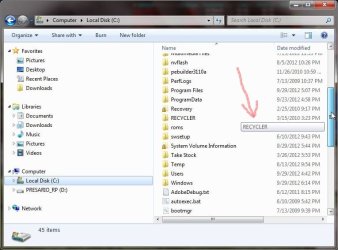
First off, I have performed a clean boot, then ran system restore, also performed all necessary cleanup including registry. I have Googled, and Googled and Googled with different phrasings of my issue. But to no avail I have yet to come up with an answer so here is hoping someone else has solved this. While it is not an operational issue, it is very much a distraction. It all started with in the last couple of days and the last thing I installed was "FireFox" browser which I have since uninstalled and then performed the above named procedures. When I open windows file explorer, and if I left-click and hold the vertical scroll bar for the right pane and drag to scroll an "info bar" popups displays the folder or file name as I scroll down. To me this is a real irritant. I will attach a screen capture that will show it. Any help appreciated........:confused:
 

Attachments

  • Screen 2.jpg
    Screen 2.jpg
    60.3 KB · Views: 23

My Computer

Computer Manufacturer/Model Number
Compaq Presario F756NR Laptop
OS
Windows 7 Ultimate
CPU
AMD Turion
Memory
2GB
Win 7 Explorer

Not much help here. Due to a couple of other behaviours, what I would call unusual, I abandoned Win 7 Exploreer and use Explorer++.
 

My Computer

Computer Manufacturer/Model Number
BGC (Bob's Garage Crew)
OS
win 7 X64 Ultimate SP1
CPU
I3770K
Motherboard
Asus P8Z77-V Deluxe
Memory
G Skill F3-14900CL9-4GBXL x 4
Graphics Card(s)
NVIDIA GeForce GTX670 + Intel 4000
Sound Card
Realtek HD 5.1 (MOB)
Monitor(s) Displays
Asus VW224T (1)
Screen Resolution
1920 x 1080
Hard Drives
SATA Corsair Force GT 2.5" 180GB (System) Sata 3
OCZ Vertex3 120GB
OCZ Vertex 2 120GB 2.5" SATA II
ST31000524AS 1000.2GB
WD15EARS (External)
PSU
CoolerMaster 1000 Watt
Case
CoolerMaster HAF X
Cooling
CPU -- CoolerMaster 520N
Keyboard
MS Wireless 3000 V2
Mouse
MS Wireless 3000 V2
Internet Speed
Cable
Antivirus
Norton Internet Security
Browser
IE9
Other Info
AMI Bios 1805
OC'd 3%
I don't suppose you've just uninstalled Classic Explorer/Start menu?
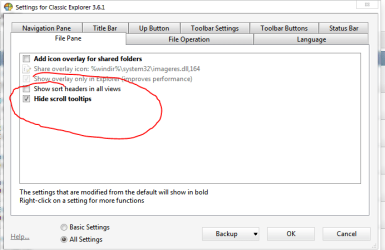
There is an option in that to enable/disable scrolling tooltips.
 

My Computer

Computer Manufacturer/Model Number
Moi
OS
Win7 Ultimate x64 7601
CPU
AMD Phenom II x4 955 Black Ed @ 3.60
Motherboard
ASUSTeK M3N72-D
Memory
8 Gig Kingston
Graphics Card(s)
nVidia 295GTX, nVidia 9800GT
Screen Resolution
1680x1050 + 1280x1024 x2 + 1280x768
Hard Drives
500GB Spinpoint F3 x2 in Hardware RAID0
PSU
Thermaltake 850w
Cooling
Arctic Cooling
Keyboard
OCZ
Mouse
Ozone Smog
No I haven't uninstalled the classic explorer, I am using Aero style and not classic. I am not sure of the particular setting about the enable/disable you are referring to. Enlighten me on that one.
 

My Computer

Computer Manufacturer/Model Number
Compaq Presario F756NR Laptop
OS
Windows 7 Ultimate
CPU
AMD Turion
Memory
2GB
Have you performed a AV scan?

Microsoft Security Essentials is available in my signature below.
 

My Computer

Computer type
Laptop
This is Classic Shell (soz, I named it wrong in previous post) Welcome to Classic Shell
If you do install it, you only need to install the Classic explorer item.

The option to disable/enable scrolling tooltips is shown in the image.
you will have to enable advanced settings to access it.

Also, No... ^^ its not a virus :/
 

Attachments

  • Capture.PNG
    Capture.PNG
    15.5 KB · Views: 11

My Computer

Computer Manufacturer/Model Number
Moi
OS
Win7 Ultimate x64 7601
CPU
AMD Phenom II x4 955 Black Ed @ 3.60
Motherboard
ASUSTeK M3N72-D
Memory
8 Gig Kingston
Graphics Card(s)
nVidia 295GTX, nVidia 9800GT
Screen Resolution
1680x1050 + 1280x1024 x2 + 1280x768
Hard Drives
500GB Spinpoint F3 x2 in Hardware RAID0
PSU
Thermaltake 850w
Cooling
Arctic Cooling
Keyboard
OCZ
Mouse
Ozone Smog
Thanks carbon6, I will take a look at the classic shell. And yes, bluerobot I have performed all a/v and spyware scans with uptodate definitions. Even though the classic may work, I would still like to know how to disable the little annoying balloon.
 

My Computer

Computer Manufacturer/Model Number
Compaq Presario F756NR Laptop
OS
Windows 7 Ultimate
CPU
AMD Turion
Memory
2GB
Installing classic explorer & changing that option will remove the tooltip you are bothered by.
Classic explorer doesn't give you the old win95 shell, its a Explorer addon that provides you with a few usability options. Such as disabling that tooltip!
 

My Computer

Computer Manufacturer/Model Number
Moi
OS
Win7 Ultimate x64 7601
CPU
AMD Phenom II x4 955 Black Ed @ 3.60
Motherboard
ASUSTeK M3N72-D
Memory
8 Gig Kingston
Graphics Card(s)
nVidia 295GTX, nVidia 9800GT
Screen Resolution
1680x1050 + 1280x1024 x2 + 1280x768
Hard Drives
500GB Spinpoint F3 x2 in Hardware RAID0
PSU
Thermaltake 850w
Cooling
Arctic Cooling
Keyboard
OCZ
Mouse
Ozone Smog
OK carbon6, I installed the Classic Shell and the first thing I checked was for the balloon tip, and it was there. I made the change in settings and it is gone. Now to continue with finding answer to the original issue. Sorry, but I am persistant in these matters. Thanks for your help! :D
 

My Computer

Computer Manufacturer/Model Number
Compaq Presario F756NR Laptop
OS
Windows 7 Ultimate
CPU
AMD Turion
Memory
2GB
OK, update. Wasn't crazy about the classic shell (sorry) so I uninstalled it. After uninstalling, the "infotip" was gone. I was in "detail mode", so I tried "list mode" and still OK, the "small icons mode" and still OK, the "content mode" and there it was, and after switching back to "details mode" it was back. Strange behavior... so still working on an answer as to how to permanently disable it.
 

My Computer

Computer Manufacturer/Model Number
Compaq Presario F756NR Laptop
OS
Windows 7 Ultimate
CPU
AMD Turion
Memory
2GB
Back
Top