Windows 7 Firewall rules not working anymore

Local time
5:14 PM
Messages
97
The firewall's advanced rules all of a sudden don't work anymore.

If I tell the firewall to block all incoming connections it does, and Windows says the firewall is working.

But all rules, old and new, regarding a particular application, don't work anymore. If I tell the firewall to block incoming connections on a particular executable with tcp ports, for instance, it doesn't anymore. Until a few weeks ago it did.
 

My Computer

Computer type
PC/Desktop
OS
Windows 7 x86

Please scan your machine with ESET OnlineScan

You will need to disable your antivirus prior to scanning.

  • Hold down Control and click on the following link to open ESET OnlineScan in a new window.
    ESET OnlineScan
  • Click the
    esetonlinebtn.png
    button.
  • For alternate browsers only: (Microsoft Internet Explorer users can skip these steps)
    • Click on esetsmartinstaller_enu.exe to download the ESET Smart Installer.
      Save it to your Desktop.
    • Double click on the
      esetsmartinstaller_enu.png
      to download the ESET Smart Installer. icon on your Desktop.
  • Check "YES, I
  • accept the Terms of Use."
  • Click the Start button.
  • Accept any security warnings from your browser.
  • Under Scan Settings, check "Scan Archives" and Remove Found Threats
  • Click Advanced settingsand select the following:
    • Scan potentially unwanted applications
    • Scan for potentially unsafe applications
    • Enable Anti-Stealth technology
  • ESET will then download updates for itself, install itself, and begin scanning your computer. Please be patient as this can take some time.
  • When the scan completes, click List Threats
  • Click Export, and save the file to your desktop using a unique name, such as ESET Scan. Include the contents of this report in your next reply.
  • Click the Back button.
  • Click the Finish button


After you have completed the ESET scan, please run the all in one tool. :thumbsup:


Note:
. It is imperative that Antivirus software, is disabled prior to running this tool!! If you are unsure how to disable then uninstall it. !!

Can you please download the All in one Repair tool.

  • Once it has downloaded, right-click it and select Run as administrator
  • Once it is open, select Step 4 from the tabs along the top.
  • Create a backup of your registry by selecting Backup
  • After that has finished, click on the Start Repairs tab, and select Start
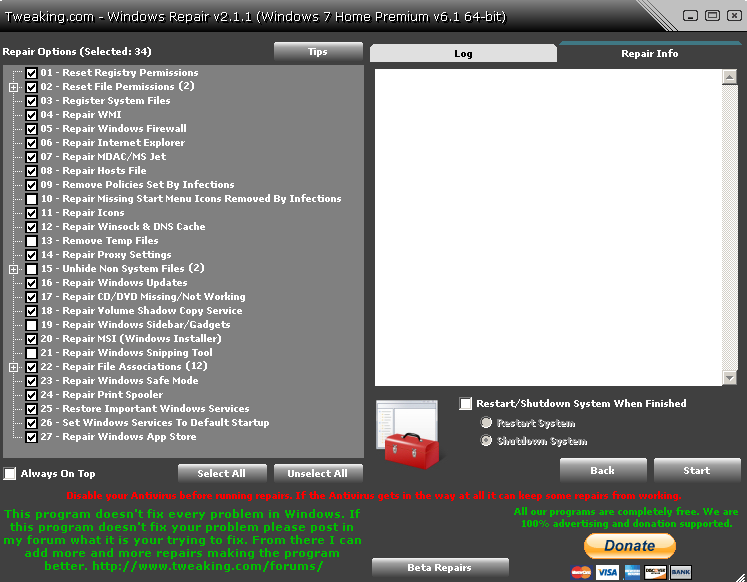
  • Make sure the boxes shown in the following screenshot are selected:
l52X3X6.png


  • Select Start, and let the program run.
  • The program will shut down the machine when done, if not reboot from start menu.
  • Make sure that the program has completed though.
 

My Computer

Computer type
PC/Desktop
OS
Windows 7 Home Premium 64bit.
What means "don't work" anymore? Does it gives an error? Or every program just can connect to anywere unaffected by the rules?

Did you install any other security software in the meantime? (antiviruses, other firewalls and so on)
 

My Computer

Computer type
Laptop
Computer Manufacturer/Model Number
Toshiba Sattelite A665-S6092
OS
Windows 7 Ultimate x64
CPU
Intel Core i7-740QM
Memory
8 GB DDR3
Graphics Card(s)
NVIDIA GeForce 330GT
Screen Resolution
1366x768
Hard Drives
Samsung 840 SSD 500GB
1TB USB3 external HD
Cooling
Coolermaster Notepal U3 notebook cooling pad
Internet Speed
3mbps ASDL
Antivirus
ClamWin 0.98.7
Browser
Opera 12.17 x86 (main), Firefox 38 (sec), IE11 (last resort)
Back
Top