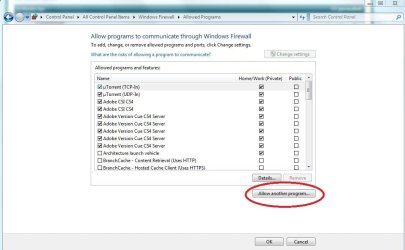
I'm experiencing a problem with Thunderbird, (one of the outgoing servers), and was pointed to a suggestion to alter the firewall setting to see if that resolves it. However, the suggestion is for XP SP2 and I cannot make head or tail of how to apply this to a W7 firewall.
I would appreciate if someone can translate the guideline into W7 settings. Here is the guideline:-
In some cases, you may need to remove Firefox/Thunderbird/Mozilla Suite from Windows Firewall exceptions list, if listed, and re-add it. The following instructions are for Windows XP sp2 (Windows Vista should be similar):
Close Firefox/Thunderbird/Mozilla Suite
Start -> Settings -> Control Panel -> Windows Firewall
General tab - Make sure the firewall is switched on and "Don't allow exceptions" is unchecked.
Exceptions tab - Find the Firefox/Thunderbird/Mozilla Suite entry and delete it.
Check the box next to "Display a notification when Windows Firewall blocks a program".
Click "OK" to exit the Windows Firewall window.
Start Firefox/Thunderbird/Mozilla Suite.
Windows Firewall should then ask whether you want to keep blocking or unblock. Select "Unblock".
Found why I could not find it, I've been looking at Firewall with Advanced Settings rather than Firewall itself. The former has a different layout.
Followed your suggestion and added TB but unfortunately did not resolve the problem.
Thanks for your help.
The reason for my original posting was because I could not send with yahoo. After further searching found that I need to have a paid subscription to send. Currently yahoo allows me to receive but not send. It had nothing to do with TB or W7.
Thanks all for your input.