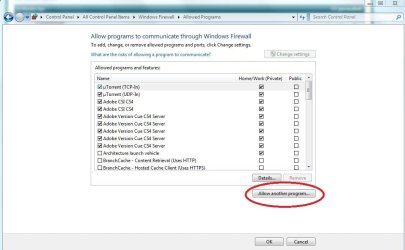
Windows 7 firewall setting

rayone

New member
Local time
10:11 AM
Messages
6
I'm experiencing a problem with Thunderbird, (one of the outgoing servers), and was pointed to a suggestion to alter the firewall setting to see if that resolves it. However, the suggestion is for XP SP2 and I cannot make head or tail of how to apply this to a W7 firewall.
I would appreciate if someone can translate the guideline into W7 settings. Here is the guideline:-

In some cases, you may need to remove Firefox/Thunderbird/Mozilla Suite from Windows Firewall exceptions list, if listed, and re-add it. The following instructions are for Windows XP sp2 (Windows Vista should be similar):

  1. Close Firefox/Thunderbird/Mozilla Suite
  2. Start -> Settings -> Control Panel -> Windows Firewall
  3. General tab - Make sure the firewall is switched on and "Don't allow exceptions" is unchecked.
  4. Exceptions tab - Find the Firefox/Thunderbird/Mozilla Suite entry and delete it.
  5. Check the box next to "Display a notification when Windows Firewall blocks a program".
  6. Click "OK" to exit the Windows Firewall window.
  7. Start Firefox/Thunderbird/Mozilla Suite.
  8. Windows Firewall should then ask whether you want to keep blocking or unblock. Select "Unblock".
 

My Computer

OS
Windows 7 32
Open Control Panel.
Open Windows Firewall.
Select "Allow a program..."
Adjust settings for Thunderbird
 

My Computer

Computer Manufacturer/Model Number
tw33k
OS
Windows 7 Ultimate (x64) SP1
CPU
Intel 3770k 4.6GHz
Motherboard
ASUS Maximus V Formula
Memory
8GB (2x 4GB) Crucial Ballistix
Graphics Card(s)
Sapphire 7950 (1060/1600)
Sound Card
On Board Realtek HD Audio
Monitor(s) Displays
27" Acer B273HU (via HDMI)
Screen Resolution
2048 x 1152
Hard Drives
Crucial M4 128GB
2TB WD Black
1TB Samsung F3 SATA
1TB WD Elite External
2TB WD USB 3.0
PSU
Corsair AX750 Gold
Case
Corsair Obsidian 800DW
Cooling
Corsair H100 (2x AP-121/2x UK-3000 push/pull)
Keyboard
Microsoft Wireless 5000
Mouse
Microsoft Wireless 5000
Internet Speed
5mb/s
Other Info
Logitech z-2300 2.1 speakers
Lamptron FC-5 v2
I have looked under File Action View Help and their sub-menus but cannot find
Allow a program..?
 

My Computer

OS
Windows 7 32
it's pretty easy to see...
 

Attachments

  • firewall.JPG
    firewall.JPG
    61.9 KB · Views: 295

My Computer

Computer Manufacturer/Model Number
tw33k
OS
Windows 7 Ultimate (x64) SP1
CPU
Intel 3770k 4.6GHz
Motherboard
ASUS Maximus V Formula
Memory
8GB (2x 4GB) Crucial Ballistix
Graphics Card(s)
Sapphire 7950 (1060/1600)
Sound Card
On Board Realtek HD Audio
Monitor(s) Displays
27" Acer B273HU (via HDMI)
Screen Resolution
2048 x 1152
Hard Drives
Crucial M4 128GB
2TB WD Black
1TB Samsung F3 SATA
1TB WD Elite External
2TB WD USB 3.0
PSU
Corsair AX750 Gold
Case
Corsair Obsidian 800DW
Cooling
Corsair H100 (2x AP-121/2x UK-3000 push/pull)
Keyboard
Microsoft Wireless 5000
Mouse
Microsoft Wireless 5000
Internet Speed
5mb/s
Other Info
Logitech z-2300 2.1 speakers
Lamptron FC-5 v2
Found why I could not find it, I've been looking at Firewall with Advanced Settings rather than Firewall itself. The former has a different layout.
Followed your suggestion and added TB but unfortunately did not resolve the problem.
Thanks for your help.
 

My Computer

OS
Windows 7 32

My Computer

Computer type
PC/Desktop
Computer Manufacturer/Model Number
Bruce ... somewhere in his 40's
OS
Windows 7 Ultimate 32bit SP1
CPU
Intel(R) Core(TM)2 Quad CPU @ 2.40GHz, 2400 MHz
Motherboard
INTEL/D975XBX2
Memory
4 GB
Graphics Card(s)
ATI Radeon HD 2600 Pro
Monitor(s) Displays
Samsung SyncMaster 914v
Screen Resolution
1280 x 1024
Hard Drives
2/500GB each ... ST3500630AS ATA Device.
One is not connected
PSU
Rocketfish 700 W
Case
G.Skill Gigabyte Chassis
Keyboard
Standard PS/2 Keyboard
Mouse
Microsoft PS/2 Mouse
Internet Speed
DSL
Antivirus
Avira Internet Security
Browser
IE 11
Other Info
ATI HDMI Audio
The reason for my original posting was because I could not send with yahoo. After further searching found that I need to have a paid subscription to send. Currently yahoo allows me to receive but not send. It had nothing to do with TB or W7.
Thanks all for your input.
 

My Computer

OS
Windows 7 32
Back
Top