Solved Windows 7 gadgets not working properly

sbstratos79

New member
Local time
2:01 AM
Messages
7
Location
India
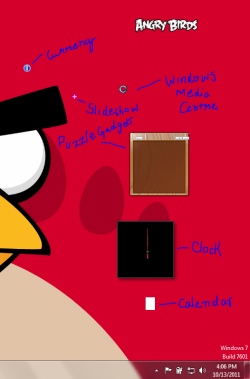
I had installed Kaspersky Internet Security 2012 in my pc. After installation a Kaspersky gadget appeared on my desktop. But when I uninstalled Kaspersky Internet Security 2012, its gadget still remained on my desktop. So I closed it down and uninstalled the gadget. But when I opened the clock, and other default gadgets, they were looking quite funny. As shown in the screenshot
I reinstalled the Windows gadget platform, tried Enable registry.reg, but nothing worked can anyone help me?:(
 

Attachments

  • Trouble gadget.PNG
    Trouble gadget.PNG
    33.2 KB · Views: 65

My Computer My Computer

At a glance

Windows 7 Ultimate 32bitAMD Athlon 64 X2nVIDIA GeForce 9100M G
Computer Manufacturer/Model Number
Acer/Aspire 4530
OS
Windows 7 Ultimate 32bit
CPU
AMD Athlon 64 X2
Graphics Card(s)
nVIDIA GeForce 9100M G
Screen Resolution
1280*800
Mouse
Synaptics pointing device
Internet Speed
4 Mbps
Looks like Kapersky gadget uninstall may have taken or damaged some Systems files. Try running SFC -SCANNOW Command

Next try System Restore to before you did these things, or even better before you installed or uninstalled KIS. Then try closing the gadget with it's X, or search gadgets to see List of Installed Gadgets and uninstall it that way.
 
The SFC-SCANNOW command did'nt work, and I have not created any system restore points yet, so is there any other way to fix this problem?:confused:
 

My Computer My Computer

At a glance

Windows 7 Ultimate 32bitAMD Athlon 64 X2nVIDIA GeForce 9100M G
Computer Manufacturer/Model Number
Acer/Aspire 4530
OS
Windows 7 Ultimate 32bit
CPU
AMD Athlon 64 X2
Graphics Card(s)
nVIDIA GeForce 9100M G
Screen Resolution
1280*800
Mouse
Synaptics pointing device
Internet Speed
4 Mbps
What do you mean SFC command didn't work? Did it run, find any damaged System File, any irreparable?

Why are there no Restore points available? There should be at least some.

Next I would try a Repair Install
 

My Computer My Computer

At a glance

64-bit Windows 11 Pro for WorkstationsIntel i7-8700K OC'd to 5 GHz64 GB (4x16GB) G.SKILL TridentZ RGB DDR4 3600...ASUS ROG-STRIX-GTX1080TI-O11G-GAMING
Computer type
PC/Desktop
Computer Manufacturer/Model Number
Self built custom
OS
64-bit Windows 11 Pro for Workstations
CPU
Intel i7-8700K OC'd to 5 GHz
Motherboard
ASUS ROG Maximus XI Formula Z390
Memory
64 GB (4x16GB) G.SKILL TridentZ RGB DDR4 3600 MHz
Graphics Card(s)
ASUS ROG-STRIX-GTX1080TI-O11G-GAMING
Sound Card
Integrated
Monitor(s) Displays
2 x Samsung Odyssey G7 27"
Screen Resolution
2560x1440
Hard Drives
1TB Samsung 990 PRO M.2,
4TB Samsung 990 PRO PRO M.2,
TerraMaster F8 SSD Plus NAS
PSU
Seasonic Prime Titanium 850W
Case
Thermaltake Core P3
Cooling
Corsair Hydro H115i
Keyboard
Logitech wireless K800
Mouse
Logitech MX Master 4
Internet Speed
2 Gb/s Download and 100 Mb/s Upload
Antivirus
Malwarebyte Anti-Malware Premium
Browser
Google Chrome
Other Info
Logitech Z625 speaker system,
Logitech BRIO 4K Pro webcam,
HP Color LaserJet Pro MFP M477fdn,
APC SMART-UPS RT 1000 XL - SURT1000XLI,
Galaxy S23 Plus phone
Hello gregrocker, I had done a system scan with SFC-SCANNOW command and it found some errors and fixed them, but when i restarted my pc gadgets were still malfunctioning. So I againg did the same thing but this time it didn't find any errors. I don't have any system restore points because I had a serious problems related to icons. I had tried many troubleshooting methods listed on some websites but none of them worked for me so I had to restore from the pc image file, that solved my problem but I had created this image file after the gadget problem and at that time I didn't have any system restore points.
 

My Computer My Computer

At a glance

Windows 7 Ultimate 32bitAMD Athlon 64 X2nVIDIA GeForce 9100M G
Computer Manufacturer/Model Number
Acer/Aspire 4530
OS
Windows 7 Ultimate 32bit
CPU
AMD Athlon 64 X2
Graphics Card(s)
nVIDIA GeForce 9100M G
Screen Resolution
1280*800
Mouse
Synaptics pointing device
Internet Speed
4 Mbps
Try Brink's fix which look's promising.

How are all other aspects of performance?
 

My Computer My Computer

At a glance

Windows 10 Home x64INTEL Core i5-750 Quad-Core 3.37GHzHyperX Fury Black Series 8GB (2 x 4GB) 1866MhzEVGA GeForce GTX 750 Superclocked 1GB 128-Bit...
Computer type
PC/Desktop
OS
Windows 10 Home x64
CPU
INTEL Core i5-750 Quad-Core 3.37GHz
Motherboard
ASUS P7P55D
Memory
HyperX Fury Black Series 8GB (2 x 4GB) 1866Mhz
Graphics Card(s)
EVGA GeForce GTX 750 Superclocked 1GB 128-Bit GDDR5
Monitor(s) Displays
LG 32MA68HY 32" IPS
Screen Resolution
1920 x 1080
Hard Drives
Samsung 840 Evo 120GB, SEAGATE 500GB Barracuda® 7200.12, SATA 3 Gb/s, 7200 RPM, 16MB cache
PSU
ANTEC TruePower New TP-550, 80 PLUS, 550W
Case
ANTEC Three Hundred Illusion
Cooling
COOLER MASTER Hyper 212 Plus, 4 x 120mm 1 x 140mm Noctua's
Internet Speed
85 + Mbps
Antivirus
Avast
Browser
Vivaldi
Sorry for replying too late, but I have now formatted my pc and reinstalled windows 7 64 bit. Sorry for the inconvenience.
 

My Computer My Computer

At a glance

Windows 7 Ultimate 32bitAMD Athlon 64 X2nVIDIA GeForce 9100M G
Computer Manufacturer/Model Number
Acer/Aspire 4530
OS
Windows 7 Ultimate 32bit
CPU
AMD Athlon 64 X2
Graphics Card(s)
nVIDIA GeForce 9100M G
Screen Resolution
1280*800
Mouse
Synaptics pointing device
Internet Speed
4 Mbps
No problem. Thank you for posting back with your results. :)
 

My Computer My Computer

At a glance

64-bit Windows 11 Pro for WorkstationsIntel i7-8700K OC'd to 5 GHz64 GB (4x16GB) G.SKILL TridentZ RGB DDR4 3600...ASUS ROG-STRIX-GTX1080TI-O11G-GAMING
Computer type
PC/Desktop
Computer Manufacturer/Model Number
Self built custom
OS
64-bit Windows 11 Pro for Workstations
CPU
Intel i7-8700K OC'd to 5 GHz
Motherboard
ASUS ROG Maximus XI Formula Z390
Memory
64 GB (4x16GB) G.SKILL TridentZ RGB DDR4 3600 MHz
Graphics Card(s)
ASUS ROG-STRIX-GTX1080TI-O11G-GAMING
Sound Card
Integrated
Monitor(s) Displays
2 x Samsung Odyssey G7 27"
Screen Resolution
2560x1440
Hard Drives
1TB Samsung 990 PRO M.2,
4TB Samsung 990 PRO PRO M.2,
TerraMaster F8 SSD Plus NAS
PSU
Seasonic Prime Titanium 850W
Case
Thermaltake Core P3
Cooling
Corsair Hydro H115i
Keyboard
Logitech wireless K800
Mouse
Logitech MX Master 4
Internet Speed
2 Gb/s Download and 100 Mb/s Upload
Antivirus
Malwarebyte Anti-Malware Premium
Browser
Google Chrome
Other Info
Logitech Z625 speaker system,
Logitech BRIO 4K Pro webcam,
HP Color LaserJet Pro MFP M477fdn,
APC SMART-UPS RT 1000 XL - SURT1000XLI,
Galaxy S23 Plus phone
For those of you who these solutions did not work for here is what finally worked for me! I found that if I created a new user account the gadgets worked fine so I knew it was an issue with the account settings. I found the folder where Windows stores the individual sidebar settings and discovered a settings.ini file in \app data\local\microsoft\windows sidebar for the user account. This controls the startup of the sidebar for the user. I terminated sidebar.exe using task manager, moved the file to the desktop (just in case it was needed) and then restarted sidebar (right click desktop and choose gadgets). I had no initial gadgets but when I added gadgets now they worked just fine. I then deleted the settings.ini from my desktop.
 

My Computer My Computer

At a glance

Windows 7 RC ultimate
OS
Windows 7 RC ultimate
Back
Top