
Please forgive my long post, but it seems like a lot of threads seem to start with a short post and then people have to ask questions about the details. Hopefully the length of the post won't discourage anyone from replying.
Description of Problem
Windows usually will not detect my Firewire ExpressCards when they are inserted while it's running. Sometimes it will not even detected them if they are inserted before booting. There are times when Windows will detect them if they have just recently been disconnected using the icon in the system tray and then physically removed and reinserted. It also seems like Windows will detect the cards more readily if it is restarting after it recently has been running. Letting it sit overnight and restarting seems to reduce the chances the card will be detected. These cards are advertised as being capable of hot plugging.
Hardware
Laptop
Fujitsu Lifebook AH530
Operating System: Windows 7 Home Premium Home Edition Media Center 6.01.7601 Service Pack 1
> Platform : Intel Calpella
> Mainboard : FUJITSU FJNBB06
> Chipset : Intel HM55
> Processor : Intel Core i3 350M @ 2266MHz
> Physical Memory : 4096MB (2 x 2048 DDR3-SDRAM )
> Video Card : Intel(R) HD Graphics
> Hard Disk : Western Digital WD5000BEVT-16A0RT0 (500GB)
> Monitor Type : N156B6-L0B - 16 inches
> Network Card : Atheros Communications AR9285 Wireless Network Adapter (PCIe)
> Network Card : Realtek Semiconductor RTL8168/8111 PCIe Gigabit Ethernet Adapter
> Ports installed : Intel(R) 5 Series/3400 Series Chipset Family USB Enhanced Host Controller
Firewire Cards
The 2 Firewire ExpressCards Used / Drivers / Chipsets:
SIIG NN-EC2022-S1
VIA 1394 OHCI Compliant Host Controller
VIA VT6315
Rosewill RC-612
Texas Instruments 1394 OHCI Compliant Host Controller
TI XIO2200AZHH
Troubleshooting Steps So Far
Insured that Windows was up to date
Insured that all drivers were up to date
Tested the SIIG card on a Windows XP notebook.
I tested the SIIG card with a notebook running Windows XP at a computer shop. That notebook detected the card and showed in in Device Manager instantly every time it was inserted.
Visually inspected the ExpressCard connector
Visually inspected the ExpressCard connector - OK, but I blasted it with air anyway.
Used the Legacy driver for the SIIG card
I tried using the Legacy driver for SIIG / VIA chipset cards. This didn't help with the detection problem and the card had frequent audio dropouts (I'm using the Firewire card to connect to a multi-channel audio interface). The Win 7 drivers performed better than the Legacy drivers once they were detected.
Checked for new BIOS
Checked for new BIOS. I have the current one. Tried resetting to defaults. No help.
Called the notebook manufacturer
Called Fujitsu. The notebook is a couple of weeks out of warranty. It will cost from $250 to $500 to get them to "fix" it if it is broken.
Called SIIG - the Firewire card manufacturer
Called SIIG - the Firewire card manufacturer - they said I could get a RMA if I wanted to swap it. But it works fine under Win XP, so why get it replaced?
Tried a Unibrain driver
Tried a Unibrain driver - wouldn't work with my audio interface and didn't fix the detection problem.
Removed "ghosted" driver entries
Removed the inactive Firewire devices from Device Manager in hopes it would then detect them on insert. Used Ghostbusters utility rather than geek with Device Manager every time just to be able to see them. No help. Windows never detected them without rebooting and sometimes not even after rebooting either.
Disabled and reenabled the "parent" port device
I disabled and reenabled the parent port device of the Firewire devices. That being the Intel(R) 5 Series/3400 Series Chipset Family USB Enhanced Host Controller device the the cards appeared under in Device Manager when viewing Devices by Connection on those occasions when they were detected by Windows. I did this in hopes Windows would then detect the Firewire card. This was never successful.
Bought a different Firewired ExpressCard with a different chipset
The original card I bought was the SIIG NN-EC2022-S1 with the VIA chipset. I bought the Rosewill RC-612 with a TI chipset as a means of troubleshooting the problem.
Used the Legacy driver for the TI chipset card
I tried using the Legacy driver for both the TI card. This didn't help with the detection problem.
Tried using an updated, non-Fujitsu Intel driver for the chipset
Using a newer Intel driver for the chipset did not help with the detection problem. Reverted to the current Fujitsu version.
Disabled Windows USB Root Hub power management
I unchecked "Allow the computer to turn off this device to save power" for the USB Root Hub and Generic USB Hub that are parent devices in Device Manager when viewing Devices by connection.
Tried a JMicron Filter driver
Tried a JMicron Filter driver that I had no real evidence was related to my cards. Caused some occasional BSOD problems and was a PITA to completely remove from startup.
Installed a couple of Microsoft Hotfixes
Installed a couple of Microsoft hotfixes that seemed like they might be related to the problem (SiS USB Registry Patch, KB2599521 - IEEE 1394 Problem).
Googled myself crazy
Questions
Is there a software utility that I can use to troubleshoot this problem?
I have a desktop with a PCI Firewire card in it that works flawlessly. What's different with the laptop aside from using the ExpressCard port instead of a PCI slot?
Is there some additional, intermediary device I need to check for driver updates?
My intuition is that there is a screwy driver somewhere. I have the latest drivers. Are there any "better" third party drivers available?
My assumption is that these cards should be detected first time, every time when they're inserted or Windows boots with them inserted. That was what happened using XP. Is this an unrealistic expectation?
What else can I do? I don't want to have clients waiting on me while I repeatedly reboot hoping Windows will detect the Firewire card.
Description of Problem
Windows usually will not detect my Firewire ExpressCards when they are inserted while it's running. Sometimes it will not even detected them if they are inserted before booting. There are times when Windows will detect them if they have just recently been disconnected using the icon in the system tray and then physically removed and reinserted. It also seems like Windows will detect the cards more readily if it is restarting after it recently has been running. Letting it sit overnight and restarting seems to reduce the chances the card will be detected. These cards are advertised as being capable of hot plugging.
Hardware
Laptop
Fujitsu Lifebook AH530
Operating System: Windows 7 Home Premium Home Edition Media Center 6.01.7601 Service Pack 1
> Platform : Intel Calpella
> Mainboard : FUJITSU FJNBB06
> Chipset : Intel HM55
> Processor : Intel Core i3 350M @ 2266MHz
> Physical Memory : 4096MB (2 x 2048 DDR3-SDRAM )
> Video Card : Intel(R) HD Graphics
> Hard Disk : Western Digital WD5000BEVT-16A0RT0 (500GB)
> Monitor Type : N156B6-L0B - 16 inches
> Network Card : Atheros Communications AR9285 Wireless Network Adapter (PCIe)
> Network Card : Realtek Semiconductor RTL8168/8111 PCIe Gigabit Ethernet Adapter
> Ports installed : Intel(R) 5 Series/3400 Series Chipset Family USB Enhanced Host Controller
Firewire Cards
The 2 Firewire ExpressCards Used / Drivers / Chipsets:
SIIG NN-EC2022-S1
VIA 1394 OHCI Compliant Host Controller
VIA VT6315
Rosewill RC-612
Texas Instruments 1394 OHCI Compliant Host Controller
TI XIO2200AZHH
Troubleshooting Steps So Far
Insured that Windows was up to date
Insured that all drivers were up to date
Tested the SIIG card on a Windows XP notebook.
I tested the SIIG card with a notebook running Windows XP at a computer shop. That notebook detected the card and showed in in Device Manager instantly every time it was inserted.
Visually inspected the ExpressCard connector
Visually inspected the ExpressCard connector - OK, but I blasted it with air anyway.
Used the Legacy driver for the SIIG card
I tried using the Legacy driver for SIIG / VIA chipset cards. This didn't help with the detection problem and the card had frequent audio dropouts (I'm using the Firewire card to connect to a multi-channel audio interface). The Win 7 drivers performed better than the Legacy drivers once they were detected.
Checked for new BIOS
Checked for new BIOS. I have the current one. Tried resetting to defaults. No help.
Called the notebook manufacturer
Called Fujitsu. The notebook is a couple of weeks out of warranty. It will cost from $250 to $500 to get them to "fix" it if it is broken.
Called SIIG - the Firewire card manufacturer
Called SIIG - the Firewire card manufacturer - they said I could get a RMA if I wanted to swap it. But it works fine under Win XP, so why get it replaced?
Tried a Unibrain driver
Tried a Unibrain driver - wouldn't work with my audio interface and didn't fix the detection problem.
Removed "ghosted" driver entries
Removed the inactive Firewire devices from Device Manager in hopes it would then detect them on insert. Used Ghostbusters utility rather than geek with Device Manager every time just to be able to see them. No help. Windows never detected them without rebooting and sometimes not even after rebooting either.
Disabled and reenabled the "parent" port device
I disabled and reenabled the parent port device of the Firewire devices. That being the Intel(R) 5 Series/3400 Series Chipset Family USB Enhanced Host Controller device the the cards appeared under in Device Manager when viewing Devices by Connection on those occasions when they were detected by Windows. I did this in hopes Windows would then detect the Firewire card. This was never successful.
Bought a different Firewired ExpressCard with a different chipset
The original card I bought was the SIIG NN-EC2022-S1 with the VIA chipset. I bought the Rosewill RC-612 with a TI chipset as a means of troubleshooting the problem.
Used the Legacy driver for the TI chipset card
I tried using the Legacy driver for both the TI card. This didn't help with the detection problem.
Tried using an updated, non-Fujitsu Intel driver for the chipset
Using a newer Intel driver for the chipset did not help with the detection problem. Reverted to the current Fujitsu version.
Disabled Windows USB Root Hub power management
I unchecked "Allow the computer to turn off this device to save power" for the USB Root Hub and Generic USB Hub that are parent devices in Device Manager when viewing Devices by connection.
Tried a JMicron Filter driver
Tried a JMicron Filter driver that I had no real evidence was related to my cards. Caused some occasional BSOD problems and was a PITA to completely remove from startup.
Installed a couple of Microsoft Hotfixes
Installed a couple of Microsoft hotfixes that seemed like they might be related to the problem (SiS USB Registry Patch, KB2599521 - IEEE 1394 Problem).
Googled myself crazy
Questions
Is there a software utility that I can use to troubleshoot this problem?
I have a desktop with a PCI Firewire card in it that works flawlessly. What's different with the laptop aside from using the ExpressCard port instead of a PCI slot?
Is there some additional, intermediary device I need to check for driver updates?
My intuition is that there is a screwy driver somewhere. I have the latest drivers. Are there any "better" third party drivers available?
My assumption is that these cards should be detected first time, every time when they're inserted or Windows boots with them inserted. That was what happened using XP. Is this an unrealistic expectation?
What else can I do? I don't want to have clients waiting on me while I repeatedly reboot hoping Windows will detect the Firewire card.
Last edited:
My Computer
At a glance
Windows 7 Home Premium 64-biti3 350M4GIntel HD Graphics
- Computer Manufacturer/Model Number
- Fujitsu
- OS
- Windows 7 Home Premium 64-bit
- CPU
- i3 350M
- Motherboard
- Fujitsu
- Memory
- 4G
- Graphics Card(s)
- Intel HD Graphics
- Sound Card
- Fujitsu/Intel 5 Series
- Monitor(s) Displays
- Internal

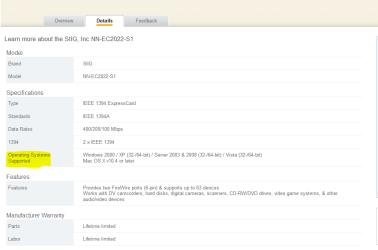

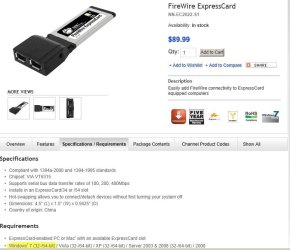
 I am going to stand by my theory that the card is not fully Windows 7 compatible unfortunately because it works (sometimes) I think it is just being pushed as Windows 7 compatible. It may be worthwhile to attempt to install it (uninstall old drivers first) with the XP drivers in compatibility mode;
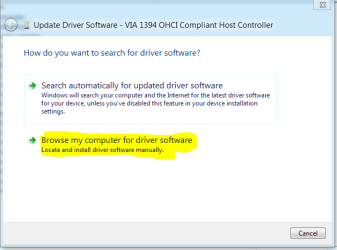
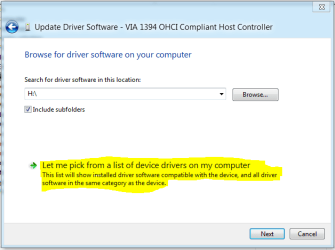
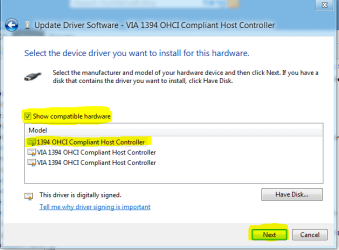
 .
.