Windows 7 - HDMI out no audio - Intel HDMI audio

ratclifp

New member
Local time
11:04 PM
Messages
1
Hey everyone,

I recently upgraded to Windows 7 (Build 7100) from Vista (32 bit) and am having trouble getting audio from my HDMI out port.

I am using the Mobile Intel 965 Express Chipset and have upgraded to the latest available driver but still no luck.

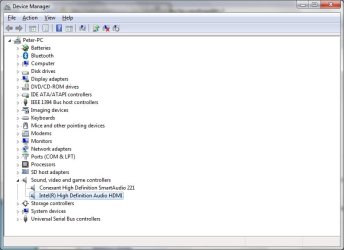
I have attached a screen shot of my device manager and my sound devices with the HDMI plugged in - there is no option to select the HDMI as an audio device.

Any ideas?

Appreciate any help!

moz-screenshot.png
moz-screenshot-1.png
 

Attachments

  • Device-Manager.jpg
    Device-Manager.jpg
    45.3 KB · Views: 9,429
  • Sound.jpg
    Sound.jpg
    25.3 KB · Views: 719

My Computer My Computer

At a glance

Windows 7 Evaluation copy. Build 7100Intel Core 2 Duo T5550 1.83Ghz3GBMobile Intel 965 Express Chipset
Computer Manufacturer/Model Number
Toshiba Equium U400
OS
Windows 7 Evaluation copy. Build 7100
CPU
Intel Core 2 Duo T5550 1.83Ghz
Memory
3GB
Graphics Card(s)
Mobile Intel 965 Express Chipset
Sound Card
Conexant High Definition SmartAudio 221
Try to set the SPDIF as the default audio device. That might work.

If it doesn't, try updating audio driver.

At last, as you said, your GPU driver is the last one, still, the problem might be right there. Usually, when the device manager shows the HDMI audio as functional and it still doesn't work, it's probably a GPU driver issue.

Try switching your GPU driver to older but stable versions.

On my case, nVidia drivers area always a pain in the *ss, so, when I successfully find a good and stable driver I stick with it for a long long time.
 

My Computer My Computer

At a glance

Windows 7 Build 7600 - 64 bitsMobile DualCore Intel Core 2 Duo T7500, 2200 ...3072 MB (DDR2-667 DDR2 SDRAM)NVIDIA GeForce 8600M GT (256 MB)
Computer Manufacturer/Model Number
ACPI x64-based PC (Mobile)
OS
Windows 7 Build 7600 - 64 bits
CPU
Mobile DualCore Intel Core 2 Duo T7500, 2200 MHz (11 x 200)
Motherboard
Asus G1000S Series Notebook
Memory
3072 MB (DDR2-667 DDR2 SDRAM)
Graphics Card(s)
NVIDIA GeForce 8600M GT (256 MB)
Sound Card
Realtek ALC660 @ Intel 82801HBM ICH8M - High Definition Audi
Monitor(s) Displays
Samsung LTN154P1-L03 [15.4" LCD]
Screen Resolution
1680x1050
Hard Drives
Hitachi HTS542525K9SA00 ATA Device (250 GB, 5400 RPM, SATA)
I had the same problem with my HD TV after upgrading to Windows 7. What I did was updated the drives to my chipset. I learned on here that with HMDI you need to have your Video card updated and not by microsoft. You need to go to the manufacturer web site and download it directly from there. I have a Dell Inspiron 1525 with an Intel 965 chipset and once I updated to the windows 7 driver from intel, everything started to work. I did this on 11/20/09 and as soon as I hooked back up to my HD TV in the sound box it also showed the HDMI TV connection. Then I made it my default sound choice and low and behold I was so happy to have sound. Worked on this for two nights and it still amazes me that microsoft updates would not catch this. Thats the problem with being a pioneer in electronics. We get to solve their issues.
 

My Computer My Computer

At a glance

Windows 7
OS
Windows 7
I had a similar problem with my HDMI. It worked perfectly in Windows Vista. After upgrading to Win 7 I have not used the Audio over HDMI and when I connected a new Sony Bravia 32" and could not get the sound working through the HDMI.
It took a long night and half day to resolve it (only by chance) as no posts on forums, no upgrade of Video or Sound drivers did not help.
What I have done is I have installed a Sigmatel High Definition Audio Codec (5612), then I found an older one (5609) and tried to install that one, the installation stopped in the middle with an error but it changed enough to activate the Digital Audio (HDMI) in the sound 'playback' option. So it is no longer greyed out and can be selected as default. The problem before was that it reported the cable not plugged it despite it being plugged.
Hope it will help someone to resolve their problems as it was really frustrating for me.
 

My Computer My Computer

At a glance

Windows 72.00 Ghz4GBNVidia GeForce 8400M GT
Computer Manufacturer/Model Number
Sony Vaio VGN-AR51J
OS
Windows 7
CPU
2.00 Ghz
Memory
4GB
Graphics Card(s)
NVidia GeForce 8400M GT
Hard Drives
250GB SATA
Back
Top