Windows 7 home edition updatable

randhir

New member
Local time
3:21 AM
Messages
1
I have purchased a Dell laptop with Windows 7 home edition. My query is that since this version of Windows 7 home edition is a licensed copy, can the updates happen over the net? And also, is this copy of Windows 7 continue to remain as an authorized copy as these licenses should not be having a time span.

I hope, my questions are clear.

Please revert with the reply to my query.

Regards
 

My Computer My Computer

OS
Windows 7 Professional
Hi,

Generally speaking, the answer is yes to both your questions. Its always best to ensure that there aren't activation problems that might inhibit Windows updates, by following these steps so we can check this for you:

1. Download and save this tool to your desktop:
http://go.microsoft.com/fwlink/?linkid=52012

2. Run the tool, and then click 'Copy' - ignore any errors if they appear

3. Use CTRL+V to paste the unedited results of the validation tool here in your next reply

Regards,
Golden
 

My Computer My Computer

Computer type
PC/Desktop
Computer Manufacturer/Model Number
Golden Mk. I.4
OS
Windows 10 Pro x64 ; Xubuntu x64
CPU
Intel i7 860 @ 2.80 GHz O/C'ed to 4.0GHz
Motherboard
Gigabyte P55A-UD3R Rev.1. Award BIOS F13
Memory
16GB Corsair Vengance DDR3 @ 661 MHz Dual Channel (9-9-9-24)
Graphics Card(s)
EVGA NVidia GTX 560 1024MB
Sound Card
Realtek Integrated
Monitor(s) Displays
Dual Samsung SyncMaster 2494HS
Screen Resolution
1920*1080 and 1920*1080
Hard Drives
1*Samsung 840 EVO 120GB SSD;
1*OCZ Vertex 2 60GB SSD;
2*Samsung F3 SpinPoint 1TB in RAID0;
1*Samsung F1 SpinPoint 1TB;
2*Western Digital 1TB External USB 3.0
1*Western Digital 500GB External USB 3.0
1*Seagate 500GB External USB 2.0
PSU
Thermaltake ToughPower QFan 750W
Case
Thermaltake Element S VK60001W2Z
Cooling
Corsair H60 Water Cooling, 2*230mm and 2*80mm case fans
Keyboard
Logitech G110
Mouse
Logitech MX518
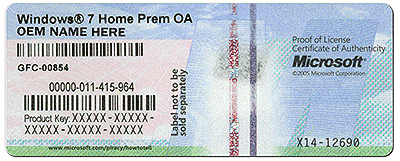
Is there a COA sticker on the bottom of the laptop or under the battery with a readable Product Key?
coa-stickers.gif

This is your ticket to Clean Reinstall - Factory OEM Windows 7 as often as you want for the life of the PC.

This is a much better install without all of the Dell Factory bloatware and useless duplicate utilities which have much better versions built into Win7, although if you still have the factory preinstall you should be able to run Dell Windows 7 PC Restore.

There may also still be a bootable diagnostics partition so try running that now to check the status of your hardware: Dell Diagnostics Utility - How to Run the. If it runs then be sure to leave that partition intact if you Clean Reinstall, deleting all other partitions during booted reinstall.
http://www.pchelpforum.com/xf/threa...l-diagnostics-utility-error-code-list.122044/
 
If you bought it from Dell, then yes, it is a licensed copy and won't expire.
 

My Computer My Computer

OS
Windows 7 Ultimate x64 SP1
CPU
Intel Core i7-2600
Motherboard
Gigabyte GA-P67A-UD3P-B3
Memory
12 GB Patriot Extreme DDR3-1333
Graphics Card(s)
Nvidia GTX 470
Monitor(s) Displays
Dell UltraSharp 2209WA
Hard Drives
OCZ Agility3 240 GB, WD5001AALS, WD7501AALS
PSU
OCZ ModStream 700W
Case
CoolerMaster HAF 912 Advanced
Cooling
CoolerMaster Hyper 212 Plus
Back
Top