Windows 7 Home fails to startup on ASUS laptop.

mconn127

New member
Local time
8:56 AM
Messages
12
Location
Los Angeles
I have tried Recovery Disks and they fail every time. Start up repair also fails. This happened after Windows Updates downloaded and installed then rebooted to finish installation. The computer then began to fail at start up.

It did restore itself the very first time start up repair ran and booted up into the desktop. Then when the computer was turned off it never was able to boot again.

Link to the Computer Model and Specs: ASUS U52F-BBG6 Intel Core i3 380M (2.53GHz) 4GB Memory 640GB HDD 15.6" Notebook Windows 7 Home Premium - Newegg.com

Please help! Thanks!
 

My Computer My Computer

At a glance

Win7 Ultimate x64Intel Core i5-2500K 3.30GHz8 GBATI Radeon HD 5700 Series
OS
Win7 Ultimate x64
CPU
Intel Core i5-2500K 3.30GHz
Memory
8 GB
Graphics Card(s)
ATI Radeon HD 5700 Series
Sound Card
Sound Blasters Audigy 2
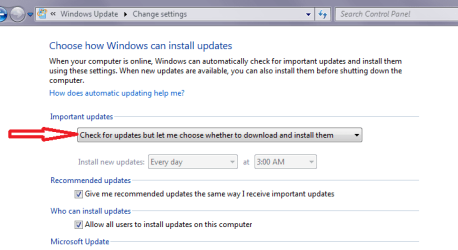
mconn mate go into safe mode and run restore back before the updates as they seem to be your problem. Set the update service to what I have in my pic and then do them in very small batches.
Once you hit the problem again try and isolate the problem update and hide it - right click on it and Hide.
 

Attachments

  • UPDATE SETTING.PNG
    UPDATE SETTING.PNG
    13.8 KB · Views: 0

My Computer My Computer

At a glance

Desk1 7 Home Prem / Desk2 10 Pro / Main lap A...Desk1 i5 3750K / Laptop i7 GTX 860M / Desk2 i...Desk1 8GB (1866) / Desk2 16GB (1333) / Laptop...Desk 1& 2NVidia GTX 650 & Laptops on board Intel
Computer type
PC/Desktop
Computer Manufacturer/Model Number
Own build (new) Desk1 / Asus ROG Win 7 / Desk2 1st build
OS
Desk1 7 Home Prem / Desk2 10 Pro / Main lap Asus ROG 10 Pro 2 laptop Toshiba 7 Pro Asus P2520 7 & 10
CPU
Desk1 i5 3750K / Laptop i7 GTX 860M / Desk2 i5 2500
Motherboard
Desk1 Asus P877-V / Desk2 Gigabyte H67 UD3H / Laptop ?
Memory
Desk1 8GB (1866) / Desk2 16GB (1333) / Laptop 8Gb DDR3
Graphics Card(s)
Desk 1& 2NVidia GTX 650 & Laptops on board Intel
Sound Card
Desk 1 & 2 -XONAR DG Realtek High Def audio Laptop
Monitor(s) Displays
Desk 1 Benq HD 2450 / Desk2 Philips 24" / Laptop 17.5"
Screen Resolution
1920x1080 D1 & D2 & Laptop 1
Hard Drives
Desk1 Samsung 120GB 830 SSD
Asus ROG 256GB 850 Pro SSD
Desk2 Samsung 840 256 SSD
Toshiba 120GB EVO
PSU
Desk 1 Corsair HX 1050/ Laptop ? / Desk 2 Corsair HX 650
Case
Desk 1 Cooler HAF XM ? Toshiba laptop / Desk2 Coolermaster
Cooling
Fans on all Desk1 -2 Desk2 - all Coolermasters 5 Laptop ?
Keyboard
Desk 1 MS Sidewinder X6 Desk 2 MS Sidewinder X 4
Mouse
Desk 1&2 - Gigabyte MS 900 gamer - laptop - Logitec wireless
Internet Speed
ADSL2+
Other Info
One other Desktop (tester) and spare Toshba laptop both with SSD's
Running Kaspersky 2016 ISS on all machines config'd identically
Logitec audio stereo systems on each machine (x3)
Canon MG5250MFC
Router/modem TP-Link running WPA2SK
I forgot to mention! Safe mode will not boot either... And the computer says that there are no restore points at all, ever... ????
 

My Computer My Computer

At a glance

Win7 Ultimate x64Intel Core i5-2500K 3.30GHz8 GBATI Radeon HD 5700 Series
OS
Win7 Ultimate x64
CPU
Intel Core i5-2500K 3.30GHz
Memory
8 GB
Graphics Card(s)
ATI Radeon HD 5700 Series
Sound Card
Sound Blasters Audigy 2

My Computer My Computer

At a glance

Windows 10 Pro x64Intel Core i7 6700KGSkill TridentZ RGB 16GB 3600 16-16-16-36EVGA GTX 980 Ti SC x2
Computer type
PC/Desktop
Computer Manufacturer/Model Number
Skylake Special #666
OS
Windows 10 Pro x64
CPU
Intel Core i7 6700K
Motherboard
Asus Sabertooth Z170 Mark 1
Memory
GSkill TridentZ RGB 16GB 3600 16-16-16-36
Graphics Card(s)
EVGA GTX 980 Ti SC x2
Sound Card
Realtek High Definition
Monitor(s) Displays
AOC G2460PG
Screen Resolution
1920 x 1080 144Hz
Hard Drives
Samsung 860 Pro 256GB, Seagate Barracuda 4TB x2
PSU
EVGA 1000 P2, EVGA White Custom Braided Cables
Case
Corsair Vengeance C70 Gunmetal Black
Cooling
Corsair H100i v2, Corsair ML120 x2, Thermal Grizzly Kryonaut
Keyboard
Logitech G910 Orion Spectrum
Mouse
Logitech G700s
Internet Speed
Verizon Fios Quantum Gateway 75/75
Antivirus
Windows Defender, Malwarebytes Free 3.8.3
Browser
Chrome
Other Info
Corsair SP120 x4, LG Blu-ray Drive, Durabrand HT-395 100 Watt Dolby Digital Amp, Corsair H2100 Wireless 7.1 Headset
Just out of interest how old is the amchine?? - maybe a warranty job.

If it is out of warranty and you wnt to do a complete reinstall then try this to recover any data you may need.

BOOTABLEUBUNTU

Make a bootable Ubuntu disk http://www.ubuntu.com/download

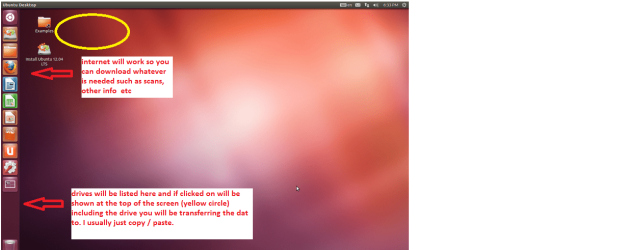
Set the BIOS to boot from theoptical when the machine boots it will show you a screen with TRY or INSTALL> select TRY NOT INSTALL

When it is finished - it takes verylittle time you will get a screen like in the pic .

Open the drive you want > Userand dig down until you get to the data / settings you may be able to copy /paste the material you want to an external source or other installed drive doingthis.

I am not sure if it will but I haverecovered tons of data etc using this method both on "dead" or justplain drives that you cannot get data from using Windows.
You will of course need to get someone to make that disk for you.
 

Attachments

  • Ubuntu screen.PNG
    Ubuntu screen.PNG
    115.3 KB · Views: 0

My Computer My Computer

At a glance

Desk1 7 Home Prem / Desk2 10 Pro / Main lap A...Desk1 i5 3750K / Laptop i7 GTX 860M / Desk2 i...Desk1 8GB (1866) / Desk2 16GB (1333) / Laptop...Desk 1& 2NVidia GTX 650 & Laptops on board Intel
Computer type
PC/Desktop
Computer Manufacturer/Model Number
Own build (new) Desk1 / Asus ROG Win 7 / Desk2 1st build
OS
Desk1 7 Home Prem / Desk2 10 Pro / Main lap Asus ROG 10 Pro 2 laptop Toshiba 7 Pro Asus P2520 7 & 10
CPU
Desk1 i5 3750K / Laptop i7 GTX 860M / Desk2 i5 2500
Motherboard
Desk1 Asus P877-V / Desk2 Gigabyte H67 UD3H / Laptop ?
Memory
Desk1 8GB (1866) / Desk2 16GB (1333) / Laptop 8Gb DDR3
Graphics Card(s)
Desk 1& 2NVidia GTX 650 & Laptops on board Intel
Sound Card
Desk 1 & 2 -XONAR DG Realtek High Def audio Laptop
Monitor(s) Displays
Desk 1 Benq HD 2450 / Desk2 Philips 24" / Laptop 17.5"
Screen Resolution
1920x1080 D1 & D2 & Laptop 1
Hard Drives
Desk1 Samsung 120GB 830 SSD
Asus ROG 256GB 850 Pro SSD
Desk2 Samsung 840 256 SSD
Toshiba 120GB EVO
PSU
Desk 1 Corsair HX 1050/ Laptop ? / Desk 2 Corsair HX 650
Case
Desk 1 Cooler HAF XM ? Toshiba laptop / Desk2 Coolermaster
Cooling
Fans on all Desk1 -2 Desk2 - all Coolermasters 5 Laptop ?
Keyboard
Desk 1 MS Sidewinder X6 Desk 2 MS Sidewinder X 4
Mouse
Desk 1&2 - Gigabyte MS 900 gamer - laptop - Logitec wireless
Internet Speed
ADSL2+
Other Info
One other Desktop (tester) and spare Toshba laptop both with SSD's
Running Kaspersky 2016 ISS on all machines config'd identically
Logitec audio stereo systems on each machine (x3)
Canon MG5250MFC
Router/modem TP-Link running WPA2SK
Do you mean you attempted repairs with the System Repair Disk?

Boot back into this disk or the Win7 installation media provided for your licensed version in Step 9 of Troubleshooting Windows 7 Failure to Start.

Confirm that the 100mb System Reserved (preferred if you have it) or C is Partition Marked Active
then run Startup Repair - Run 3 Separate Times no matter what it reports. Then report back the results.

If this fails everything that possibly can be done to start Win7 is in the first tutorial, leading up to if necessary rescuiing your files to do a superior Clean Reinstall - Factory OEM Windows 7 which steps are the same for retail and will assure a perfect install.
 
I wasn't trying to do a recovery. I tried system restore. I tried it over 5 times.. lol. I was able to extract the hard drive and get the files I need. I will have to reinstall the OS. I was just hoping to avoid this. :(

Thanks for the help though!
 

My Computer My Computer

At a glance

Win7 Ultimate x64Intel Core i5-2500K 3.30GHz8 GBATI Radeon HD 5700 Series
OS
Win7 Ultimate x64
CPU
Intel Core i5-2500K 3.30GHz
Memory
8 GB
Graphics Card(s)
ATI Radeon HD 5700 Series
Sound Card
Sound Blasters Audigy 2
Back
Top