Windows 7 Home Premium x64 hangs randomly

konradgrixti

New member
Local time
11:22 PM
Messages
7
My 3 year old Toshiba Qosmio x500 started hanging randomly so I did a fresh install using a Windows 7 Home Premium x64 OEM using my original serial no.

Still having random hangs. I use PC mainly for browsing nowadays. No heavy gameplay.

Only upgrades are additional 4Gb RAm and repalced HDD with SSD as previous one was busted.

In event viewer I got 19 Critical errors-Kernel power 41 as follows:

BugcheckCode 0
BugcheckParameter1 0x0
BugcheckParameter2 0x0
BugcheckParameter3 0x0
BugcheckParameter4 0x0
SleepInProgress true
PowerButtonTimestamp 130143938015870891

I have also run Memtest all night and run Furmark to burn test video card. All ok

Any ideas if it is hardware or software problem?

Tx,
Konrad
 

My Computer My Computer

At a glance

Windows 7 Home Premium x64Intel Coe i7 CPU Q720 @ 1.6Ghz 1.6Ghz4GbGEForce GTS360M
Computer type
Laptop
Computer Manufacturer/Model Number
Toshiba Qosmio X500-11N
OS
Windows 7 Home Premium x64
CPU
Intel Coe i7 CPU Q720 @ 1.6Ghz 1.6Ghz
Memory
4Gb
Graphics Card(s)
GEForce GTS360M
Hard Drives
OCZ Agility3
Antivirus
Windows Security Essentials
Browser
IE10 & Chrome
I let Windows do its job during install without interfering....however when ready I had to get the wireless driver from Toshiba website as it was not recognised. Plus that I installed a bunch of other drivers from the Toshiba website including Turbo boost, Chipset utility, Intel management engine interface and Rapid storage technology driver. As for the video card I downloaded the driver from Nvidia website as the performance with the Windows driver was very poor.Should I do another fresh install and just install the wireless and Nvidia drivers and see how it goes?Thank you....
 

My Computer My Computer

At a glance

Windows 7 Home Premium x64Intel Coe i7 CPU Q720 @ 1.6Ghz 1.6Ghz4GbGEForce GTS360M
Computer type
Laptop
Computer Manufacturer/Model Number
Toshiba Qosmio X500-11N
OS
Windows 7 Home Premium x64
CPU
Intel Coe i7 CPU Q720 @ 1.6Ghz 1.6Ghz
Memory
4Gb
Graphics Card(s)
GEForce GTS360M
Hard Drives
OCZ Agility3
Antivirus
Windows Security Essentials
Browser
IE10 & Chrome
It depends upon what performance is like before importing the Toshiba OEM drivers which should be a last resort based on bad performance, i.e. Standard VGA placeholder driver given for Display with bad resolution, chipset functions poor or missing requiring Toshiba website chipset, etc.

Particularly important is how the IRST driver affected performance and whether your Toshiba offers an IRST setting in BIOS, possibly under SATA settings. If installed in IRST mode and hanging, I'd want to reinstall in AHCI mode, or vice versa.
 
HI Greg,

Thanks for your valuable advice.
Before I ran the Nvidia driver not even Windows movie maker was working and the Windows experience index was 1.8 if I recall correctly. Now it is 6.7.
At this point I will re-install strictly following your guidelines. I am just hoping it is not a hardware problem but I don't think this is the case.
Will keep you posted.
 

My Computer My Computer

At a glance

Windows 7 Home Premium x64Intel Coe i7 CPU Q720 @ 1.6Ghz 1.6Ghz4GbGEForce GTS360M
Computer type
Laptop
Computer Manufacturer/Model Number
Toshiba Qosmio X500-11N
OS
Windows 7 Home Premium x64
CPU
Intel Coe i7 CPU Q720 @ 1.6Ghz 1.6Ghz
Memory
4Gb
Graphics Card(s)
GEForce GTS360M
Hard Drives
OCZ Agility3
Antivirus
Windows Security Essentials
Browser
IE10 & Chrome
Hi Greg,
Decided to remove one of my 4Gb ram. First attempt still crashed and actually got 2 BSOD's. Replaced with the removed one and so far not even one hang......ran clean at least for 3 hours so far.
Will see in the following days.
Just wondering how Memtest did not report anything wrong if it is the faulty ram after all.

Tx,
Kon
 

My Computer My Computer

At a glance

Windows 7 Home Premium x64Intel Coe i7 CPU Q720 @ 1.6Ghz 1.6Ghz4GbGEForce GTS360M
Computer type
Laptop
Computer Manufacturer/Model Number
Toshiba Qosmio X500-11N
OS
Windows 7 Home Premium x64
CPU
Intel Coe i7 CPU Q720 @ 1.6Ghz 1.6Ghz
Memory
4Gb
Graphics Card(s)
GEForce GTS360M
Hard Drives
OCZ Agility3
Antivirus
Windows Security Essentials
Browser
IE10 & Chrome
Good to hear, Konrad. Keep us posted.

Be sure if you replace the bad RAM stick to spec it carefully so that it matches the specs and the other RAM.
 
Hi there,

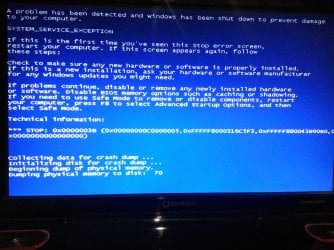
Unfortunately my relief was short lived. Still having BSOD's. I also did another fresh clean install this time without installing any drivers apart the Realtek wireless driver and official Nvidia driver. I have also replaced back the original 2 x 2GB memory sticks originally installed on my laptop but still getting BSOD's. I have attached a screenshot of my last BSOD a couple of minutes ago. This happened while the pc was doing nothing actually.....looks like it is another hardware problem......about a year ago my youngest son threw up on the keyboard and had to replace the keyboard!!!!!!...maybe now some other parts are corroding slowly? System HDD was replaced a couple of months ago as pc center blamed the HDD for the BSOD's....obviously they where wrong.
Any ideas before I scrap this laptop? Don't feel like actually cost me an eye.
 

Attachments

  • 20130714_175348.jpg
    20130714_175348.jpg
    856.2 KB · Views: 6

My Computer My Computer

At a glance

Windows 7 Home Premium x64Intel Coe i7 CPU Q720 @ 1.6Ghz 1.6Ghz4GbGEForce GTS360M
Computer type
Laptop
Computer Manufacturer/Model Number
Toshiba Qosmio X500-11N
OS
Windows 7 Home Premium x64
CPU
Intel Coe i7 CPU Q720 @ 1.6Ghz 1.6Ghz
Memory
4Gb
Graphics Card(s)
GEForce GTS360M
Hard Drives
OCZ Agility3
Antivirus
Windows Security Essentials
Browser
IE10 & Chrome
OP, Hi, yes do the full BSOD reporting tool procedure, so we get an eye on your memory DUMPS.

Doesn't take that long to do, and attach in reply.

BSOD causes are wide ranging from bad RAM, driver corruption, wrong driver installed, etc etc.
 

My Computer My Computer

At a glance

Windows 7 Ultimate Retail Box (64-bit install...AMD FX-8350 CPU v1.15 (or 1.0F) BIOS was requ...8G CAS-7 G-Skill DDR3 @1333 (2 fours) [mobo n...Radeon HD 7950 [3 gigs of GDDR5] MSI Twin Fro...
Computer type
PC/Desktop
Computer Manufacturer/Model Number
Self Built Custom
OS
Windows 7 Ultimate Retail Box (64-bit installed) + Service Pack 1
CPU
AMD FX-8350 CPU v1.15 (or 1.0F) BIOS was required!
Motherboard
MSI 890FXA-GD70
Memory
8G CAS-7 G-Skill DDR3 @1333 (2 fours) [mobo nonOC max rec'd]
Graphics Card(s)
Radeon HD 7950 [3 gigs of GDDR5] MSI Twin Frozr model
Sound Card
Realtek High Definition Audio (onboard mobo, ALC-889 chip)
Monitor(s) Displays
2 WS LED Monitors: One LG One Viewsonic
Screen Resolution
1920 by 1080
Hard Drives
SSD for OS: Samsung 840 Pro
SSD for VM and utilities: Adata SX900
7200 RPM SATA HDs for the rest: Hitachi and Seagate
PSU
Corsair TX850 - 850W max, in service since August 2010.
Case
Thermaltake Armor A90
Cooling
Thermaltake Spin Q CPU Cooler, in service since August 2010
Keyboard
Logitech G11
Mouse
Logitech M310 Wireless
Internet Speed
100 Megabit broadband supposedly upgraded from 50 (Cable)
Antivirus
Bitdefender Internet Security 2014 suite
Browser
Pale Moon 64-bit main, also IceDragon, Opera, and Maxthon.
Other Info
CompTIA A+ certified (220-800 series) in July 2013.
Hi all,

Here are the crash dumps as instructed. Hope I understood correctly.

Tx,
Konrad
 

Attachments

My Computer My Computer

At a glance

Windows 7 Home Premium x64Intel Coe i7 CPU Q720 @ 1.6Ghz 1.6Ghz4GbGEForce GTS360M
Computer type
Laptop
Computer Manufacturer/Model Number
Toshiba Qosmio X500-11N
OS
Windows 7 Home Premium x64
CPU
Intel Coe i7 CPU Q720 @ 1.6Ghz 1.6Ghz
Memory
4Gb
Graphics Card(s)
GEForce GTS360M
Hard Drives
OCZ Agility3
Antivirus
Windows Security Essentials
Browser
IE10 & Chrome
Hi all,

Here are the crash dumps as instructed. Hope I understood correctly.

Tx,
Konrad

The analysts are in the Crashes forum.

What about the other steps, did you miss them too?

Hi Konrad -

What I would do at this point is simultaneously work through the Troubleshooting Steps for Windows 7
to go over your install thoroughly,

and post up the BSOD in our Crashes forum for expert analysis. Blue Screen of Death (BSOD) Posting Instructions - Windows 7 Forums

I'd also try different configurations with the RAM, one stick at a time, etc. to sort whether it might still be the problem. You've stress tested it overnight with memtest86? RAM - Test with Memtest86+
 
Looks like OP has a rootkit they need to be rid of: win32k.sys

win32k.sys - win32k.sys:2 - Program Information

To be rid of it:

http://www.malwarebytes.org/products/mbar/
Get and use their regular tool also, it's pretty much the gold standard for A/V scanners.
------------------------------------------------------------------------------------------
watchdog.sys caused another BSOD.

The fix I found for that:

Go to Adobe - Flash Player and right-click the flash animation in the middle,
click on settings and deactivate hardware acceleration.
It's a problem with the new flash player, some graphics cards don't support the hardware acceleration.
--------------------------------------------------------------------------------------------------
MSE is not a good solution for Anti-virus/malware, seek out something better, avtest.org can help.
http://www.av-test.org/en/tests/home-user/windows-7/novdec-2012/
MSE is rated worst; pathetic at catching zero-day (new) ones is the problem.
 
Last edited:

My Computer My Computer

At a glance

Windows 7 Ultimate Retail Box (64-bit install...AMD FX-8350 CPU v1.15 (or 1.0F) BIOS was requ...8G CAS-7 G-Skill DDR3 @1333 (2 fours) [mobo n...Radeon HD 7950 [3 gigs of GDDR5] MSI Twin Fro...
Computer type
PC/Desktop
Computer Manufacturer/Model Number
Self Built Custom
OS
Windows 7 Ultimate Retail Box (64-bit installed) + Service Pack 1
CPU
AMD FX-8350 CPU v1.15 (or 1.0F) BIOS was required!
Motherboard
MSI 890FXA-GD70
Memory
8G CAS-7 G-Skill DDR3 @1333 (2 fours) [mobo nonOC max rec'd]
Graphics Card(s)
Radeon HD 7950 [3 gigs of GDDR5] MSI Twin Frozr model
Sound Card
Realtek High Definition Audio (onboard mobo, ALC-889 chip)
Monitor(s) Displays
2 WS LED Monitors: One LG One Viewsonic
Screen Resolution
1920 by 1080
Hard Drives
SSD for OS: Samsung 840 Pro
SSD for VM and utilities: Adata SX900
7200 RPM SATA HDs for the rest: Hitachi and Seagate
PSU
Corsair TX850 - 850W max, in service since August 2010.
Case
Thermaltake Armor A90
Cooling
Thermaltake Spin Q CPU Cooler, in service since August 2010
Keyboard
Logitech G11
Mouse
Logitech M310 Wireless
Internet Speed
100 Megabit broadband supposedly upgraded from 50 (Cable)
Antivirus
Bitdefender Internet Security 2014 suite
Browser
Pale Moon 64-bit main, also IceDragon, Opera, and Maxthon.
Other Info
CompTIA A+ certified (220-800 series) in July 2013.
Hi Faladu,

Downloaded Malwarebytes anti rootkit and scanned in safe mode with networking. Nothing found.
Disabled flash player hardware acceleration.
As for Antivirus I still have Vipre subscribed until November but decided to try MSE. I will install AVG and keep you posted.

Thanks and regards,
Konrad
 

My Computer My Computer

At a glance

Windows 7 Home Premium x64Intel Coe i7 CPU Q720 @ 1.6Ghz 1.6Ghz4GbGEForce GTS360M
Computer type
Laptop
Computer Manufacturer/Model Number
Toshiba Qosmio X500-11N
OS
Windows 7 Home Premium x64
CPU
Intel Coe i7 CPU Q720 @ 1.6Ghz 1.6Ghz
Memory
4Gb
Graphics Card(s)
GEForce GTS360M
Hard Drives
OCZ Agility3
Antivirus
Windows Security Essentials
Browser
IE10 & Chrome
Back
Top