Windows 7 instalation stuck at "Starting Windows 7"

marciopol

New member
Local time
6:27 AM
Messages
21
Hello. As in topic, I am unable to install Windows 7 from bootable USB stick made using RUFUS, basing on a guide on this forum (this big one). So few information about my system:

Laptop model: Sony Vaio SVE-something with win8 preinstalled (I wanted to make it dualboot win7/8)
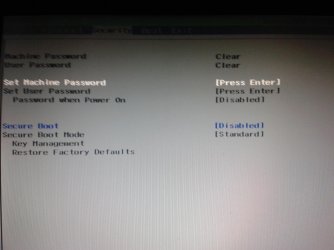
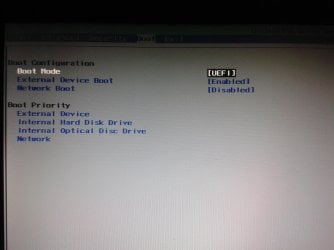
Bios mode: UEFI with secure boot disabled.

USB stick seems correct, as I managed to launch windows 7 setup.exe under working system, and it even copied all the files to the drive on which I want to install it.

Quick help appreciated.

Best regards /marciopol
 

My Computer My Computer

At a glance

Windows 8 Home x64/Windows 7 Ultimate x64Intel i54g ramAti Radeon 7xxx
Computer type
Laptop
Computer Manufacturer/Model Number
Sony
OS
Windows 8 Home x64/Windows 7 Ultimate x64
CPU
Intel i5
Motherboard
who knows
Memory
4g ram
Graphics Card(s)
Ati Radeon 7xxx
Hard Drives
Hitachi hts 640gb
Antivirus
GData
Browser
Chrome
Yes, formatted to Fat32 (otherwise it wouldn't be detected on boot). My steps are following these all guides, It just won't go past Starting Windows screen.
 

My Computer My Computer

At a glance

Windows 8 Home x64/Windows 7 Ultimate x64Intel i54g ramAti Radeon 7xxx
Computer type
Laptop
Computer Manufacturer/Model Number
Sony
OS
Windows 8 Home x64/Windows 7 Ultimate x64
CPU
Intel i5
Motherboard
who knows
Memory
4g ram
Graphics Card(s)
Ati Radeon 7xxx
Hard Drives
Hitachi hts 640gb
Antivirus
GData
Browser
Chrome
Let's check all of the UEFI, CSM, Legacy BIOS and any other related settings in BIOS. Please post back camera snaps showing all of them, or type them out for us to see the exact choices.

Sometimes it requires CSM or Legacy just to install Win7.

Also, is there Reset to Defaults and what are those choices?

Have you tried install in Legacy Mode?
 
When I launch in Legacy mode, the pendrive isnt recognised (system not found). Earlier I made a legacy bootable usb key, it booted fine, but when I came to the partition picking screen, it said that Windows cannot be installed on disk x partition x because gpt style (wouldn't let me press Next neither). Attaching all bios settings.

EDIT cant attach. I have: Secure boot = disabled, boot mode= UEFI and that's it, there are very little options in VAIO's bios :<

There is load default values (globally for whole bios I guess) and restore factory defaults under secure boot, which is greyed out as the secure boot is disabled. I havent been changing anything there (except of boot order, setting to uefi/legacy and secure boot disabling)
 

My Computer My Computer

At a glance

Windows 8 Home x64/Windows 7 Ultimate x64Intel i54g ramAti Radeon 7xxx
Computer type
Laptop
Computer Manufacturer/Model Number
Sony
OS
Windows 8 Home x64/Windows 7 Ultimate x64
CPU
Intel i5
Motherboard
who knows
Memory
4g ram
Graphics Card(s)
Ati Radeon 7xxx
Hard Drives
Hitachi hts 640gb
Antivirus
GData
Browser
Chrome
You'll need to delete all partitions to clear the GPT formatting, or if that isn't enough access DISKPART At PC Startup from installer to run Diskpart Clean Command.

I asked you what the Reset options are as if you reset to Win8 defaults it may re-enable Secure Boot with no way to access BIOS via the OS. Some mobos have a Reset to Legacy defaults.

What were the exact choices under Boot mode?

Check again for CSM, Legacy BIOS, etc.
 
ok all options on boot and another tab

there is only one bios setup on this PC i believe, it also contains Windows 8 recovery partiton (refresh pc etc.)
 

Attachments

  • 20140510_195907.jpg
    20140510_195907.jpg
    398.7 KB · Views: 0
  • 20140510_195913.jpg
    20140510_195913.jpg
    468 KB · Views: 0

My Computer My Computer

At a glance

Windows 8 Home x64/Windows 7 Ultimate x64Intel i54g ramAti Radeon 7xxx
Computer type
Laptop
Computer Manufacturer/Model Number
Sony
OS
Windows 8 Home x64/Windows 7 Ultimate x64
CPU
Intel i5
Motherboard
who knows
Memory
4g ram
Graphics Card(s)
Ati Radeon 7xxx
Hard Drives
Hitachi hts 640gb
Antivirus
GData
Browser
Chrome
What's on the Advanced and Exit tabs? What are the other choices for Boot Mode?

The Restore to Defaults you'd want should be on the Exit tab, not the Secure Boot settings.
 
Boot mode can only be changed to "Legacy" or UEFI. Advanced tab allows to enable Intel Virtualization technology, there is load default values on Exit tab. Exit tab has shutdown, save changes etc. options, nothing to change there
 

My Computer My Computer

At a glance

Windows 8 Home x64/Windows 7 Ultimate x64Intel i54g ramAti Radeon 7xxx
Computer type
Laptop
Computer Manufacturer/Model Number
Sony
OS
Windows 8 Home x64/Windows 7 Ultimate x64
CPU
Intel i5
Motherboard
who knows
Memory
4g ram
Graphics Card(s)
Ati Radeon 7xxx
Hard Drives
Hitachi hts 640gb
Antivirus
GData
Browser
Chrome
I'd reset the Default on the Exit tab, then double check Secure Boot is turned off and Boot Mode set to Legacy.

Use the installer which worked for Legacy before. This time delete all partitions or wipe the drive to clear GPT formatting, create and format new partitions during Steps 7/8 of Clean Install Windows 7
 
But I don't want to wipe my hard drive, I want to keep windows 8 alongside windows 7 :< isn't there any way to do that?
 

My Computer My Computer

At a glance

Windows 8 Home x64/Windows 7 Ultimate x64Intel i54g ramAti Radeon 7xxx
Computer type
Laptop
Computer Manufacturer/Model Number
Sony
OS
Windows 8 Home x64/Windows 7 Ultimate x64
CPU
Intel i5
Motherboard
who knows
Memory
4g ram
Graphics Card(s)
Ati Radeon 7xxx
Hard Drives
Hitachi hts 640gb
Antivirus
GData
Browser
Chrome
Then you'll have to get it to install in UEFI, which isn't always possible depending on the mobo.

Sometimes it requires setting to Legacy to install Win7 regardless of mode. Are there UEFI choices in the boot menu still presented when you choose Legacy?

If not then make sure your flash stick is formatted correctly, or try DVD install.

Is there a newer BIOS update which might give you more UEFI choices?

You can also change to Legacy and reinstall both Win7 and Win8 in that order to have clean installs. Clean Install - Windows 8
 
I dont have dvd drive in my laptop (dog ate it lol). Will try everything you proposed tommorow, have a good night and thanks for help so far
 

My Computer My Computer

At a glance

Windows 8 Home x64/Windows 7 Ultimate x64Intel i54g ramAti Radeon 7xxx
Computer type
Laptop
Computer Manufacturer/Model Number
Sony
OS
Windows 8 Home x64/Windows 7 Ultimate x64
CPU
Intel i5
Motherboard
who knows
Memory
4g ram
Graphics Card(s)
Ati Radeon 7xxx
Hard Drives
Hitachi hts 640gb
Antivirus
GData
Browser
Chrome
Does it matter wheter the data is read from USB or CD?
 

My Computer My Computer

At a glance

Windows 8 Home x64/Windows 7 Ultimate x64Intel i54g ramAti Radeon 7xxx
Computer type
Laptop
Computer Manufacturer/Model Number
Sony
OS
Windows 8 Home x64/Windows 7 Ultimate x64
CPU
Intel i5
Motherboard
who knows
Memory
4g ram
Graphics Card(s)
Ati Radeon 7xxx
Hard Drives
Hitachi hts 640gb
Antivirus
GData
Browser
Chrome
Sometimes the other installation media will work better.

What about the BIOS update choices? When the UEFI settings are so lacking, many mobo maker's try to catch up with a firmware update. Check now.

I've had to struggle to install 7 in a Dual Boot to an 8 PC every time but still eventually got it installed by finding the correct BIOS settings.
 
Last edited:

My Computer My Computer

At a glance

Windows 8 Home x64/Windows 7 Ultimate x64Intel i54g ramAti Radeon 7xxx
Computer type
Laptop
Computer Manufacturer/Model Number
Sony
OS
Windows 8 Home x64/Windows 7 Ultimate x64
CPU
Intel i5
Motherboard
who knows
Memory
4g ram
Graphics Card(s)
Ati Radeon 7xxx
Hard Drives
Hitachi hts 640gb
Antivirus
GData
Browser
Chrome
Also, I booted this key with legacy with the same output as before - Windows is unable to install because GPT style. USB is formatted correctly, 100% sure on that
 

My Computer My Computer

At a glance

Windows 8 Home x64/Windows 7 Ultimate x64Intel i54g ramAti Radeon 7xxx
Computer type
Laptop
Computer Manufacturer/Model Number
Sony
OS
Windows 8 Home x64/Windows 7 Ultimate x64
CPU
Intel i5
Motherboard
who knows
Memory
4g ram
Graphics Card(s)
Ati Radeon 7xxx
Hard Drives
Hitachi hts 640gb
Antivirus
GData
Browser
Chrome
You'd only want a BIOS update for Windows 7 and which affects UEFI settings.

If you keep Win8 install then the hard drive remains GPT format until it is wiped, so it can't be installing in Legacy mode which requires deleting all partitions or wiping the HD to change its format to MBR.

So you'll need to get it to install Win7 in UEFI if you want to keep Win8, or else delete all partitions to install Win7 and then reinstall Win8 in Legacy.

When I have tried to install Win7 in Dual Boot on new Win8 PC the issue has always been BIOS settings.

I notice when you have the BIOS boot tab set to UEFI Boot Mode there are no UEFI devices presented in the Boot Priority just below that. If your stick is plugged in at the time it should be listed specifically as a UEFI flash stick. Are you getting that choice when you boot from stick to install in UEFI mode?


http://www.sevenforums.com/tutorials/52129-disk-clean-clean-all-diskpart-command.html
 
There are never other boot options, because this bios setup only deals in absolutes- A harddrive, an optic drive, network or external drive are the only options, it doesn't matter if UEFI/Legacy is selected. I found sth else though, in windows 8 recovery option there is "Use external device" and then the EFI USB Device is listed, should I try it?
 

My Computer My Computer

At a glance

Windows 8 Home x64/Windows 7 Ultimate x64Intel i54g ramAti Radeon 7xxx
Computer type
Laptop
Computer Manufacturer/Model Number
Sony
OS
Windows 8 Home x64/Windows 7 Ultimate x64
CPU
Intel i5
Motherboard
who knows
Memory
4g ram
Graphics Card(s)
Ati Radeon 7xxx
Hard Drives
Hitachi hts 640gb
Antivirus
GData
Browser
Chrome
You need to boot the stick as a UEFI device. Where are these Recovery options - in BIOS?
 
Back
Top