Windows 7 instalation stuck at "Starting Windows 7"

No no no, its the built in windows 8 recovery partition
 

My Computer My Computer

At a glance

Windows 8 Home x64/Windows 7 Ultimate x64Intel i54g ramAti Radeon 7xxx
Computer type
Laptop
Computer Manufacturer/Model Number
Sony
OS
Windows 8 Home x64/Windows 7 Ultimate x64
CPU
Intel i5
Motherboard
who knows
Memory
4g ram
Graphics Card(s)
Ati Radeon 7xxx
Hard Drives
Hitachi hts 640gb
Antivirus
GData
Browser
Chrome
Never heard of such a BIOS. Recovery is normally only to restore 8. Can you attach a picture?
 

My Computer My Computer

At a glance

Windows 8 Home x64/Windows 7 Ultimate x64Intel i54g ramAti Radeon 7xxx
Computer type
Laptop
Computer Manufacturer/Model Number
Sony
OS
Windows 8 Home x64/Windows 7 Ultimate x64
CPU
Intel i5
Motherboard
who knows
Memory
4g ram
Graphics Card(s)
Ati Radeon 7xxx
Hard Drives
Hitachi hts 640gb
Antivirus
GData
Browser
Chrome
Would you like to see all the options on this recovery? As there are some UEFI related as I noticed. We could use skype webcam connection or something for faster help maybe?
 

My Computer My Computer

At a glance

Windows 8 Home x64/Windows 7 Ultimate x64Intel i54g ramAti Radeon 7xxx
Computer type
Laptop
Computer Manufacturer/Model Number
Sony
OS
Windows 8 Home x64/Windows 7 Ultimate x64
CPU
Intel i5
Motherboard
who knows
Memory
4g ram
Graphics Card(s)
Ati Radeon 7xxx
Hard Drives
Hitachi hts 640gb
Antivirus
GData
Browser
Chrome
Just take camera snaps and attach them back using only the paper clip in reply box.

We need to see all UEFI, CSM, Legacy BIOS, and Boot mode settings expanded to show every choice available. Choose UEFI Firmware Settings (which is BIOS setup) on the System Recovery Options screen shown below:

11881d1353866139t-automatic-repair-run-windows-8-advanced-options.jpg
 
Ok, I'm on it
 

My Computer My Computer

At a glance

Windows 8 Home x64/Windows 7 Ultimate x64Intel i54g ramAti Radeon 7xxx
Computer type
Laptop
Computer Manufacturer/Model Number
Sony
OS
Windows 8 Home x64/Windows 7 Ultimate x64
CPU
Intel i5
Motherboard
who knows
Memory
4g ram
Graphics Card(s)
Ati Radeon 7xxx
Hard Drives
Hitachi hts 640gb
Antivirus
GData
Browser
Chrome
Clicking UEFI settings directs to blue screen shown in attachment, when I click restart it goes to Vaio assist menu, no additional settings are shown it just loops
 

Attachments

  • 20140512_201021.jpg
    20140512_201021.jpg
    310.4 KB · Views: 1
  • 20140512_200836.jpg
    20140512_200836.jpg
    288.8 KB · Views: 0

My Computer My Computer

At a glance

Windows 8 Home x64/Windows 7 Ultimate x64Intel i54g ramAti Radeon 7xxx
Computer type
Laptop
Computer Manufacturer/Model Number
Sony
OS
Windows 8 Home x64/Windows 7 Ultimate x64
CPU
Intel i5
Motherboard
who knows
Memory
4g ram
Graphics Card(s)
Ati Radeon 7xxx
Hard Drives
Hitachi hts 640gb
Antivirus
GData
Browser
Chrome
There are also no Windows Startup Settings in this menu at my laptop :<
 

My Computer My Computer

At a glance

Windows 8 Home x64/Windows 7 Ultimate x64Intel i54g ramAti Radeon 7xxx
Computer type
Laptop
Computer Manufacturer/Model Number
Sony
OS
Windows 8 Home x64/Windows 7 Ultimate x64
CPU
Intel i5
Motherboard
who knows
Memory
4g ram
Graphics Card(s)
Ati Radeon 7xxx
Hard Drives
Hitachi hts 640gb
Antivirus
GData
Browser
Chrome
Ok one second
 

My Computer My Computer

At a glance

Windows 8 Home x64/Windows 7 Ultimate x64Intel i54g ramAti Radeon 7xxx
Computer type
Laptop
Computer Manufacturer/Model Number
Sony
OS
Windows 8 Home x64/Windows 7 Ultimate x64
CPU
Intel i5
Motherboard
who knows
Memory
4g ram
Graphics Card(s)
Ati Radeon 7xxx
Hard Drives
Hitachi hts 640gb
Antivirus
GData
Browser
Chrome
Clicking it leads to regular bios setu, which I have shown before
 

My Computer My Computer

At a glance

Windows 8 Home x64/Windows 7 Ultimate x64Intel i54g ramAti Radeon 7xxx
Computer type
Laptop
Computer Manufacturer/Model Number
Sony
OS
Windows 8 Home x64/Windows 7 Ultimate x64
CPU
Intel i5
Motherboard
who knows
Memory
4g ram
Graphics Card(s)
Ati Radeon 7xxx
Hard Drives
Hitachi hts 640gb
Antivirus
GData
Browser
Chrome
Insert your win7 install media reboot and select F11 or F12 Boot Menu key as its booting. Is the device shown as UEFI when BIOS is set to UEFI? If not then the flash media is not created correctly.

If either F key isn't working at boot after several tries then try Startup Settings choice in picture I posted above or from the Recovery Menu you posted.
 
There is no boot list in my bios. Only place where USB is shown and I can manually pick it to boot, is the Recovery for Windows 8, (Use external device to recovery option) and there it is indeed shown as EFI USB Device
 

My Computer My Computer

At a glance

Windows 8 Home x64/Windows 7 Ultimate x64Intel i54g ramAti Radeon 7xxx
Computer type
Laptop
Computer Manufacturer/Model Number
Sony
OS
Windows 8 Home x64/Windows 7 Ultimate x64
CPU
Intel i5
Motherboard
who knows
Memory
4g ram
Graphics Card(s)
Ati Radeon 7xxx
Hard Drives
Hitachi hts 640gb
Antivirus
GData
Browser
Chrome
There will always be a BIOS Boot Priority order list in BIOS setup. Look on the Boot tab. It is listed there at the bottom. The stick should show up as EFI device there when plugged in. Try External device.

There is normally also a BIOS Boot Menu which is likely what the Recovery is accessing via F11. You said the stick shows up and can be chosen there as a EFI device, correct? Go ahead and choose it to try again. If it fails try formatting it again.
 
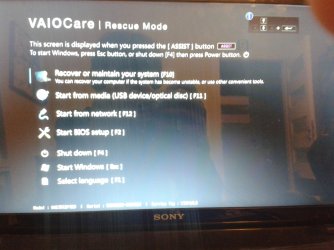
BIOS boot priority menu is not anyhow interactive on my laptop, it is just "Internal Harddrive", Internal Optical Drive, External Device and Network. Nothing else, just that. I have been formatting this stick many times, on many ways, and it has always been stucking on Starting Windows screen with colorful dots floating. Neither of F-keys during boot work, only way to access BIOS and recovery and such is dedicated ASSIST button, which directs to this black menu full of options (not really) that I have shown on page 3 of this post. Choosing this EFI stick boot option in recovery just boots the stick and it is stucking on f-ing windows is starting screen so I don't know what to do. Is there any way to unlock more bios settings maybe?
 

My Computer My Computer

At a glance

Windows 8 Home x64/Windows 7 Ultimate x64Intel i54g ramAti Radeon 7xxx
Computer type
Laptop
Computer Manufacturer/Model Number
Sony
OS
Windows 8 Home x64/Windows 7 Ultimate x64
CPU
Intel i5
Motherboard
who knows
Memory
4g ram
Graphics Card(s)
Ati Radeon 7xxx
Hard Drives
Hitachi hts 640gb
Antivirus
GData
Browser
Chrome
These BIOS settings are often locked down by Windows 8 which only provides access via the Advanced Options shown in post #25. For this reason I'd reinstall a Dual Boot Installation - Windows 8 and Windows 7
in Legacy mode while deleting all partitions to free up access to the BIOS per normal.

Until then with the Win8 existing you may not be able to install Win7. However when facing the exact same stall you have during 7 Dual Boot with existing factory Win8 keeping all partitions intact, I have resolved it by finding the BIOS setting responsible. That setting may not be present without a BIOS update.
 
Back
Top