Solved Windows 7 install Not Shown in Restore

tomg

New member
Local time
5:57 AM
Messages
21
I recently upgraded an older Windows 7 computer to Windows 10 with no issues. I now wish to upgrade another older Windows 7 computer to Windows 10. During the first upgrade, I made a system image and repair disk to use in the event of upgrade failure but fortunately did not need it. However, as a test, I did start the computer with the repair disk to be sure I could see the disk image. I was also able to see the installed operating system in the restore window. Concerning the second computer, when I start it with the repair disk I made for it, I am able to see the system image I made for it but am not able to see the installed Windows 7 operating system in the restore window. Will this have any impact on my ability to upgrade Windows 7 to Windows 10 on this computer? Strangely, the boot drive is not shown in the BIOS but is shown in Administrative Tools -> Disk Management of the current Windows 7 installation. May I proceed with the upgrade to Windows 10 or is not being able to see the current installation of Windows 7 in the restore window a red flag that the Windows 10 upgrade will fail? Thank you.
 

My Computer My Computer

OS
W7
Repair disk a waste of time.
What restore window? on second computer?
System Image? Where? Not on a Disk!
You lost me.
Upgrade from Win7 to Win10 YES?

If you didn't have an issue with the first Upgrade, what is the problem now?
Win upgrades make a backup C:\Windows.old

You should always make a full disk image to an external drive, even a USB temporarily is better than relying on windows, and you certainly don't want to save it on the drive you are upgrading.

Bill
 
Last edited:

My Computer My Computer

Computer type
PC/Desktop
Computer Manufacturer/Model Number
HP Desktop & Compaq Laptop
OS
Win 10 x64, Linux Lite, Win 7 x64, BlackArch, & Kali
Hard Drives
Samsung 850 Pro 256Gb,
Hitachi HDD 1Tb,
Crucial MX SSD 250Gb
Segate 3Tb USB 3.0 Ext. Backup HDD
Internet Speed
150Mbps dn, 20Mbps up
Antivirus
Avast Free, Malwarebytes Anti-Exploit & Anti-Ransomware
Browser
Firefox, Chrome, Opera, & VPN
System Restore & System Image
The only similarity is "System"
Bill
 

My Computer My Computer

Computer type
PC/Desktop
Computer Manufacturer/Model Number
HP Desktop & Compaq Laptop
OS
Win 10 x64, Linux Lite, Win 7 x64, BlackArch, & Kali
Hard Drives
Samsung 850 Pro 256Gb,
Hitachi HDD 1Tb,
Crucial MX SSD 250Gb
Segate 3Tb USB 3.0 Ext. Backup HDD
Internet Speed
150Mbps dn, 20Mbps up
Antivirus
Avast Free, Malwarebytes Anti-Exploit & Anti-Ransomware
Browser
Firefox, Chrome, Opera, & VPN
Microsoft System Update Readiness Tool http://support.microsoft.com/kb/947821 for the purpose of ascertaining if you have any issue that may prevent an Upgrade, either In Place Upgrade or Upgrade from, say, Win7 to Win10.
 

My Computer My Computer

Computer type
PC/Desktop
Computer Manufacturer/Model Number
HP Desktop & Compaq Laptop
OS
Win 10 x64, Linux Lite, Win 7 x64, BlackArch, & Kali
Hard Drives
Samsung 850 Pro 256Gb,
Hitachi HDD 1Tb,
Crucial MX SSD 250Gb
Segate 3Tb USB 3.0 Ext. Backup HDD
Internet Speed
150Mbps dn, 20Mbps up
Antivirus
Avast Free, Malwarebytes Anti-Exploit & Anti-Ransomware
Browser
Firefox, Chrome, Opera, & VPN
Repair disk a waste of time.
I thought I needed the repair disk to boot the computer and use the system image if the upgrade to Win 10 fails and I cannot restart the computer.

What restore window? on second computer?
The window that appears when I select "restore from system image" after booting the second computer with the repair disk that I made for the second computer.

System Image? Where? Not on a Disk!
I tried putting the system image on an external hard disk that is connected to a USB3 port but it was not "found" when I got the the "restore from system image" screen.

You lost me.
Upgrade from Win7 to Win10 YES?

If you didn't have an issue with the first Upgrade, what is the problem now?
No problem yet - just trying to prevent one.

Win upgrades make a backup C:\Windows.old

You should always make a full disk image to an external drive, even a USB temporarily is better than relying on windows, and you certainly don't want to save it on the drive you are upgrading.
After I tried putting the system image on an external hard disk that is connected to a USB3 port but it was not "found" when I got the the "restore from system image" screen as mentioned above, I then made another system image on an internal hard disk (not the one I am upgrading), and the "restore from system image" screen could see it.

Also, I went back to the bios and the drive I am upgrading is shown the "boot order" portion of the bios screen so maybe I am worrying needlessly.

Thank you.
 

My Computer My Computer

OS
W7
No repair disk, you create a bootable disk from the backup software to access the image

You can't restore an image that you saved with M$ on one computer to another computer unless you have that image to transfer. Then it will most likely not work properly because it is a different computer, different registry, different applications. Some or most applications will/may work, but you never know.

If you make the image with M$ I'm not sure about that at all, don't use it as I said.

Above is per paragraph of last post. Yes, too worried. Use AOMEI, to external hard drive, with integrity check, look for image on EHD it's there. You can open it with AOMEI
Here's 2 Videos on AOMEI
Back up disk easily with AOMEI Backupper


My Computer My Computer

Computer type
PC/Desktop
Computer Manufacturer/Model Number
HP Desktop & Compaq Laptop
OS
Win 10 x64, Linux Lite, Win 7 x64, BlackArch, & Kali
Hard Drives
Samsung 850 Pro 256Gb,
Hitachi HDD 1Tb,
Crucial MX SSD 250Gb
Segate 3Tb USB 3.0 Ext. Backup HDD
Internet Speed
150Mbps dn, 20Mbps up
Antivirus
Avast Free, Malwarebytes Anti-Exploit & Anti-Ransomware
Browser
Firefox, Chrome, Opera, & VPN
Your patience is appreciated. Researching AEOMI quickly, it appears to not not only make a system backup but also provides a method to create bootable media that will start the system when windows will not start. I am unsure if this old computer, Intel 2600K processor in Asus P8z68-V Gen 3 motherboard, will boot to a flash drive but it will boot to a CD and it looks like AEOMI will make a bootable CD. Guess I could just make a bootable flash drive with AEOMI, configure the bios to boot to the flash drive, and see what happens or is there a better way to run a test boot to a flash drive? Thank you.
 

My Computer My Computer

OS
W7
AOMEI, like Macrium Reflect, has a verify saved image somewhere in its menu board. That might be enough assurance concerning your saved system partition full image.
 
Last edited:

My Computer My Computer

Computer type
PC/Desktop
Computer Manufacturer/Model Number
Antec desktop; Acer Aspire laptops
OS
Windows 7 Professional 64-bit
CPU
Desktop i5; Acers i5 & i7
Memory
desktop 16GB; 1 Acer 8GB & 1 Acer 16GB
Hard Drives
1TB split into 2 equal partitions [OS and data] usable by RJS
Internet Speed
AT&T DSL
Browser
FF, GChrome, msIE
Other Info
Windows 7 Firewall, Emsisoft AM/AV, MSE [scan-only], SpywareBlaster, Ruiware/BillP combine
There you go tomg, cookin' now!! :thumbsup::tip::dinesh:
There are no dumb questions! Always hope that OP has issue resolved and knowledge has been passed along as well!

Yes, AOMEI will make bootable media ISO, CD or DVD being AOMEI WinPE ISO Image is less than 750 MB.
Any AOMEI will open any AOMEI created ISO, for sure x64 on x64 x32 on x32, not sure about cross x64 open x32 maybe, x32 open x64 I don't think so, not sure.
Here's a link to AOMEI Professional with working key, use 2nd one, just tried it, it works, checked link clean, download clean!
YES I ALWAYS TEST LINKS AND DOWNLOADS!

Patience is a virtue when working with computers!
 

My Computer My Computer

Computer type
PC/Desktop
Computer Manufacturer/Model Number
HP Desktop & Compaq Laptop
OS
Win 10 x64, Linux Lite, Win 7 x64, BlackArch, & Kali
Hard Drives
Samsung 850 Pro 256Gb,
Hitachi HDD 1Tb,
Crucial MX SSD 250Gb
Segate 3Tb USB 3.0 Ext. Backup HDD
Internet Speed
150Mbps dn, 20Mbps up
Antivirus
Avast Free, Malwarebytes Anti-Exploit & Anti-Ransomware
Browser
Firefox, Chrome, Opera, & VPN
Hope to proceed with AOMEI today after dealing with HVAC tech. Sure appreciate your encouragement. Will post again shortly. Thank you.
 

My Computer My Computer

OS
W7
connected to a USB3 port but it was not "found"

Possibly your boot media doesn't contain usb3 drivers.
 

My Computers My Computers

System One System Two

  • Computer type
    PC/Desktop
    OS
    7 X64
    CPU
    i5 8400
    Motherboard
    gigabyte b365m ds3h
    Memory
    2x8gb 3200mhz
    Hard Drives
    various
    PSU
    pure power 11 400w cm
    Case
    Coolermaster
    Cooling
    cryorig m9i
  • Computer type
    PC/Desktop
    OS
    7x64
    CPU
    g5400
    Motherboard
    ga b365m ds3h
    Memory
    8gb ddr4 2400
    PSU
    xfx pro 450w
I am unsure if this old computer, Intel 2600K processor in Asus P8z68-V Gen 3 motherboard will boot to a flash drive

It must be able to. Even my ancient 755 socket mobo can do that.


If you are creating aomei boot media, download the winpe they offer

aomei-download-wipe.jpg


Alternatively you could use my boot media:

183x64.iso

ideally should be extracted to usb using e.g. usb7ice
View attachment Usb7ice.zip

eset.jpg
 

My Computers My Computers

System One System Two

  • Computer type
    PC/Desktop
    OS
    7 X64
    CPU
    i5 8400
    Motherboard
    gigabyte b365m ds3h
    Memory
    2x8gb 3200mhz
    Hard Drives
    various
    PSU
    pure power 11 400w cm
    Case
    Coolermaster
    Cooling
    cryorig m9i
  • Computer type
    PC/Desktop
    OS
    7x64
    CPU
    g5400
    Motherboard
    ga b365m ds3h
    Memory
    8gb ddr4 2400
    PSU
    xfx pro 450w
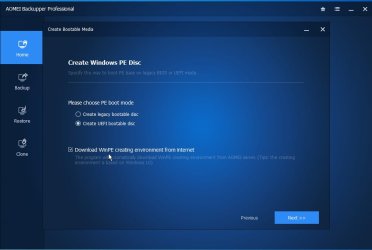
Downloaded and installed AOMEI backupper standard. Ran the program, selected "create new backup" and saw the screen shown below. The default for saving the file to H: (another SSD in the system), was the only option. There was no option to save the file to the flash drive plugged into a usb3 port or to an external hard drive plugged into another usb3 port. The only other option was "save to a network location" which I do not wish to do. How do I specify the flash drive as the place for AOMEI to save the system backup? Thank you.


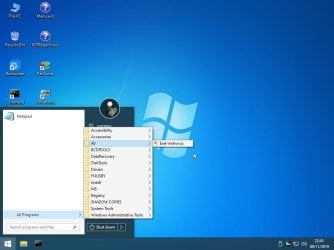
Read two posts above then downloaded 183x64.iso and USB7ice.zip. Used USB7ice to create flash drive with 183x64. Restarted computer pressing F8 but flash drive was not shown in the boot options. Elected eufi from the menu, entered the bios, and noticed on the boot options that eufi was disabled. Went to another page in the bios, clicked on eufi and the system apparently loaded the contents of the flash drive made with the 183x64 iso as it appeared to be a minimal version of windows 10. I did start Aomei while in the Windows 10 environment but had no backups since I had been unable to make the backup to a flash drive. Appears from SIW2's post above that the option to use the WinPE environment is with AOMEI Pro which I do not have. The only option that AOMEI standard is offering is to make the backup to another onboard SSD which I guess would work. Help please. Thank you.


Another update (still using AOMEO standard):
I overwrote the bootable flash disk mentioned in my last post above by going into AOMEI standard "tools" and making a Windows PE Disc in the Create UEFI bootable disc mode and did have the option to enable "download WinPE creating environment from internet". Restarted the computer, pressed F8 at the Asus splash screen and selected EUFI from the boot options menu. The system booted from the flash drive into Win10PE. There was an icon for AOMEI which I used to launch AOMEI then was able to see a backup the system had made on another onboard SSD (not the system drive). I closed the restore window and surmise that I now have an emergency option in the event the upgrade from Win7 to Win10 fails. Is this correct or do I need to pursue this until I can get AOMEI to make its backup on a flash drive instead of the onboard SSD?
 

Attachments

  • screen.png
    screen.png
    10.1 KB · Views: 15
Last edited:

My Computer My Computer

OS
W7
Successfully upgraded from Win 7 to Win 10 today. Thanks to all who offered helpful suggestions. tomg
 

My Computer My Computer

OS
W7

My Computers My Computers

System One System Two

  • Computer type
    PC/Desktop
    OS
    7 X64
    CPU
    i5 8400
    Motherboard
    gigabyte b365m ds3h
    Memory
    2x8gb 3200mhz
    Hard Drives
    various
    PSU
    pure power 11 400w cm
    Case
    Coolermaster
    Cooling
    cryorig m9i
  • Computer type
    PC/Desktop
    OS
    7x64
    CPU
    g5400
    Motherboard
    ga b365m ds3h
    Memory
    8gb ddr4 2400
    PSU
    xfx pro 450w

My Computer My Computer

Computer type
PC/Desktop
Computer Manufacturer/Model Number
HP Desktop & Compaq Laptop
OS
Win 10 x64, Linux Lite, Win 7 x64, BlackArch, & Kali
Hard Drives
Samsung 850 Pro 256Gb,
Hitachi HDD 1Tb,
Crucial MX SSD 250Gb
Segate 3Tb USB 3.0 Ext. Backup HDD
Internet Speed
150Mbps dn, 20Mbps up
Antivirus
Avast Free, Malwarebytes Anti-Exploit & Anti-Ransomware
Browser
Firefox, Chrome, Opera, & VPN
Windows is not activated. Tried putting in my valid Win7 product key and it did not work. Very discouraged.
 

My Computer My Computer

OS
W7
You could use the gatherosstate method.

1.If you do not currently have win7 installed on that machine:
2.Shrink your win10 partition to create enough space to restore the win7 image you have.
3.Restore your win7 image to that free space.
4.Boot into your restored win7
5.copy gatherosstate.exe from win10 installation media sources folder onto your win 7 desktop.
6. Run gaterosstate.exe and it will create a genuineticket.xml file on your win7 desktop
7.Copy the genuineticket.xml it created from your win7 desktop into the windows 10 \ProgramData\Microsoft\Windows\ClipSVC\GenuineTicket.

You will need to have Hidden Folders showing to see it. Foder Options > View > Show hidden files
 

My Computers My Computers

System One System Two

  • Computer type
    PC/Desktop
    OS
    7 X64
    CPU
    i5 8400
    Motherboard
    gigabyte b365m ds3h
    Memory
    2x8gb 3200mhz
    Hard Drives
    various
    PSU
    pure power 11 400w cm
    Case
    Coolermaster
    Cooling
    cryorig m9i
  • Computer type
    PC/Desktop
    OS
    7x64
    CPU
    g5400
    Motherboard
    ga b365m ds3h
    Memory
    8gb ddr4 2400
    PSU
    xfx pro 450w
First, thank you for the information.

You could use the gatherosstate method.
Gatherosstate seems similar to the procedure discussed in this video:
YouTube

1.If you do not currently have win7 installed on that machine:
I believe Win7 is gone after the upgrade to Win10 though there is a folder called Window.sold on the C: drive.
2.Shrink your win10 partition to create enough space to restore the win7 image you have.
Attached is a screenshot of what I see in the "Computer Management" window of Administrative Tools. I surmise we would want to shrink the c: partition? How much?
3.Restore your win7 image to that free space.
Not sure how - using AOMEI?

4.Boot into your restored win7
Not sure how - F8 on boot and select the drive containing Win7?

5.copy gatherosstate.exe from win10 installation media sources folder onto your win 7 desktop.

I do not have a media sources folder so would it be generated when creating a flash drive using the Windows Media creation tool?
6. Run gaterosstate.exe and it will create a genuineticket.xml file on your win7 desktop
7.Copy the genuineticket.xml it created from your win7 desktop into the windows 10 \ProgramData\Microsoft\Windows\ClipSVC\GenuineTicket.
I do not find a \ProgramData\Microsoft\Windows\ClipSVC\GenuineTicket folder in Windows 10.

You will need to have Hidden Folders showing to see it. Foder Options > View > Show hidden files

I am sure you can tell by my comments above that my knowledge level is inadequate for the task. Sorry to take your time and not be able to follow the procedure. tomg
 

My Computer My Computer

OS
W7
Gentlemen -
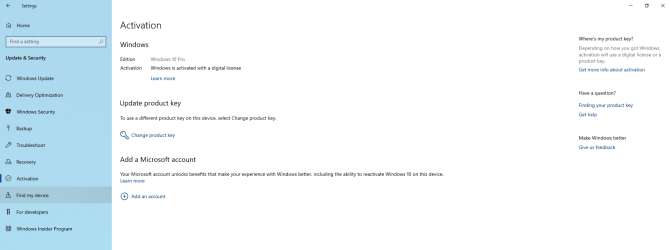
I cannot explain it but read on. Following my last post, I actually found the Win7 Pro CD that I used to install Win7 Pro when I built this computer, called MS store support, and they refused to allow the upgrade though I had proof that I was upgrading a legitimate copy of Win7 Pro. So, following SIW2's latest suggestions in an amateurish way, I found an old 120GB SSD that I had taken out of my wife's computer years ago and installed it in my computer with the idea of restoring the AOMEI backup of Win7 to it rather than trying to shrink partitions which I felt was above my knowledge level. Formatted the 120GB SSD, rebooted with the AOMEI flash drive, selected the image to restore, and got an error that the available space was 107GB and the restoration needed 183GB. Exited the restore process, rebooted and did not see the "Activate Windows" logo on my desktop. Went to the activation screen and saw the message that "Windows is activated with a digital license linked to your Microsoft account". See the screenshot below. I was not aware I had a Microsoft account but did put it my email address when prompted by Windows 10 yesterday, was asked to set as password, did, and then got an email that my MS Account password had been updated. I do not see how the actions recounted here could precipitate the activation of my Windows 10 upgrade but for now, all is well.

Comment as you like - I feel like I am living in the Twilight Zone (for those of you over age 50).

Thank you all so much.

tomg
 

Attachments

  • activated.png
    activated.png
    82.6 KB · Views: 1

My Computer My Computer

OS
W7
Back
Top