Windows 7 install problem (Vista and XP dual boot)

Which file am i supposed to replace. ntldr or ntdlr ?

Your looking for ntldr, john was just making sure you were not looking for the wrong file because you said you could not find ntdlr which i just assumed was a typo. Copy the file to E:\ it will ask you if you want to replace it if the file exits, if not it will just copy it.
 

My Computer My Computer

At a glance

Win 7
OS
Win 7
sorry, my english isn't good.

Please help me, My DVD drive broken, I have Win7.iso

I installed WinXP and win7. Then I installed WinXP again. I have boot XP but I lost boot Win 7
. You have software to fix error. I don't want install win 7 again.
Thank you!
 

My Computer My Computer

At a glance

windows 7
OS
windows 7

My Computers My Computers

  • At a glance

    Windows 11 21H2 Current buildAMD Ryzen 9 3950X4 * 32 GB - Corsair Vengeance 3600 MHzEVGA GeForce RTX 3080 Ti XC3 ULTRA GAMING (12...
    Computer type
    PC/Desktop
    Computer Manufacturer/Model Number
    The Beast Model A (homebrew)
    OS
    Windows 11 21H2 Current build
    CPU
    AMD Ryzen 9 3950X
    Motherboard
    MSI MEG X570 GODLIKE
    Memory
    4 * 32 GB - Corsair Vengeance 3600 MHz
    Graphics Card(s)
    EVGA GeForce RTX 3080 Ti XC3 ULTRA GAMING (12G-P5-3955-KR)
    Sound Card
    Realtek® ALC1220 Codec
    Monitor(s) Displays
    2x Eve Spectrum ES07D03 4K Gaming Monitor (Matte) | Eve Spec
    Screen Resolution
    3x 3840 x 2160
    Hard Drives
    3x Samsung 980 Pro NVMe PCIe 4 M.2 2 TB SSD (MZ-V8P2T0B/AM) } 3x Sabrent Rocket NVMe 4.0 1 TB SSD
    PSU
    PC Power & Cooling’s Silencer Series 1050 Watt, 80 Plus Plat
    Case
    Fractal Design Define 7 XL Dark ATX Full Tower Case
    Cooling
    SteelSeries Apex Pro Wired Gaming Keyboard
    Keyboard
    SteelSeries Apex Pro
    Mouse
    Logitech MX Master 3S | MX Master 3 for business
    Internet Speed
    AT&T LightSpeed Gigabit Duplex Ftth
    Antivirus
    Windows Defender + MB 3
    Browser
    Nightly (default) + Firefox (stable),Chrome, Edge
  • At a glance

    ChromeOS Flex Dev Channel (current)Intel(R) Core(TM) i5-6300U CPU @ 2.40GHz, 250...16 GBIntel(R) HD Graphics 520
    Computer type
    PC/Desktop
    System Manufacturer/Model Number
    Dell Latitude E5470
    OS
    ChromeOS Flex Dev Channel (current)
    CPU
    Intel(R) Core(TM) i5-6300U CPU @ 2.40GHz, 2501 Mhz, 2 Core(s), 4 Logical Processor(s)
    Motherboard
    Dell
    Memory
    16 GB
    Graphics Card(s)
    Intel(R) HD Graphics 520
    Sound Card
    Intel(R) HD Graphics 520 + RealTek Audio
    Monitor(s) Displays
    Dell laptop display 15"
    Screen Resolution
    1920 * 1080
    Hard Drives
    Toshiba 128GB M.2 22300 drive
    INTEL Cherryville 520 Series SSDSC2CW180A 180 GB SATA III SSD
    PSU
    Dell
    Case
    Dell
    Cooling
    Dell
    Keyboard
    Dell
    Mouse
    Logitech MX Master 3S (shared w. Sys 1) | Dell TouchPad
    Internet Speed
    AT&T LightSpeed Gigabit Duplex Ftth
Thank you verry much!
 

My Computer My Computer

At a glance

windows 7
OS
windows 7
PROnetworks helped me very well, and it took me 2 min to enable dual boot after many hours of going throug a lot of sites. Hope it will help others.
 

My Computer My Computer

At a glance

Windows 7 Build 7201 X64 bitIntel(R) Core(TM)2 Duo CPU Y7500 @ 2.20GHZ 2....3.00 GBNVIDIA Quadro NVS 140M (Prerelease - WDDM 1.1)
OS
Windows 7 Build 7201 X64 bit
CPU
Intel(R) Core(TM)2 Duo CPU Y7500 @ 2.20GHZ 2.20 GHz
Memory
3.00 GB
Graphics Card(s)
NVIDIA Quadro NVS 140M (Prerelease - WDDM 1.1)
Monitor(s) Displays
ThinkPad Display 1440x900
Keyboard
Standard PS/2 Keybord
OT:

i'm having problems activating my 7100 and 7077 builds...it says connection timed out thingy and it gives an error number...what seems to be the problem?
 

My Computer My Computer

At a glance

windows xp, vista, windows 7 7077 build
OS
windows xp, vista, windows 7 7077 build
Okay I've got a delemma. My Acer laptop has Vista sp1 32 bit, 4gbRAM, and a 250gb hard drive. I tried putting Seven RC1. The installation seemed like it went well, but when I tried to reboot, it would almost get to the sign in page, and then there would be an error about the installation. Now there are two partitions on my HD. All of my documents are on my second partition, and my OS is on my first partition. is there a way to wipe the first partition on the BIOS so that I can attempt to do a clean install of Seven RC1?
 

My Computer My Computer

At a glance

Windows 7 Beta
OS
Windows 7 Beta
is there a way to wipe the first partition on the BIOS so that I can attempt to do a clean install of Seven RC1?

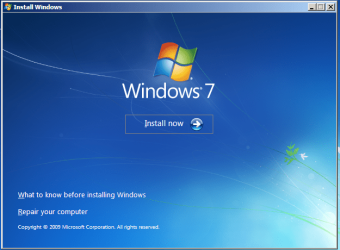
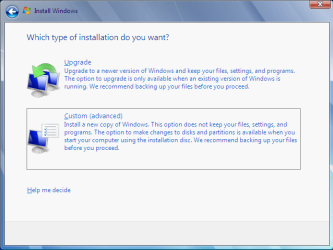
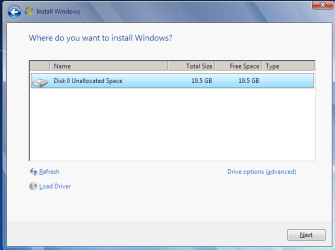
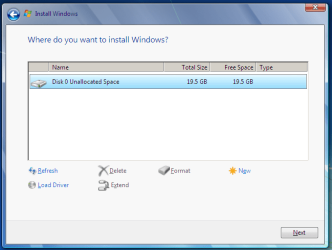
Sure it is, insert windows 7 DVD and start the process when it asks to upgrade or custom say custom and then when it asks the location then show the drive where u want to install and click below for the drive option and select to format it and proceed, this should not be an extra burden as this is in ur wayt of installation itself

see the screen shots below...
 

Attachments

  • 7-1.PNG
    7-1.PNG
    83.4 KB · Views: 158
  • 7-2.PNG
    7-2.PNG
    23.1 KB · Views: 47
  • 7-3.PNG
    7-3.PNG
    17.3 KB · Views: 87
  • 7-install.PNG
    7-install.PNG
    20.2 KB · Views: 51
I am also using 3 OS. Win 7, Vista and XP. After i installed windows 7 my xp has crashed. It is showing me that \ntdlr is missing. My windows vista and seven are working fine.
Please help me.

Thank you

I've got exactly the same problem :S but i just have Xp and 7 and when i try to boot with xp shows me the same Error msg that him, I tried everything you say yo fix it but it was imposible
 

My Computer My Computer

At a glance

Windows 7Intel core2 Duo E85004gb ddr2 800 Xms2 CorsairAti Radeon HD4870 512mb
OS
Windows 7
CPU
Intel core2 Duo E8500
Motherboard
Gigabyte
Memory
4gb ddr2 800 Xms2 Corsair
Graphics Card(s)
Ati Radeon HD4870 512mb
Monitor(s) Displays
Lg 19 inches
Screen Resolution
1440*900
Hard Drives
500 gb Sata
PSU
Agiler 700Watts
Case
Generic
Mouse
Logitech G5
Internet Speed
2mb
XP problem

I'm not sure if it's not off-topic (it's more XP problem I guess) but that's what happening to me:
I had 1 old ATA drive and 3 SATA connected in RAID 0. XP boot files (ntldr, ntdetect, etc.) were located on ATA drive. I removed it, and repaired bootloader with windows 7 dvd. Windows 7 works great, but (as you could expect) windows XP gave "no NTLDR" error.
Windows 7 is currently at partition C: which is 2nd partition on raid, and windows xp is on D: which is first partition. Please notice that when I boot XP (connecting old ATA drive again - it works ok), windows 7 partition is J:, XP is I: and old ata drive is C:.

I found solution on other forum to copy ntldr, ntdetect, and boot.ini onto windows xp partition and rebuild windows 7 loader with some tool doing same thing which is described at the begining of this thread.
After I've done it I get error (when trying to boot xp) which goes sth like this:

Incorrect file BOOT.INI
Running C:\WINDOWS\

and it immidiately resets (took me some skill in reflex reading, and couple of resets to get it)
It might not be exact words as i'm translating it from my language version.

My boot.ini looks like that:
Code:
;
;Warning: Boot.ini is used on Windows XP and earlier operating systems.
;Warning: Use BCDEDIT.exe to modify Windows Vista boot options.
;
[boot loader]
timeout=30
default=multi(0)disk(0)rdisk(1)partition(1)\WINDOWS
[operating systems]
multi(0)disk(0)rdisk(1)partition(1)\WINDOWS="Microsoft Windows XP Professional" /NOEXECUTE=OPTIN /FASTDETECT
I'm not sure about it, but I guess that if there is only raid left in the system, and ata drive is disconected, multi(0)disk(0)rdisk(1)partition(1) should become multi(0)disk(0)rdisk(0)partition(1). I tried this, but came up with the same error.
It's courious that if I connect ATA drive in USB case as USB drive, I can boot xp from it with no problem.

Any idea how can I fix it?

I need to add, that windows XP instalation doesn't see XP installed and wants to make fresh instalation (I fixed such problems couple of times by reinstalling XP), and windows 7 instalation sees only windows 7 (no XP listed).

 
Last edited:

My Computer My Computer

At a glance

7 RC 64bitAMD Phenom II X4 965 BE4 GB OCZ Reaper (2x2GB)GIGABYTE GEFORCE GTX 275 896MB DDR3 OVERCLOCK...
Computer Manufacturer/Model Number
Own made
OS
7 RC 64bit
CPU
AMD Phenom II X4 965 BE
Motherboard
ASUS M4N32 Deluxe
Memory
4 GB OCZ Reaper (2x2GB)
Graphics Card(s)
GIGABYTE GEFORCE GTX 275 896MB DDR3 OVERCLOCKED ULTRA DURABL
Sound Card
Sound Blaster X-Fi Audio
Monitor(s) Displays
Samsung SyncMaster 226BW
Screen Resolution
1680x1050
Hard Drives
1x160GB Intel SSD
3x250 Sata Barracuda in RAID 0 (disconnected. Switching to SSD)
1x160 Caviar disconnected (running as USB drive with router)
PSU
Yeisco FL-550ATX
Case
ThermalTake TaiChi
Cooling
ThermalRight TrueCopper
Keyboard
Logitech G15
Mouse
Steelseries WoW MMO Gaming Mouse
Internet Speed
4MBit/4Mbit
Other Info
Almost passive cooling. One 120 fan:
Noctua 120x120x25 NF-S12-1200 6/17dBA
running half speed on massive CPU cooler (6dB in theory) plus stock graphics card cooling.
Finally dual boot fixed!!!

This worked for me with extra steps. Read all before trying.

Case 1: You have Dual Boot Win7 and XP/Vista and you lost the XP/Vista boot option at startup, but Win7 boots fine.

Solution:
1. Start Win7.

2. If you can see your XP/Vista partition in Computer, write down the drive letter (e.g. D:)

3. If you can't see the XP partition and you see all others but this one, open Control Panel - Adminstrative Tools - Computer Management -> Disk Management(left pane) and right-click the partition without a drive letter, choose "Change drive letters and paths" and assign a drive letter for the partition, e.g. D: .

4. Open an elevated command prompt and type the following lines followed by Enter for each line, changing the drive letter D: (in blue) with the one on your XP/Vista partition:

FOR RESTORING XP

Code:
[B]bcdedit /create {ntldr} /d "Windows XP"[/B]
 
[B]bcdedit /set {ntldr} device partition=D:[/B]
 
[B]bcdedit /set {ntldr} path \ntldr[/B]
 
[B]bcdedit /displayorder {ntldr} /addlast[/B]
[/quote]
 
Do all of the above first. Next you need to go to this website and Download the newest Beta of EasyBCD. Yes it is a vista program but run it under windows 7.
 
[URL="http://neosmart.net/forums/showthread.php?t=642"]EasyBCD 2.0 Beta Builds - The NeoSmart Forums[/URL]
 
Once you have it installed, Click on the tool pull down and select:
 
Auto-Configure Boot.ini
 
This will rebuild your NTLDR files and the BOOT.ini files on your XP partition
 
Reboot and select the XP installation from the start up menu and see if it worked. Worked for me.
 
By the way.. I have one hard drive partitioned into 2 and had XP pro running on both partitions. I installed Windows 7 on the first partition and that is what seems to have killed my XP install. I followed Limneous's instructions and got the NTLDR errors. I manually copied the NTLDR files to the XP partition and got the x000brf blah blah error. EasyBCD fixed it all for me. I am not sure what else it does or if it will mess up your Windows 7 or XP installs by playing with other options but it fixed my dual boot.
 

My Computer My Computer

At a glance

windows 7
OS
windows 7
I have tried everything shown in the post. I have even tried repairing my windows xp, but when i do a startup repair for my win vista, then xp crash again. But my Vista and 7 are working fine. My windows xp keep showing me \ntdlr missing and some error x000000f.

I have EXACTLY the same problem. In my case Win 7 is on a seperate HD. The boot menu shows Win 7, XP and Vista. I can boot into Win 7 and Vista, but If I select XP, I also get your error message. And no, Win 7 is NOT on the same partition as XP. I can look at the XP partition from Win 7 or vista and all the files are there. I desparately need to get into XP. The error message tells me to run Repair from its Install CD. I DO have an image backup of the XP partition. Should I resore it, or is there an easier fix ?
Errol
 

My Computer My Computer

At a glance

XP/VISTA/WIN7 RC1Athlon64 +32002GBNvidia 7600 XS
Computer Manufacturer/Model Number
Self Build
OS
XP/VISTA/WIN7 RC1
CPU
Athlon64 +3200
Motherboard
Gigabyte
Memory
2GB
Graphics Card(s)
Nvidia 7600 XS
Monitor(s) Displays
Phillips 109P and 107P
Hard Drives
Western Digital 250 GB SATA and Seagate 40GB
Win 7 and multiboot fix

Just to let you all know, the fixes here including the one about bcdedit beta fixed my problems ! Many many thanks.
Errol
 

My Computer My Computer

At a glance

XP/VISTA/WIN7 RC1Athlon64 +32002GBNvidia 7600 XS
Computer Manufacturer/Model Number
Self Build
OS
XP/VISTA/WIN7 RC1
CPU
Athlon64 +3200
Motherboard
Gigabyte
Memory
2GB
Graphics Card(s)
Nvidia 7600 XS
Monitor(s) Displays
Phillips 109P and 107P
Hard Drives
Western Digital 250 GB SATA and Seagate 40GB
Please i need help!
I've just installed Windows Vista x86 in a partition of my HD.
In another partition it was installed Windows 7 RTM x64, my preferred OS.
Now, i cannot boot Win 7.
I tried to repair Win 7 boot with rescue tool of the dvd: now Windows 7 (repaired) appears in the boot menu, but when i try to select it (or F8) it says that error: <<File: \Windows\System32\winload.exe Status: 0xc0000428 Info: Windows cannot verify digital signature for this file.>>
I tried also this guide http://www.sevenforums.com/tutorials/20864-mbr-restore-windows-7-master-boot-record.html with those commands: bootsect /nt60 SYS ; bootsect /nt60 D: (Windows 7 drive); bootsect /nt60 D: /mbr . Operations successfully executed, but same error message.
I tried to repair Win 7 boot also with Easy BCD and Vista Boot Pro from Win Vista, but the problem is the same...
I don't know what i can do....
Pleas help me!

Sorry for my English...
 

My Computer My Computer

At a glance

Windows 7
OS
Windows 7
Hello guys! Great forum about the great W7!

I have a similar problem with a tripple-boot:

First i had a Vista/XP dualboot installed, than i
installed Windows 7. After i did this i could only
boot Windows 7 and Windows Vista.

But when i try to boot XP it gives the following error:
" ... mising or corrupt: <Windows>\system32\ntoskrnl.exe

What are the steps i have to do now? Can this be fixed
with the BCDedit?

Kind regards,

Pieter
 

My Computer My Computer

At a glance

XP - Vista - 7
Computer Manufacturer/Model Number
Sony Vaio AR51SU
OS
XP - Vista - 7
Deleted because I did a reinstall - won't help others. :D
 
Last edited:

My Computer My Computer

At a glance

Windows 7 RTM
OS
Windows 7 RTM
prob with easy bcd

Hi,
I have the same problem finding the boor loader of xp as i have installed 7 after xp in another drive

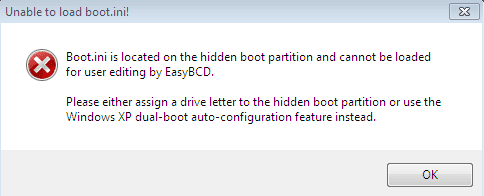
i have followed all steps specified and installed easybcd but couldnt find the Autoconfigure boot.ini option in the tool pull down menu.
This following error is being shown.
Please tell what am i missing.
btw.. i couldnt find the boot.ini file even in the installation CD of XP. I have copied ntldr and ntdetect into the xp drive though!
 

Attachments

  • eastbcd error.PNG
    eastbcd error.PNG
    4.3 KB · Views: 5

My Computer My Computer

At a glance

xp, vista, 7
OS
xp, vista, 7
Back
Top