Windows 7 installation doesn't detect hard drive

Rapmaster

New member
Local time
1:34 AM
Messages
1
Install everything, the bios detect the hard drive (it's a new hard drive, never been use) but when installing the Win7 64, the hard drive list is empty.

Here my spec

Phenom II 940BE | Gigabyte 790X-UD4P | Seagate Barracuda 7200.12 500GB | XFX HD4770 512MB | OCZ StealthXStream 600W | NZXT Tempest

thanks
 

My Computer

OS
Vista 64
You need to format new hard drives. no? :huh:
 

My Computer

Computer type
PC/Desktop
Computer Manufacturer/Model Number
Self Build
OS
MS Windows 7 Professional 64-bit SP1
CPU
AMD FX(tm)-6100 Six-Core Processor Socket AM3+ (942)
Motherboard
ASUSTeK COMPUTER INC. SABERTOOTH 990FX (AM3r2)
Memory
8.00 GB Dual-Channel DDR3 @ 802MHz (11-11-11-36) 1.5Volts
Graphics Card(s)
NVIDIA GeForce GTX 560 Ti
Sound Card
Onboard Realtek HD
Monitor(s) Displays
shimian (1920x1080@60Hz)
Screen Resolution
1920*1080
Hard Drives
OCZ-AGIL ITY3 SATA Disk Device 120GB
PSU
Corsair TX 750
Case
Corsair
Cooling
WaterCooled
Keyboard
Microsoft Wired
Mouse
Logitech USB Optical TiltWheel Mouse
Internet Speed
Realtek PCIe GBE Family Controller 20MB*1MB
Antivirus
Avast
Browser
Firefox
Other Info
150GB Internal Hard Drive for Backing Up Important Files -
Hauppauge Nova-DT Dual DVB-T Tuner Device (+IR) -
USB PC Camera with Mic (SN9C105)
Hi Rapmaster, welcome to the forums.

Do you have anything listed at all? The drive may be showing as 'Unallocated' which will require you to create a 'New' partition.


Jeff
 

My Computer

Computer Manufacturer/Model Number
Compaq Desktop
OS
Windows 7 Ultimate x64
CPU
AMD Sempron Dual Core
Memory
3GB
Graphics Card(s)
NVIDIA GeForce 6150SE nForce 430
Screen Resolution
1024x768
Hard Drives
150GB Sata
I'm having the same problem. My question is, how do you format it without the Windows Install? Can you do ti in BIOS or something?

Help!


Dave
 

My Computer

OS
Windows 7 Pro
I'm having the same problem. My question is, how do you format it without the Windows Install? Can you do ti in BIOS or something?

Help!


Dave

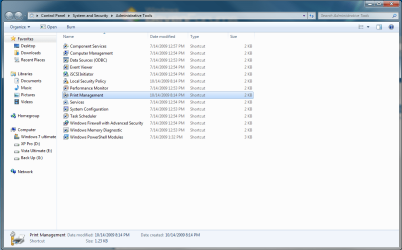
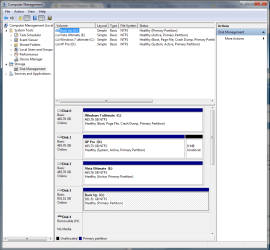
Go to see my attachment

Capture.PNG

slelct computer management, in the left hand pane select disk management .... in the right hand side, select the disk you wan to format, right hand click on it and select quick format

Capture1.PNG

hope this helps
 

My Computer

OS
Windows 7 64 ultimate ( to be installed)
CPU
Q6600
Motherboard
MSI P36NEO
Memory
4 GB 5-5-5-12
Graphics Card(s)
GeForce 8800GTS 512MB overclocled
Sound Card
5.1 surround sound Realtek
Monitor(s) Displays
BenQ 24"
Hard Drives
500GB SATA II XP
500GB SATA II Vista ultimate 64
500GB SATA II Windows 7 Ultimate 64
1 TB external drive Western Digital
PSU
CoolerMaster 1KW
Case
CoolerMaster Cosmos 1000
Cooling
3 exaust, 1 inlet fan 120mm and 120mm ThermalTake Bigtyphoon
Keyboard
Microsoft wireless 3000
Mouse
wireless optical 2.0A

My Computers

System One System Two

  • Computer type
    PC/Desktop
    Computer Manufacturer/Model Number
    ChillBlast - Custom to my design
    OS
    Windows 11 Pro x64 [Latest Release and Release Preview]
    CPU
    Ryzen 9 5950X, 3.8 - 5.2 MHz
    Motherboard
    Asus Prime X570-Pro
    Memory
    64GB [2 x 32GB] DDR4 3200MHz
    Graphics Card(s)
    4GB NVIDIA GEFORCE GTX 1650 Ti
    Sound Card
    On-board SPDIF to 5.1 System + HDMI [5.1 system]
    Monitor(s) Displays
    32" UHD 32 Bit HDR Monitor + 43" UHD 4K 32Bit HDR TV
    Screen Resolution
    2 x 3840 x 2160 @60Hz
    Hard Drives
    1TB M2 SSD OS, 500GB Fast Access SSD, 2 x 8TB Data + Various Externals from 1TB to 4TB, 10TB NAS
    PSU
    NZXT C750 80 PLUS Gold 750W Modular PSU
    Case
    Workstation Case [Matt Black]
    Cooling
    NZXT Kraken X63 280mm CPU Cooler +2x Quiet Case fans
    Keyboard
    Logitech Wireless MX Keys & K400 + others
    Mouse
    Logitech Wireless MX Master 3S
    Internet Speed
    920 MB Down 50 MB Up
    Antivirus
    BitDefender Total Security Pro
    Browser
    Chrome (always run latest Non-Beta)
    Other Info
    Also run ...
    Laptop - Quad 8GB - Windows 10 Pro x64
    Nexus 7 Android tablet x2
    Samsung 10.2" tablet
    Blackview TAB 8 4G Android Tablet c/w Keyboard
    Wacom Intuos Pro Medium Pen Pad
    Wacom Intuos Pro Small Pen Pad
    Wacom Expresskeys Remote
    Loopdeck+ Graphics Controller
    Shuttle Pro v2 Control
  • Computer type
    Laptop
    System Manufacturer/Model Number
    Dell XPS 17 10750H
    OS
    Windows 11 Pro x64 Latest RP
    CPU
    Intel I7 10750H 5.0GHz
    Motherboard
    Dell XPS
    Memory
    32GB [2x16GB] DDR4 2933 MHz
    Graphics Card(s)
    nVidia GTX1650Ti 4 GB GDDR6
    Sound Card
    Stock [Realtek] 4 Speaker
    Monitor(s) Displays
    17" IPS UHD+ Infinity Edge Touchscreen
    Screen Resolution
    3840 x 2400
    Hard Drives
    2TB M2 NVMe, 4TB External + various 500GB & 1TB External NVMe (also have access to spinner HDD from
    PSU
    Stock
    Case
    Stock XPS Aluminium & Carbon Fibre
    Cooling
    Stock - Active Fan Control
    Keyboard
    Backlit + Various Logitech
    Mouse
    Stock Track Pad + Logitech MX Trackball
    Internet Speed
    72 MB Down 18MB Up
    Browser
    Chrome
    Other Info
    Also run ...
    Laptop - Quad 8GB - Windows 10 Pro x64
    Nexus 7 Android tablet x2
    10.2" tablet
    Sony Z3 Android Smartphone
    Wacom Intuos Pro Medium Pen Pad
    Wacom Intuos Pro Small Pen Pad
    Wacom Expresskeys Remote
    Loopdeck+ Graphics Controller
    Shuttle Pro v2 Control Pad
    10TB NAS
Install everything, the bios detect the hard drive (it's a new hard drive, never been use) but when installing the Win7 64, the hard drive list is empty.

Here my spec

Phenom II 940BE | Gigabyte 790X-UD4P | Seagate Barracuda 7200.12 500GB | XFX HD4770 512MB | OCZ StealthXStream 600W | NZXT Tempest

thanks

Is your hard drive connected to SATA controller
 

My Computer

OS
Windows 7 64 ultimate ( to be installed)
CPU
Q6600
Motherboard
MSI P36NEO
Memory
4 GB 5-5-5-12
Graphics Card(s)
GeForce 8800GTS 512MB overclocled
Sound Card
5.1 surround sound Realtek
Monitor(s) Displays
BenQ 24"
Hard Drives
500GB SATA II XP
500GB SATA II Vista ultimate 64
500GB SATA II Windows 7 Ultimate 64
1 TB external drive Western Digital
PSU
CoolerMaster 1KW
Case
CoolerMaster Cosmos 1000
Cooling
3 exaust, 1 inlet fan 120mm and 120mm ThermalTake Bigtyphoon
Keyboard
Microsoft wireless 3000
Mouse
wireless optical 2.0A
I'm having the same problem. My question is, how do you format it without the Windows Install? Can you do ti in BIOS or something?

Help!


Dave


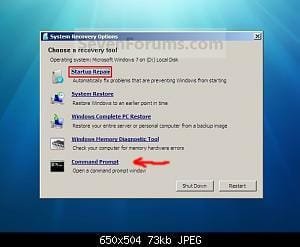
You can use Command Prompt in Repair my Computer.
 

Attachments

  • Repair.jpg
    Repair.jpg
    11.2 KB · Views: 41,569

My Computer

OS
ME/XP/Vista/Win7
Ok thanks for all the replies guys.

My problem is that I can't access Disk Management as I haven't installed Windows 7 yet.

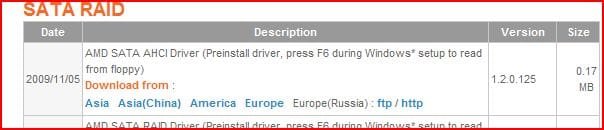
My Hard Drive is recognized in BIOS, and I have set up BIOS to read it as both AHCI and RAID to see if it would make a difference. I have the latest Drivers for my MB (on both the MB CD and a flash drive), but when I select the driver, it just hangs for awhile then goes back to the Window screen saying there are no Drives located.

Would this be an HD installation problem? a MB problem?

I suck at this!

Thanks again,

Dave
 

My Computer

OS
Windows 7 Pro
Ok thanks for all the replies guys.

My problem is that I can't access Disk Management as I haven't installed Windows 7 yet.

My Hard Drive is recognized in BIOS, and I have set up BIOS to read it as both AHCI and RAID to see if it would make a difference. I have the latest Drivers for my MB (on both the MB CD and a flash drive), but when I select the driver, it just hangs for awhile then goes back to the Window screen saying there are no Drives located.

Would this be an HD installation problem? a MB problem?

I suck at this!

Thanks again,

Dave

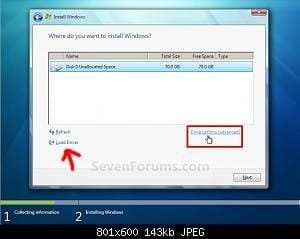
Load your SATA controller drivers here.
 

Attachments

  • Step7.jpg
    Step7.jpg
    10 KB · Views: 41,607

My Computer

OS
ME/XP/Vista/Win7
theog,

Thanks! But thats what I have been trying. I click on load drivers, then I locate the relevant driver and select it. The loading bar moves for a while, and then it returns to that page with no driver in sight.

Do I have to do the whole F6 thing on boot? Or set any jumpers on the actual HD itself?

I'm pulling my hair out!


Thanks!

Dave
 

My Computer

OS
Windows 7 Pro
Dave;

Are you just trying to format an empty disk?

Try this:

run diskpart command from a prompt.

Then each of these commands, followed by the enter key after each one.

list disk (to show the ID number of the hard disk to partition, normally Disk 0)

select disk 0 (change 0 to another number if applicable)

clean (this deletes all partitions)

create partition primary size=80000 (creates a partition with 80 GB space; to use the entire disk as one partition, omit the “size=value” parameter switch; use a similar command to create more partitions if needed or create in Windows 7 after installation)

select partition 1

active

format fs=ntfs quick

exit
 

My Computer

Computer type
PC/Desktop
Computer Manufacturer/Model Number
Ignatz Special; 4 speed manual gearbox; factory air conditioning; one of one
OS
Windows 7 Home Premium SP1, 64-bit
CPU
Intel Skylake i5-6600K, not overclocked
Motherboard
AsRock Z170M Extreme 4, micro ATX
Memory
8 GB HyperX DDR4-2666 (2 x 4 GB)
Graphics Card(s)
none; graphics are integrated on CPU
Sound Card
onboard: Realtek ALC1150; external: USB Behringer UF0-202
Monitor(s) Displays
Dell S2340M 23 inch IPS
Screen Resolution
1600 x 900
Hard Drives
System: Crucial MX100 series SSD, 128 GB;
Data: Samsung Spinpoint 103SJ, 1 TB;
Backup: WD Caviar Green WD30EZRX-00D8PB0, 3 TB
PSU
Rosewill SilentNight 500 watt fanless, semi-modular
Case
Antec Solo II
Cooling
Noctua NH-U12S; Noctua F12 intake, Noctua S12A exhaust
Keyboard
Microsoft 200 6JH-00001 USB
Mouse
Dell or Microsoft optical wired; USB
Antivirus
Microsoft Security Essentials and Malwarebytes Premium
Browser
Pale Moon
Other Info
All fans PWM; speeds at idle: CPU circa 500 rpm; intake circa 600 rpm; exhaust circa 600 rpm; CPU temps 27 idle and 47 C load in a warm room (27 C/81 F) when running Intel Extreme Tuning Utility stress test.
Where do I run the command prompt? At what point in boot up?

Thanks for the help!
 

My Computer

OS
Windows 7 Pro
If you are booting from the Windows 7 install disc, you hit SHIFT and F10 keys at the first screen (where you are asked about language and location).

Those keys in combination drop you into a command prompt, where you then issue the commands.

When you finish and type exit, you will be dropped back into the Windows 7 install.

But I'm not sure you are simply trying to partition, format, and install?
 

My Computer

Computer type
PC/Desktop
Computer Manufacturer/Model Number
Ignatz Special; 4 speed manual gearbox; factory air conditioning; one of one
OS
Windows 7 Home Premium SP1, 64-bit
CPU
Intel Skylake i5-6600K, not overclocked
Motherboard
AsRock Z170M Extreme 4, micro ATX
Memory
8 GB HyperX DDR4-2666 (2 x 4 GB)
Graphics Card(s)
none; graphics are integrated on CPU
Sound Card
onboard: Realtek ALC1150; external: USB Behringer UF0-202
Monitor(s) Displays
Dell S2340M 23 inch IPS
Screen Resolution
1600 x 900
Hard Drives
System: Crucial MX100 series SSD, 128 GB;
Data: Samsung Spinpoint 103SJ, 1 TB;
Backup: WD Caviar Green WD30EZRX-00D8PB0, 3 TB
PSU
Rosewill SilentNight 500 watt fanless, semi-modular
Case
Antec Solo II
Cooling
Noctua NH-U12S; Noctua F12 intake, Noctua S12A exhaust
Keyboard
Microsoft 200 6JH-00001 USB
Mouse
Dell or Microsoft optical wired; USB
Antivirus
Microsoft Security Essentials and Malwarebytes Premium
Browser
Pale Moon
Other Info
All fans PWM; speeds at idle: CPU circa 500 rpm; intake circa 600 rpm; exhaust circa 600 rpm; CPU temps 27 idle and 47 C load in a warm room (27 C/81 F) when running Intel Extreme Tuning Utility stress test.
theog,

Thanks! But thats what I have been trying. I click on load drivers, then I locate the relevant driver and select it. The loading bar moves for a while, and then it returns to that page with no driver in sight.

Do I have to do the whole F6 thing on boot? Or set any jumpers on the actual HD itself?

I'm pulling my hair out!


Thanks!

Dave

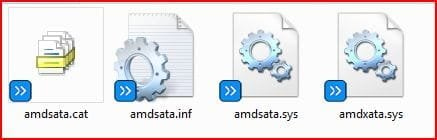
Are these the drivers you loading?

If not, download from here:

GA-MA790XT-UD4P (rev. 1.0) - GIGABYTE - Support&Download - Motherboard - Driver
 

Attachments

  • Capture.JPG
    Capture.JPG
    20.8 KB · Views: 268
  • 2.JPG
    2.JPG
    17.7 KB · Views: 134

My Computer

OS
ME/XP/Vista/Win7
I have the exact same problem as Dave.

Stats:
HP Touchsmart iq506
Intel 2.16 Core Duo
Chipset: Intel Mobile GM965 Express
500GB Seagate drive
Motherboard - Pegatron IMISR-CF

Doing a clean install of windows 7 (tried a recovery of vista as well), so it is not an OS issue. PC had worked fine prior, so there is no wire and or physical drive issue.

During the install it does not show the drive I have (Seagate 500GB), yet in the BIOS it shows up.

However, when I run You cannot select or format a hard disk partition when you try to install Windows Vista, Windows 7 or Windows Server 2008 R2 (step 8) - diskpart
The drive shows up as Disk 1 but as offline (with zero's for size/capacity)

In the Windows 7 Install - when it asks for which drive do you want to load the OS on, I do not have an selections and it calls for the Mass Storage Device driver (
I have loaded the original intel mass storage drivers.
Intel® Rapid Storage Technology 64-bit Intel® RST Driver Files for F6 Install
to a USB drive and try to load during the process.

So my questions are:
1. How do I confirm which drivers I need based on my computer info?
2. If the diskpart results are showing as they are showing the disk is not online, this I assume is the issue because the storage drivers are not available, thus the drive cannot be detected as online except for when it shows in the BIOS.

I have been struggling at this one for a bit, so thanks in advance for your help!

 

My Computer

Computer Manufacturer/Model Number
HP Touchsmart IQ506
OS
windows 7
CPU
Intel Core Duo 2.16
Memory
4 GB
Graphics Card(s)
NVIDIA
Hard Drives
Segate 7200RPM 500GB
Adding to my above thread

I just ran diskpart to view the disks
and it comes up as Disk 1 Status No Media Size = 0
type det disk
and shows no media, no id for the disk, location path unavailable and says no volumes.

So my guess is that the controllers for the drive have either become corrupt during one of the reinstalls. so now the drive does not show.

But again in the BIOS it does show up as being there with the storage size of 500GB.

Thanks for your help!
 

My Computer

Computer Manufacturer/Model Number
HP Touchsmart IQ506
OS
windows 7
CPU
Intel Core Duo 2.16
Memory
4 GB
Graphics Card(s)
NVIDIA
Hard Drives
Segate 7200RPM 500GB
OCZ Vertex 2 SSD won't detect in windows 7 x64 install

I am having the same problem - Windows install won't detect my new OCZ Vertex 2 SSD. I have tried the following:

Downloading drivers from Asus website and clicking the "load drivers" button in the install.
Downloading drivers from Intel website and clicking the "load drivers" button in the install.
Updating the bios of my notebook.
Updating the firmware for the SSD (no new firmware release as yet, apparently it was due on 1st June 2010.)
Ghosting the original drive to the SSD - just a normal "disk to disk" ghost. I'm not sure exactly what happened, if it copied fully or it didn't, but there were no error messages. "Missing operating system" (still) after doing this and trying to boot from the SSD.

There are virtially no options for anything in the BIOS apart from boot order. No "ide mode" or "AHCI mode".

There is only 1 HDD bay in this laptop, there is usually two but this model has extra ram slots in the second hdd bay (hence the 8gb ram - 4 x 2gb).

The hdd detects in the bios and is useable if plugged into another working machine, either internally or via a usb cadddy.

pleeeeeeeeeeeeeeaaaaaaaaaaaaaaaaase somebody help!
 

My Computer

Computer Manufacturer/Model Number
Asus G51J notebook
OS
Windows 7 x64
CPU
i7 720QM
Motherboard
G60JX
Memory
8GB
Hard Drives
OCZ Vertex 2 SSD
if you are unable to even install windows 7 this idea may help.
get ubuntu from another computer
Download | Ubuntu
put it on a flash drive
Universal USB Installer – Easy as 1 2 3 | USB Pen Drive Linux
run linux from the flash drive. once your running from there, open a program called administration>gparted. in gparted you can format any hard drive. it sounded like you couldn't format it because you were using it and you didnt have the os running. im not really sure. i hope this helps! : )
 

My Computer

OS
windows 7
Back
Top