
Computer does not detect hard drive on startup

IcedEclipse

New member
Local time
8:53 AM
Messages
29
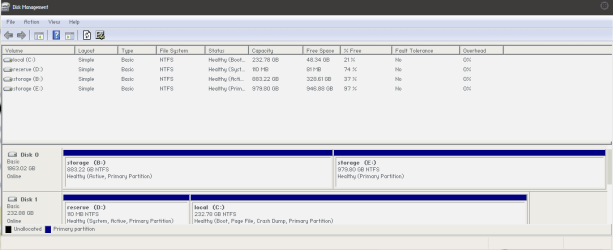
I've suddenly been having this problem for the past week or so. Sometimes when I boot up my computer, my other internal hard drives (B and E) are not detected; only the C drive is. The disks don't appear in my computer, and the space doesn't appear to be available in disk partition (all of the files saved on those disks also cannot be accessed obviously).

Usually the problem fixes itself after a few reboots, but it becomes really inconvenient to reboot like 3-5 times every time I want to restart my computer. Does anyone have a possible solution? Any help is appreciated, thanks.
 

My Computer

Computer type
PC/Desktop
OS
Microsoft Windows 7 Ultimate 64-bit 7601 Multiprocessor Free Service Pack 1
CPU
Intel(R) Core(TM) i7-3770K CPU @ 3.50GHz
Motherboard
ASUSTeK COMPUTER INC. P8Z77-V
Memory
32.00 GB
Graphics Card(s)
NVIDIA GeForce GTX 680
Sound Card
(1) NVIDIA High Definition Audio (2) High Definition Audio
Screen Resolution
1920 x 1080 x 32 bits (4294967296 colors) @ 60 Hz
Hard Drives
(1) Samsung SSD 840 Series ATA Device (2) ST2000DM001-9YN164 ATA Device

My Computer

Computer type
PC/Desktop
Computer Manufacturer/Model Number
Home made Desktop
OS
Windows 10 Pro. 64/ version 1709 Windows 7 Pro/64
CPU
Intel i7-6800K @ 4.3
Motherboard
ASUS X-99 Deluxe II
Memory
Corsair Platinum 16 gig @2400
Graphics Card(s)
EVGA GTX 1070 OC
Monitor(s) Displays
Asus 27" LED LCD/VE278Q
Screen Resolution
1920-1080 or 1280-720 HDMI
Hard Drives
INTEL SSD 730-240 Gb Sata 3.0/
PSU
EVGA Platium 1200W
Case
Phanteks Luxe Tempered Glass 8 fans/ one radiator
Cooling
XSPC/ Water Cooled CPU
Keyboard
Das 4 Professional
Mouse
Logitech M705/MX Anywhere 2-S
Internet Speed
100 mbits
Antivirus
Microsoft Security Essentials/ Malwarebytes Premium 3.0/ SAS
Browser
I.E. 11 default/Firefox/ ISP Time Warner Cable/Spectrum
Other Info
LG BluRay Burner/
Sound system-KLipsch-THX/
Icy Dock ssd Hot Swap bays.
This is what my disk management looks like when everything is functional. When I get the error, the B and E drives simply do not show up anywhere (there is no "empty" space to partition either, as if the drives just don't exist)
 

Attachments

  • disk management.png
    disk management.png
    8.3 KB · Views: 7

My Computer

Computer type
PC/Desktop
OS
Microsoft Windows 7 Ultimate 64-bit 7601 Multiprocessor Free Service Pack 1
CPU
Intel(R) Core(TM) i7-3770K CPU @ 3.50GHz
Motherboard
ASUSTeK COMPUTER INC. P8Z77-V
Memory
32.00 GB
Graphics Card(s)
NVIDIA GeForce GTX 680
Sound Card
(1) NVIDIA High Definition Audio (2) High Definition Audio
Screen Resolution
1920 x 1080 x 32 bits (4294967296 colors) @ 60 Hz
Hard Drives
(1) Samsung SSD 840 Series ATA Device (2) ST2000DM001-9YN164 ATA Device
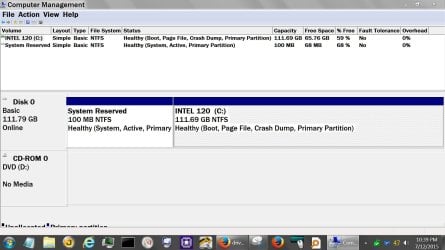
Things I would do if I had this computer to fix.

1. Swap the sata cables on the drives so Windows and Reserve were Drive (0)
Then make sure the computer boots.

2. Remove the drive letter from the Reserve Partition.

3. Partiton (B) should not be Active

Simple Example:

Disc Management.JPG
 

My Computer

Computer type
PC/Desktop
Computer Manufacturer/Model Number
Home made Desktop
OS
Windows 10 Pro. 64/ version 1709 Windows 7 Pro/64
CPU
Intel i7-6800K @ 4.3
Motherboard
ASUS X-99 Deluxe II
Memory
Corsair Platinum 16 gig @2400
Graphics Card(s)
EVGA GTX 1070 OC
Monitor(s) Displays
Asus 27" LED LCD/VE278Q
Screen Resolution
1920-1080 or 1280-720 HDMI
Hard Drives
INTEL SSD 730-240 Gb Sata 3.0/
PSU
EVGA Platium 1200W
Case
Phanteks Luxe Tempered Glass 8 fans/ one radiator
Cooling
XSPC/ Water Cooled CPU
Keyboard
Das 4 Professional
Mouse
Logitech M705/MX Anywhere 2-S
Internet Speed
100 mbits
Antivirus
Microsoft Security Essentials/ Malwarebytes Premium 3.0/ SAS
Browser
I.E. 11 default/Firefox/ ISP Time Warner Cable/Spectrum
Other Info
LG BluRay Burner/
Sound system-KLipsch-THX/
Icy Dock ssd Hot Swap bays.
Things I would do if I had this computer to fix.

1. Swap the sata cables on the drives so Windows and Reserve were Drive (0)
Then make sure the computer boots.

2. Remove the drive letter from the Reserve Partition.

3. Partiton (B) should not be Active

Simple Example:

View attachment 368972

Alright I just did four reboots and seem to have no problem with the hard drives so hopefully the problem is fixed (or I just got lucky). Going to mark this as solved, thank you Layback Bear for your help.
 

My Computer

Computer type
PC/Desktop
OS
Microsoft Windows 7 Ultimate 64-bit 7601 Multiprocessor Free Service Pack 1
CPU
Intel(R) Core(TM) i7-3770K CPU @ 3.50GHz
Motherboard
ASUSTeK COMPUTER INC. P8Z77-V
Memory
32.00 GB
Graphics Card(s)
NVIDIA GeForce GTX 680
Sound Card
(1) NVIDIA High Definition Audio (2) High Definition Audio
Screen Resolution
1920 x 1080 x 32 bits (4294967296 colors) @ 60 Hz
Hard Drives
(1) Samsung SSD 840 Series ATA Device (2) ST2000DM001-9YN164 ATA Device
Your very welcome.
 

My Computer

Computer type
PC/Desktop
Computer Manufacturer/Model Number
Home made Desktop
OS
Windows 10 Pro. 64/ version 1709 Windows 7 Pro/64
CPU
Intel i7-6800K @ 4.3
Motherboard
ASUS X-99 Deluxe II
Memory
Corsair Platinum 16 gig @2400
Graphics Card(s)
EVGA GTX 1070 OC
Monitor(s) Displays
Asus 27" LED LCD/VE278Q
Screen Resolution
1920-1080 or 1280-720 HDMI
Hard Drives
INTEL SSD 730-240 Gb Sata 3.0/
PSU
EVGA Platium 1200W
Case
Phanteks Luxe Tempered Glass 8 fans/ one radiator
Cooling
XSPC/ Water Cooled CPU
Keyboard
Das 4 Professional
Mouse
Logitech M705/MX Anywhere 2-S
Internet Speed
100 mbits
Antivirus
Microsoft Security Essentials/ Malwarebytes Premium 3.0/ SAS
Browser
I.E. 11 default/Firefox/ ISP Time Warner Cable/Spectrum
Other Info
LG BluRay Burner/
Sound system-KLipsch-THX/
Icy Dock ssd Hot Swap bays.
Alright I hate that I have to revive this thread, but the problem just came up again. My B and E drives randomly disappeared while I was on steam (Steam froze then crashed because it was saved on drive B). This happened randomly after around an hour or two of normal use.

My hard drive model is a Seagate barracuda ST2000DM001 2TB if that helps.

This is what my disk management looks like after the two drives have disappeared.

Once again, any help would be appreciated! Thanks!
 

Attachments

  • crash.png
    crash.png
    7.7 KB · Views: 2

My Computer

Computer type
PC/Desktop
OS
Microsoft Windows 7 Ultimate 64-bit 7601 Multiprocessor Free Service Pack 1
CPU
Intel(R) Core(TM) i7-3770K CPU @ 3.50GHz
Motherboard
ASUSTeK COMPUTER INC. P8Z77-V
Memory
32.00 GB
Graphics Card(s)
NVIDIA GeForce GTX 680
Sound Card
(1) NVIDIA High Definition Audio (2) High Definition Audio
Screen Resolution
1920 x 1080 x 32 bits (4294967296 colors) @ 60 Hz
Hard Drives
(1) Samsung SSD 840 Series ATA Device (2) ST2000DM001-9YN164 ATA Device
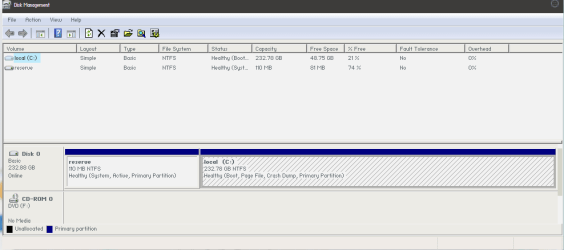
First off, one drive has disappeared that had two partitions, (B & E),

What is on B and E partitions.

Can you see two drives in your bios?

Check all connection to the hard drive.

Make sure you reboot and see if things have changed.
 

My Computer

Computer type
PC/Desktop
Computer Manufacturer/Model Number
Home made Desktop
OS
Windows 10 Pro. 64/ version 1709 Windows 7 Pro/64
CPU
Intel i7-6800K @ 4.3
Motherboard
ASUS X-99 Deluxe II
Memory
Corsair Platinum 16 gig @2400
Graphics Card(s)
EVGA GTX 1070 OC
Monitor(s) Displays
Asus 27" LED LCD/VE278Q
Screen Resolution
1920-1080 or 1280-720 HDMI
Hard Drives
INTEL SSD 730-240 Gb Sata 3.0/
PSU
EVGA Platium 1200W
Case
Phanteks Luxe Tempered Glass 8 fans/ one radiator
Cooling
XSPC/ Water Cooled CPU
Keyboard
Das 4 Professional
Mouse
Logitech M705/MX Anywhere 2-S
Internet Speed
100 mbits
Antivirus
Microsoft Security Essentials/ Malwarebytes Premium 3.0/ SAS
Browser
I.E. 11 default/Firefox/ ISP Time Warner Cable/Spectrum
Other Info
LG BluRay Burner/
Sound system-KLipsch-THX/
Icy Dock ssd Hot Swap bays.
"B"... is that really allowed\recommended to use for a fixed drive ?
 

My Computer

Computer type
Laptop
Computer Manufacturer/Model Number
Dell \ Lenovo\ HP \ Toshiba
OS
W7, W8.1
Antivirus
MSE, Malwarebytes
Browser
FF
Very good point 4wd. Thank you.

Thinking back in my 3 brain cell restore points (B) is not a good idea but I don't remember why.

Once we can see the drive I think replacing the letter (B) is a good idea.
 

My Computer

Computer type
PC/Desktop
Computer Manufacturer/Model Number
Home made Desktop
OS
Windows 10 Pro. 64/ version 1709 Windows 7 Pro/64
CPU
Intel i7-6800K @ 4.3
Motherboard
ASUS X-99 Deluxe II
Memory
Corsair Platinum 16 gig @2400
Graphics Card(s)
EVGA GTX 1070 OC
Monitor(s) Displays
Asus 27" LED LCD/VE278Q
Screen Resolution
1920-1080 or 1280-720 HDMI
Hard Drives
INTEL SSD 730-240 Gb Sata 3.0/
PSU
EVGA Platium 1200W
Case
Phanteks Luxe Tempered Glass 8 fans/ one radiator
Cooling
XSPC/ Water Cooled CPU
Keyboard
Das 4 Professional
Mouse
Logitech M705/MX Anywhere 2-S
Internet Speed
100 mbits
Antivirus
Microsoft Security Essentials/ Malwarebytes Premium 3.0/ SAS
Browser
I.E. 11 default/Firefox/ ISP Time Warner Cable/Spectrum
Other Info
LG BluRay Burner/
Sound system-KLipsch-THX/
Icy Dock ssd Hot Swap bays.
First off, one drive has disappeared that had two partitions, (B & E),

What is on B and E partitions.

Can you see two drives in your bios?

Check all connection to the hard drive.

Make sure you reboot and see if things have changed.

1. Yeah, it's 1 hard drive split into two partitions (B & E)

2. Where do I check?

3. I checked the SATA and power cables and they all seemed fine

4. Rebooted and changed drive B: to K:, and still seem to have the problem

I just went out and bought a new SATA cable and am going to replace my existing one, I'll see if that changes anything
EDIT: Changing the cable did nothing
EDIT 2: I did a disk test with crystal disk info and got a "caution" result, which could suggest that the disk itself is dying? Does anyone know the average lifespan of these disks? (Had mine for about 3 years)

Thank you guys for your continued help!
 
Last edited:

My Computer

Computer type
PC/Desktop
OS
Microsoft Windows 7 Ultimate 64-bit 7601 Multiprocessor Free Service Pack 1
CPU
Intel(R) Core(TM) i7-3770K CPU @ 3.50GHz
Motherboard
ASUSTeK COMPUTER INC. P8Z77-V
Memory
32.00 GB
Graphics Card(s)
NVIDIA GeForce GTX 680
Sound Card
(1) NVIDIA High Definition Audio (2) High Definition Audio
Screen Resolution
1920 x 1080 x 32 bits (4294967296 colors) @ 60 Hz
Hard Drives
(1) Samsung SSD 840 Series ATA Device (2) ST2000DM001-9YN164 ATA Device
You can get a brand new hard drive and it be bad in a very short time.
You could also have hard drives last for many years.
As far as I know their is no set time for life span.
Some just last longer than others.
 

My Computer

Computer type
PC/Desktop
Computer Manufacturer/Model Number
Home made Desktop
OS
Windows 10 Pro. 64/ version 1709 Windows 7 Pro/64
CPU
Intel i7-6800K @ 4.3
Motherboard
ASUS X-99 Deluxe II
Memory
Corsair Platinum 16 gig @2400
Graphics Card(s)
EVGA GTX 1070 OC
Monitor(s) Displays
Asus 27" LED LCD/VE278Q
Screen Resolution
1920-1080 or 1280-720 HDMI
Hard Drives
INTEL SSD 730-240 Gb Sata 3.0/
PSU
EVGA Platium 1200W
Case
Phanteks Luxe Tempered Glass 8 fans/ one radiator
Cooling
XSPC/ Water Cooled CPU
Keyboard
Das 4 Professional
Mouse
Logitech M705/MX Anywhere 2-S
Internet Speed
100 mbits
Antivirus
Microsoft Security Essentials/ Malwarebytes Premium 3.0/ SAS
Browser
I.E. 11 default/Firefox/ ISP Time Warner Cable/Spectrum
Other Info
LG BluRay Burner/
Sound system-KLipsch-THX/
Icy Dock ssd Hot Swap bays.
I would recommend testing your Drive with SeaTools for Windows. SeaTools for Windows | Seagate
User Guide: http://www.seagate.com/staticfiles/support/downloads/seatools/docs/SeaTools%20for%20Windows.en-US.pdf ( Do read the user guide )

Run both Short Test and Long Test. Long Test will take a few hours to complete. Long Test will terminate if it encounters a bad sector. In that case you should consider running Seatools for DOS as recommended in the user Guide (SeaToolsDOS223ALL.ISO) with Repair option selected.
 

My Computer

OS
Windows 7 Home Premium 32 bit
IcedEclipse if you want to test your hard drive/s please follow jumanji guidance.
 

My Computer

Computer type
PC/Desktop
Computer Manufacturer/Model Number
Home made Desktop
OS
Windows 10 Pro. 64/ version 1709 Windows 7 Pro/64
CPU
Intel i7-6800K @ 4.3
Motherboard
ASUS X-99 Deluxe II
Memory
Corsair Platinum 16 gig @2400
Graphics Card(s)
EVGA GTX 1070 OC
Monitor(s) Displays
Asus 27" LED LCD/VE278Q
Screen Resolution
1920-1080 or 1280-720 HDMI
Hard Drives
INTEL SSD 730-240 Gb Sata 3.0/
PSU
EVGA Platium 1200W
Case
Phanteks Luxe Tempered Glass 8 fans/ one radiator
Cooling
XSPC/ Water Cooled CPU
Keyboard
Das 4 Professional
Mouse
Logitech M705/MX Anywhere 2-S
Internet Speed
100 mbits
Antivirus
Microsoft Security Essentials/ Malwarebytes Premium 3.0/ SAS
Browser
I.E. 11 default/Firefox/ ISP Time Warner Cable/Spectrum
Other Info
LG BluRay Burner/
Sound system-KLipsch-THX/
Icy Dock ssd Hot Swap bays.
Back
Top