Windows 7 Installed on C drive and D/Recovery Drive

awalls

New member
Local time
1:43 PM
Messages
13
Ok-I was reinstalling Windows 7 on my Dell Inspiron 1750. I, by mistake, installed it on the D/Recovery Drive. Did not realize this until I went to install my MS Office again. After realizing my mistake I reinstalled on the C drive. Now I have Windows 7 on C and D. My recovery drive is completely full and I wanted to see if there is a way I can remove it off of my recovery drive. The one on my C drive is working great. I do know a little bit about computers. I looked over several forums online but nothing seems to be in just plain "cornbread english" for me to understand fully. Can anyone please help me....

Thanks,
Amanda
 

My Computer My Computer

At a glance

windows 7
Computer Manufacturer/Model Number
dell inspiron 1750
OS
windows 7
Ok-I was reinstalling Windows 7 on my Dell Inspiron 1750. I, by mistake, installed it on the D/Recovery Drive. Did not realize this until I went to install my MS Office again. After realizing my mistake I reinstalled on the C drive. Now I have Windows 7 on C and D. My recovery drive is completely full and I wanted to see if there is a way I can remove it off of my recovery drive. The one on my C drive is working great. I do know a little bit about computers. I looked over several forums online but nothing seems to be in just plain "cornbread english" for me to understand fully. Can anyone please help me....

Thanks,
Amanda

When you reinstalled Win 7, did you do it from a DVD? If that is the case, there should not be anything on the recovery drive that you would need. Let me know how you reinstalled Win 7 and what is on the D drive.
 

My Computer My Computer

At a glance

Windows 7 Home Premium 32-Bit - Build 7600 SP1Intel Core i3-2120 3.30GhzKingston 4 GB DDR3 1333 mhzAMD Radeon HD6670
Computer type
PC/Desktop
Computer Manufacturer/Model Number
Custom Build
OS
Windows 7 Home Premium 32-Bit - Build 7600 SP1
CPU
Intel Core i3-2120 3.30Ghz
Motherboard
Asus P8Z68-V LX Intel Z68 Socket H2 ATX
Memory
Kingston 4 GB DDR3 1333 mhz
Graphics Card(s)
AMD Radeon HD6670
Sound Card
Sound Blaster Audigy SE 24-Bit
Monitor(s) Displays
Asus VE228
Screen Resolution
1440 X 900
Hard Drives
OCZ Vertex 3 120 GB Sata 3 SSD ==
Kingston SH103/S3 120 G Hyper X 120 GB SSD ==
Western Digital 500 GB Caviar Green 7200 RPM ==
PSU
Corsair CX600M == 600 Watt
Case
NZXT Apollo - Silver with Clear Side Panel
Cooling
Three 120 mm Fans
Keyboard
Microsoft Natural 4000
Mouse
Microsoft Custom Optical 3000
Internet Speed
AT&T Fiber Optic Wireless Network
Antivirus
Microsoft Security Essentials
Browser
Chrome
Other Info
120 mm Blue LED Fan -- Three Blue LED Lazer Light Sticks
Hello awalls, welcome to Seven Forums!


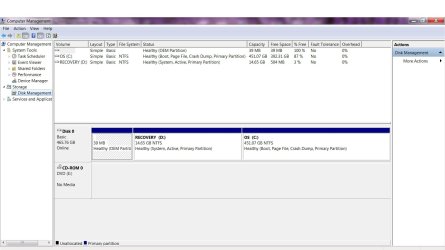
Before we make any specific recommendations will you please post a snip/screen-shot of the entire disk management drive map with a full description as to which drive/partition is which, so we can see what you have going on as there may be a fairly simple way to resolve the situation.

In the Windows start menu right click computer and click manage, in the left pane of the "Computer Management" window that opens click disk management and post a snip of that.

Be sure to post back with any further questions you may have and to keep us informed.


How to Upload and Post a Screenshot and File in Seven Forums
 

My Computer My Computer

At a glance

W 7 64-bit UltimateIntel Q9550 Yorkfield8GB Dominator 8500C5DATI : XFX 5870
Computer Manufacturer/Model Number
* BFK Customs *
OS
W 7 64-bit Ultimate
CPU
Intel Q9550 Yorkfield
Motherboard
ASUS P5Q Pro
Memory
8GB Dominator 8500C5D
Graphics Card(s)
ATI : XFX 5870
Sound Card
Realtek HD Audio 7-1
Monitor(s) Displays
1x 47" LCD HDMI & 3x 26" LCD HDMI
Screen Resolution
1920x1080P & 1920x1200
Hard Drives
1x 80GB Intel X25-M G2 SSD : 1x 500GB & 1x 640GB WD Caviar Black(s)
PSU
Corsair 620HX
Case
Cooler Master RC-690
Cooling
Tuniq Tower 120, 2x 140mm and 3x 120mm case fans
Keyboard
Microsoft 500
Mouse
Razer Diamondback 3G
Internet Speed
14 Mb/s
Other Info
1x Koutech 3Gb/s SATA HDD Hot Swap Rack
I installed on both drives w/ my re installation dvd that came w/ my dell package. I really appreciate any help...when i got to reading and it started talking about reformat this and repartition this...i started getting lost...any help is so great
 

Attachments

  • screen shot.jpg
    screen shot.jpg
    95.5 KB · Views: 192

My Computer My Computer

At a glance

windows 7
Computer Manufacturer/Model Number
dell inspiron 1750
OS
windows 7
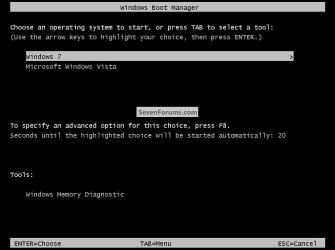
Do you get a screen like this when the PC is first booted with 2 Windows 7 entries or does W_7 just start right up?


click to enlarge
Dual Boot2.jpg
 

My Computer My Computer

At a glance

W 7 64-bit UltimateIntel Q9550 Yorkfield8GB Dominator 8500C5DATI : XFX 5870
Computer Manufacturer/Model Number
* BFK Customs *
OS
W 7 64-bit Ultimate
CPU
Intel Q9550 Yorkfield
Motherboard
ASUS P5Q Pro
Memory
8GB Dominator 8500C5D
Graphics Card(s)
ATI : XFX 5870
Sound Card
Realtek HD Audio 7-1
Monitor(s) Displays
1x 47" LCD HDMI & 3x 26" LCD HDMI
Screen Resolution
1920x1080P & 1920x1200
Hard Drives
1x 80GB Intel X25-M G2 SSD : 1x 500GB & 1x 640GB WD Caviar Black(s)
PSU
Corsair 620HX
Case
Cooler Master RC-690
Cooling
Tuniq Tower 120, 2x 140mm and 3x 120mm case fans
Keyboard
Microsoft 500
Mouse
Razer Diamondback 3G
Internet Speed
14 Mb/s
Other Info
1x Koutech 3Gb/s SATA HDD Hot Swap Rack
I get that screen w/ 2 windows 7. the top one is my c drive ( which I am using right now ) and the bottom one is my recovery drive
 

My Computer My Computer

At a glance

windows 7
Computer Manufacturer/Model Number
dell inspiron 1750
OS
windows 7
1) If you select the "other" W_7 will it start-up and run correctly?

2) Do you have a Windows 7 full installer DVD?
 

My Computer My Computer

At a glance

W 7 64-bit UltimateIntel Q9550 Yorkfield8GB Dominator 8500C5DATI : XFX 5870
Computer Manufacturer/Model Number
* BFK Customs *
OS
W 7 64-bit Ultimate
CPU
Intel Q9550 Yorkfield
Motherboard
ASUS P5Q Pro
Memory
8GB Dominator 8500C5D
Graphics Card(s)
ATI : XFX 5870
Sound Card
Realtek HD Audio 7-1
Monitor(s) Displays
1x 47" LCD HDMI & 3x 26" LCD HDMI
Screen Resolution
1920x1080P & 1920x1200
Hard Drives
1x 80GB Intel X25-M G2 SSD : 1x 500GB & 1x 640GB WD Caviar Black(s)
PSU
Corsair 620HX
Case
Cooler Master RC-690
Cooling
Tuniq Tower 120, 2x 140mm and 3x 120mm case fans
Keyboard
Microsoft 500
Mouse
Razer Diamondback 3G
Internet Speed
14 Mb/s
Other Info
1x Koutech 3Gb/s SATA HDD Hot Swap Rack
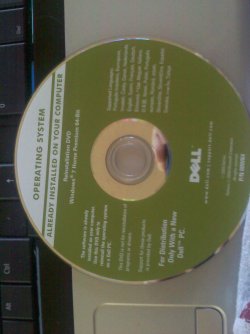
it will run correctly...im not sure it this is the full installation dvd or not. I am attaching a picture of what I have.
 

My Computer My Computer

At a glance

windows 7
Computer Manufacturer/Model Number
dell inspiron 1750
OS
windows 7
This is the disk that I have
 

Attachments

  • 1007001215.jpg
    1007001215.jpg
    244.2 KB · Views: 24

My Computer My Computer

At a glance

windows 7
Computer Manufacturer/Model Number
dell inspiron 1750
OS
windows 7
That looks like it's a full installer.


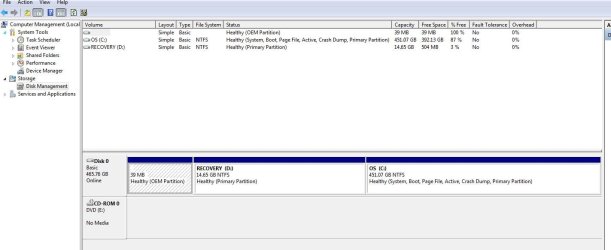
The first thing I'd do is to make the C: partition as the "System, Active" partition so that is where the Windows 7 boot files will be stored; you can see that the D: partition is now that.

Have a look at this tutorial at the link below for a description of what needs done to accomplish this, this is a needed step to be able to remove the other partitions; that is what you want to do, correct?

Startup Repair - Run 3 Separate Times


After you have C: booting as "System, Active" post back and we'll discuss the next step.
 

My Computer My Computer

At a glance

W 7 64-bit UltimateIntel Q9550 Yorkfield8GB Dominator 8500C5DATI : XFX 5870
Computer Manufacturer/Model Number
* BFK Customs *
OS
W 7 64-bit Ultimate
CPU
Intel Q9550 Yorkfield
Motherboard
ASUS P5Q Pro
Memory
8GB Dominator 8500C5D
Graphics Card(s)
ATI : XFX 5870
Sound Card
Realtek HD Audio 7-1
Monitor(s) Displays
1x 47" LCD HDMI & 3x 26" LCD HDMI
Screen Resolution
1920x1080P & 1920x1200
Hard Drives
1x 80GB Intel X25-M G2 SSD : 1x 500GB & 1x 640GB WD Caviar Black(s)
PSU
Corsair 620HX
Case
Cooler Master RC-690
Cooling
Tuniq Tower 120, 2x 140mm and 3x 120mm case fans
Keyboard
Microsoft 500
Mouse
Razer Diamondback 3G
Internet Speed
14 Mb/s
Other Info
1x Koutech 3Gb/s SATA HDD Hot Swap Rack
This is what I have now....
 

Attachments

  • Capture.JPG
    Capture.JPG
    68.2 KB · Views: 82

My Computer My Computer

At a glance

windows 7
Computer Manufacturer/Model Number
dell inspiron 1750
OS
windows 7
Excellent, now what would you like to do, is there anything on that partition you need to save (backup) elsewhere?

There is a way to safely recover all that space into the Windows partition if that is what you want to do.
 

My Computer My Computer

At a glance

W 7 64-bit UltimateIntel Q9550 Yorkfield8GB Dominator 8500C5DATI : XFX 5870
Computer Manufacturer/Model Number
* BFK Customs *
OS
W 7 64-bit Ultimate
CPU
Intel Q9550 Yorkfield
Motherboard
ASUS P5Q Pro
Memory
8GB Dominator 8500C5D
Graphics Card(s)
ATI : XFX 5870
Sound Card
Realtek HD Audio 7-1
Monitor(s) Displays
1x 47" LCD HDMI & 3x 26" LCD HDMI
Screen Resolution
1920x1080P & 1920x1200
Hard Drives
1x 80GB Intel X25-M G2 SSD : 1x 500GB & 1x 640GB WD Caviar Black(s)
PSU
Corsair 620HX
Case
Cooler Master RC-690
Cooling
Tuniq Tower 120, 2x 140mm and 3x 120mm case fans
Keyboard
Microsoft 500
Mouse
Razer Diamondback 3G
Internet Speed
14 Mb/s
Other Info
1x Koutech 3Gb/s SATA HDD Hot Swap Rack
On the D partition? No-I have all my files etc that I wanted to keep already backed up on discs. It is just a recovery drive from what I understand so I don't know of anything on there that I will need.
 

My Computer My Computer

At a glance

windows 7
Computer Manufacturer/Model Number
dell inspiron 1750
OS
windows 7
Here's the deal, you're good to go now, some manufacturers tie their recovery disk (your disk) to the recovery partition and the disk will not work if the partition is removed.


Lets take this one step at a time.

In the Windows start menu click the computer button, in the window that opens right click the C: partition and rename it to anything you like so you will know in the next step which is which.


name.jpg
 

My Computer My Computer

At a glance

W 7 64-bit UltimateIntel Q9550 Yorkfield8GB Dominator 8500C5DATI : XFX 5870
Computer Manufacturer/Model Number
* BFK Customs *
OS
W 7 64-bit Ultimate
CPU
Intel Q9550 Yorkfield
Motherboard
ASUS P5Q Pro
Memory
8GB Dominator 8500C5D
Graphics Card(s)
ATI : XFX 5870
Sound Card
Realtek HD Audio 7-1
Monitor(s) Displays
1x 47" LCD HDMI & 3x 26" LCD HDMI
Screen Resolution
1920x1080P & 1920x1200
Hard Drives
1x 80GB Intel X25-M G2 SSD : 1x 500GB & 1x 640GB WD Caviar Black(s)
PSU
Corsair 620HX
Case
Cooler Master RC-690
Cooling
Tuniq Tower 120, 2x 140mm and 3x 120mm case fans
Keyboard
Microsoft 500
Mouse
Razer Diamondback 3G
Internet Speed
14 Mb/s
Other Info
1x Koutech 3Gb/s SATA HDD Hot Swap Rack
okay i have renamed my c drive
 

My Computer My Computer

At a glance

windows 7
Computer Manufacturer/Model Number
dell inspiron 1750
OS
windows 7
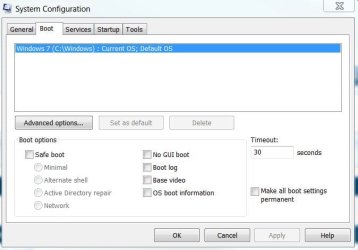
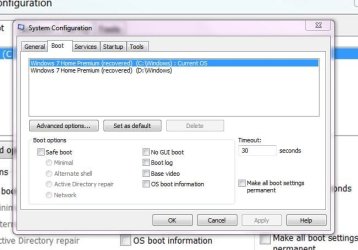
Now in the Windows start menu type msconfig at the boot tab what do you have?


ms.JPG
 

My Computer My Computer

At a glance

W 7 64-bit UltimateIntel Q9550 Yorkfield8GB Dominator 8500C5DATI : XFX 5870
Computer Manufacturer/Model Number
* BFK Customs *
OS
W 7 64-bit Ultimate
CPU
Intel Q9550 Yorkfield
Motherboard
ASUS P5Q Pro
Memory
8GB Dominator 8500C5D
Graphics Card(s)
ATI : XFX 5870
Sound Card
Realtek HD Audio 7-1
Monitor(s) Displays
1x 47" LCD HDMI & 3x 26" LCD HDMI
Screen Resolution
1920x1080P & 1920x1200
Hard Drives
1x 80GB Intel X25-M G2 SSD : 1x 500GB & 1x 640GB WD Caviar Black(s)
PSU
Corsair 620HX
Case
Cooler Master RC-690
Cooling
Tuniq Tower 120, 2x 140mm and 3x 120mm case fans
Keyboard
Microsoft 500
Mouse
Razer Diamondback 3G
Internet Speed
14 Mb/s
Other Info
1x Koutech 3Gb/s SATA HDD Hot Swap Rack
I have attached what I have. I want to run off of the c drive and that is what I am currently using. I didn't know if I needed to empty the d/recovery drive since it is full. Do I need that. I really didn't even know I had it until today. You apparently understand all this better than I. What do I need to do. Is there are way to keep the d drive but empty the contents...idk. Thank you for all of your help
 

Attachments

  • Capture.JPG
    Capture.JPG
    42.9 KB · Views: 35

My Computer My Computer

At a glance

windows 7
Computer Manufacturer/Model Number
dell inspiron 1750
OS
windows 7
I see that BFK is helping you with this so I will bow out for now.

My only point is that if you overwrote D (confirm that) with your reinstall, had reasons to reinstall Win7, then you can consider deleting C and recovering System MBR into D so you can continue with setting up Win7, since your files are all backed up anyway.
 
Last edited:
We're making it so it will boot directly to the OS you want to keep without the boot menu at system startup.

You will still have the D: but it will be "out-of -the-way" for a while so you can figure out if the recovery partition is needed to use the disk to reinstall, so maybe you can remove it later.


Click to high-light the other entry and click delete then restart the PC and come back to let me know how it went.

ms2.jpg
 

My Computer My Computer

At a glance

W 7 64-bit UltimateIntel Q9550 Yorkfield8GB Dominator 8500C5DATI : XFX 5870
Computer Manufacturer/Model Number
* BFK Customs *
OS
W 7 64-bit Ultimate
CPU
Intel Q9550 Yorkfield
Motherboard
ASUS P5Q Pro
Memory
8GB Dominator 8500C5D
Graphics Card(s)
ATI : XFX 5870
Sound Card
Realtek HD Audio 7-1
Monitor(s) Displays
1x 47" LCD HDMI & 3x 26" LCD HDMI
Screen Resolution
1920x1080P & 1920x1200
Hard Drives
1x 80GB Intel X25-M G2 SSD : 1x 500GB & 1x 640GB WD Caviar Black(s)
PSU
Corsair 620HX
Case
Cooler Master RC-690
Cooling
Tuniq Tower 120, 2x 140mm and 3x 120mm case fans
Keyboard
Microsoft 500
Mouse
Razer Diamondback 3G
Internet Speed
14 Mb/s
Other Info
1x Koutech 3Gb/s SATA HDD Hot Swap Rack
I see that BFK is helping you with this so I will bow out for now.

My only point is that if you overwrote D (confirm that) with your reinstall, had reasons to reinstall Win7, then you can consider deleting C and recovering System MBR into D so you can continue with setting up Win7, since your files are all backed up anyway.


I think he has reinstalled to C: last so it's the newest.
 

My Computer My Computer

At a glance

W 7 64-bit UltimateIntel Q9550 Yorkfield8GB Dominator 8500C5DATI : XFX 5870
Computer Manufacturer/Model Number
* BFK Customs *
OS
W 7 64-bit Ultimate
CPU
Intel Q9550 Yorkfield
Motherboard
ASUS P5Q Pro
Memory
8GB Dominator 8500C5D
Graphics Card(s)
ATI : XFX 5870
Sound Card
Realtek HD Audio 7-1
Monitor(s) Displays
1x 47" LCD HDMI & 3x 26" LCD HDMI
Screen Resolution
1920x1080P & 1920x1200
Hard Drives
1x 80GB Intel X25-M G2 SSD : 1x 500GB & 1x 640GB WD Caviar Black(s)
PSU
Corsair 620HX
Case
Cooler Master RC-690
Cooling
Tuniq Tower 120, 2x 140mm and 3x 120mm case fans
Keyboard
Microsoft 500
Mouse
Razer Diamondback 3G
Internet Speed
14 Mb/s
Other Info
1x Koutech 3Gb/s SATA HDD Hot Swap Rack
Back
Top