Windows 7 Installed on C drive and D/Recovery Drive

Bare Foot Kid-You rock!!!! I booted right up w/ no issues. Do I need to do anything w/ that d partition? Is there a way I can remove win7 from it-if I did want to back anything up to that drive. Thanks for all of your help! You have been most kind.
 

My Computer My Computer

At a glance

windows 7
Computer Manufacturer/Model Number
dell inspiron 1750
OS
windows 7
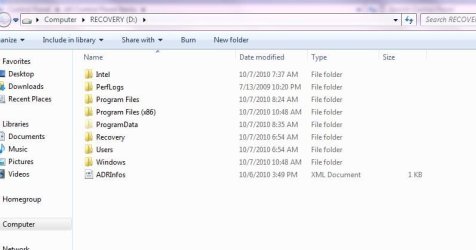
Have a look at this tutorial at the link below to un-hide files/folders, then post a snip of the contents of the D: partition so we can have a look at what's there.

Be sure: to re-hide the files/folders after you get the snip. ;)


Hidden Files and Folders - Show or Hide
 

My Computer My Computer

At a glance

W 7 64-bit UltimateIntel Q9550 Yorkfield8GB Dominator 8500C5DATI : XFX 5870
Computer Manufacturer/Model Number
* BFK Customs *
OS
W 7 64-bit Ultimate
CPU
Intel Q9550 Yorkfield
Motherboard
ASUS P5Q Pro
Memory
8GB Dominator 8500C5D
Graphics Card(s)
ATI : XFX 5870
Sound Card
Realtek HD Audio 7-1
Monitor(s) Displays
1x 47" LCD HDMI & 3x 26" LCD HDMI
Screen Resolution
1920x1080P & 1920x1200
Hard Drives
1x 80GB Intel X25-M G2 SSD : 1x 500GB & 1x 640GB WD Caviar Black(s)
PSU
Corsair 620HX
Case
Cooler Master RC-690
Cooling
Tuniq Tower 120, 2x 140mm and 3x 120mm case fans
Keyboard
Microsoft 500
Mouse
Razer Diamondback 3G
Internet Speed
14 Mb/s
Other Info
1x Koutech 3Gb/s SATA HDD Hot Swap Rack
I hope this is what you are looking for...I fixed it to show all files and then opened the d partition and took my snip from there.
 

Attachments

  • Capture.JPG
    Capture.JPG
    39.1 KB · Views: 41

My Computer My Computer

At a glance

windows 7
Computer Manufacturer/Model Number
dell inspiron 1750
OS
windows 7
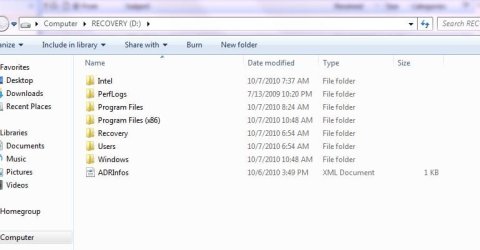
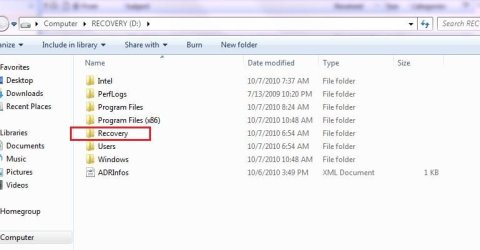
Can we see the unhidden contents of the Recovery folder? You may still have your Recov image on there.

You can also cut to the chase and see if your Recovery partition will still run from boot to restore to factory condition: http://support.dell.com/support/topics/global.aspx/support/dsn/en/document?docid=362066. If not the first two partitions are now useless and can be recovered into C this way: http://www.sevenforums.com/tutorials/109752-partition-recover-space-used-older-os.html?ltr=P

Were you given Recovery Disks in addition to the Win7 clean install DVD? You are fortunate since Dell has now stopped providing them, but when they did they usually included Recov Disks as well.

Are you going to need any of the Dell Factory programs and Utilties now that you have a Win7 clean reinstall? You may be able to find some on the Dell Support Downloads webpage for your model where you can also find any missing drivers. But most Dell factory-installed programs and utilities are only available using Recov disks to reinstall.
 
I have the drivers and utilities disk also and I have already installed those. Attached is the unhidden files...
 

Attachments

  • Capture1.JPG
    Capture1.JPG
    36.1 KB · Views: 14

My Computer My Computer

At a glance

windows 7
Computer Manufacturer/Model Number
dell inspiron 1750
OS
windows 7
He meant to see what is in this file, if you care to.


he.jpg
 

My Computer My Computer

At a glance

W 7 64-bit UltimateIntel Q9550 Yorkfield8GB Dominator 8500C5DATI : XFX 5870
Computer Manufacturer/Model Number
* BFK Customs *
OS
W 7 64-bit Ultimate
CPU
Intel Q9550 Yorkfield
Motherboard
ASUS P5Q Pro
Memory
8GB Dominator 8500C5D
Graphics Card(s)
ATI : XFX 5870
Sound Card
Realtek HD Audio 7-1
Monitor(s) Displays
1x 47" LCD HDMI & 3x 26" LCD HDMI
Screen Resolution
1920x1080P & 1920x1200
Hard Drives
1x 80GB Intel X25-M G2 SSD : 1x 500GB & 1x 640GB WD Caviar Black(s)
PSU
Corsair 620HX
Case
Cooler Master RC-690
Cooling
Tuniq Tower 120, 2x 140mm and 3x 120mm case fans
Keyboard
Microsoft 500
Mouse
Razer Diamondback 3G
Internet Speed
14 Mb/s
Other Info
1x Koutech 3Gb/s SATA HDD Hot Swap Rack
that folder is empty...also checked it for hidden files. completely empty
 

My Computer My Computer

At a glance

windows 7
Computer Manufacturer/Model Number
dell inspiron 1750
OS
windows 7
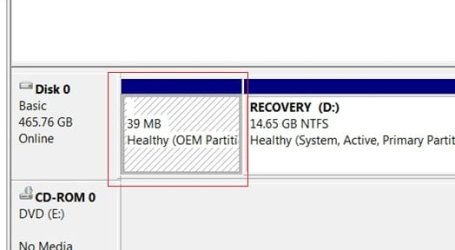
OK so you have confirmed that D:Recovery drive is useless, however if you reinstalled utilities I would keep the first OEM partition (after having a peek using PW to rightclick>Explore) since it may host some utilities.

If you'd like to delete D and recover its space into C, use the steps in BarefootKid's tutorial which apply here: Partition : Recover Space Used by an Older OS

You can skip Step One: Mark Active since C already is, then in Step Two Delete and Wipe D (instead of XP in example), and Resize C into D space as given in Step Three.
 
Last edited:
Hello again.


It seems safe now to do as Greg has suggested though don't do anything to this partition, just do the D: partition.

click to enlarge
save.jpg
 

My Computer My Computer

At a glance

W 7 64-bit UltimateIntel Q9550 Yorkfield8GB Dominator 8500C5DATI : XFX 5870
Computer Manufacturer/Model Number
* BFK Customs *
OS
W 7 64-bit Ultimate
CPU
Intel Q9550 Yorkfield
Motherboard
ASUS P5Q Pro
Memory
8GB Dominator 8500C5D
Graphics Card(s)
ATI : XFX 5870
Sound Card
Realtek HD Audio 7-1
Monitor(s) Displays
1x 47" LCD HDMI & 3x 26" LCD HDMI
Screen Resolution
1920x1080P & 1920x1200
Hard Drives
1x 80GB Intel X25-M G2 SSD : 1x 500GB & 1x 640GB WD Caviar Black(s)
PSU
Corsair 620HX
Case
Cooler Master RC-690
Cooling
Tuniq Tower 120, 2x 140mm and 3x 120mm case fans
Keyboard
Microsoft 500
Mouse
Razer Diamondback 3G
Internet Speed
14 Mb/s
Other Info
1x Koutech 3Gb/s SATA HDD Hot Swap Rack
Back
Top