Windows 7 is not connecting to WiFi.

qpod25

New member
Member
Local time
4:56 PM
Messages
82
Hi,
According to some friends advice here i purchased usb wifi adapter.
It was working about an hour ago it has stopped working.
This is my usb wifi adapter
https://www.daraz.pk/products/alfa-network-wifi-wireless-usb-adapter-300-mbps-i104836005-s1251356351.html?dsource=share&laz_share_info=1388926_100_100_600005940702_819166_null&laz_token=9ec5ed5408c166ea52ebdf71767b6e4b
The wifi icon in task bar is there with yellow star.
Its not a yellow triangle.
Any help would be greatly appreciated.
Best regards.
 

My Computer My Computer

At a glance

windows 7 ultimate 32 bitsintel celeron cpu 540 1.86 GHzkingston 4Gbmobile intel(R) 965 Express Chipset Family
Computer type
Laptop
Computer Manufacturer/Model Number
toshiba
OS
windows 7 ultimate 32 bits
CPU
intel celeron cpu 540 1.86 GHz
Motherboard
asus
Memory
kingston 4Gb
Graphics Card(s)
mobile intel(R) 965 Express Chipset Family
Hard Drives
WDC WD800BEVS-22RST0 ATA Device
Antivirus
avast 2017
Browser
ie11,ff54
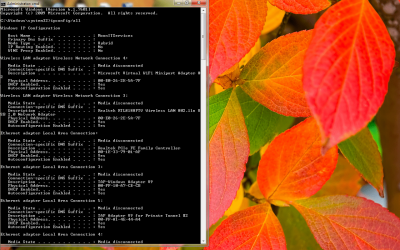
Have you tried reconnection or a reboot? Open a CMD prompt type


Ipconfig /all


Post results
 

My Computer My Computer

At a glance

win 8 32 bit
Computer type
PC/Desktop
OS
win 8 32 bit
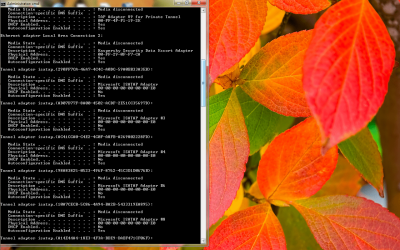
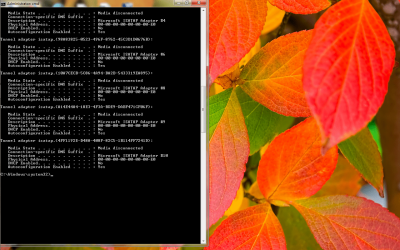
Here are the results
 

Attachments

  • err3.png
    err3.png
    272.2 KB · Views: 2
  • err4.png
    err4.png
    274.7 KB · Views: 1
  • err5.png
    err5.png
    269.6 KB · Views: 1
  • err1.png
    err1.png
    56.8 KB · Views: 2
  • err2.png
    err2.png
    40.1 KB · Views: 2
  • err6.png
    err6.png
    39.1 KB · Views: 0

My Computer My Computer

At a glance

windows 7 ultimate 32 bitsintel celeron cpu 540 1.86 GHzkingston 4Gbmobile intel(R) 965 Express Chipset Family
Computer type
Laptop
Computer Manufacturer/Model Number
toshiba
OS
windows 7 ultimate 32 bits
CPU
intel celeron cpu 540 1.86 GHz
Motherboard
asus
Memory
kingston 4Gb
Graphics Card(s)
mobile intel(R) 965 Express Chipset Family
Hard Drives
WDC WD800BEVS-22RST0 ATA Device
Antivirus
avast 2017
Browser
ie11,ff54
Remove all the tunnels


How to remove the unwanted Tunnel Adapters via Device Manager:

(This solution has been tested and confirmed to work)

  • Open Start Menu
  • Type In: Device Manager
  • Select Device Manager
  • Click the View menu from the top
  • Select Show Hidden Devices (Must be check before continuing)
  • Scroll down and expand Network Adapters
  • Right-Click a duplicated Microsoft 6to4 Adapter or Microsoft ISATAP Adapter
  • Select Uninstall
  • Click OK for the pop-up warning message
  • Repeat and repeat for each of the unwanted duplicated adapter
  • Close Device Manager when finish
Your problems could be your anti virus as it's running a network card which may use a proxy check browser isn't set to use a proxy. Delete the wireless profile for this router
 

My Computer My Computer

At a glance

win 8 32 bit
Computer type
PC/Desktop
OS
win 8 32 bit
Microsoft 6to4 Adapter
Is only one so your settings suggests that it should not be uninstalled.
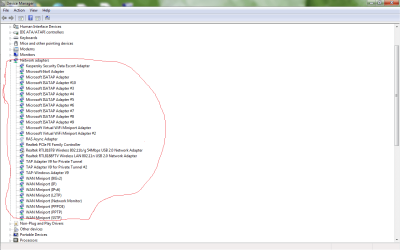
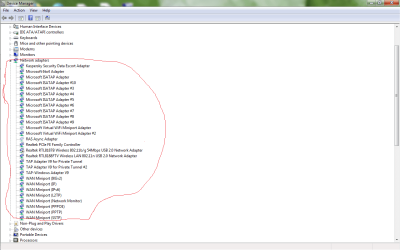
Microsoft ISATAP Adapters are 9
One has no number with it, the have numbers 10,3,4,5,6,7,8,9.
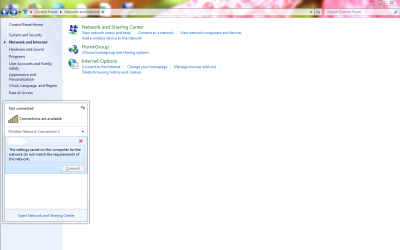
Below picture will explain it
 

Attachments

  • expl1.png
    expl1.png
    29.8 KB · Views: 0

My Computer My Computer

At a glance

windows 7 ultimate 32 bitsintel celeron cpu 540 1.86 GHzkingston 4Gbmobile intel(R) 965 Express Chipset Family
Computer type
Laptop
Computer Manufacturer/Model Number
toshiba
OS
windows 7 ultimate 32 bits
CPU
intel celeron cpu 540 1.86 GHz
Motherboard
asus
Memory
kingston 4Gb
Graphics Card(s)
mobile intel(R) 965 Express Chipset Family
Hard Drives
WDC WD800BEVS-22RST0 ATA Device
Antivirus
avast 2017
Browser
ie11,ff54
Windows 7 is not connecting to WiFi

I am sending picture for explanation
 

Attachments

  • expl1.png
    expl1.png
    29.8 KB · Views: 0

My Computer My Computer

At a glance

windows 7 ultimate 32 bitsintel celeron cpu 540 1.86 GHzkingston 4Gbmobile intel(R) 965 Express Chipset Family
Computer type
Laptop
Computer Manufacturer/Model Number
toshiba
OS
windows 7 ultimate 32 bits
CPU
intel celeron cpu 540 1.86 GHz
Motherboard
asus
Memory
kingston 4Gb
Graphics Card(s)
mobile intel(R) 965 Express Chipset Family
Hard Drives
WDC WD800BEVS-22RST0 ATA Device
Antivirus
avast 2017
Browser
ie11,ff54
Removed and restarted computer.Also deleted the wireless profile and then created it.
And internet is not working.
I am using a popular antivirus (name beginning with a)
But i don't use its VPN, so i don't have any proxy.
 

My Computer My Computer

At a glance

windows 7 ultimate 32 bitsintel celeron cpu 540 1.86 GHzkingston 4Gbmobile intel(R) 965 Express Chipset Family
Computer type
Laptop
Computer Manufacturer/Model Number
toshiba
OS
windows 7 ultimate 32 bits
CPU
intel celeron cpu 540 1.86 GHz
Motherboard
asus
Memory
kingston 4Gb
Graphics Card(s)
mobile intel(R) 965 Express Chipset Family
Hard Drives
WDC WD800BEVS-22RST0 ATA Device
Antivirus
avast 2017
Browser
ie11,ff54
Troubleshooting says
Your wireless network adapter is disabled.
So anyone know how to enable it.
 

My Computer My Computer

At a glance

windows 7 ultimate 32 bitsintel celeron cpu 540 1.86 GHzkingston 4Gbmobile intel(R) 965 Express Chipset Family
Computer type
Laptop
Computer Manufacturer/Model Number
toshiba
OS
windows 7 ultimate 32 bits
CPU
intel celeron cpu 540 1.86 GHz
Motherboard
asus
Memory
kingston 4Gb
Graphics Card(s)
mobile intel(R) 965 Express Chipset Family
Hard Drives
WDC WD800BEVS-22RST0 ATA Device
Antivirus
avast 2017
Browser
ie11,ff54
Someone said to uinstall usb adapter driver but don't remove it, so i did it, and then restarted computer
Then computer automatically installed usb WiFi driver.
Now WiFi working.
When problem comes again i will
Talk to great people here.
Best regards.
 

My Computer My Computer

At a glance

windows 7 ultimate 32 bitsintel celeron cpu 540 1.86 GHzkingston 4Gbmobile intel(R) 965 Express Chipset Family
Computer type
Laptop
Computer Manufacturer/Model Number
toshiba
OS
windows 7 ultimate 32 bits
CPU
intel celeron cpu 540 1.86 GHz
Motherboard
asus
Memory
kingston 4Gb
Graphics Card(s)
mobile intel(R) 965 Express Chipset Family
Hard Drives
WDC WD800BEVS-22RST0 ATA Device
Antivirus
avast 2017
Browser
ie11,ff54
I use Avast antivirus and it is the best antivirus because
it has helped me safe from viruses.
And my WiFi has started working.
 

My Computer My Computer

At a glance

windows 7 ultimate 32 bitsintel celeron cpu 540 1.86 GHzkingston 4Gbmobile intel(R) 965 Express Chipset Family
Computer type
Laptop
Computer Manufacturer/Model Number
toshiba
OS
windows 7 ultimate 32 bits
CPU
intel celeron cpu 540 1.86 GHz
Motherboard
asus
Memory
kingston 4Gb
Graphics Card(s)
mobile intel(R) 965 Express Chipset Family
Hard Drives
WDC WD800BEVS-22RST0 ATA Device
Antivirus
avast 2017
Browser
ie11,ff54
again wifii disconnects automatically.
to solve this previous problem
i bought this usb wifii adapter
https://www.daraz.pk/products/alfa-...ll&laz_token=9ec5ed5408c166ea52ebdf71767b6e4b
and installed its driver of course.But it is written in the manua,that one has to disable the windows default(native) wifii adapte.so i disabled my windows 7 inbuilt wifii adapter.
and it was working.
but when my wifii again disconnected without any reason,I investigated the matter,
so opening network and sharing center ----------------->change adapter settings.
my windows 7 was using the disabled default windows wifii adapter.
long story short windows is not using the new usb wifii adapter but the disabled default inbuilt wifii adapter.how to fix it
 

My Computer My Computer

At a glance

windows 7 ultimate 32 bitsintel celeron cpu 540 1.86 GHzkingston 4Gbmobile intel(R) 965 Express Chipset Family
Computer type
Laptop
Computer Manufacturer/Model Number
toshiba
OS
windows 7 ultimate 32 bits
CPU
intel celeron cpu 540 1.86 GHz
Motherboard
asus
Memory
kingston 4Gb
Graphics Card(s)
mobile intel(R) 965 Express Chipset Family
Hard Drives
WDC WD800BEVS-22RST0 ATA Device
Antivirus
avast 2017
Browser
ie11,ff54
Back
Top