Windows 7 is slow on AMD 9550 quadcore

spg123

New member
Local time
4:29 PM
Messages
10
Hello,

i just installed Windows 7 Ultimate on my;
HP Notebook:
OS Name Microsoft Windows 7 Ultimate
Version 6.1.7600 Build 7600
System Model HP Pavilion dv6 Notebook PC
System Type x64-based PC
Processor Intel(R) Core(TM)2 Duo CPU T6500 @ 2.10GHz, 2100 Mhz, 2 Cores
Installed Physical Memory (RAM) 4.00 GB

and my Desktop:
OS Name Microsoft Windows 7 Ultimate
Version 6.1.7600 Build 7600
OS Manufacturer Microsoft Corporation
System Manufacturer HP-Pavilion
System Model FQ574AAR-ABA m9517c
System Type x64-based PC
Processor AMD Phenom(tm) 9550 Quad-Core Processor, 2200 Mhz, 4 Cores
Installed Physical Memory (RAM) 8.00 GB

The Notebook works like a charm. (love using windows 7)
My Desktop is not so smooth.
I have updated all of my drivers, I have Avast installed on both machines and have installed all windows updates.

Using the desktop, the main hick-up is the spinning wheel. if I try doing 2 tasks at once, it stops to think for several minutes at a time. (very slow sometimes).
I try task-manager and even that gives me the "not responding"
the CPU for system idle process is at 99, no other processes register much of anything.

Is this normal?

Internet explorer gives me alot of problems as well. I tried Chrome and Firefox and that was a disaster. ie-8 gives me the fastest results.

Is it the AMD processor?
 

My Computer My Computer

Computer Manufacturer/Model Number
HP M9517C
OS
Windows 7 Ultimate
CPU
Desktop
Memory
8G
PSU
AMD 9550 Quad-Core 2.20 GHz x64
I have AMD Phenom II 955 BE and mine works great 64 bit. Make sure you are using all of your cores. I think it is three by default. Go into bios and make sure you are using all cores. Then I had to re-install w7. W7 did not recognize my processor so I had to do a clean install. My w7 index performance is 7.3 and memory is 7.5. Hope this helps.
 

My Computer My Computer

Computer Manufacturer/Model Number
Compaq SR5130NX
OS
Windows 7 64 bit
CPU
AMD 64X2 6000+
Motherboard
Asus
Memory
4 MB
Graphics Card(s)
Nvidia Geforce 9600 GSO
Screen Resolution
1024X740
Hard Drives
Stock 200 GB 7400 rpm
Cooling
3 Blue colored Fans
Internet Speed
ATT 6.0 Xtreme
Hello,

Is this normal?

Internet explorer gives me alot of problems as well. I tried Chrome and Firefox and that was a disaster. ie-8 gives me the fastest results.

Is it the AMD processor?
.
Definitely not normal and not the result of AMD. I have a quad core AMD and Windows 7 flies on it. Obviously something is wrong - we just have to figure out what :geek: As corvet786c recommended, check the BIOS settings first. Also, when you open the task manager and click on the performance tab do you see four graphs representing each core? Have a look at the logs in the Event Manager as well.
 

My Computer My Computer

Computer type
PC/Desktop
OS
Windows 7 x64
CPU
Intel Core2 Extreme Q6850 3.00GHz
Motherboard
EVGA 132-CK-NF79
Memory
8 GB
Graphics Card(s)
Radeon R7 260X
Sound Card
Xonar DS
Hard Drives
Hitachi Deskstar 1 tb
I guarentee that if you do not see those 4 graphs in task manager on performance tab, you have to re-install windows 7. Do a clean install. This will work. Also I remember that I did set it in bios to use all cores and it still did not show all 4 graphs in task manager. Re install w7.
 

My Computer My Computer

Computer Manufacturer/Model Number
Compaq SR5130NX
OS
Windows 7 64 bit
CPU
AMD 64X2 6000+
Motherboard
Asus
Memory
4 MB
Graphics Card(s)
Nvidia Geforce 9600 GSO
Screen Resolution
1024X740
Hard Drives
Stock 200 GB 7400 rpm
Cooling
3 Blue colored Fans
Internet Speed
ATT 6.0 Xtreme
I have 4 graphs in task manager on performance tab. I also have a gadget that shows the performance of each core. (They are all active.).
When my PC starts to get slow and chugg, (usually when ie-8 is running and I try to surf through my Documents using explorer) there is nothing going on in either core. On the taskmanager, under CPU, the only thing listed above 00 is system idle process which reads 99.
SVC host is running at 150,000+ in mem-usage.
By the way I have clean-installed windows 7 twice.
I have also tried a clean boot and that did not help.
 

My Computer My Computer

Computer Manufacturer/Model Number
HP M9517C
OS
Windows 7 Ultimate
CPU
Desktop
Memory
8G
PSU
AMD 9550 Quad-Core 2.20 GHz x64
Hello,

i just installed Windows 7 Ultimate on my;
HP Notebook:
OS Name Microsoft Windows 7 Ultimate
Version 6.1.7600 Build 7600
System Model HP Pavilion dv6 Notebook PC
System Type x64-based PC
Processor Intel(R) Core(TM)2 Duo CPU T6500 @ 2.10GHz, 2100 Mhz, 2 Cores
Installed Physical Memory (RAM) 4.00 GB

and my Desktop:
OS Name Microsoft Windows 7 Ultimate
Version 6.1.7600 Build 7600
OS Manufacturer Microsoft Corporation
System Manufacturer HP-Pavilion
System Model FQ574AAR-ABA m9517c
System Type x64-based PC
Processor AMD Phenom(tm) 9550 Quad-Core Processor, 2200 Mhz, 4 Cores
Installed Physical Memory (RAM) 8.00 GB

The Notebook works like a charm. (love using windows 7)
My Desktop is not so smooth.
I have updated all of my drivers, I have Avast installed on both machines and have installed all windows updates.

Using the desktop, the main hick-up is the spinning wheel. if I try doing 2 tasks at once, it stops to think for several minutes at a time. (very slow sometimes).
I try task-manager and even that gives me the "not responding"
the CPU for system idle process is at 99, no other processes register much of anything.

Is this normal?

Internet explorer gives me alot of problems as well. I tried Chrome and Firefox and that was a disaster. ie-8 gives me the fastest results.

Is it the AMD processor?


No it isnt normal. Take a look in event viewer (type eventvwr in search) go to the windows logs>application tab. Look for critical errors (they have red in the left column) that say app hang, app crash, etc. when you find them not the event ID and source codes and let us know what they are.


Ken
 

My Computer My Computer

Computer Manufacturer/Model Number
HP Pavillion dv-7 1005 Tx
OS
Win 8 Release candidate 8400
CPU
[email protected]
Memory
4 gigs
Graphics Card(s)
Nvidia 9600M
Sound Card
HD built-in
Monitor(s) Displays
17" Wxga
Screen Resolution
1440x900
Cooling
none
Internet Speed
45Mb down 5Mb up
is your computer registering that you have 8 gigs installed? have you checked hp's website for a possible bios upgrade for your computer? lastly, did you purchase the pc with windows 7 or did you upgrade? and if upgrade, do you do a clean install or an in-place upgrade?

as far as it being a processor issue, really can't say yet. that is a first gen phenom. there were perfomance issues with some of the first one's but honestly, it would take someone who has a similar pc config to state whether or not they have similar performance with that processor that you're experiencing.
 

My Computer My Computer

Computer Manufacturer/Model Number
Rig 1
OS
Windows 7 Ultimate x64
CPU
AMD Phenom II X4 940 Black Edition @ 3.4GHz (AM2+)
Motherboard
Gigabyte GA-MA790X-UD4P (AM2+)
Memory
Corsair CM2X4096-8500C5 (4 X 2GB)
Graphics Card(s)
XFX Radeon HD 5770 / Diamond Radeon HD 5770 CrossFireX
Sound Card
Asus Xonar DS (PCI)
Monitor(s) Displays
Samsung SyncMaster 932bw+ (3)
Screen Resolution
4320x900
Hard Drives
OCZ Vertex 2 80 GB - Windows 7 System --
WD Caviar Black 1TB - Music, Movies, Vids, Pics --
WD Caviar Black 640GB - User Profiles & Games --
WD My Book 320GB external
PSU
Corsair CMPSU-750TX
Case
Cooler Master HAF 932
Cooling
Corsair Hydro Series H50
Keyboard
Logitech Desktop Wave
Mouse
Logitech LX8 Laser
Internet Speed
20 down / 2 up
Other Info
LG GGC-H20L Blu-Ray / HDDVD combo --
Hauppauge HVR-1250 --
Silverstone MFP-51 --
Logitech Webcam C600
I have 4 graphs in task manager on performance tab. I also have a gadget that shows the performance of each core. (They are all active.).
When my PC starts to get slow and chugg, (usually when ie-8 is running and I try to surf through my Documents using explorer) there is nothing going on in either core. On the taskmanager, under CPU, the only thing listed above 00 is system idle process which reads 99.
SVC host is running at 150,000+ in mem-usage.
By the way I have clean-installed windows 7 twice.
I have also tried a clean boot and that did not help.
.
When you right click "Computer" and select properties you can see how much ram Windows thinks is installed - is all of it being recognized? Also, what scores do you have in the Windows Experience Index?
 

My Computer My Computer

Computer type
PC/Desktop
OS
Windows 7 x64
CPU
Intel Core2 Extreme Q6850 3.00GHz
Motherboard
EVGA 132-CK-NF79
Memory
8 GB
Graphics Card(s)
Radeon R7 260X
Sound Card
Xonar DS
Hard Drives
Hitachi Deskstar 1 tb
Is the machine set up properly in the bios? Also, switch off cool n quiet as that might be slowing things down? I don't know if you're using cpu speed stepping but that can cause all sorts of nonsense. Not trying to be clever, but I always discount the obvious first, then start looking at other stuff. For instance I use Paperport 12 and after scanning something my intel 9450 slows to a crawl. It appears Kaspersky does a full file check but why it takes so long is a mystery? I just disable and off we go.

Good Luck
 

My Computer My Computer

Computer Manufacturer/Model Number
Home Build
OS
Win 7 (32)
CPU
i5 750
Motherboard
Asus P7H55D-M Evo
Memory
4GB Crucial DDR3
Graphics Card(s)
ATI Radeon 4670
Sound Card
Onboard Realtek
Monitor(s) Displays
Philips 23"
Hard Drives
Samsung 1TB
PSU
Thermal Take 550
Case
Coolermaster Lite
Cooling
Arctic Cooling Freezer 7 Pro Rev 2 CPU Cooler
Keyboard
Di Novo Edge
Internet Speed
20Mbit
Hello,

i just installed Windows 7 Ultimate on my;
HP Notebook:
OS Name Microsoft Windows 7 Ultimate
Version 6.1.7600 Build 7600
System Model HP Pavilion dv6 Notebook PC
System Type x64-based PC
Processor Intel(R) Core(TM)2 Duo CPU T6500 @ 2.10GHz, 2100 Mhz, 2 Cores
Installed Physical Memory (RAM) 4.00 GB

and my Desktop:
OS Name Microsoft Windows 7 Ultimate
Version 6.1.7600 Build 7600
OS Manufacturer Microsoft Corporation
System Manufacturer HP-Pavilion
System Model FQ574AAR-ABA m9517c
System Type x64-based PC
Processor AMD Phenom(tm) 9550 Quad-Core Processor, 2200 Mhz, 4 Cores
Installed Physical Memory (RAM) 8.00 GB

The Notebook works like a charm. (love using windows 7)
My Desktop is not so smooth.
I have updated all of my drivers, I have Avast installed on both machines and have installed all windows updates.

Using the desktop, the main hick-up is the spinning wheel. if I try doing 2 tasks at once, it stops to think for several minutes at a time. (very slow sometimes).
I try task-manager and even that gives me the "not responding"
the CPU for system idle process is at 99, no other processes register much of anything.

Is this normal?

Internet explorer gives me alot of problems as well. I tried Chrome and Firefox and that was a disaster. ie-8 gives me the fastest results.

Is it the AMD processor?


No it isnt normal. Take a look in event viewer (type eventvwr in search) go to the windows logs>application tab. Look for critical errors (they have red in the left column) that say app hang, app crash, etc. when you find them not the event ID and source codes and let us know what they are.


Ken


Here is a common error:

The description for Event ID 1000 from source Microsoft-Windows-User Profiles General cannot be found. Either the component that raises this event is not installed on your local computer or the installation is corrupted. You can install or repair the component on the local computer.
If the event originated on another computer, the display information had to be saved with the event.
The following information was included with the event:
Error Code: 0
------
Checking mounting
Mouting point check complete
Using partition (C:\)
Created bootsect.exe
Created GRLDR
Created tag
Installed certificate and serial
------
Error Stack:
the message resource is present but the message is not found in the string/message table
 

My Computer My Computer

Computer Manufacturer/Model Number
HP M9517C
OS
Windows 7 Ultimate
CPU
Desktop
Memory
8G
PSU
AMD 9550 Quad-Core 2.20 GHz x64
For something to take MINUTES when it should take seconds implies a looping process that's preventing your second task from coming up. But, since you have more than 1 core, we can probably rule that out.

Or, there's an extremely long wait-event of some kind. With XP, I've had power outages such that rebooting is fine, but when I launch IE for the first time (post-power outage) it takes almost a MINUTE (CPU is idling). Successive IE launches are back to sub-second.

Get task-manager up PRIOR to doing anything. Size the window and select all useful columns.

Now do your thing and go back to TM. If you can't even get back to TM, then we'll have to try something else.
 

My Computer My Computer

Computer type
PC/Desktop
Computer Manufacturer/Model Number
Custom
OS
Windows 7
CPU
AMD Phenom II X2 (dual-core)
Motherboard
GA-MA785GM-US2H
Memory
4G
Graphics Card(s)
integrated ATI HD 4200
Sound Card
integrated
Monitor(s) Displays
Samsung 24"
Screen Resolution
1920x1080
Hard Drives
1 SSD - Samsung 840 - 500 GB - OS and DATA partitions
1 SSD - Intel 320 - 120 GB (used for backups) - Misc/BACKUP
1 SATA HD - WD, 500 GB - BACKUP
PSU
Ultra X4 500W
Case
Ultra X-blaster
Keyboard
Microsoft Digital Media Pro
Mouse
Logitech WIRED!
Internet Speed
15 Mbps FIOS
I have 4 graphs in task manager on performance tab. I also have a gadget that shows the performance of each core. (They are all active.).
When my PC starts to get slow and chugg, (usually when ie-8 is running and I try to surf through my Documents using explorer) there is nothing going on in either core. On the taskmanager, under CPU, the only thing listed above 00 is system idle process which reads 99.
SVC host is running at 150,000+ in mem-usage.
By the way I have clean-installed windows 7 twice.
I have also tried a clean boot and that did not help.
.
When you right click "Computer" and select properties you can see how much ram Windows thinks is installed - is all of it being recognized? Also, what scores do you have in the Windows Experience Index?


Windows thinks I have 8 gig of ram installed (which is correct)
My score is 4.4 :mad:
Processor 6.9
Memory (RAM) 7.2
Graphics (Desktop Perfomance for Windoes Aero) 4.4
Gaming Graphics 5.4
Primary Hard Disc 5.9
 

My Computer My Computer

Computer Manufacturer/Model Number
HP M9517C
OS
Windows 7 Ultimate
CPU
Desktop
Memory
8G
PSU
AMD 9550 Quad-Core 2.20 GHz x64
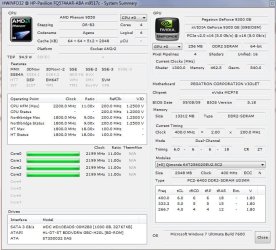
Crappy factory PC's - post a screenshot of HWInfo32's summary screen.
 

My Computer My Computer

Computer Manufacturer/Model Number
Sony Vaio Z46GDU
OS
Windows 7 Ultimate x86-64
CPU
[email protected] 1066MHz FSB
Motherboard
Sony branded
Memory
6GB DDR3 1066MHz
Graphics Card(s)
9300M GS 256MB Dedicated (Speed) + Intel4500MHD (Stamina)
Sound Card
Realtek HD Audio
Monitor(s) Displays
13.1' WXGA
Screen Resolution
1600x900
Hard Drives
320GB 7200RPM w/ 16MB cache
Internet Speed
1MB/s

Attachments

  • Capture.JPG
    Capture.JPG
    102.4 KB · Views: 221

My Computer My Computer

Computer Manufacturer/Model Number
HP M9517C
OS
Windows 7 Ultimate
CPU
Desktop
Memory
8G
PSU
AMD 9550 Quad-Core 2.20 GHz x64
Proprietary tech. Easier to build your own. Get updates from HP's website.
 

My Computer My Computer

Computer Manufacturer/Model Number
Sony Vaio Z46GDU
OS
Windows 7 Ultimate x86-64
CPU
[email protected] 1066MHz FSB
Motherboard
Sony branded
Memory
6GB DDR3 1066MHz
Graphics Card(s)
9300M GS 256MB Dedicated (Speed) + Intel4500MHD (Stamina)
Sound Card
Realtek HD Audio
Monitor(s) Displays
13.1' WXGA
Screen Resolution
1600x900
Hard Drives
320GB 7200RPM w/ 16MB cache
Internet Speed
1MB/s
Back
Top