Solved Windows 7 Issues

GRoston

New member
Power User
VIP
Local time
7:28 PM
Messages
374
From my perspective, Windows 10 and Office 365 are nothing more than fancy spyware and I refuse to make my computer use these pieces of software. However, since it is spyware and since Microsoft will capitalize on it in some manner, I believe that they have pushed ‘updates’ for Windows 7 that cause problems, thereby greatly enticing folks like me to upgrade if we want computers that work properly.

My Windows 7 machine has been working well for more than a decade and I keep it both updated and free from malware. However, over the past six months (or so), the following problems (among others) have occurred (and I believe they all started happening at about the same time):
  • Firefox, my browser of choice (which I have been using since it was Netscape) will hang for no apparent reason and not do anything for up to two minutes. I am convinced that this is not a Firefox issue because I have run ‘Firefox –safe-mode’ and have had the exact same issues. Sometime the only way to resolve this issue is to open the Task Manager and kill the process.
  • I use PSPad as my default txt-file editor and it has worked, without issue, for years. Now, it regularly throws errors and crashes, and the program’s author is unaware of any issues. Interestingly, sometimes opening or closing PSPad causes Firefox to hang. As with the above, sometime the only way to fix this is via Task Manager.
  • I can no longer double-click on Excel files to open them. When I do, I see the error ‘There was a problem sending the command to the program’ and that is after having to wait far longer than is reasonable.

Needless to say, if you have any ideas about system upgrades, or anything like that, that could have caused these issues I would like to hear them. While I could, theoretically rebuild the computer it is a) a huge amount of effort and b) if the issue was caused by an update, I would probably re-install that update and not fix the issue.
 

My Computer

Computer type
PC/Desktop
OS
Windows 7 x64 Pro
CPU
Core i7 860 @ 3.8 GHz
Motherboard
MSI P55-GD80
Memory
16 GB F3-12800CL7D (DDR3 1600 7-7-7-24)
Graphics Card(s)
Sapphire Vapor-X 100283VXL Radeon HD 5770
Monitor(s) Displays
NEC LCD3090WQXi-BK
Let's do the basic

Open a CMD window as administrator and type:
chkdsk c: /f
It will say your disk is in use and ask if you want to schedule to next start = yes
Restart
Pay attention on the results, specially bad blocks, bad clusters, bad sectors etc

Back to Windows, open a CMD window as administrator and type:
sfc /scannow

If it finds any corruption, fixing or not, restart and run again.

To uninstall the telemetry, run cmd file to uninstall those KB files.
kb_spy.cmd.txt
Rename it as KB_Spy.cmd and run it
 

My Computers

System One System Two

  • Computer type
    PC/Desktop
    Computer Manufacturer/Model Number
    custom build
    OS
    Windows 7 HP 64
    CPU
    i5 6600K - 800MHz to 4200MHz
    Motherboard
    GA-Z170-HD3P
    Memory
    4+4G GSkill DDR4 3000
    Graphics Card(s)
    IG - Intel 530
    Monitor(s) Displays
    Samsung 226BW
    Screen Resolution
    1680x1050
    Hard Drives
    (1) -1 SM951 – 128GB M.2 AHCI PCIe SSD drive for Windows 7 and Lubuntu
    (2) -1 WD SATA 3 - 1T for Data
    (3) -1 WD SATA 3 - 1T for backup
    PSU
    Thermaltake 450W TR2 gold
    Keyboard
    Old and good Chicony mechanical keyboard
    Mouse
    Logitech mX performance - 9 buttons (had to disable some)
    Internet Speed
    500Mb/s
    Browser
    Firefox 64
    Other Info
    TinyWall firewall
  • Computer type
    Laptop
    System Manufacturer/Model Number
    Asus Q550LF
    OS
    Windows 7 Pro
    CPU
    i7-4500U 800MHz to 3.0GHz
    Motherboard
    Asus Q550LF
    Memory
    (4+4)G DDR3 1600
    Graphics Card(s)
    IG intel 4400 + NVIDIA GeForce GT 745M
    Sound Card
    Realtek
    Monitor(s) Displays
    LG Display LP156WF4-SPH1
    Screen Resolution
    1920 x 1080
    Hard Drives
    BX500 120G SSD for Windows and programs +
    1T HDD for data
    Internet Speed
    500 Mb/s
    Browser
    Firefox
    Other Info
    TinyWall firewall
Megahertz07 - Thank you! Both chksdsk and sfc turned up nothing, as I expected. I then did the uninstalls and have not had Firefox hang or PSPad crash since. Still in 'testing' mode, but I am hopeful. I suspect that the issue was one of these four updates: kb:3068708, kb:3080149, kb: 971033, or kb:3021917 because these are the only ones that Windows said needed to be installed. (I had a file someplace, cannot find it, in which I had a list of updates to not install - must have missed these).

The one remaining issue is the Excel one mentioned above. Any ideas for resolving that would be greatly welcomed.
 

My Computer

Computer type
PC/Desktop
OS
Windows 7 x64 Pro
CPU
Core i7 860 @ 3.8 GHz
Motherboard
MSI P55-GD80
Memory
16 GB F3-12800CL7D (DDR3 1600 7-7-7-24)
Graphics Card(s)
Sapphire Vapor-X 100283VXL Radeon HD 5770
Monitor(s) Displays
NEC LCD3090WQXi-BK
For Win 7 updates, forget WU, turn it to Never check. Use Single file with all updates - Simplix
Run WU manually to find Office updates etc. Don't install any Win 7 update.

For Excel, try to find if the suffix xls or xlsx is associate with Excel.exe.
 

My Computers

System One System Two

  • Computer type
    PC/Desktop
    Computer Manufacturer/Model Number
    custom build
    OS
    Windows 7 HP 64
    CPU
    i5 6600K - 800MHz to 4200MHz
    Motherboard
    GA-Z170-HD3P
    Memory
    4+4G GSkill DDR4 3000
    Graphics Card(s)
    IG - Intel 530
    Monitor(s) Displays
    Samsung 226BW
    Screen Resolution
    1680x1050
    Hard Drives
    (1) -1 SM951 – 128GB M.2 AHCI PCIe SSD drive for Windows 7 and Lubuntu
    (2) -1 WD SATA 3 - 1T for Data
    (3) -1 WD SATA 3 - 1T for backup
    PSU
    Thermaltake 450W TR2 gold
    Keyboard
    Old and good Chicony mechanical keyboard
    Mouse
    Logitech mX performance - 9 buttons (had to disable some)
    Internet Speed
    500Mb/s
    Browser
    Firefox 64
    Other Info
    TinyWall firewall
  • Computer type
    Laptop
    System Manufacturer/Model Number
    Asus Q550LF
    OS
    Windows 7 Pro
    CPU
    i7-4500U 800MHz to 3.0GHz
    Motherboard
    Asus Q550LF
    Memory
    (4+4)G DDR3 1600
    Graphics Card(s)
    IG intel 4400 + NVIDIA GeForce GT 745M
    Sound Card
    Realtek
    Monitor(s) Displays
    LG Display LP156WF4-SPH1
    Screen Resolution
    1920 x 1080
    Hard Drives
    BX500 120G SSD for Windows and programs +
    1T HDD for data
    Internet Speed
    500 Mb/s
    Browser
    Firefox
    Other Info
    TinyWall firewall
Regarding WU: I have automatic updates turned off - I have to manually accept everything it suggests updating. I goofed...

Regarding Excel: Some weirdness going on. I opened ‘Default Programs’ and did not see Excel under the list of programs (nor do I see any way to add programs to the list). In Explorer, I right-clicked on a .xlsx file, chose Open With->Choose Default Program, chose Excel, but then got the same error. Also, no changes appeared in ‘Default Programs’. In all cases, when I double-click the .xlsx file, Excel opens, then shows the error message.

- - - Updated - - -

Okay – I did some more digging and may have found the error. Looking in the Registry, under HKEY_CLASSES_ROOT\Applications\EXCEL.EXE\shell\Open\command, I found two entries:
  1. @=""C:\\Program Files (x86)\\Microsoft Office\\Office14\\EXCEL.EXE" /dde"
  2. "command"=hex(7):79,00,6b,00,47,00,5e,00,56,00,35,00,21,00,21,00,21,00,21,00, 21,00,21,00,21,00,21,00,21,00,4d,00,4b,00,4b,00,53,00,6b,00,45,00,58,00,43, 00,45,00,4c,00,46,00,69,00,6c,00,65,00,73,00,3e,00,56,00,69,00,6a,00,71,00, 42,00,6f,00,66,00,28,00,59,00,38,00,27,00,77,00,21,00,46,00,49,00,64,00,31, 00,67,00,4c,00,51,00,20,00,2f,00,64,00,64,00,65,00,00,00,00,00
The first entry seems to be the correct one, but I have no idea what the second one is. Also, not sure how to fix this.
 

My Computer

Computer type
PC/Desktop
OS
Windows 7 x64 Pro
CPU
Core i7 860 @ 3.8 GHz
Motherboard
MSI P55-GD80
Memory
16 GB F3-12800CL7D (DDR3 1600 7-7-7-24)
Graphics Card(s)
Sapphire Vapor-X 100283VXL Radeon HD 5770
Monitor(s) Displays
NEC LCD3090WQXi-BK
I use Office 2010 but don't have HKEY_CLASSES_ROOT\Applications\EXCEL.EXE.

Try to export the key (so you can recover it ) and then delete it.

On Control Panel\All Control Panel Items\Programs and Features - MS office hit change and then repair.
 

My Computers

System One System Two

  • Computer type
    PC/Desktop
    Computer Manufacturer/Model Number
    custom build
    OS
    Windows 7 HP 64
    CPU
    i5 6600K - 800MHz to 4200MHz
    Motherboard
    GA-Z170-HD3P
    Memory
    4+4G GSkill DDR4 3000
    Graphics Card(s)
    IG - Intel 530
    Monitor(s) Displays
    Samsung 226BW
    Screen Resolution
    1680x1050
    Hard Drives
    (1) -1 SM951 – 128GB M.2 AHCI PCIe SSD drive for Windows 7 and Lubuntu
    (2) -1 WD SATA 3 - 1T for Data
    (3) -1 WD SATA 3 - 1T for backup
    PSU
    Thermaltake 450W TR2 gold
    Keyboard
    Old and good Chicony mechanical keyboard
    Mouse
    Logitech mX performance - 9 buttons (had to disable some)
    Internet Speed
    500Mb/s
    Browser
    Firefox 64
    Other Info
    TinyWall firewall
  • Computer type
    Laptop
    System Manufacturer/Model Number
    Asus Q550LF
    OS
    Windows 7 Pro
    CPU
    i7-4500U 800MHz to 3.0GHz
    Motherboard
    Asus Q550LF
    Memory
    (4+4)G DDR3 1600
    Graphics Card(s)
    IG intel 4400 + NVIDIA GeForce GT 745M
    Sound Card
    Realtek
    Monitor(s) Displays
    LG Display LP156WF4-SPH1
    Screen Resolution
    1920 x 1080
    Hard Drives
    BX500 120G SSD for Windows and programs +
    1T HDD for data
    Internet Speed
    500 Mb/s
    Browser
    Firefox
    Other Info
    TinyWall firewall
I went into the Registry Editor and deleted the keys that were obviously bad. This did not help. I then looked at the registry on another computer and concur with you that this key does not exist. I deleted it, but this did not help. I then rebooted the computer, and again, the same error.

I then ran Default Programs. Under ‘Set your default program’, I see none of the Office programs. However, under ‘Associate a file type…', the entries to Excel are there and correct. So nothing here to do. I then ran the control panel/repair (as suggested), rebooted the computer, and got the same error. What the heck is going on???

- - - Updated - - -

Okay - I solved this issue. I went here [Fixed] There Was a Problem Sending the Command to the Program and Solution 2 fixed the issue.
 

My Computer

Computer type
PC/Desktop
OS
Windows 7 x64 Pro
CPU
Core i7 860 @ 3.8 GHz
Motherboard
MSI P55-GD80
Memory
16 GB F3-12800CL7D (DDR3 1600 7-7-7-24)
Graphics Card(s)
Sapphire Vapor-X 100283VXL Radeon HD 5770
Monitor(s) Displays
NEC LCD3090WQXi-BK

My Computers

System One System Two

  • Computer type
    PC/Desktop
    Computer Manufacturer/Model Number
    custom build
    OS
    Windows 7 HP 64
    CPU
    i5 6600K - 800MHz to 4200MHz
    Motherboard
    GA-Z170-HD3P
    Memory
    4+4G GSkill DDR4 3000
    Graphics Card(s)
    IG - Intel 530
    Monitor(s) Displays
    Samsung 226BW
    Screen Resolution
    1680x1050
    Hard Drives
    (1) -1 SM951 – 128GB M.2 AHCI PCIe SSD drive for Windows 7 and Lubuntu
    (2) -1 WD SATA 3 - 1T for Data
    (3) -1 WD SATA 3 - 1T for backup
    PSU
    Thermaltake 450W TR2 gold
    Keyboard
    Old and good Chicony mechanical keyboard
    Mouse
    Logitech mX performance - 9 buttons (had to disable some)
    Internet Speed
    500Mb/s
    Browser
    Firefox 64
    Other Info
    TinyWall firewall
  • Computer type
    Laptop
    System Manufacturer/Model Number
    Asus Q550LF
    OS
    Windows 7 Pro
    CPU
    i7-4500U 800MHz to 3.0GHz
    Motherboard
    Asus Q550LF
    Memory
    (4+4)G DDR3 1600
    Graphics Card(s)
    IG intel 4400 + NVIDIA GeForce GT 745M
    Sound Card
    Realtek
    Monitor(s) Displays
    LG Display LP156WF4-SPH1
    Screen Resolution
    1920 x 1080
    Hard Drives
    BX500 120G SSD for Windows and programs +
    1T HDD for data
    Internet Speed
    500 Mb/s
    Browser
    Firefox
    Other Info
    TinyWall firewall
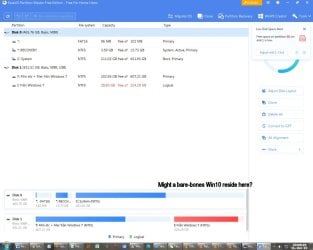
The worst has happened. Is dual-boot the answer for me?

Hi, I have used all versions of Windows, beginning in the 80's with Windows 2. My absolute favorite version, all things considered, is 7. I've tried 10 and scrapped it in disgust.

Recently the issuer of the electronic identifying software I use to log in to sites (my bank for instance and lots of other sites where identity is crucial) announced their product was no longer functional under Windows 7 as there are no longer any security updates but insisted I 'upgrade' to Windows 10.

This is a major, crucial problem for me as I think that Windows 10 is an inferior OS and I would happily have continued with 7 indefinitely. I have a Windows 10 installation disk with product code and now wonder if I have enough space on the system drive to house the thing and dual-boot as necessary?

Easeus screen shot.jpg

Thank you.
 

My Computer

Computer type
PC/Desktop
Computer Manufacturer/Model Number
Dell OptiPlex 3040
OS
Windows 7 Pro 64-bit
CPU
AMD Athlon 64X2 Dual Core 5000+ @ 2611 Mhz
Motherboard
ASUS
Memory
4 GB Dual-Channel DDR2 @ 373 MHz
Graphics Card(s)
NVIDIA GeForce 6150SE nForce 430
Sound Card
Proprietary, I suppose
Monitor(s) Displays
19" LG Flatron L1910B
Screen Resolution
1280x1024
Hard Drives
Some 2,5 TB divided among one internal SATA, partitioned into C: and D:, and two USB 2.0-connected external drives, the latter for independent backups
PSU
Super Flower 500W
Case
Sure
Cooling
Yes
Keyboard
A year old Dell. The best so far, excluding the original IBM
Mouse
Logitech
Internet Speed
Wireless modem 2 MB/s and down; typically 0.5 to 1.3 MB/s
Antivirus
AVG free
Browser
Chrome
Admiral Awesome - Cannot answer your question, but you are correct. Windows 10 is nothing more than spyware being marketed as an OS...
 

My Computer

Computer type
PC/Desktop
OS
Windows 7 x64 Pro
CPU
Core i7 860 @ 3.8 GHz
Motherboard
MSI P55-GD80
Memory
16 GB F3-12800CL7D (DDR3 1600 7-7-7-24)
Graphics Card(s)
Sapphire Vapor-X 100283VXL Radeon HD 5770
Monitor(s) Displays
NEC LCD3090WQXi-BK
'Windows 10 is nothing more than spyware being marketed as an OS...' Amen.
 

My Computer

Computer type
PC/Desktop
Computer Manufacturer/Model Number
Dell OptiPlex 3040
OS
Windows 7 Pro 64-bit
CPU
AMD Athlon 64X2 Dual Core 5000+ @ 2611 Mhz
Motherboard
ASUS
Memory
4 GB Dual-Channel DDR2 @ 373 MHz
Graphics Card(s)
NVIDIA GeForce 6150SE nForce 430
Sound Card
Proprietary, I suppose
Monitor(s) Displays
19" LG Flatron L1910B
Screen Resolution
1280x1024
Hard Drives
Some 2,5 TB divided among one internal SATA, partitioned into C: and D:, and two USB 2.0-connected external drives, the latter for independent backups
PSU
Super Flower 500W
Case
Sure
Cooling
Yes
Keyboard
A year old Dell. The best so far, excluding the original IBM
Mouse
Logitech
Internet Speed
Wireless modem 2 MB/s and down; typically 0.5 to 1.3 MB/s
Antivirus
AVG free
Browser
Chrome
It takes me several hours to properly set up a new install of Windows 10.
Two absolutes are to kill WUDO and Cortana. (huge security holes). Then there are a whole bunch of Tweaks, to get 10 working at it's max performance. The Classic Shell is a must!
I pity the fool who just turns on Win-10 without any expert assistance. It's a fools errand!

I'm still running Win-8.1 because it's much more kind and considerate, and takes less time to set up.

Happy New Year, Y'all!
TM :cool:
 

My Computer

Computer type
PC/Desktop
Computer Manufacturer/Model Number
Various
OS
Win 7 Pro, SP1, x86, Win-11/Pro/64
CPU
AMD
Motherboard
Various
Memory
8GB Crucial
Graphics Card(s)
Various
Sound Card
OnBoard
Monitor(s) Displays
Acer 21.5"
Hard Drives
Crucial SSD, 500 GB
PSU
OEM
Case
SFF Slim Line Case
Cooling
OEM
Keyboard
eMachines
Mouse
Logitech Wireless
Internet Speed
varies
Antivirus
Windows Defender/Super Anti-Spyware
Browser
Firefox
It takes me several hours to properly set up a new install of Windows 10.
Two absolutes are to kill WUDO and Cortana. (huge security holes). Then there are a whole bunch of Tweaks, to get 10 working at it's max performance. The Classic Shell is a must!
I pity the fool who just turns on Win-10 without any expert assistance. It's a fools errand!
I'm still running Win-8.1 because it's much more kind and considerate, and takes less time to set up.
Happy New Year, Y'all!
TM :cool:

You speak the truth friend. I remember when, having reluctantly made the switch to Windows 10, I noticed that whenever I googled the question 'how make Windows 10 act and feel like Windows 7?' or words to that effect, a gazillion people had asked much the same thing.

Hmmm...I remember spending much time getting back the ease and simplicity and intuitivity of 7 that way until I finally scrapped 10 in disgust, vowing never to make that mistake again.

Happy New Year to you TM! :party:
 

My Computer

Computer type
PC/Desktop
Computer Manufacturer/Model Number
Dell OptiPlex 3040
OS
Windows 7 Pro 64-bit
CPU
AMD Athlon 64X2 Dual Core 5000+ @ 2611 Mhz
Motherboard
ASUS
Memory
4 GB Dual-Channel DDR2 @ 373 MHz
Graphics Card(s)
NVIDIA GeForce 6150SE nForce 430
Sound Card
Proprietary, I suppose
Monitor(s) Displays
19" LG Flatron L1910B
Screen Resolution
1280x1024
Hard Drives
Some 2,5 TB divided among one internal SATA, partitioned into C: and D:, and two USB 2.0-connected external drives, the latter for independent backups
PSU
Super Flower 500W
Case
Sure
Cooling
Yes
Keyboard
A year old Dell. The best so far, excluding the original IBM
Mouse
Logitech
Internet Speed
Wireless modem 2 MB/s and down; typically 0.5 to 1.3 MB/s
Antivirus
AVG free
Browser
Chrome
Hi, I have used all versions of Windows, beginning in the 80's with Windows 2. My absolute favorite version, all things considered, is 7. I've tried 10 and scrapped it in disgust.

Recently the issuer of the electronic identifying software I use to log in to sites (my bank for instance and lots of other sites where identity is crucial) announced their product was no longer functional under Windows 7 as there are no longer any security updates but insisted I 'upgrade' to Windows 10.

This is a major, crucial problem for me as I think that Windows 10 is an inferior OS and I would happily have continued with 7 indefinitely.
Did you try using an agent switcher? Ex: string data reports to site you're on W10 or W11 using FF (or Chrome or another browser) when you're actually on W7 using FF.
 

My Computer

OS
Win 7 Ultimate 64-bit
I've heard of people having problems dual booting 10 with older Windows versions. I think it would be safer to give it its own drive (and install with all other drives disconnected so it doesn't pollute them) Another option would be to install a virtualization software like VirtualBox or VMWare and run Windows 10 as a VM. This can be slow on old computers and you'd need at least 50GB disk space, preferably SSD, but you wouldn't risk being unable to boot into 7.
 

My Computer

Computer type
PC/Desktop
OS
Windows 7 Ultimate x64 (single boot)
Antivirus
Cryptoprevent
Browser
Pale Moon
Back
Top