Windows 7 keeps sending monitor to sleep

baddudevsninja

New member
Local time
12:32 PM
Messages
13
Hi have had this problem since I can remember, after about 20 minutes windows will send the monitor to sleep if its idle, The picture will fade away and then the monitor says no signal is being received, its the same on both my monitor and TV . I have changed the power settings to Never on both "Turn off display" and "Put the computer to sleep".
I'm really not sure when this started but it makes it impossible to watch films or play games when using a controller. I also have no screen savers set.

specs if it helps:
Asus M4A79XTD EVO Motherboard
AMD Phenom II X4 955 Processor 3.20 GHz
2GB RAM
NVIDIA 9600GT

This is probably something simple but I'm really not sure what to do. I searched a few forums and found a few similar problems but no solutions have helped me yet.
 

My Computer My Computer

At a glance

Windows 7 Professional 64-BitAMD Phenom II x4 955 BE2GB Corsair DDR3Nvidia Geforce 9600GT
OS
Windows 7 Professional 64-Bit
CPU
AMD Phenom II x4 955 BE
Motherboard
Asus M4A79XTD EVO
Memory
2GB Corsair DDR3
Graphics Card(s)
Nvidia Geforce 9600GT
Hard Drives
1TB WD caviare
PSU
400w poc
Case
Phantom NZXT White
Cooling
CM Hyper 212 +
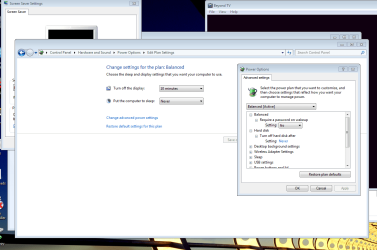
Click on Change advanced power settings.
Change "Turn off hard disk after" setting from 20 minutes to never.
Be sure to press Apply, OK, Save change or whatever the prompts are.

Let us know if it works.


Capture.PNG
 

My Computer My Computer

At a glance

Windows 7 Home Premium 64 bitIntel Core i7-4790G.SKILL 8GB (2 x 4GB) DDR3 F3-10666CL9D-8GBNTAMD Radeon R7 250
Computer type
PC/Desktop
Computer Manufacturer/Model Number
Custom Build
OS
Windows 7 Home Premium 64 bit
CPU
Intel Core i7-4790
Motherboard
GA-Z87X-D3H
Memory
G.SKILL 8GB (2 x 4GB) DDR3 F3-10666CL9D-8GBNT
Graphics Card(s)
AMD Radeon R7 250
Sound Card
Realtek ALC892
Monitor(s) Displays
Samsung UN32EH5000, Dell 1703FPT
Screen Resolution
1920 x 1080, 1280 x 1024
Hard Drives
WD5003AZEX
WD10EZEX
Samsung HD103SJ
Samsung 128 GB 840 PRO
PSU
SeaSonic M12II SS-500GM
Case
Fractal Design Define R4
Cooling
Zalman CNPS9900ALED
Keyboard
Logitech K800
Mouse
Logitech M705
Internet Speed
16 Mbps
Antivirus
Avast
Browser
Firefox
Other Info
Bose Companion 2 Multimedia Speakers
Hi thanks for the quick reply, set hard disk to never, played a game for 20 minutes using a controller and the exact same thing happened. Do you have any other suggestions? Thanks for the help.
 

My Computer My Computer

At a glance

Windows 7 Professional 64-BitAMD Phenom II x4 955 BE2GB Corsair DDR3Nvidia Geforce 9600GT
OS
Windows 7 Professional 64-Bit
CPU
AMD Phenom II x4 955 BE
Motherboard
Asus M4A79XTD EVO
Memory
2GB Corsair DDR3
Graphics Card(s)
Nvidia Geforce 9600GT
Hard Drives
1TB WD caviare
PSU
400w poc
Case
Phantom NZXT White
Cooling
CM Hyper 212 +
Try this.
Power off the PC.
Unplug the power cord and hold down the power button for 30-60 seconds, then plug it back in and turn it on.
 

My Computer My Computer

At a glance

Windows 7 Home Premium 64 bitIntel Core i7-4790G.SKILL 8GB (2 x 4GB) DDR3 F3-10666CL9D-8GBNTAMD Radeon R7 250
Computer type
PC/Desktop
Computer Manufacturer/Model Number
Custom Build
OS
Windows 7 Home Premium 64 bit
CPU
Intel Core i7-4790
Motherboard
GA-Z87X-D3H
Memory
G.SKILL 8GB (2 x 4GB) DDR3 F3-10666CL9D-8GBNT
Graphics Card(s)
AMD Radeon R7 250
Sound Card
Realtek ALC892
Monitor(s) Displays
Samsung UN32EH5000, Dell 1703FPT
Screen Resolution
1920 x 1080, 1280 x 1024
Hard Drives
WD5003AZEX
WD10EZEX
Samsung HD103SJ
Samsung 128 GB 840 PRO
PSU
SeaSonic M12II SS-500GM
Case
Fractal Design Define R4
Cooling
Zalman CNPS9900ALED
Keyboard
Logitech K800
Mouse
Logitech M705
Internet Speed
16 Mbps
Antivirus
Avast
Browser
Firefox
Other Info
Bose Companion 2 Multimedia Speakers
Nope no change. Its still switching off after 20 minutes.
 

My Computer My Computer

At a glance

Windows 7 Professional 64-BitAMD Phenom II x4 955 BE2GB Corsair DDR3Nvidia Geforce 9600GT
OS
Windows 7 Professional 64-Bit
CPU
AMD Phenom II x4 955 BE
Motherboard
Asus M4A79XTD EVO
Memory
2GB Corsair DDR3
Graphics Card(s)
Nvidia Geforce 9600GT
Hard Drives
1TB WD caviare
PSU
400w poc
Case
Phantom NZXT White
Cooling
CM Hyper 212 +
Set your screen saver to blank. Turn off display 10 minutes.
 

My Computer My Computer

At a glance

Windows 7 Home Premium 64 bitIntel Core i7-4790G.SKILL 8GB (2 x 4GB) DDR3 F3-10666CL9D-8GBNTAMD Radeon R7 250
Computer type
PC/Desktop
Computer Manufacturer/Model Number
Custom Build
OS
Windows 7 Home Premium 64 bit
CPU
Intel Core i7-4790
Motherboard
GA-Z87X-D3H
Memory
G.SKILL 8GB (2 x 4GB) DDR3 F3-10666CL9D-8GBNT
Graphics Card(s)
AMD Radeon R7 250
Sound Card
Realtek ALC892
Monitor(s) Displays
Samsung UN32EH5000, Dell 1703FPT
Screen Resolution
1920 x 1080, 1280 x 1024
Hard Drives
WD5003AZEX
WD10EZEX
Samsung HD103SJ
Samsung 128 GB 840 PRO
PSU
SeaSonic M12II SS-500GM
Case
Fractal Design Define R4
Cooling
Zalman CNPS9900ALED
Keyboard
Logitech K800
Mouse
Logitech M705
Internet Speed
16 Mbps
Antivirus
Avast
Browser
Firefox
Other Info
Bose Companion 2 Multimedia Speakers
Hi,

Can you check both the TV and monitor to see if they have their own "sleep" settings?

Regards,
Golden
 

My Computer My Computer

At a glance

Windows 10 Pro x64 ; Xubuntu x64Intel i7 860 @ 2.80 GHz O/C'ed to 4.0GHz16GB Corsair Vengance DDR3 @ 661 MHz Dual Cha...EVGA NVidia GTX 560 1024MB
Computer type
PC/Desktop
Computer Manufacturer/Model Number
Golden Mk. I.4
OS
Windows 10 Pro x64 ; Xubuntu x64
CPU
Intel i7 860 @ 2.80 GHz O/C'ed to 4.0GHz
Motherboard
Gigabyte P55A-UD3R Rev.1. Award BIOS F13
Memory
16GB Corsair Vengance DDR3 @ 661 MHz Dual Channel (9-9-9-24)
Graphics Card(s)
EVGA NVidia GTX 560 1024MB
Sound Card
Realtek Integrated
Monitor(s) Displays
Dual Samsung SyncMaster 2494HS
Screen Resolution
1920*1080 and 1920*1080
Hard Drives
1*Samsung 840 EVO 120GB SSD;
1*OCZ Vertex 2 60GB SSD;
2*Samsung F3 SpinPoint 1TB in RAID0;
1*Samsung F1 SpinPoint 1TB;
2*Western Digital 1TB External USB 3.0
1*Western Digital 500GB External USB 3.0
1*Seagate 500GB External USB 2.0
PSU
Thermaltake ToughPower QFan 750W
Case
Thermaltake Element S VK60001W2Z
Cooling
Corsair H60 Water Cooling, 2*230mm and 2*80mm case fans
Keyboard
Logitech G110
Mouse
Logitech MX518
Rightclick on desktop, select Personalize, set screensaver to None.

Check your monitor's manual for any sleep settings: go to maker's Support Downloads webpage for the exact model, read Manual. Check optional Updates for newer monitor driver or other newer drivers.

If it is not Power Options>Display, or ScreenSaver, then it must be monitor itself.
 
Did you try the Ctrl-Alt-Del thingy to see if the monitor wakes up?

Also

If you are using W7

Go to Start
Type Screen Saver
Click on "Change Power Savings"
Click "Change When The Computer Sleeps"
Make sure that "Put The Computer To Sleep" says Never
Click on "Change Advanced Power Settings"
Click on "Sleep"
Click on each of the four options and see what they say
 

My Computer My Computer

At a glance

Windows 7 Home Premium 64bitAthlon XII4GBATI Radeon 4200
Computer Manufacturer/Model Number
Dell 570MT
OS
Windows 7 Home Premium 64bit
CPU
Athlon XII
Motherboard
?
Memory
4GB
Graphics Card(s)
ATI Radeon 4200
Sound Card
?
Monitor(s) Displays
Asus and Dell
Hard Drives
Unknown
PSU
unknown
Case
unknown
Cooling
unknown
The only time I have ever seen "No Signal Being Received" is when the PC is turned off and the monitor is on. Is your PC still turned on when you see the "No Signal" on the monitor?
 

My Computer My Computer

At a glance

Windows 7 Home Premium 32-Bit - Build 7600 SP1Intel Core i3-2120 3.30GhzKingston 4 GB DDR3 1333 mhzAMD Radeon HD6670
Computer type
PC/Desktop
Computer Manufacturer/Model Number
Custom Build
OS
Windows 7 Home Premium 32-Bit - Build 7600 SP1
CPU
Intel Core i3-2120 3.30Ghz
Motherboard
Asus P8Z68-V LX Intel Z68 Socket H2 ATX
Memory
Kingston 4 GB DDR3 1333 mhz
Graphics Card(s)
AMD Radeon HD6670
Sound Card
Sound Blaster Audigy SE 24-Bit
Monitor(s) Displays
Asus VE228
Screen Resolution
1440 X 900
Hard Drives
OCZ Vertex 3 120 GB Sata 3 SSD ==
Kingston SH103/S3 120 G Hyper X 120 GB SSD ==
Western Digital 500 GB Caviar Green 7200 RPM ==
PSU
Corsair CX600M == 600 Watt
Case
NZXT Apollo - Silver with Clear Side Panel
Cooling
Three 120 mm Fans
Keyboard
Microsoft Natural 4000
Mouse
Microsoft Custom Optical 3000
Internet Speed
AT&T Fiber Optic Wireless Network
Antivirus
Microsoft Security Essentials
Browser
Chrome
Other Info
120 mm Blue LED Fan -- Three Blue LED Lazer Light Sticks
The only time I have ever seen "No Signal Being Received" is when the PC is turned off and the monitor is on. Is your PC still turned on when you see the "No Signal" on the monitor?

You should always see no signal received when Windows turns off the monitor because that is exactly what it does. It stops sending a signal to the monitor.
 

My Computer My Computer

At a glance

Windows 7 Ultimate RTM (Technet)3.00 gigahertz Intel Core2 Duo E84004GBATI Radeon X1950 Pro
Computer Manufacturer/Model Number
Custom
OS
Windows 7 Ultimate RTM (Technet)
CPU
3.00 gigahertz Intel Core2 Duo E8400
Motherboard
ASUSTeK Computer INC. P5K/EPU Rev 1.xx
Memory
4GB
Graphics Card(s)
ATI Radeon X1950 Pro
Sound Card
Built in HD Audio
Monitor(s) Displays
22" Gateway LCD
Screen Resolution
1920 x 1200
Hard Drives
ST3160023A [Hard drive] (160.04 GB) -- drive 0, rev 8.01, ST3500630AS [Hard drive] (500.11 GB) -- drive 2, rev 3.AAK
ST3500630AS [Hard drive] (500.11 GB) -- drive 1, rev 3.AAK
Keyboard
Logitech G11
Mouse
Microsoft Wireless Laser Mouse 5000
Internet Speed
13.44 Mbps
The only time I have ever seen "No Signal Being Received" is when the PC is turned off and the monitor is on. Is your PC still turned on when you see the "No Signal" on the monitor?

You should always see no signal received when Windows turns off the monitor because that is exactly what it does. It stops sending a signal to the monitor.
Confirmed just now, MacGyvr. You are correct. Perhaps bigmck has just never noticed it? A very easy oversight if one is not sitting at their computer when the monitor goes off - especially depending on the power settings for the monitor. For example, if one has the monitor shut-off set for a long duration one might never see it actually shut off and the resultant "No Signal" message. Often the message is so short, on some monitors, that it can be easily missed even then.
 

My Computer My Computer

At a glance

Windows 7 Ultimate x64 SP1Core2 Duo4 GBGM965 on-board
Computer Manufacturer/Model Number
Toshiba L355D
OS
Windows 7 Ultimate x64 SP1
CPU
Core2 Duo
Motherboard
Intel
Memory
4 GB
Graphics Card(s)
GM965 on-board
Sound Card
RealTek on-board
Monitor(s) Displays
19"+17"(laptop)
Screen Resolution
1440x900 (x 2)
Hard Drives
500GB Ext. 200GB Internal
PSU
N/A
Case
N/A
Cooling
N/A
Set your screen saver to blank. Turn off display 10 minutes.

I thought this had solved it was really happy. Then the screen faded to black again. There are no sleep options on either the monitor or TV, so I really don't know what to do. I read somewhere that this could be a registry problem? If that makes any sense.
 

My Computer My Computer

At a glance

Windows 7 Professional 64-BitAMD Phenom II x4 955 BE2GB Corsair DDR3Nvidia Geforce 9600GT
OS
Windows 7 Professional 64-Bit
CPU
AMD Phenom II x4 955 BE
Motherboard
Asus M4A79XTD EVO
Memory
2GB Corsair DDR3
Graphics Card(s)
Nvidia Geforce 9600GT
Hard Drives
1TB WD caviare
PSU
400w poc
Case
Phantom NZXT White
Cooling
CM Hyper 212 +
Hi,

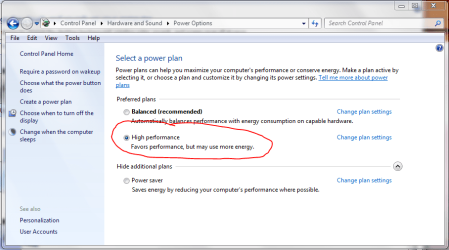
I'm not sure from your previous attempts whether you have tried this, but can you please go back to your Power Options, and check the individual settings for "High Performance" - see image.

Also : you mention a controller : can you tell us a bit more about this controller? make, type etc.
 

Attachments

  • Capture2.PNG
    Capture2.PNG
    44.1 KB · Views: 22

My Computer My Computer

At a glance

Windows 10 Pro x64 ; Xubuntu x64Intel i7 860 @ 2.80 GHz O/C'ed to 4.0GHz16GB Corsair Vengance DDR3 @ 661 MHz Dual Cha...EVGA NVidia GTX 560 1024MB
Computer type
PC/Desktop
Computer Manufacturer/Model Number
Golden Mk. I.4
OS
Windows 10 Pro x64 ; Xubuntu x64
CPU
Intel i7 860 @ 2.80 GHz O/C'ed to 4.0GHz
Motherboard
Gigabyte P55A-UD3R Rev.1. Award BIOS F13
Memory
16GB Corsair Vengance DDR3 @ 661 MHz Dual Channel (9-9-9-24)
Graphics Card(s)
EVGA NVidia GTX 560 1024MB
Sound Card
Realtek Integrated
Monitor(s) Displays
Dual Samsung SyncMaster 2494HS
Screen Resolution
1920*1080 and 1920*1080
Hard Drives
1*Samsung 840 EVO 120GB SSD;
1*OCZ Vertex 2 60GB SSD;
2*Samsung F3 SpinPoint 1TB in RAID0;
1*Samsung F1 SpinPoint 1TB;
2*Western Digital 1TB External USB 3.0
1*Western Digital 500GB External USB 3.0
1*Seagate 500GB External USB 2.0
PSU
Thermaltake ToughPower QFan 750W
Case
Thermaltake Element S VK60001W2Z
Cooling
Corsair H60 Water Cooling, 2*230mm and 2*80mm case fans
Keyboard
Logitech G110
Mouse
Logitech MX518
Hi,

I'm not sure from your previous attempts whether you have tried this, but can you please go back to your Power Options, and check the individual settings for "High Performance" - see image.

Also : you mention a controller : can you tell us a bit more about this controller? make, type etc.
Hi, went into every power option, balanced, high power etc. Everything is set to never. Changed advanced power settings to never on everything possible but am still getting the same results.
Also the controller is a PS3 controller connected via USB.
 

My Computer My Computer

At a glance

Windows 7 Professional 64-BitAMD Phenom II x4 955 BE2GB Corsair DDR3Nvidia Geforce 9600GT
OS
Windows 7 Professional 64-Bit
CPU
AMD Phenom II x4 955 BE
Motherboard
Asus M4A79XTD EVO
Memory
2GB Corsair DDR3
Graphics Card(s)
Nvidia Geforce 9600GT
Hard Drives
1TB WD caviare
PSU
400w poc
Case
Phantom NZXT White
Cooling
CM Hyper 212 +
Just a follow up for anyone else who may be having this problem and searches for solutions. It was an Asus driver called EPU-4 Engine that was overriding the W7 power settings and causing the monitor to turn off after 20 minutes.
 

My Computer My Computer

At a glance

Windows 7 Professional 64-BitAMD Phenom II x4 955 BE2GB Corsair DDR3Nvidia Geforce 9600GT
OS
Windows 7 Professional 64-Bit
CPU
AMD Phenom II x4 955 BE
Motherboard
Asus M4A79XTD EVO
Memory
2GB Corsair DDR3
Graphics Card(s)
Nvidia Geforce 9600GT
Hard Drives
1TB WD caviare
PSU
400w poc
Case
Phantom NZXT White
Cooling
CM Hyper 212 +
Wow! Well done on tracking down that problem.
 

My Computer My Computer

At a glance

Windows 10 Pro x64 ; Xubuntu x64Intel i7 860 @ 2.80 GHz O/C'ed to 4.0GHz16GB Corsair Vengance DDR3 @ 661 MHz Dual Cha...EVGA NVidia GTX 560 1024MB
Computer type
PC/Desktop
Computer Manufacturer/Model Number
Golden Mk. I.4
OS
Windows 10 Pro x64 ; Xubuntu x64
CPU
Intel i7 860 @ 2.80 GHz O/C'ed to 4.0GHz
Motherboard
Gigabyte P55A-UD3R Rev.1. Award BIOS F13
Memory
16GB Corsair Vengance DDR3 @ 661 MHz Dual Channel (9-9-9-24)
Graphics Card(s)
EVGA NVidia GTX 560 1024MB
Sound Card
Realtek Integrated
Monitor(s) Displays
Dual Samsung SyncMaster 2494HS
Screen Resolution
1920*1080 and 1920*1080
Hard Drives
1*Samsung 840 EVO 120GB SSD;
1*OCZ Vertex 2 60GB SSD;
2*Samsung F3 SpinPoint 1TB in RAID0;
1*Samsung F1 SpinPoint 1TB;
2*Western Digital 1TB External USB 3.0
1*Western Digital 500GB External USB 3.0
1*Seagate 500GB External USB 2.0
PSU
Thermaltake ToughPower QFan 750W
Case
Thermaltake Element S VK60001W2Z
Cooling
Corsair H60 Water Cooling, 2*230mm and 2*80mm case fans
Keyboard
Logitech G110
Mouse
Logitech MX518
The only time I have ever seen "No Signal Being Received" is when the PC is turned off and the monitor is on. Is your PC still turned on when you see the "No Signal" on the monitor?

You should always see no signal received when Windows turns off the monitor because that is exactly what it does. It stops sending a signal to the monitor.

Had the same problem and thought I turned off everything..


go back into control panel and click
hardware and sound/power options/change plan setting/change advanced power setting

and look for PCIexpress/link state power management and turn it to off
 

My Computer My Computer

At a glance

windows 7 premium 64 bit
OS
windows 7 premium 64 bit
Back
Top