Windows 7 Language Packs

unifex

New member
Guru
VIP
Local time
1:19 PM
Messages
797
It's probably a simple question, but somehow I am confused about what's going to happen if I install a Language Pack.

The real issue is the following. Consider for example an app that creates a catalog of your DVDs. If all your movies are in English, there is no issue. But, if you have also movies in foreign languages, and especially if these languages use different characters - such as Cyrillic, for example - then most "standard" apps will fail you, they will not be able to use foreign titles.

Now, the question - if I install a Language Pack, then will it completely change the user interface, i.e. all menus will now be int he foreign language, or it will add a possibility to use foreign characters for those programs that might need that feature?

Another example, right now, if I install, say again, a DVD catalog app and choose the language to be Russian, then all menus will be unreadable - I will just see some random collection of question marks and other symbols. I guess this is because all menus are somehow related to whatever settings the OS has as a default. Now, if I install a Language Pack, will all my other programs (which are in English) suddenly become unusable or I will be able to use two different languages for menus?
 

My Computer

Computer Manufacturer/Model Number
Dell Inspiron 530
OS
Windows 7 Ultimate (x64)
CPU
Q6600
Memory
8 GB
Graphics Card(s)
ATI Radeon HD 2600 XT
Monitor(s) Displays
Samsung Syncmaster P2450
Screen Resolution
1920x1080
Hard Drives
Samsung HD103UJ
Samsung HD501LJ
Internet Speed
25 Mb/s
Everything that is currently in English will remain in English. The question marks and weird characters will appear as the characters they are supposed to be. I believe there will be an option to change everything OS related to the other language but this will not happen by default. In case you are wondering, I installed all of the language packs back when I had 7 RC (early version of 7 ultimate), and had no issues at all.
 

My Computer

Computer type
Laptop
Computer Manufacturer/Model Number
Toshiba P775-S7100
OS
Windows 7 Professional SP1 64-bit
CPU
Intel Core i5-2450M @2.5 GHz
Memory
6 GB DDR3 1333MHz
Graphics Card(s)
Intel HD 3000
Monitor(s) Displays
Built-in 17.3" LED; 22" Insignia NS-L22Q-10A
Screen Resolution
1600x900; 1360x768
Hard Drives
750 GB Hitachi
1TB Seagate FreeAgent External
Internet Speed
Verizon DSL Speed(Down/Up): 3360 Kbps / 800 Kbps
Antivirus
MSE and MBAM Pro
Browser
IE10
Installing one or more language packs is not going to help you in this issue. A language pack transforms a chosen user account of Windows 7 completely to another language, changing the language of the user interface, included original software (Paint, Notepad, Help and Support etc), features, menus and dialogs.

A language pack has non whatsoever effect on third party software, i.e. if you install let's say Russian language pack on an English Windows 7, your DVD catalog app with all it's menus would still be in English.

Kari
 

My Computer

Computer type
Laptop
Computer Manufacturer/Model Number
HP ENVY 17-1150eg
OS
Windows 10 Pro x64 EN-GB
CPU
1.6 GHz Intel Core i7-720QM Processor
Memory
6 GB
Graphics Card(s)
ATI Mobility Radeon HD 5850 Graphics
Sound Card
Beats sound system with integrated subwoofer
Monitor(s) Displays
17" laptop display, 22" LED and 32" Full HD TV through HDMI
Screen Resolution
1600*900 (1), 1920*1080 (2&3)
Hard Drives
Internal: 2 x 500 GB SATA Hard Disk Drive 7200 rpm
External: 2TB for backups, 3TB USB3 network drive for media
Cooling
As Envy runs a bit warm, I have it on a Cooler Master pad
Keyboard
Logitech diNovo Media Desktop Laser (bluetooth)
Mouse
Logitech Performance Mouse MX
Internet Speed
50/10 Mbps VDSL
Antivirus
Windows Defender 4.3.9431.0
Browser
Maxthon 3.5.2., IE11
Everything that is currently in English will remain in English.
That is not true. After installing and applying a language pack on an English system, everything that was in English, except third party apps and software, will be changed to language of the applied language pack. ;)
 

My Computer

Computer type
Laptop
Computer Manufacturer/Model Number
HP ENVY 17-1150eg
OS
Windows 10 Pro x64 EN-GB
CPU
1.6 GHz Intel Core i7-720QM Processor
Memory
6 GB
Graphics Card(s)
ATI Mobility Radeon HD 5850 Graphics
Sound Card
Beats sound system with integrated subwoofer
Monitor(s) Displays
17" laptop display, 22" LED and 32" Full HD TV through HDMI
Screen Resolution
1600*900 (1), 1920*1080 (2&3)
Hard Drives
Internal: 2 x 500 GB SATA Hard Disk Drive 7200 rpm
External: 2TB for backups, 3TB USB3 network drive for media
Cooling
As Envy runs a bit warm, I have it on a Cooler Master pad
Keyboard
Logitech diNovo Media Desktop Laser (bluetooth)
Mouse
Logitech Performance Mouse MX
Internet Speed
50/10 Mbps VDSL
Antivirus
Windows Defender 4.3.9431.0
Browser
Maxthon 3.5.2., IE11
Everything that is currently in English will remain in English.
That is not true. After installing and applying a language pack on an English system, everything that was in English, except third party apps and software, will be changed to language of the applied language pack. ;)

Weird. Back in the RC1 days I downloaded multiple language packs and never had a problem. I will say I'm unsure about this one for the time being, because I've agreed with everything I've seen you post until now.
 

My Computer

Computer type
Laptop
Computer Manufacturer/Model Number
Toshiba P775-S7100
OS
Windows 7 Professional SP1 64-bit
CPU
Intel Core i5-2450M @2.5 GHz
Memory
6 GB DDR3 1333MHz
Graphics Card(s)
Intel HD 3000
Monitor(s) Displays
Built-in 17.3" LED; 22" Insignia NS-L22Q-10A
Screen Resolution
1600x900; 1360x768
Hard Drives
750 GB Hitachi
1TB Seagate FreeAgent External
Internet Speed
Verizon DSL Speed(Down/Up): 3360 Kbps / 800 Kbps
Antivirus
MSE and MBAM Pro
Browser
IE10
I do not follow you. What is that you do not believe, Petey?

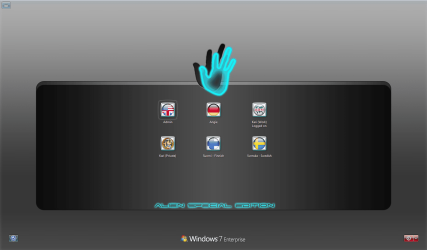
A picture is better than thousand words, so let's show some pics. First my logon screen, where I can choose if I want to log on to a Finnish, English, German or Swedish user account:

Logon_PC2.png

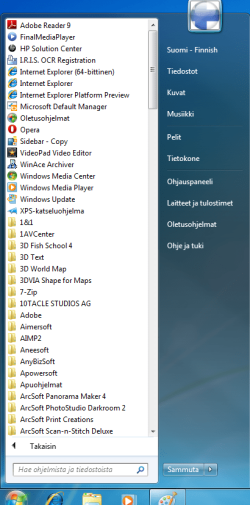
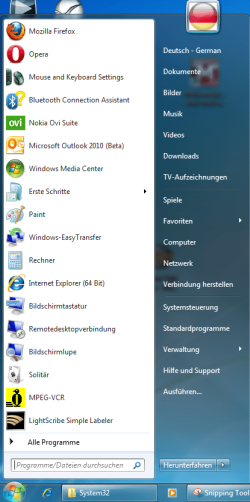
I'm now logged in to my English user account, but I went to Finnish and German accounts to make some screenshots. Here are some examples, shown always Finnish on top, German underneath it.

Please notice, these screenshots are from this same computer, from two different user accounts using two different language packs.

Start menu:

FI_2.png
DE_2.png

Windows Paint:

FI_3.PNG
DE_3.PNG

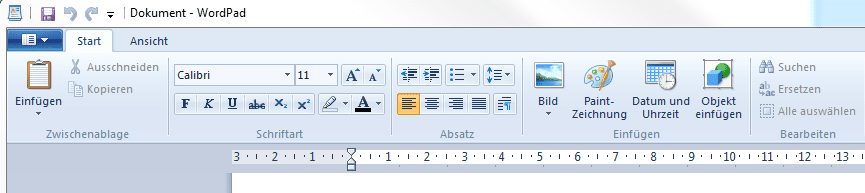
Windows WordPad:

FI_4.PNG
DE_4.PNG

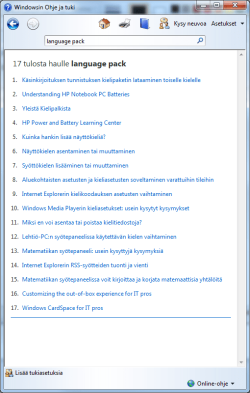
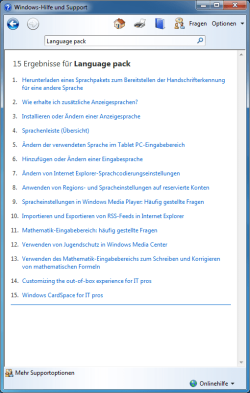
Windows Help & Support:

FI_5.PNG
DE_5.PNG

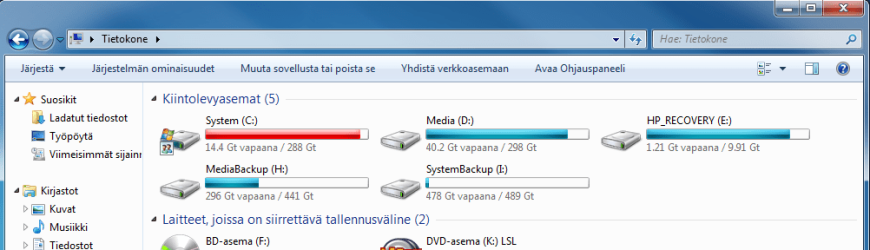
My Computer:

FI_6.PNG
DE_6.PNG


Notice that the language of Windows is completely changed. Everything that was originally English in this Windows setup of mine, is changed to my chosen language.

One more time:

Windows 7 (and Vista) Language Pack transforms the chosen user account completely to the language of the chosen language pack. Translated are all Windows UI elements, features, included apps and software, help systems, IE8 browser, error and other dialogs, menus and so on.

Windows Language Pack can not and will not change the language of third party applications. Other than that, the language change is complete.

Kari
 
Last edited:

My Computer

Computer type
Laptop
Computer Manufacturer/Model Number
HP ENVY 17-1150eg
OS
Windows 10 Pro x64 EN-GB
CPU
1.6 GHz Intel Core i7-720QM Processor
Memory
6 GB
Graphics Card(s)
ATI Mobility Radeon HD 5850 Graphics
Sound Card
Beats sound system with integrated subwoofer
Monitor(s) Displays
17" laptop display, 22" LED and 32" Full HD TV through HDMI
Screen Resolution
1600*900 (1), 1920*1080 (2&3)
Hard Drives
Internal: 2 x 500 GB SATA Hard Disk Drive 7200 rpm
External: 2TB for backups, 3TB USB3 network drive for media
Cooling
As Envy runs a bit warm, I have it on a Cooler Master pad
Keyboard
Logitech diNovo Media Desktop Laser (bluetooth)
Mouse
Logitech Performance Mouse MX
Internet Speed
50/10 Mbps VDSL
Antivirus
Windows Defender 4.3.9431.0
Browser
Maxthon 3.5.2., IE11
A language pack has non whatsoever effect on third party software, i.e. if you install let's say Russian language pack on an English Windows 7, your DVD catalog app with all it's menus would still be in English.

Kari

Hmm, so is there anything one can do? I don't mean the menus, I am quite happy with the English menus. However, some apps - the DVD catalog was just one example - can't handle foreign languages properly. Basically I would even be able to type in a foreign text, but then it won't reproduce it correctly. Are you saying it's up to the app, how these languages are handled?
 

My Computer

Computer Manufacturer/Model Number
Dell Inspiron 530
OS
Windows 7 Ultimate (x64)
CPU
Q6600
Memory
8 GB
Graphics Card(s)
ATI Radeon HD 2600 XT
Monitor(s) Displays
Samsung Syncmaster P2450
Screen Resolution
1920x1080
Hard Drives
Samsung HD103UJ
Samsung HD501LJ
Internet Speed
25 Mb/s
I wasn't saying that you can't change the language. On some websites, they have things written in different languages (obviously). Sometimes characters won't show up correctly. It has been over a year now, but I seem to recall installing all language packs, and then seeing the characters just fine, instead of a question mark or square box. Using 7, its rare to see them anyways, but it still happens from time to time. Looking at the wikipedia articles for various mangas, I those question marks the OP describes. With 7 RC with all language packs installed, I never saw them as far as I can remember. If you say language packs wouldn't have anything to do with this, I have no problem accepting it. It also seemed to me that the OP was asking if simply downloading the language pack would automatically change the language of his profile, which, to my knowledge, won't happen.
 

My Computer

Computer type
Laptop
Computer Manufacturer/Model Number
Toshiba P775-S7100
OS
Windows 7 Professional SP1 64-bit
CPU
Intel Core i5-2450M @2.5 GHz
Memory
6 GB DDR3 1333MHz
Graphics Card(s)
Intel HD 3000
Monitor(s) Displays
Built-in 17.3" LED; 22" Insignia NS-L22Q-10A
Screen Resolution
1600x900; 1360x768
Hard Drives
750 GB Hitachi
1TB Seagate FreeAgent External
Internet Speed
Verizon DSL Speed(Down/Up): 3360 Kbps / 800 Kbps
Antivirus
MSE and MBAM Pro
Browser
IE10
Hmm, so is there anything one can do? I don't mean the menus, I am quite happy with the English menus. However, some apps - the DVD catalog was just one example - can't handle foreign languages properly. Basically I would even be able to type in a foreign text, but then it won't reproduce it correctly. Are you saying it's up to the app, how these languages are handled?
Your best shot IMO is to install keyboard layouts (input languages) in those languages your application does not seem to support, and then type names in those languages manually.

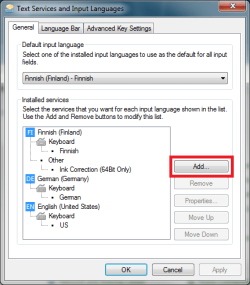
Please notice the difference between a display language (language pack) and an input language. Input languages can be added in Control Panel > Region and Language > Keyboard and Languages > Change Keyboards:

Input_Language.png

Some non-Latin based input languages need a few extra steps, as described for instance in here.

Links:

I wasn't saying that you can't change the language. On some websites, they have things written in different languages (obviously). Sometimes characters won't show up correctly. It has been over a year now, but I seem to recall installing all language packs, and then seeing the characters just fine, instead of a question mark or square box. Using 7, its rare to see them anyways, but it still happens from time to time. Looking at the wikipedia articles for various mangas, I those question marks the OP describes. With 7 RC with all language packs installed, I never saw them as far as I can remember. If you say language packs wouldn't have anything to do with this, I have no problem accepting it. It also seemed to me that the OP was asking if simply downloading the language pack would automatically change the language of his profile, which, to my knowledge, won't happen.
This must be a misunderstanding. Even if you install all 35 available languages, it has nothing to do with how different languages are shown or if they include wrong, strange characters.

Once again, I ask you not to mix input languages with language packs. Two completely different things. Input language changes the keyboard layout, and together with system locale the way foreign, non-Latin based characters are shown. Language pack changes the language of the system.

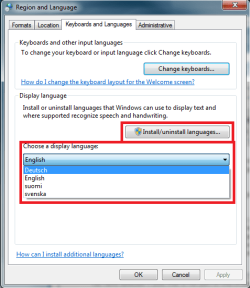
The only language pack that is used in any given moment is the one applied to the user account you are using. Only one language can be at use, applied, in any given moment; if you want to change the language of that user account and apply a new language, you have to completely log off, which removes all remains of the old language from that user account, and log in to apply a new language.

Display_Language.png

OP's issue with wrongly shown foreign characters in a third party application has absolutely, most definitely nothing to do with, nor can it be solved with installing a language pack.

Links:

Finally: yes, Petey, that's right. Downloading and installing a language pack does change nothing. It must be separately applied.

Kari
 
Last edited:

My Computer

Computer type
Laptop
Computer Manufacturer/Model Number
HP ENVY 17-1150eg
OS
Windows 10 Pro x64 EN-GB
CPU
1.6 GHz Intel Core i7-720QM Processor
Memory
6 GB
Graphics Card(s)
ATI Mobility Radeon HD 5850 Graphics
Sound Card
Beats sound system with integrated subwoofer
Monitor(s) Displays
17" laptop display, 22" LED and 32" Full HD TV through HDMI
Screen Resolution
1600*900 (1), 1920*1080 (2&3)
Hard Drives
Internal: 2 x 500 GB SATA Hard Disk Drive 7200 rpm
External: 2TB for backups, 3TB USB3 network drive for media
Cooling
As Envy runs a bit warm, I have it on a Cooler Master pad
Keyboard
Logitech diNovo Media Desktop Laser (bluetooth)
Mouse
Logitech Performance Mouse MX
Internet Speed
50/10 Mbps VDSL
Antivirus
Windows Defender 4.3.9431.0
Browser
Maxthon 3.5.2., IE11
Okay. Sorry for my confusion over language packs. Thanks for the info Kari.
 

My Computer

Computer type
Laptop
Computer Manufacturer/Model Number
Toshiba P775-S7100
OS
Windows 7 Professional SP1 64-bit
CPU
Intel Core i5-2450M @2.5 GHz
Memory
6 GB DDR3 1333MHz
Graphics Card(s)
Intel HD 3000
Monitor(s) Displays
Built-in 17.3" LED; 22" Insignia NS-L22Q-10A
Screen Resolution
1600x900; 1360x768
Hard Drives
750 GB Hitachi
1TB Seagate FreeAgent External
Internet Speed
Verizon DSL Speed(Down/Up): 3360 Kbps / 800 Kbps
Antivirus
MSE and MBAM Pro
Browser
IE10
No problem, mate. That's why Seven Forums exists.
 

My Computer

Computer type
Laptop
Computer Manufacturer/Model Number
HP ENVY 17-1150eg
OS
Windows 10 Pro x64 EN-GB
CPU
1.6 GHz Intel Core i7-720QM Processor
Memory
6 GB
Graphics Card(s)
ATI Mobility Radeon HD 5850 Graphics
Sound Card
Beats sound system with integrated subwoofer
Monitor(s) Displays
17" laptop display, 22" LED and 32" Full HD TV through HDMI
Screen Resolution
1600*900 (1), 1920*1080 (2&3)
Hard Drives
Internal: 2 x 500 GB SATA Hard Disk Drive 7200 rpm
External: 2TB for backups, 3TB USB3 network drive for media
Cooling
As Envy runs a bit warm, I have it on a Cooler Master pad
Keyboard
Logitech diNovo Media Desktop Laser (bluetooth)
Mouse
Logitech Performance Mouse MX
Internet Speed
50/10 Mbps VDSL
Antivirus
Windows Defender 4.3.9431.0
Browser
Maxthon 3.5.2., IE11
Well, I do have various input languages already configured :). Trouble is, these catalog apps - and not only them - seem not to pay attention. I may type whatever I want and even see the correct spelling in the input line, but the app will only "remember" the "English" text, everything else will later on appear as a bunch of question marks. That's why I thought the Language Pack might help - the app seems to be using the same character table as what's used by the OS for the menus.
 

My Computer

Computer Manufacturer/Model Number
Dell Inspiron 530
OS
Windows 7 Ultimate (x64)
CPU
Q6600
Memory
8 GB
Graphics Card(s)
ATI Radeon HD 2600 XT
Monitor(s) Displays
Samsung Syncmaster P2450
Screen Resolution
1920x1080
Hard Drives
Samsung HD103UJ
Samsung HD501LJ
Internet Speed
25 Mb/s
You can of course try, but I doubt it works as you want to. Even if it did work, it would we painfully slow and tedious: apply a new language, log off and log in again, check your catalog app, when done apply original language, log off and log in.
 

My Computer

Computer type
Laptop
Computer Manufacturer/Model Number
HP ENVY 17-1150eg
OS
Windows 10 Pro x64 EN-GB
CPU
1.6 GHz Intel Core i7-720QM Processor
Memory
6 GB
Graphics Card(s)
ATI Mobility Radeon HD 5850 Graphics
Sound Card
Beats sound system with integrated subwoofer
Monitor(s) Displays
17" laptop display, 22" LED and 32" Full HD TV through HDMI
Screen Resolution
1600*900 (1), 1920*1080 (2&3)
Hard Drives
Internal: 2 x 500 GB SATA Hard Disk Drive 7200 rpm
External: 2TB for backups, 3TB USB3 network drive for media
Cooling
As Envy runs a bit warm, I have it on a Cooler Master pad
Keyboard
Logitech diNovo Media Desktop Laser (bluetooth)
Mouse
Logitech Performance Mouse MX
Internet Speed
50/10 Mbps VDSL
Antivirus
Windows Defender 4.3.9431.0
Browser
Maxthon 3.5.2., IE11
Just to finish this thread - I contacted the customer support of my DVD cataloging app, and they say that they do not support unicode characters yet, so while one can choose various languages in the app, one can use only one character set at a time and it has to correspond to the chosen locale. So Kari was right - Language Pack won't help. It's up to the developers to introduce the ability to use multiple character sets in the same database. Not the answer I hoped for, but at least it's clear now.
 

My Computer

Computer Manufacturer/Model Number
Dell Inspiron 530
OS
Windows 7 Ultimate (x64)
CPU
Q6600
Memory
8 GB
Graphics Card(s)
ATI Radeon HD 2600 XT
Monitor(s) Displays
Samsung Syncmaster P2450
Screen Resolution
1920x1080
Hard Drives
Samsung HD103UJ
Samsung HD501LJ
Internet Speed
25 Mb/s
Good to hear you got more information. One tip to coders, too: not everyone uses English alphabet all the time.
 

My Computer

Computer type
Laptop
Computer Manufacturer/Model Number
HP ENVY 17-1150eg
OS
Windows 10 Pro x64 EN-GB
CPU
1.6 GHz Intel Core i7-720QM Processor
Memory
6 GB
Graphics Card(s)
ATI Mobility Radeon HD 5850 Graphics
Sound Card
Beats sound system with integrated subwoofer
Monitor(s) Displays
17" laptop display, 22" LED and 32" Full HD TV through HDMI
Screen Resolution
1600*900 (1), 1920*1080 (2&3)
Hard Drives
Internal: 2 x 500 GB SATA Hard Disk Drive 7200 rpm
External: 2TB for backups, 3TB USB3 network drive for media
Cooling
As Envy runs a bit warm, I have it on a Cooler Master pad
Keyboard
Logitech diNovo Media Desktop Laser (bluetooth)
Mouse
Logitech Performance Mouse MX
Internet Speed
50/10 Mbps VDSL
Antivirus
Windows Defender 4.3.9431.0
Browser
Maxthon 3.5.2., IE11
Back
Top