Windows 7 laptop no longer recognises external HDD

TheClague

New member
Local time
9:28 PM
Messages
2
Hey,

I am pulling my hair out trying to sort out this issue and despite several hours of forum trawling and tinkering I am no closer to a solution.

I have a Toshiba laptop running Windows 7 and for a long time it has run without any problems and my external Toshiba 500gb HDD connected without a problem. A few weeks ago I plugged in the HDD and it never appeared in 'my computer'. The HDD works fine on other systems (both Win7 and Vista and even another laptop identical to mine) but not on this laptop.

Details:
- when plugged in the drive light goes on and the disk starts up, it has a double USB lead but it makes no difference if one or both are plugged in
- in the device manager the there is a 'USB mass storage device' with a yellow error triangle next to it which is a Code 52 regarding a faulty digital signiture
- in disk managment the HDD is visible and 'healthy' but has not disk letter attached

I have tried:
- reformatting the HDD - no change
- updating the USB drivers - no change
- allocating the HDD a new letter in the disk management - the change path option is unavailable (in fact the only option is help)
- removing digital signing authorisation in advanced boot options - I could not find where to change this

Any ideas and thanks in advance.
 

My Computer My Computer

At a glance

Windows 7 Professional 32bit
OS
Windows 7 Professional 32bit
Hello TheClague, welcome to the forum;
Try this; http://www.sevenforums.com/tutorials/165554-usb-driver-general-fix-problems.html?filter[2]=Hardware%20and%20Drivers
I would recommend using a wired mouse, removing all USB devices and in the section where it says Uninstall all the faded entries. take that as reading uninstall everything USB, if you cannot get hold of a wired mouse then you will have to follow the tutorial as written.
 

My Computer My Computer

At a glance

Windows 7 Ultimate x64Intel Core i7-2600K16 GB G Skill F3-10666 CL9D-4GBRLATI Radeon HD 6870
Computer Manufacturer/Model Number
Something I threw together
OS
Windows 7 Ultimate x64
CPU
Intel Core i7-2600K
Motherboard
Asus P8P67
Memory
16 GB G Skill F3-10666 CL9D-4GBRL
Graphics Card(s)
ATI Radeon HD 6870
Sound Card
ATI Radeon HDMI / Realtek ALC892
Monitor(s) Displays
2 x 22" standard monitors / LG32LC56v TV to watch films
Screen Resolution
1920 x1080
Hard Drives
2 x OCZ Vertex2 111.79GB
3 x Samsung103SJ
1 x Samsung103UJ
1 x WD3200BEVT
1 x Hitachi5K320-160
PSU
Thermaltake Toughpower Cable Management 750W
Case
Antec 300
Cooling
Noctua NH-U12P SE2 and 5 120mm Case fans
Keyboard
Microsoft Comfort Curve Keyboard 2000
Mouse
Hama M3110 / Logitech M305
Internet Speed
16000
Other Info
I have also used Fedora, Suse, Ubuntu Linux
And all other Windows from 95 to date except ME
Thanks for the reply.

I followed the guide to the letter and I ran it through twice. Both times the process fails at the same point. Having restarted the system at the end I plug in my HDD and the hardware installer pop-up appears. If you click on it to watch the progress the driver installers runs for a few minutes and then says 'failed'.

If I click on the yellow triange in the device manager it still says:
Windows cannot verify the digital signature for the drivers required for this device. A recent hardware or software change might have installed a file that is signed incorrectly or damaged, or that might be malicious software from an unknown source. (Code 52)

Any ideas and where I can go from here? If it is a software issue is it possible to get a different version of the drivers from somewhere? If so, where do I look because the Toshiba website is useless.

Thanks.
 

My Computer My Computer

At a glance

Windows 7 Professional 32bit
OS
Windows 7 Professional 32bit
The only option is to visit Toshiba's website for a driver but I doubt you will find one.
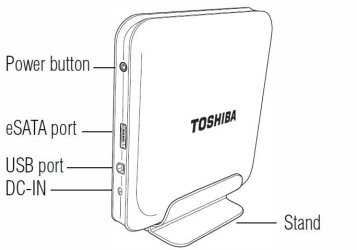
You mentioned that it has a double USB lead, this is strange do you perhaps mean USB and e-SATA?

Capture.JPG

If this is the case you do not want to connect both at the same time to the PC as you only need one cable. Plugging the e-SATA cable into the PC will block the USB cable!! and using both cables at once may damage the external drive. do you have an e-SATA connection on your PC?

You could also try a scan with Malwarebytes : Free anti-malware, anti-virus and spyware removal download to ensure your PC is bug free
 

My Computer My Computer

At a glance

Windows 7 Ultimate x64Intel Core i7-2600K16 GB G Skill F3-10666 CL9D-4GBRLATI Radeon HD 6870
Computer Manufacturer/Model Number
Something I threw together
OS
Windows 7 Ultimate x64
CPU
Intel Core i7-2600K
Motherboard
Asus P8P67
Memory
16 GB G Skill F3-10666 CL9D-4GBRL
Graphics Card(s)
ATI Radeon HD 6870
Sound Card
ATI Radeon HDMI / Realtek ALC892
Monitor(s) Displays
2 x 22" standard monitors / LG32LC56v TV to watch films
Screen Resolution
1920 x1080
Hard Drives
2 x OCZ Vertex2 111.79GB
3 x Samsung103SJ
1 x Samsung103UJ
1 x WD3200BEVT
1 x Hitachi5K320-160
PSU
Thermaltake Toughpower Cable Management 750W
Case
Antec 300
Cooling
Noctua NH-U12P SE2 and 5 120mm Case fans
Keyboard
Microsoft Comfort Curve Keyboard 2000
Mouse
Hama M3110 / Logitech M305
Internet Speed
16000
Other Info
I have also used Fedora, Suse, Ubuntu Linux
And all other Windows from 95 to date except ME
Back
Top