Windows 7 laptop not booting up

CapriAnupam

New member
Local time
12:09 AM
Messages
8
Hi all,

I have a Dell Inspiron N5050 laptop of a relative with me which isn't booting up. When booted, after BIOS it just shows a blank screen.

I will share what all I have tried so far.

When I first got the laptop, the hard drive wasn't being detected in the BIOS.

Then, I had booted laptop with Wondershare Live BootCD, and then the hard drive and its partitions were showing there. I ran checkdisk from there, and they all turned out fine.

I then booted up laptop from Windows 7 CD, and chose the option to repair the computer. However, no OS could be found. After searching OS for a long time, it shows the message that a problem had been detected, and shows to fix and repair the issue and restart. Under the details, this is what it shows.
The following startup options will be added:

Name: Windows 7 Home Basic (recovered)
Path: Windows
Windows Device: Partition = F: (99998 MB)

Name: Windows Recovery Environment (recovered)
Path: Recovery\(some long string of random numbers)\Winre.wim
Windows Device: Partition = F: (99998 MB)

Name: Windows Recovery Environment (recovered)
Path: Recovery\WindowsRE\Winre.wim
Windows Device: Partition = C: (20000 MB)

When I click on "fix and restart", the operation goes on for quite a while before the laptop reboots. But, after reboot, still no joy. It also gave this error after booting:

Windows Boot Manager as title.

After that the usual long message of error, and then it shows this:

File: \Boot\BCD
Status: 0xc000000f
Info: An error occurred while attempting to read the boot configuration data.

After searching for the error code, I had tried booting with Windows 7 CD, and ran the command "bootrec /rebuildCD", but again, the laptop doesn't boot.

I have also tried "bootrec /fixmbr", and "bootrec "fixboot", both of which showed successful, but the laptop still does not boot.

However, after this, the hard drive is now detected in the BIOS.

I have also ran both short and long tests on the hard drive from Seagate SeaTools CD, both of which were passed. So, there does not seem to be an issue with the hard drive. It is a Toshiba hard drive 500 GB, by the way.

Seems like I have exhausted tries from my side. If there is anything else I can try, please advise. Otherwise, format and re-installation seems to be the way.

Can it be possible that the names of the system and recovery hard drives have changed, because from whatever CD I booted, it shows C as Recovery, and F drive contains Windows and system files.
Also, the Windows error which shows to fix issue, also somewhat shows the same thing... although I cannot interpret what it's doing exactly. Would appreciate if someone explained it.

If the drives have somehow interchanged, how do I solve it? Or, is it just wrong assumption on my part?

Any help will be appreciated.

BTW, just for information, I had posted this in an another forum too, here:

https://forums.techguy.org/threads/system-and-recovery-drives-interchanged.1161520/

Help I got was pretty good there.

Just wanted to see if there is anything more I can do to solve this issue. Otherwise, I will just perform the format.

I have also tried factory restore, which according to information should come in options when I press F8 after the Dell Welcome screen when the laptop boots up... but doing that doesn't do anything either. Just shows a blank screen.

I wonder if the recovery partition is still safe, or will it pose any problems when I format and re-install.
 

My Computer My Computer

Computer type
Laptop
Computer Manufacturer/Model Number
Dell Inspiron N5050
OS
Windows 7 Home Basic
CPU
Intel Core i3-2350M @ 2.30GHz
Memory
2 GB DDR3
Graphics Card(s)
Integrated Intel HD Graphics
Sound Card
IDT 92HD87B1
Monitor(s) Displays
15.0" HD WLED with TrueLife
Screen Resolution
1366 * 768
Hard Drives
Toshiba 500 GB
Keyboard
Laptop Integrated Keyboard
Mouse
External USB Mouse

My Computer My Computer

Computer type
PC/Desktop
Computer Manufacturer/Model Number
Own build (new) Desk1 / Asus ROG Win 7 / Desk2 1st build
OS
Desk1 7 Home Prem / Desk2 10 Pro / Main lap Asus ROG 10 Pro 2 laptop Toshiba 7 Pro Asus P2520 7 & 10
CPU
Desk1 i5 3750K / Laptop i7 GTX 860M / Desk2 i5 2500
Motherboard
Desk1 Asus P877-V / Desk2 Gigabyte H67 UD3H / Laptop ?
Memory
Desk1 8GB (1866) / Desk2 16GB (1333) / Laptop 8Gb DDR3
Graphics Card(s)
Desk 1& 2NVidia GTX 650 & Laptops on board Intel
Sound Card
Desk 1 & 2 -XONAR DG Realtek High Def audio Laptop
Monitor(s) Displays
Desk 1 Benq HD 2450 / Desk2 Philips 24" / Laptop 17.5"
Screen Resolution
1920x1080 D1 & D2 & Laptop 1
Hard Drives
Desk1 Samsung 120GB 830 SSD
Asus ROG 256GB 850 Pro SSD
Desk2 Samsung 840 256 SSD
Toshiba 120GB EVO
PSU
Desk 1 Corsair HX 1050/ Laptop ? / Desk 2 Corsair HX 650
Case
Desk 1 Cooler HAF XM ? Toshiba laptop / Desk2 Coolermaster
Cooling
Fans on all Desk1 -2 Desk2 - all Coolermasters 5 Laptop ?
Keyboard
Desk 1 MS Sidewinder X6 Desk 2 MS Sidewinder X 4
Mouse
Desk 1&2 - Gigabyte MS 900 gamer - laptop - Logitec wireless
Internet Speed
ADSL2+
Other Info
One other Desktop (tester) and spare Toshba laptop both with SSD's
Running Kaspersky 2016 ISS on all machines config'd identically
Logitec audio stereo systems on each machine (x3)
Canon MG5250MFC
Router/modem TP-Link running WPA2SK
Thank you for your reply.

The laptop is of my relative, and not mine. So, posting system specs will go into my profile?
Also, are the system specs required for this issue that the laptop is having? It isn't even booting up. Anyways, if it's required, guess I will do it.

I will read the troubleshooting link to see if I missed anything.
 

My Computer My Computer

Computer type
Laptop
Computer Manufacturer/Model Number
Dell Inspiron N5050
OS
Windows 7 Home Basic
CPU
Intel Core i3-2350M @ 2.30GHz
Memory
2 GB DDR3
Graphics Card(s)
Integrated Intel HD Graphics
Sound Card
IDT 92HD87B1
Monitor(s) Displays
15.0" HD WLED with TrueLife
Screen Resolution
1366 * 768
Hard Drives
Toshiba 500 GB
Keyboard
Laptop Integrated Keyboard
Mouse
External USB Mouse
OK, I have updated the system specs as far as I could gather.

I didn't think of this before, but how do I find out if the OS installed is 32-bit or 64-bit version?

When I try to get information from Dell site by putting in the service tag, it shows drivers for 64-bit version. However, the memory on this laptop is only 2 GB. Should be 4 GB for 64-bit version, right?
How do I confirm what bit OS is running?

If it's 64-bit, I will have to download Windows 7 64-bit ISO for further troubleshooting. I only have 32-bit with me.
Same goes for Partition Wizard CD which is mentioned in the troubleshooting page.
 

My Computer My Computer

Computer type
Laptop
Computer Manufacturer/Model Number
Dell Inspiron N5050
OS
Windows 7 Home Basic
CPU
Intel Core i3-2350M @ 2.30GHz
Memory
2 GB DDR3
Graphics Card(s)
Integrated Intel HD Graphics
Sound Card
IDT 92HD87B1
Monitor(s) Displays
15.0" HD WLED with TrueLife
Screen Resolution
1366 * 768
Hard Drives
Toshiba 500 GB
Keyboard
Laptop Integrated Keyboard
Mouse
External USB Mouse
No mate - sorry should have been a little more specific just let us know model numbers for motherboard RAM CPU hard drives GPU/s PSU the OS version and the age of the machine would go a long way.

Look one thing you can try is this and if this works then at least the data can be retrieved should things go really pear shaped and we can gather some info from it - that's if the BIOS can be changed to boot from the optical or USB ( I prefer the optical) and then there is also the fact that the machine will go looking a for a bootable source anyway.
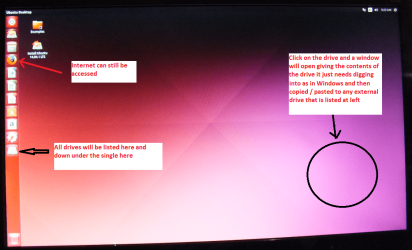
BOOTABLE UBUNTU
Make a bootable Ubuntu disk Download Ubuntu Desktop | Download | Ubuntu
Set the BIOS to boot from the optical when the machine boots it will show you a screen with TRY or INSTALL > select TRY not INSTALL
When it is finished - it takes very little time you will get a screen like in the pic .
Open the drive you want > User and dig down until you get to the data / settings you may be able to copy / paste the material you want to an external source or other installed drive doing this.
I am not sure if it will but I have recovered tons of data etc using this method both on "dead" or just plain drives that you cannot get data from using Windows.
 

Attachments

  • UBUNTU SCREEN X2.PNG
    UBUNTU SCREEN X2.PNG
    272.7 KB · Views: 1

My Computer My Computer

Computer type
PC/Desktop
Computer Manufacturer/Model Number
Own build (new) Desk1 / Asus ROG Win 7 / Desk2 1st build
OS
Desk1 7 Home Prem / Desk2 10 Pro / Main lap Asus ROG 10 Pro 2 laptop Toshiba 7 Pro Asus P2520 7 & 10
CPU
Desk1 i5 3750K / Laptop i7 GTX 860M / Desk2 i5 2500
Motherboard
Desk1 Asus P877-V / Desk2 Gigabyte H67 UD3H / Laptop ?
Memory
Desk1 8GB (1866) / Desk2 16GB (1333) / Laptop 8Gb DDR3
Graphics Card(s)
Desk 1& 2NVidia GTX 650 & Laptops on board Intel
Sound Card
Desk 1 & 2 -XONAR DG Realtek High Def audio Laptop
Monitor(s) Displays
Desk 1 Benq HD 2450 / Desk2 Philips 24" / Laptop 17.5"
Screen Resolution
1920x1080 D1 & D2 & Laptop 1
Hard Drives
Desk1 Samsung 120GB 830 SSD
Asus ROG 256GB 850 Pro SSD
Desk2 Samsung 840 256 SSD
Toshiba 120GB EVO
PSU
Desk 1 Corsair HX 1050/ Laptop ? / Desk 2 Corsair HX 650
Case
Desk 1 Cooler HAF XM ? Toshiba laptop / Desk2 Coolermaster
Cooling
Fans on all Desk1 -2 Desk2 - all Coolermasters 5 Laptop ?
Keyboard
Desk 1 MS Sidewinder X6 Desk 2 MS Sidewinder X 4
Mouse
Desk 1&2 - Gigabyte MS 900 gamer - laptop - Logitec wireless
Internet Speed
ADSL2+
Other Info
One other Desktop (tester) and spare Toshba laptop both with SSD's
Running Kaspersky 2016 ISS on all machines config'd identically
Logitec audio stereo systems on each machine (x3)
Canon MG5250MFC
Router/modem TP-Link running WPA2SK
I have already updated the system specs for CPU, RAM, Hard Drive, Graphics Card from "Edit your system specs" in User CP. I can't get information about the motherboard.

I have already booted from Windows 7 CD, and Wondershare Live Boot CD, as posted earlier, so BIOS is setup to boot first from optical drive or USB. As mentioned, I have performed some tests and diagnostics.

I talked with the relative, and the data inside is not important anymore. He just wants the laptop to be fine and working. So, what I would like is for any advice to make the laptop boot up somehow.

Otherwise, format and reinstallation seems to be the last option.

I was wanting to restore laptop to factory state. I wanted to try that, but as I mentioned, pressing F8 after Dell welcome screen, is not showing any options. So, what to do?
 

My Computer My Computer

Computer type
Laptop
Computer Manufacturer/Model Number
Dell Inspiron N5050
OS
Windows 7 Home Basic
CPU
Intel Core i3-2350M @ 2.30GHz
Memory
2 GB DDR3
Graphics Card(s)
Integrated Intel HD Graphics
Sound Card
IDT 92HD87B1
Monitor(s) Displays
15.0" HD WLED with TrueLife
Screen Resolution
1366 * 768
Hard Drives
Toshiba 500 GB
Keyboard
Laptop Integrated Keyboard
Mouse
External USB Mouse
Ok what I can make out is that the machine is in fact a 64bit supported one It came with 2GB RAM which is only just sufficient for say the Home Premium version of Windows and it will chew through that in no time flat when in normal use so 4GB is minimum .

Now if the data is not of concern the factory restore will wipe it anyway but how to do that is proving to be hard to find but have a read of this and see if any of the fixes actually work http://en.community.dell.com/support-forums/laptop/f/3518/t/19457350

Now just as an afterthought the power adaptor is ok I suppose? it might be worth checking with meter or get it checked by someone with one. Once we can get this machine running it is going to be a whole lot easier to delve into whatever has gone wrong.
 

My Computer My Computer

Computer type
PC/Desktop
Computer Manufacturer/Model Number
Own build (new) Desk1 / Asus ROG Win 7 / Desk2 1st build
OS
Desk1 7 Home Prem / Desk2 10 Pro / Main lap Asus ROG 10 Pro 2 laptop Toshiba 7 Pro Asus P2520 7 & 10
CPU
Desk1 i5 3750K / Laptop i7 GTX 860M / Desk2 i5 2500
Motherboard
Desk1 Asus P877-V / Desk2 Gigabyte H67 UD3H / Laptop ?
Memory
Desk1 8GB (1866) / Desk2 16GB (1333) / Laptop 8Gb DDR3
Graphics Card(s)
Desk 1& 2NVidia GTX 650 & Laptops on board Intel
Sound Card
Desk 1 & 2 -XONAR DG Realtek High Def audio Laptop
Monitor(s) Displays
Desk 1 Benq HD 2450 / Desk2 Philips 24" / Laptop 17.5"
Screen Resolution
1920x1080 D1 & D2 & Laptop 1
Hard Drives
Desk1 Samsung 120GB 830 SSD
Asus ROG 256GB 850 Pro SSD
Desk2 Samsung 840 256 SSD
Toshiba 120GB EVO
PSU
Desk 1 Corsair HX 1050/ Laptop ? / Desk 2 Corsair HX 650
Case
Desk 1 Cooler HAF XM ? Toshiba laptop / Desk2 Coolermaster
Cooling
Fans on all Desk1 -2 Desk2 - all Coolermasters 5 Laptop ?
Keyboard
Desk 1 MS Sidewinder X6 Desk 2 MS Sidewinder X 4
Mouse
Desk 1&2 - Gigabyte MS 900 gamer - laptop - Logitec wireless
Internet Speed
ADSL2+
Other Info
One other Desktop (tester) and spare Toshba laptop both with SSD's
Running Kaspersky 2016 ISS on all machines config'd identically
Logitec audio stereo systems on each machine (x3)
Canon MG5250MFC
Router/modem TP-Link running WPA2SK
To determine if the OS is 64-bit, I booted from Hiren's Boot CD, and found the Program Files (x86) folder in the system drive. So yes, it is a 64-bit OS.

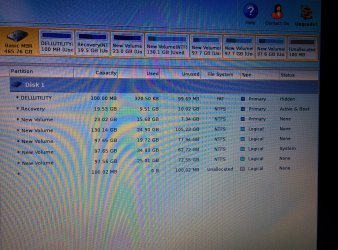
I have taken a disk map of the hard drive by booting from Partition Wizard CD. Attaching the image here:

IMG_20151210_161004.jpg

Please have a look and advise if something needs to be done to restore normal OS, or, to atleast something by which a factory restore is possible for the laptop. Right now, I cannot even perform a factory restore. As mentioned earlier, pressing F8 (which should be for factory restore), nothing happens, and same blank screen shows.

Also, in case I decide to go for a fresh install via Windows 7 CD, what precautions I need to take to keep the recovery partition as it is, so that it is possible to do a factory restore sometime later?

For the rest of the hard drive, I want to delete all partitions, and perform a fresh partition allocation, and installation.
 

My Computer My Computer

Computer type
Laptop
Computer Manufacturer/Model Number
Dell Inspiron N5050
OS
Windows 7 Home Basic
CPU
Intel Core i3-2350M @ 2.30GHz
Memory
2 GB DDR3
Graphics Card(s)
Integrated Intel HD Graphics
Sound Card
IDT 92HD87B1
Monitor(s) Displays
15.0" HD WLED with TrueLife
Screen Resolution
1366 * 768
Hard Drives
Toshiba 500 GB
Keyboard
Laptop Integrated Keyboard
Mouse
External USB Mouse
Help please?
 

My Computer My Computer

Computer type
Laptop
Computer Manufacturer/Model Number
Dell Inspiron N5050
OS
Windows 7 Home Basic
CPU
Intel Core i3-2350M @ 2.30GHz
Memory
2 GB DDR3
Graphics Card(s)
Integrated Intel HD Graphics
Sound Card
IDT 92HD87B1
Monitor(s) Displays
15.0" HD WLED with TrueLife
Screen Resolution
1366 * 768
Hard Drives
Toshiba 500 GB
Keyboard
Laptop Integrated Keyboard
Mouse
External USB Mouse
Hum quite a mess and I am just curious as to why you need all those partitions and to keep that Dell partition - if you do a clean install from a genuine OEM or retail if you can find one unless there is something in the Dell utilities "bloat" filled partition you don't really need it.

Personally when I buy a new laptop (or rebuild an older desktop) and I do not want the OS it comes with for example I find the activation code for the version one has and using it and an ISO of the installed version install a squeaky clean OS. But before I do that I always wipe/cleanall a drive to make sure the drive is squeaky clean.

Now depending on your budget you can get a new drive and install onto that and then transfer data from the old drive. Doing it this way you have control over what is onto the drive.

If you do not not have a sticker on the machine with the code see this http://www.sevenforums.com/tutorials/153626-product-key-number-windows-7-find-see.html - I use the Magic Jelly Bean from this good for all Microsoft products OS Office etc etc

The data from the old drive can be retrieved quite easily and doesn't have to involve booting into Windows. But you may need a USB to SATA adaptor or a dock I prefer the former.
 

My Computer My Computer

Computer type
PC/Desktop
Computer Manufacturer/Model Number
Own build (new) Desk1 / Asus ROG Win 7 / Desk2 1st build
OS
Desk1 7 Home Prem / Desk2 10 Pro / Main lap Asus ROG 10 Pro 2 laptop Toshiba 7 Pro Asus P2520 7 & 10
CPU
Desk1 i5 3750K / Laptop i7 GTX 860M / Desk2 i5 2500
Motherboard
Desk1 Asus P877-V / Desk2 Gigabyte H67 UD3H / Laptop ?
Memory
Desk1 8GB (1866) / Desk2 16GB (1333) / Laptop 8Gb DDR3
Graphics Card(s)
Desk 1& 2NVidia GTX 650 & Laptops on board Intel
Sound Card
Desk 1 & 2 -XONAR DG Realtek High Def audio Laptop
Monitor(s) Displays
Desk 1 Benq HD 2450 / Desk2 Philips 24" / Laptop 17.5"
Screen Resolution
1920x1080 D1 & D2 & Laptop 1
Hard Drives
Desk1 Samsung 120GB 830 SSD
Asus ROG 256GB 850 Pro SSD
Desk2 Samsung 840 256 SSD
Toshiba 120GB EVO
PSU
Desk 1 Corsair HX 1050/ Laptop ? / Desk 2 Corsair HX 650
Case
Desk 1 Cooler HAF XM ? Toshiba laptop / Desk2 Coolermaster
Cooling
Fans on all Desk1 -2 Desk2 - all Coolermasters 5 Laptop ?
Keyboard
Desk 1 MS Sidewinder X6 Desk 2 MS Sidewinder X 4
Mouse
Desk 1&2 - Gigabyte MS 900 gamer - laptop - Logitec wireless
Internet Speed
ADSL2+
Other Info
One other Desktop (tester) and spare Toshba laptop both with SSD's
Running Kaspersky 2016 ISS on all machines config'd identically
Logitec audio stereo systems on each machine (x3)
Canon MG5250MFC
Router/modem TP-Link running WPA2SK
If it was my laptop, I would have done a clean wipe, and then installed the OS fresh. This is what I do too, for my computers, and of computers of my relatives/friends who are okay with it. However, this isn't my laptop, and therefore, I wanted to avoid a clean installation, and let the laptop remain as it is. But, yea, if it isn't possible, then I will do a clean install.

The product key is there on the back of the laptop, and I have noted it.

As I said, the data does not matter at this point.

So, if there is any way that the laptop can be made to boot, looking at the partition table, then it would be great. Otherwise, yes, a format and installation seems to be the way to go.

I also wanted to solve this issue so that I could also get to learn something out of this. Otherwise, I can always perform the clean installation.

So, if something is wrong with that partition table, please advise how to solve it, and get the laptop to boot.
 

My Computer My Computer

Computer type
Laptop
Computer Manufacturer/Model Number
Dell Inspiron N5050
OS
Windows 7 Home Basic
CPU
Intel Core i3-2350M @ 2.30GHz
Memory
2 GB DDR3
Graphics Card(s)
Integrated Intel HD Graphics
Sound Card
IDT 92HD87B1
Monitor(s) Displays
15.0" HD WLED with TrueLife
Screen Resolution
1366 * 768
Hard Drives
Toshiba 500 GB
Keyboard
Laptop Integrated Keyboard
Mouse
External USB Mouse
I did a full hard drive wipe with Darik's Boot and Nuke. It went without problems.

I then tried to install Windows 7 on the hard drive. The process went fine until the last step, where it shows "Completing installation". That's where it got stuck, and I waited for 2-3 hours, but it didn't go past that. I had to perform a forced shutdown of the laptop.

After that I again tried to install Windows 7, but now it cannot install.

If I keep the hard drive mode to ATA in BIOS, Windows 7 is unable to detect a hard drive.

If I change the mode to AHCI, then it detects the drive, but gives the error that it cannot install Windows to the hard drive, because the controller might need to be enabled in BIOS.

What's this issue about? How do I solve this?
 

My Computer My Computer

Computer type
Laptop
Computer Manufacturer/Model Number
Dell Inspiron N5050
OS
Windows 7 Home Basic
CPU
Intel Core i3-2350M @ 2.30GHz
Memory
2 GB DDR3
Graphics Card(s)
Integrated Intel HD Graphics
Sound Card
IDT 92HD87B1
Monitor(s) Displays
15.0" HD WLED with TrueLife
Screen Resolution
1366 * 768
Hard Drives
Toshiba 500 GB
Keyboard
Laptop Integrated Keyboard
Mouse
External USB Mouse
Back
Top