Solved Windows 7 laptop takes 20-25 minutes to shut down, even from Safe Mode

In addition you may need to run SFC /scannow more than once to repair the files. If they don't repair then you may need to run a Repair Install.

Simultaneously you need to finish checking the condition of your HD, both by running another Disk Check as suggested by Noel, followed by the HD maker's extended HD Diagnostic CD scan as suggested by F5ing.

Remember to back up your files first, if necessary from a rescue disk:
Copy & Paste - in Windows Recovery Console
Paragon rescue disk recover data
 
Last edited:
First back up your data to external storage!
then....

Please run a full CHKDSK and SFC scan....

I could've missed it, but did you complete the first step recommended by NoelDP (backing up)?

It's important to try to recover any data that you cannot afford to lose before undergoing any testing/repairing if the hard drive is really on its way to the grave. A quick look of the SMART report using the WD utility (or even using your machine's BIOS if it's capable) may help you determine the health status of the drive.
 

My Computer My Computer

At a glance

Windows 7 Ultimate x64
OS
Windows 7 Ultimate x64
Sorry, yes, I should have mentioned that my backups are already very good (I had a big data loss in 2007 and learned my lesson). When I open WinDlg it says 'SMART status: Fail' next to the drive, and CrystalDiskInfo says 'Bad', so I'm not trusting this drive for anything.

Edit: I tried Soluto and all I really ended up doing was disabling some unnecessary add-ons in my browser - and then it tells me that it'll undo all the changes when I uninstall Soluto? What a terrible program.

I tried to run the HD diagnostic last night, but couldn't finish it (long story). I have run CHKDSK /F though and am running SFC now, I can run the diagnostic later today.

Edit: SFC finished, same message about corrupt files, I've attached the log. It's smaller this time, that must be good. I'll reboot and run it again.


Here's the outcome of CHKDSK /F:


Log Name: Application
Source: Microsoft-Windows-Wininit
Date: 18/07/2012 04:28:24
Event ID: 1001
Task Category: None
Level: Information
Keywords: Classic
User: N/A
Computer: Rachel
Description:


Checking file system on C:
The type of the file system is NTFS.


A disk check has been scheduled.
Windows will now check the disk.

CHKDSK is verifying files (stage 1 of 3)...
2188032 file records processed.

File verification completed.
1338 large file records processed.

0 bad file records processed.

0 EA records processed.

92 reparse records processed.

CHKDSK is verifying indexes (stage 2 of 3)...
2296684 index entries processed.

Index verification completed.
0 unindexed files scanned.

0 unindexed files recovered.

CHKDSK is verifying security descriptors (stage 3 of 3)...
2188032 file SDs/SIDs processed.

Cleaning up 11 unused index entries from index $SII of file 0x9.
Cleaning up 11 unused index entries from index $SDH of file 0x9.
Cleaning up 11 unused security descriptors.
Security descriptor verification completed.
54327 data files processed.

CHKDSK is verifying Usn Journal...
33719856 USN bytes processed.

Usn Journal verification completed.
CHKDSK discovered free space marked as allocated in the volume bitmap.
Windows has made corrections to the file system.

472922111 KB total disk space.
232430008 KB in 412478 files.
628904 KB in 54328 indexes.
0 KB in bad sectors.
2303487 KB in use by the system.
65536 KB occupied by the log file.
237559712 KB available on disk.

4096 bytes in each allocation unit.
118230527 total allocation units on disk.
59389928 allocation units available on disk.

Internal Info:
00 63 21 00 80 1f 07 00 aa 23 0c 00 00 00 00 00 .c!......#......
52 8e 00 00 5c 00 00 00 00 00 00 00 00 00 00 00 R...\...........
00 00 00 00 00 00 00 00 00 00 00 00 00 00 00 00 ................

Windows has finished checking your disk.
Please wait while your computer restarts.
 
Last edited:

My Computer My Computer

At a glance

Microsoft Windows 7 Home Premium 64-bit 7601 ...Intel(R) Core(TM) i3 CPU M 380 @ 2.53GHz4.00 GBATI Mobility Radeon HD 5470
OS
Microsoft Windows 7 Home Premium 64-bit 7601 Multiprocessor Free Service Pack 1
CPU
Intel(R) Core(TM) i3 CPU M 380 @ 2.53GHz
Motherboard
Dell Inc. 005WC3
Memory
4.00 GB
Graphics Card(s)
ATI Mobility Radeon HD 5470
Sound Card
(1) ATI High Definition Audio Device (2) High Definition A
Screen Resolution
1366 x 768 x 32 bits (4294967296 colors) @ 60 Hz
Hard Drives
(1) WDC WD5000BEVT-75A0RT0 (2) BUFFALO External HDD USB Device
Has your shutdown time improved at all?

SFC still seems to want a reboot and re-run
Code:
7322: 2012-07-18 11:18:16, Info                  CSI    00000349 [SR] Cannot commit interactively, there are boot critical components being repaired
but I suspect that that will not change with another run.
This report did at least seem to complete properly (I'm not convinced about the last one).

once this run of SFC is complete, and you've posted the log file, please download and run the CheckSUR tool from Description of the System Update Readiness Tool for Windows Vista, for Windows Server 2008, for Windows 7, and for Windows Server 2008 R2
and post the CheckSUR.log CheckSUR.persist.log files when complete.

[edit] - at least this time we can see the summary report for your CHKDSK, and there are no bad sectors reported, so it may simply be the massive corruption you had that was breaking things up - and may evenhave caused the SMART failure
 

My Computer My Computer

At a glance

Win 7 x64 Home Premium (and x86 VirtualBox VM...i3 370M/i7 6500U8GB - finally :)/8GBit's an i3, dude!/dual Intel&nVidia
Computer type
Laptop
Computer Manufacturer/Model Number
Asus K52F or Lenovo B51-80
OS
Win 7 x64 Home Premium (and x86 VirtualBox VM)/Win10
CPU
i3 370M/i7 6500U
Motherboard
Asus/Lenovo
Memory
8GB - finally :)/8GB
Graphics Card(s)
it's an i3, dude!/dual Intel&nVidia
Sound Card
onboard
Monitor(s) Displays
15.6" built-in
Screen Resolution
1366x768/1920x1080
Hard Drives
750GB Seagate internal
Sundry external drives attached to other computers on the local network
1TB SSD on the Lenovo
PSU
n/a
Internet Speed
as much as I can get - usually on a dongle/phone, so <1MB/s
Antivirus
MSE/Defender
Browser
IE11/12/Edge/Chrome/FF(if I must)
I would demote that drive to, at best, a temporary junk drive. Judging by the problems you've been having I kind of doubt that any WD repairs would succeed. Could be wrong of course (SMART's not perfect and I have a problem with not giving up) but the drive apparently was having issues. If you run the long test on it and it fails giving you a valid warranty code I think you can probably give up on it. Did you double-click the "FAIL" in the WD app to see what SMART attribute(s) were triggered?

I think it would be best to just get a new drive to hold the OS, start fresh.

Look on the bright side: you didn't encounter the same thing as you did in 2007!
 

My Computer My Computer

At a glance

Windows 7 Ultimate x64
OS
Windows 7 Ultimate x64
Ah, I see Noel's back. You're in good hands and I've got to get some sleep!

Good luck!
 

My Computer My Computer

At a glance

Windows 7 Ultimate x64
OS
Windows 7 Ultimate x64
The SMART problem is a 'Reallocated Sectors Count' of 134 where the threshold is 140. CrystalDiskInfo flagged that up a few weeks ago, and the score has been steadily getting worse; Google tells me this is a very bad sign though I don't really know what causes it. I've contacted a local repair shop who can put a new hard drive in for me.

As of now, I've rebooted again (no, shutdown time has not improved, I just hope this problem doesn't persist with the new drive) and am running SFC again. When it's done, I'll post the log and run that CheckSUR tool.
 

My Computer My Computer

At a glance

Microsoft Windows 7 Home Premium 64-bit 7601 ...Intel(R) Core(TM) i3 CPU M 380 @ 2.53GHz4.00 GBATI Mobility Radeon HD 5470
OS
Microsoft Windows 7 Home Premium 64-bit 7601 Multiprocessor Free Service Pack 1
CPU
Intel(R) Core(TM) i3 CPU M 380 @ 2.53GHz
Motherboard
Dell Inc. 005WC3
Memory
4.00 GB
Graphics Card(s)
ATI Mobility Radeon HD 5470
Sound Card
(1) ATI High Definition Audio Device (2) High Definition A
Screen Resolution
1366 x 768 x 32 bits (4294967296 colors) @ 60 Hz
Hard Drives
(1) WDC WD5000BEVT-75A0RT0 (2) BUFFALO External HDD USB Device
Yes, creeping bad sector count is a bad sign! - it possibly indicates worn bearings, a vibration problem, or dust (or something else).

I would suspect that unless we find the root cause of the current problem, your best bet is going to be a clean install on your new drive (which may be a good idea anyhow, to avoid any chance of 'infection' of software problems from this one). You can slave this drive to the new one until you've retrieved the data, and then junk it.
 

My Computer My Computer

At a glance

Win 7 x64 Home Premium (and x86 VirtualBox VM...i3 370M/i7 6500U8GB - finally :)/8GBit's an i3, dude!/dual Intel&nVidia
Computer type
Laptop
Computer Manufacturer/Model Number
Asus K52F or Lenovo B51-80
OS
Win 7 x64 Home Premium (and x86 VirtualBox VM)/Win10
CPU
i3 370M/i7 6500U
Motherboard
Asus/Lenovo
Memory
8GB - finally :)/8GB
Graphics Card(s)
it's an i3, dude!/dual Intel&nVidia
Sound Card
onboard
Monitor(s) Displays
15.6" built-in
Screen Resolution
1366x768/1920x1080
Hard Drives
750GB Seagate internal
Sundry external drives attached to other computers on the local network
1TB SSD on the Lenovo
PSU
n/a
Internet Speed
as much as I can get - usually on a dongle/phone, so <1MB/s
Antivirus
MSE/Defender
Browser
IE11/12/Edge/Chrome/FF(if I must)
Oh, the SFC log got bigger again. You were right, the line about 'boot critical components being repaired' is still there so I guess it can't fix that. Log attached.

Yes, when I get the new drive I'll start fresh. I enjoy setting up a shiny new Windows install, anyway. All my documents are backed up to my external drive so I don't need the repair guy to copy anything from the broken one.

I downloaded the CheckSUR .msu and ran it but it's been sitting at 'Installing hotfix' for a while. Will keep you posted.
 

My Computer My Computer

At a glance

Microsoft Windows 7 Home Premium 64-bit 7601 ...Intel(R) Core(TM) i3 CPU M 380 @ 2.53GHz4.00 GBATI Mobility Radeon HD 5470
OS
Microsoft Windows 7 Home Premium 64-bit 7601 Multiprocessor Free Service Pack 1
CPU
Intel(R) Core(TM) i3 CPU M 380 @ 2.53GHz
Motherboard
Dell Inc. 005WC3
Memory
4.00 GB
Graphics Card(s)
ATI Mobility Radeon HD 5470
Sound Card
(1) ATI High Definition Audio Device (2) High Definition A
Screen Resolution
1366 x 768 x 32 bits (4294967296 colors) @ 60 Hz
Hard Drives
(1) WDC WD5000BEVT-75A0RT0 (2) BUFFALO External HDD USB Device
CheckSUR can take literally hours to run, depending on how much work it has to do - patienceis a virtue :)
 

My Computer My Computer

At a glance

Win 7 x64 Home Premium (and x86 VirtualBox VM...i3 370M/i7 6500U8GB - finally :)/8GBit's an i3, dude!/dual Intel&nVidia
Computer type
Laptop
Computer Manufacturer/Model Number
Asus K52F or Lenovo B51-80
OS
Win 7 x64 Home Premium (and x86 VirtualBox VM)/Win10
CPU
i3 370M/i7 6500U
Motherboard
Asus/Lenovo
Memory
8GB - finally :)/8GB
Graphics Card(s)
it's an i3, dude!/dual Intel&nVidia
Sound Card
onboard
Monitor(s) Displays
15.6" built-in
Screen Resolution
1366x768/1920x1080
Hard Drives
750GB Seagate internal
Sundry external drives attached to other computers on the local network
1TB SSD on the Lenovo
PSU
n/a
Internet Speed
as much as I can get - usually on a dongle/phone, so <1MB/s
Antivirus
MSE/Defender
Browser
IE11/12/Edge/Chrome/FF(if I must)
OK, CheckSUR logs attached. I didn't realise when it said 'installing' it meant 'running' as well.
 

Attachments

My Computer My Computer

At a glance

Microsoft Windows 7 Home Premium 64-bit 7601 ...Intel(R) Core(TM) i3 CPU M 380 @ 2.53GHz4.00 GBATI Mobility Radeon HD 5470
OS
Microsoft Windows 7 Home Premium 64-bit 7601 Multiprocessor Free Service Pack 1
CPU
Intel(R) Core(TM) i3 CPU M 380 @ 2.53GHz
Motherboard
Dell Inc. 005WC3
Memory
4.00 GB
Graphics Card(s)
ATI Mobility Radeon HD 5470
Sound Card
(1) ATI High Definition Audio Device (2) High Definition A
Screen Resolution
1366 x 768 x 32 bits (4294967296 colors) @ 60 Hz
Hard Drives
(1) WDC WD5000BEVT-75A0RT0 (2) BUFFALO External HDD USB Device
Yeah, it confused me the first time as well....

It does seem to have done some business, at least - please run another SFC and post the new CBS log (hopefully there'll be less in there, as some of the missing files have been replaced).
The CBS.lof file itself may be larger - this is because it contains the data from teh last 10 days, rather than just the last run (at least until it reaches a certain size!)
 

My Computer My Computer

At a glance

Win 7 x64 Home Premium (and x86 VirtualBox VM...i3 370M/i7 6500U8GB - finally :)/8GBit's an i3, dude!/dual Intel&nVidia
Computer type
Laptop
Computer Manufacturer/Model Number
Asus K52F or Lenovo B51-80
OS
Win 7 x64 Home Premium (and x86 VirtualBox VM)/Win10
CPU
i3 370M/i7 6500U
Motherboard
Asus/Lenovo
Memory
8GB - finally :)/8GB
Graphics Card(s)
it's an i3, dude!/dual Intel&nVidia
Sound Card
onboard
Monitor(s) Displays
15.6" built-in
Screen Resolution
1366x768/1920x1080
Hard Drives
750GB Seagate internal
Sundry external drives attached to other computers on the local network
1TB SSD on the Lenovo
PSU
n/a
Internet Speed
as much as I can get - usually on a dongle/phone, so <1MB/s
Antivirus
MSE/Defender
Browser
IE11/12/Edge/Chrome/FF(if I must)
Hooray, a new message on SFC: 'Windows Resource Protection did not find any integrity violations.' Here's the log for good measure.

Thanks for the Clean Reinstall tips, it's stuff like deauthorising iTunes that I always forget.
 

My Computer My Computer

At a glance

Microsoft Windows 7 Home Premium 64-bit 7601 ...Intel(R) Core(TM) i3 CPU M 380 @ 2.53GHz4.00 GBATI Mobility Radeon HD 5470
OS
Microsoft Windows 7 Home Premium 64-bit 7601 Multiprocessor Free Service Pack 1
CPU
Intel(R) Core(TM) i3 CPU M 380 @ 2.53GHz
Motherboard
Dell Inc. 005WC3
Memory
4.00 GB
Graphics Card(s)
ATI Mobility Radeon HD 5470
Sound Card
(1) ATI High Definition Audio Device (2) High Definition A
Screen Resolution
1366 x 768 x 32 bits (4294967296 colors) @ 60 Hz
Hard Drives
(1) WDC WD5000BEVT-75A0RT0 (2) BUFFALO External HDD USB Device
That's seriously good news!
The log looks OK as far as I can see - now you need to do some testing and see if anything has changed :)
 

My Computer My Computer

At a glance

Win 7 x64 Home Premium (and x86 VirtualBox VM...i3 370M/i7 6500U8GB - finally :)/8GBit's an i3, dude!/dual Intel&nVidia
Computer type
Laptop
Computer Manufacturer/Model Number
Asus K52F or Lenovo B51-80
OS
Win 7 x64 Home Premium (and x86 VirtualBox VM)/Win10
CPU
i3 370M/i7 6500U
Motherboard
Asus/Lenovo
Memory
8GB - finally :)/8GB
Graphics Card(s)
it's an i3, dude!/dual Intel&nVidia
Sound Card
onboard
Monitor(s) Displays
15.6" built-in
Screen Resolution
1366x768/1920x1080
Hard Drives
750GB Seagate internal
Sundry external drives attached to other computers on the local network
1TB SSD on the Lenovo
PSU
n/a
Internet Speed
as much as I can get - usually on a dongle/phone, so <1MB/s
Antivirus
MSE/Defender
Browser
IE11/12/Edge/Chrome/FF(if I must)
After going through those steps, I'd be interested in seeing what the 'Reallocated Sectors Count' is now. It may give an indication of how much life is left.

By the way, you may save a little cash if you can replace that drive yourself. You might be surprised at how easy it can be. As you've seen, you can always get help/advice right here!
 

My Computer My Computer

At a glance

Windows 7 Ultimate x64
OS
Windows 7 Ultimate x64
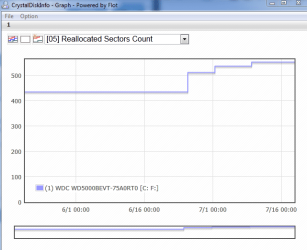
The SMART score is still 134. Oh, I have a graph from CrystalDiskInfo (attached). When I first checked it, the 'raw value' was 435 and now it's 553. Shutdown time just now was 27 minutes, but that was from a busy session - betting it'd still be 23 from a clean boot. If it didn't take half an hour, I'd test this theory.

Thanks, but I really don't trust myself to work on hardware - I'd sooner pay for it and have someone else to blame afterwards! When I graduate, I'll get a desktop I can tinker with, but until then I'm stuck with laptops.
 

Attachments

  • Capture.PNG
    Capture.PNG
    12.3 KB · Views: 1
Last edited:

My Computer My Computer

At a glance

Microsoft Windows 7 Home Premium 64-bit 7601 ...Intel(R) Core(TM) i3 CPU M 380 @ 2.53GHz4.00 GBATI Mobility Radeon HD 5470
OS
Microsoft Windows 7 Home Premium 64-bit 7601 Multiprocessor Free Service Pack 1
CPU
Intel(R) Core(TM) i3 CPU M 380 @ 2.53GHz
Motherboard
Dell Inc. 005WC3
Memory
4.00 GB
Graphics Card(s)
ATI Mobility Radeon HD 5470
Sound Card
(1) ATI High Definition Audio Device (2) High Definition A
Screen Resolution
1366 x 768 x 32 bits (4294967296 colors) @ 60 Hz
Hard Drives
(1) WDC WD5000BEVT-75A0RT0 (2) BUFFALO External HDD USB Device
Have you run the HD maker's extended CD diagnostics/repair test to get a definitive answer on the HD's state? A 27 minute shutdown could well mean a failing HD and the Disk Check was questionable.
 
How soon will you be able to get a new drive installed? Are you going to have to continue using this one until then, or do you have another machine that you can use?

BTW, a bad "reallocated sectors count" constitutes a valid WD warranty replacement. Might want to look into that.
 

My Computer My Computer

At a glance

Windows 7 Ultimate x64
OS
Windows 7 Ultimate x64
Here's the results of the WD diagnostic.

Test Option: EXTENDED TEST
Model Number: WDC WD5000BEVT-75A0RT0
Unit Serial Number: WD-WXR1EB0XYD30
Firmware Number: 01.01A01
Capacity: 500.11 GB
SMART Status: FAIL
Test Result: PASS
Test Time: 10:11:48, July 19, 2012

I didn't know that separate parts might have their own warranties. I did some googling and none of the tools where you enter your serial number would work for me, so I looked at this list: WD Support / Warranty Services / End User / Worldwide Warranty Policy and Limitations My part number has 'BEVT' in it - does that mean it's a Scorpio Blue drive, and thus under warranty since I bought it new in March 2011? (I'm in the UK, so under 'Europe'.) Where do I go from here?

Scorpio Blue is a very cool name even for a drive that doesn't work.

Edit: I could take the laptop to the shop today, I've just been procrastinating and messing about with diagnostics and things. I know the problem won't go away by itself. I can borrow my mum's laptop for essential stuff like email until I get mine back.

Edit: The WD RMA process just told me that because Dell bought the drive, not me, I have to contact Dell. And my Dell warranty ran out already. That sucks.
 
Last edited:

My Computer My Computer

At a glance

Microsoft Windows 7 Home Premium 64-bit 7601 ...Intel(R) Core(TM) i3 CPU M 380 @ 2.53GHz4.00 GBATI Mobility Radeon HD 5470
OS
Microsoft Windows 7 Home Premium 64-bit 7601 Multiprocessor Free Service Pack 1
CPU
Intel(R) Core(TM) i3 CPU M 380 @ 2.53GHz
Motherboard
Dell Inc. 005WC3
Memory
4.00 GB
Graphics Card(s)
ATI Mobility Radeon HD 5470
Sound Card
(1) ATI High Definition Audio Device (2) High Definition A
Screen Resolution
1366 x 768 x 32 bits (4294967296 colors) @ 60 Hz
Hard Drives
(1) WDC WD5000BEVT-75A0RT0 (2) BUFFALO External HDD USB Device
Back
Top