Windows 7 left click battery tray icon

beinghuman

New member
Local time
12:37 PM
Messages
9
Hello,

I'm having issues with the left click of the battery tray icon. When I click on it nothing shows up. In Vista, it would show up a tiny little window similar to the network sys tray icon. The battery window would allow you to switch power profiles. However, there is nothing that shows up when I left click or left double click on the battery tray icon. This has been a problem ever since the upgrade to windows 7.


Here is a screencap of the icon I am referring to (it's the battery on the left):
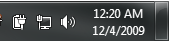
5iOMW.png


Thanks in advance for the help.
 

My Computer My Computer

OS
Windows 7 Home Premium 32-bit
Hello BeingHuman, and welcome to Seven Forums.

You should be able to also right click on it and click on Power Options to select a new power profile as well for now, but you might see if restarting the computer may be able to restore the left click function.

Hope this helps,
Shawn
 

My Computer My Computer

Computer type
PC/Desktop
Computer Manufacturer/Model Number
Self built custom
OS
64-bit Windows 11 Pro for Workstations
CPU
Intel i7-8700K OC'd to 5 GHz
Motherboard
ASUS ROG Maximus XI Formula Z390
Memory
64 GB (4x16GB) G.SKILL TridentZ RGB DDR4 3600 MHz
Graphics Card(s)
ASUS ROG-STRIX-GTX1080TI-O11G-GAMING
Sound Card
Integrated
Monitor(s) Displays
2 x Samsung Odyssey G7 27"
Screen Resolution
2560x1440
Hard Drives
1TB Samsung 990 PRO M.2,
4TB Samsung 990 PRO PRO M.2,
TerraMaster F8 SSD Plus NAS
PSU
Seasonic Prime Titanium 850W
Case
Thermaltake Core P3
Cooling
Corsair Hydro H115i
Keyboard
Logitech wireless K800
Mouse
Logitech MX Master 4
Internet Speed
2 Gb/s Download and 100 Mb/s Upload
Antivirus
Malwarebyte Anti-Malware Premium
Browser
Google Chrome
Other Info
Logitech Z625 speaker system,
Logitech BRIO 4K Pro webcam,
HP Color LaserJet Pro MFP M477fdn,
APC SMART-UPS RT 1000 XL - SURT1000XLI,
Galaxy S23 Plus phone
Right clicking the power icon on my laptop gives me 4 options:

Adjust Sceen Brightness
Power Options
Windows Mobility Center
Turn System Icons on or OFF

7 no longer has the options you are looking for (Max. Battery drain for little performance increase). Power Options gives you two options:

Balanced
Power Saver

Have no fear if you PC needs the extra CPU it will ramp it up on its own.
 

My Computer My Computer

Computer Manufacturer/Model Number
Toshiba L355D-7901
OS
Windows 7 X64
CPU
AMD Turion™ X2 Dual-Core Mobile Processor RM-72
Motherboard
AMD M780G chipset
Memory
4GB PC6400 DDR2 SDRAM
Graphics Card(s)
ATI Radeon™ 3100 Graphics
Sound Card
Realtek High Definition Audio
Monitor(s) Displays
17.0” diagonal widescreen TruBrite® TFT LCD
Screen Resolution
1440x900
Hard Drives
250GB (5400 RPM) Serial ATA
Mouse
Microsoft Bluetooth Notebook Mouse 5000
Right clicking the power icon on my laptop gives me 4 options:

Adjust Sceen Brightness
Power Options
Windows Mobility Center
Turn System Icons on or OFF

7 no longer has the options you are looking for (Max. Battery drain for little performance increase). Power Options gives you two options:

Balanced
Power Saver

Have no fear if you PC needs the extra CPU it will ramp it up on its own.


What about left clicking the power icon? Or double left clicking? That's the option I'm talking about that seems to be missing.
 

My Computer My Computer

OS
Windows 7 Home Premium 32-bit
Hello BeingHuman, and welcome to Seven Forums.

You should be able to also right click on it and click on Power Options to select a new power profile as well for now, but you might see if restarting the computer may be able to restore the left click function.

Hope this helps,
Shawn


No, restarting does not help at all.
 

My Computer My Computer

OS
Windows 7 Home Premium 32-bit
Right clicking the power icon on my laptop gives me 4 options:

Adjust Sceen Brightness
Power Options
Windows Mobility Center
Turn System Icons on or OFF

7 no longer has the options you are looking for (Max. Battery drain for little performance increase). Power Options gives you two options:

Balanced
Power Saver

Have no fear if you PC needs the extra CPU it will ramp it up on its own.


What about left clicking the power icon? Or double left clicking? That's the option I'm talking about that seems to be missing.

My bad left click is what I meant and ya the options your looking for have been removed. So when you left click you should see:

Adjust Sceen Brightness
Power Options
Windows Mobility Center
Turn System Icons on or OFF

no Max. performance you dont have any options at all?
 

My Computer My Computer

Computer Manufacturer/Model Number
Toshiba L355D-7901
OS
Windows 7 X64
CPU
AMD Turion™ X2 Dual-Core Mobile Processor RM-72
Motherboard
AMD M780G chipset
Memory
4GB PC6400 DDR2 SDRAM
Graphics Card(s)
ATI Radeon™ 3100 Graphics
Sound Card
Realtek High Definition Audio
Monitor(s) Displays
17.0” diagonal widescreen TruBrite® TFT LCD
Screen Resolution
1440x900
Hard Drives
250GB (5400 RPM) Serial ATA
Mouse
Microsoft Bluetooth Notebook Mouse 5000
Zone,

When I left click on the laptop, I still get the two Power Plan options for a quick change and the Power Options link.
 

My Computer My Computer

Computer type
PC/Desktop
Computer Manufacturer/Model Number
Self built custom
OS
64-bit Windows 11 Pro for Workstations
CPU
Intel i7-8700K OC'd to 5 GHz
Motherboard
ASUS ROG Maximus XI Formula Z390
Memory
64 GB (4x16GB) G.SKILL TridentZ RGB DDR4 3600 MHz
Graphics Card(s)
ASUS ROG-STRIX-GTX1080TI-O11G-GAMING
Sound Card
Integrated
Monitor(s) Displays
2 x Samsung Odyssey G7 27"
Screen Resolution
2560x1440
Hard Drives
1TB Samsung 990 PRO M.2,
4TB Samsung 990 PRO PRO M.2,
TerraMaster F8 SSD Plus NAS
PSU
Seasonic Prime Titanium 850W
Case
Thermaltake Core P3
Cooling
Corsair Hydro H115i
Keyboard
Logitech wireless K800
Mouse
Logitech MX Master 4
Internet Speed
2 Gb/s Download and 100 Mb/s Upload
Antivirus
Malwarebyte Anti-Malware Premium
Browser
Google Chrome
Other Info
Logitech Z625 speaker system,
Logitech BRIO 4K Pro webcam,
HP Color LaserJet Pro MFP M477fdn,
APC SMART-UPS RT 1000 XL - SURT1000XLI,
Galaxy S23 Plus phone
... Power Options gives you two options:

Balanced
Power Saver
...
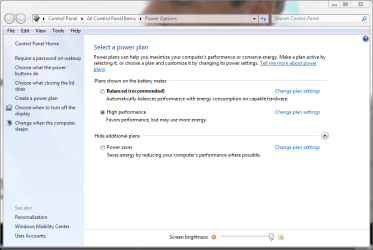
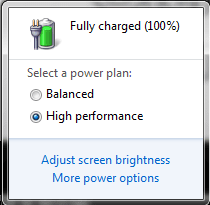
There are three power options as seen here:

power_options2.PNG

Left clicking the power icon lets you choose between balanced and High Performance or Power Saver plans (depending on which one of these two has been last used). Balanced is always shown. You also get links to adjust screen brightness and power plan options.

power_options.PNG

Kari
 

My Computer My Computer

Computer type
Laptop
Computer Manufacturer/Model Number
HP ENVY 17-1150eg
OS
Windows 10 Pro x64 EN-GB
CPU
1.6 GHz Intel Core i7-720QM Processor
Memory
6 GB
Graphics Card(s)
ATI Mobility Radeon HD 5850 Graphics
Sound Card
Beats sound system with integrated subwoofer
Monitor(s) Displays
17" laptop display, 22" LED and 32" Full HD TV through HDMI
Screen Resolution
1600*900 (1), 1920*1080 (2&3)
Hard Drives
Internal: 2 x 500 GB SATA Hard Disk Drive 7200 rpm
External: 2TB for backups, 3TB USB3 network drive for media
Cooling
As Envy runs a bit warm, I have it on a Cooler Master pad
Keyboard
Logitech diNovo Media Desktop Laser (bluetooth)
Mouse
Logitech Performance Mouse MX
Internet Speed
50/10 Mbps VDSL
Antivirus
Windows Defender 4.3.9431.0
Browser
Maxthon 3.5.2., IE11
... Power Options gives you two options:

Balanced
Power Saver
...
There are three power options as seen here:

View attachment 40585

Left clicking the power icon lets you choose between balanced and High Performance or Power Saver plans (depending on which one of these two has been last used). Balanced is always shown. You also get links to adjust screen brightness and power plan options.

View attachment 40584

Kari


View attachment 40584

This is what doesn't appear when I left click or left double click the power icon. Nothing at all appears.

I have an asus laptop. So I installed power4gear hybrid. This is not the problem however because when I uninstalled it the left click window still didn't appear. This all happened after I upgraded to windows 7 home premium 32-bit from windows vista home premium 32-bit

Thanks.
 

My Computer My Computer

OS
Windows 7 Home Premium 32-bit
Right clicking the power icon on my laptop gives me 4 options:

Adjust Sceen Brightness
Power Options
Windows Mobility Center
Turn System Icons on or OFF

7 no longer has the options you are looking for (Max. Battery drain for little performance increase). Power Options gives you two options:

Balanced
Power Saver

Have no fear if you PC needs the extra CPU it will ramp it up on its own.


What about left clicking the power icon? Or double left clicking? That's the option I'm talking about that seems to be missing.

My bad left click is what I meant and ya the options your looking for have been removed. So when you left click you should see:

Adjust Sceen Brightness
Power Options
Windows Mobility Center
Turn System Icons on or OFF

no Max. performance you dont have any options at all?


I have all the options and then some (custom plans). I just can't get that window to appear on left click or left double click.

Am I really not expressing this well enough, it seems simple enough to me.


Maybe I should say on primary click rather than left click because some may be left-handed and it may be right click for them.
 

My Computer My Computer

OS
Windows 7 Home Premium 32-bit
... Power Options gives you two options:

Balanced
Power Saver
...
There are three power options as seen here:

View attachment 40585

Left clicking the power icon lets you choose between balanced and High Performance or Power Saver plans (depending on which one of these two has been last used). Balanced is always shown. You also get links to adjust screen brightness and power plan options.

View attachment 40584

Kari

I'm in no way calling you a lair but I do not have these options in 7, I had them in Vista. My 7 is a clean install with all drivers provided by Toshiba so maybe that makes a difference. I have exactly what I posted and I don't beleive their is anything wrong with my install.
 

My Computer My Computer

Computer Manufacturer/Model Number
Toshiba L355D-7901
OS
Windows 7 X64
CPU
AMD Turion™ X2 Dual-Core Mobile Processor RM-72
Motherboard
AMD M780G chipset
Memory
4GB PC6400 DDR2 SDRAM
Graphics Card(s)
ATI Radeon™ 3100 Graphics
Sound Card
Realtek High Definition Audio
Monitor(s) Displays
17.0” diagonal widescreen TruBrite® TFT LCD
Screen Resolution
1440x900
Hard Drives
250GB (5400 RPM) Serial ATA
Mouse
Microsoft Bluetooth Notebook Mouse 5000
... Power Options gives you two options:

Balanced
Power Saver
...
There are three power options as seen here:

View attachment 40585

Left clicking the power icon lets you choose between balanced and High Performance or Power Saver plans (depending on which one of these two has been last used). Balanced is always shown. You also get links to adjust screen brightness and power plan options.

View attachment 40584

Kari

I'm in no way calling you a lair but I do not have these options in 7, I had them in Vista. My 7 is a clean install with all drivers provided by Toshiba so maybe that makes a difference. I have exactly what I posted and I don't beleive their is anything wrong with my install.

I know you're not calling me a liar. Kari is the one that posted the screenshot. However, that is the functionality I'm missing and Kari seems to have it. Whatever kind of bug it is it seems that you have it as well.
 

My Computer My Computer

OS
Windows 7 Home Premium 32-bit
I honestly don't know what to say. I am not able to reproduce your issue. You could try to turn the power icon off (right click notification are, choose Properties), reboot and turn it on again.

Kari
 

My Computer My Computer

Computer type
Laptop
Computer Manufacturer/Model Number
HP ENVY 17-1150eg
OS
Windows 10 Pro x64 EN-GB
CPU
1.6 GHz Intel Core i7-720QM Processor
Memory
6 GB
Graphics Card(s)
ATI Mobility Radeon HD 5850 Graphics
Sound Card
Beats sound system with integrated subwoofer
Monitor(s) Displays
17" laptop display, 22" LED and 32" Full HD TV through HDMI
Screen Resolution
1600*900 (1), 1920*1080 (2&3)
Hard Drives
Internal: 2 x 500 GB SATA Hard Disk Drive 7200 rpm
External: 2TB for backups, 3TB USB3 network drive for media
Cooling
As Envy runs a bit warm, I have it on a Cooler Master pad
Keyboard
Logitech diNovo Media Desktop Laser (bluetooth)
Mouse
Logitech Performance Mouse MX
Internet Speed
50/10 Mbps VDSL
Antivirus
Windows Defender 4.3.9431.0
Browser
Maxthon 3.5.2., IE11
This is what I have on my Toshiba

Right Click

Power1.jpg


Left Click

Untitled.jpg


Power Options

Power2.jpg
 

My Computer My Computer

Computer Manufacturer/Model Number
Toshiba L355D-7901
OS
Windows 7 X64
CPU
AMD Turion™ X2 Dual-Core Mobile Processor RM-72
Motherboard
AMD M780G chipset
Memory
4GB PC6400 DDR2 SDRAM
Graphics Card(s)
ATI Radeon™ 3100 Graphics
Sound Card
Realtek High Definition Audio
Monitor(s) Displays
17.0” diagonal widescreen TruBrite® TFT LCD
Screen Resolution
1440x900
Hard Drives
250GB (5400 RPM) Serial ATA
Mouse
Microsoft Bluetooth Notebook Mouse 5000
I honestly don't know what to say. I am not able to reproduce your issue. You could try to turn the power icon off (right click notification are, choose Properties), reboot and turn it on again.

Kari


Tried it a million times. Is there anyway I can uninstall the power tray app and reinstall it? It works with drivers and it's worth a shot. Though, I don't really know how to go about uninstall this feature.
 

My Computer My Computer

OS
Windows 7 Home Premium 32-bit

My Computer My Computer

Computer type
Laptop
Computer Manufacturer/Model Number
HP ENVY 17-1150eg
OS
Windows 10 Pro x64 EN-GB
CPU
1.6 GHz Intel Core i7-720QM Processor
Memory
6 GB
Graphics Card(s)
ATI Mobility Radeon HD 5850 Graphics
Sound Card
Beats sound system with integrated subwoofer
Monitor(s) Displays
17" laptop display, 22" LED and 32" Full HD TV through HDMI
Screen Resolution
1600*900 (1), 1920*1080 (2&3)
Hard Drives
Internal: 2 x 500 GB SATA Hard Disk Drive 7200 rpm
External: 2TB for backups, 3TB USB3 network drive for media
Cooling
As Envy runs a bit warm, I have it on a Cooler Master pad
Keyboard
Logitech diNovo Media Desktop Laser (bluetooth)
Mouse
Logitech Performance Mouse MX
Internet Speed
50/10 Mbps VDSL
Antivirus
Windows Defender 4.3.9431.0
Browser
Maxthon 3.5.2., IE11

My Computer My Computer

Computer Manufacturer/Model Number
Toshiba L355D-7901
OS
Windows 7 X64
CPU
AMD Turion™ X2 Dual-Core Mobile Processor RM-72
Motherboard
AMD M780G chipset
Memory
4GB PC6400 DDR2 SDRAM
Graphics Card(s)
ATI Radeon™ 3100 Graphics
Sound Card
Realtek High Definition Audio
Monitor(s) Displays
17.0” diagonal widescreen TruBrite® TFT LCD
Screen Resolution
1440x900
Hard Drives
250GB (5400 RPM) Serial ATA
Mouse
Microsoft Bluetooth Notebook Mouse 5000
We understand your issue, we just have no fix or solution to offer. I'll be back if I can find something.

Kari
 

My Computer My Computer

Computer type
Laptop
Computer Manufacturer/Model Number
HP ENVY 17-1150eg
OS
Windows 10 Pro x64 EN-GB
CPU
1.6 GHz Intel Core i7-720QM Processor
Memory
6 GB
Graphics Card(s)
ATI Mobility Radeon HD 5850 Graphics
Sound Card
Beats sound system with integrated subwoofer
Monitor(s) Displays
17" laptop display, 22" LED and 32" Full HD TV through HDMI
Screen Resolution
1600*900 (1), 1920*1080 (2&3)
Hard Drives
Internal: 2 x 500 GB SATA Hard Disk Drive 7200 rpm
External: 2TB for backups, 3TB USB3 network drive for media
Cooling
As Envy runs a bit warm, I have it on a Cooler Master pad
Keyboard
Logitech diNovo Media Desktop Laser (bluetooth)
Mouse
Logitech Performance Mouse MX
Internet Speed
50/10 Mbps VDSL
Antivirus
Windows Defender 4.3.9431.0
Browser
Maxthon 3.5.2., IE11
I found the problem.

The problem was a program that I forgot to uninstall after my upgrade to Windows 7. The program taskbar shuffle was disrupting it.

So, there is the answer to all you googlers out there, just uninstall taskbar shuffle and all is new.

beinghuman
 

My Computer My Computer

OS
Windows 7 Home Premium 32-bit
Back
Top