
Connecting to Internet : Tray Icon

Hikermann

New member
Member
Local time
2:53 AM
Messages
61
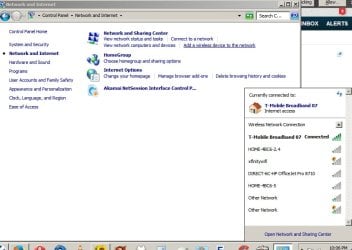
Windows 7 - Use a T-Mobile wireless HotSpot for connection; when first connecting with it a couple of years ago an icon appeared in the Tray (guess that's what it's called -- bottom of the screen); I'd turn the HotSpot on, then click on the icon and a pop-up would appear ("Open Network and Sharing Center"): there, I'd click on my T-Mobile connection and then get on with wwwLife. For some unknown reason the tray icon disappeared this past week; T-Mobile disclaims any information or relationship with that icon, suggesting it's a Windows issue. Deleated and reloaded T-Mobile HotSpot, so that's all working OK; would, however, like to have the icon back rather than having to always go Control Panel - Network and Internet - Connect to a Network to get the popup to show up. Anyone have any info about how to 1) relocate the icon, and 2) repin it to the Taskbar? Much appreciated!
 

Attachments
  • Connect.2.JPG
    Connect.2.JPG
    69.5 KB · Views: 1

My Computer My Computer

At a glance

Windows 7 Home Premium (x64) Service Pack 1
Computer type
PC/Desktop
Computer Manufacturer/Model Number
Hard Drives NW
OS
Windows 7 Home Premium (x64) Service Pack 1
Hi, I think that you are saying that the Icon from your quick launch(Tray as you call it) is missing.
If you click on your Windows Icon (bottom left) and then click "All Programs".
Find the folder that is your T-Mobile Broadband 07 and open it.
The line that you would use to launch the application right click and hover over "Send To".
Then click on "Desktop (create shortcut)"
Now go to the desktop and find the new shortcut.
Left click on it and drag it to the quick launch and release.
You will be asked if you would like to Pin this....Yes.

Is that what you require.
P.S. if the short cut already exists on your desktop then just follow the last part of my instruction.
 

My Computer My Computer

At a glance

Windows 7 Ultimate x64 SP1 OEMIntel i7 3930KKingston Genesis KHX2133C11D3K4/32GAsus RTX 2070 Ti Turbo fan series
Computer type
PC/Desktop
Computer Manufacturer/Model Number
Owner Builder
OS
Windows 7 Ultimate x64 SP1 OEM
CPU
Intel i7 3930K
Motherboard
Asus X79 Deluxe
Memory
Kingston Genesis KHX2133C11D3K4/32G
Graphics Card(s)
Asus RTX 2070 Ti Turbo fan series
Sound Card
Creative Sound Blaster ZXR
Monitor(s) Displays
Samsung U32J39 UHD
Screen Resolution
3840 x 2160
Hard Drives
Samsung 860 Pro 256 GB
OCZ Vertex 4 512GB
Western Digital Black 4TB
PSU
Corsair AX850
Case
Gigabyte
Cooling
Push - Pull 120 mm Noctua PWM, Scythe Big Shuriken 2 Rev. B
Keyboard
Logitech K800 Backlit
Mouse
Logitech MX2 Master
Internet Speed
NBN 25 Mbps
Antivirus
Kaspersky Internet Security
Browser
Mozilla FireFox
Other Info
TP-Link Archer VR600v
Sennheiser TR220 WiFi Head Phones.
Thanks for your response. Unfortunately, there is nothing in All Programs related to T-Mobile Broadband . . . so don't know where to go with what you've suggested. AND THEN: I just clicked on the Show Hidden Icons uparrow and found T-Mobile hiding in there; dragged it back to the taskbar and all appears well in the world now!

Appreciate your information.
 

My Computer My Computer

At a glance

Windows 7 Home Premium (x64) Service Pack 1
Computer type
PC/Desktop
Computer Manufacturer/Model Number
Hard Drives NW
OS
Windows 7 Home Premium (x64) Service Pack 1
Hi Hikerman,

just a comment
looking at your screenshot

your taskbar looks full-up, what i think happened
it moved it to hidden because of the lack of space, if thats the case suspect its moved another icon..

Roy
 

My Computer My Computer

At a glance

W7 home premium 32bit/W7HP 64bit/w10 tp insid...E5300 dual core3gbNvidia Geforce 7100 Nforce 630i
Computer type
PC/Desktop
Computer Manufacturer/Model Number
medionl/Aspire 6930G/acer x55a
OS
W7 home premium 32bit/W7HP 64bit/w10 tp insider ring
CPU
E5300 dual core
Motherboard
medion MS7366
Memory
3gb
Graphics Card(s)
Nvidia Geforce 7100 Nforce 630i
Monitor(s) Displays
avixc
Internet Speed
n (isp resticted to 72)
Antivirus
mse/pands
Browser
palemoon
Other Info
Belkin Fd7050 n USB using Railink RT2870 drivers, more upto date
You can get more room on the taskbar by right clicking on it, clicking on Properties, then, under the Taskbar tab, clicking on small icons. That will make the icons on the taskbar smaller, giving you more room for more icons without losing any screen real estate. To get the missing icon back (if it doesn't reappear on its own), left click on the little white arrow in the notification tray, then, at the bottom of the little window that pops up, left click on Customize. Scroll down in the window that pops up until you find the missing icon. Click on the down arrow in the box to the right of the icon and click on "Show icon and notifications". You may have to reboot afterwards to get the icon to show up.
 

My Computer My Computer

At a glance

Win 7 Ultimate 64 bitIntel i7-3930KKingston HyperX Genesis 32GB Kit (8x4GB Modul...MSI R7850 Twin Frozr 2GD5/OC Radeon HD 7850 2...
Computer type
PC/Desktop
Computer Manufacturer/Model Number
Custom Build
OS
Win 7 Ultimate 64 bit
CPU
Intel i7-3930K
Motherboard
ASUS P9X79 WS
Memory
Kingston HyperX Genesis 32GB Kit (8x4GB Modules) 1600MHz DDR
Graphics Card(s)
MSI R7850 Twin Frozr 2GD5/OC Radeon HD 7850 2GB 256-bit GDDR
Sound Card
Asus Xonar Essence STX
Monitor(s) Displays
3x Asus VG248QE 24", Vizio 32" TV
Screen Resolution
1920 x 1080, ?
Hard Drives
Samsung 128GB 840 Pro SSD (1),
Samsung 4TB 850 EVO SSDs (4)
Samsung 4TB 850 EVO SSDs (16) external backup drives used in 2.5" hot swap bays in the computer.
PSU
Corsair HX750w
Case
Antec Two Hundred v2 (modified)
Cooling
Cooler Master GeminII S524 120mm (fan replaced with a 140mm)
Keyboard
Logitech G510s
Mouse
Logitech M525 (two in use)
Internet Speed
=< 32Mbps down, 8Mbps up
Antivirus
AVAST!, MBAM, SAS, Spybot S&D (all but MBAM free) Glary Util
Browser
IE11
Other Info
LSI 9211-8i HBA card (8 SATA III ports), 2.5" & 3.5" Hot Swap Bays, HooToo HT-CR001 PCI-E to USB 3.0 Internal Hub + 6 Slot Card Reader, and LG Model CH12LS28 BD-ROM Optical Drive. Also, ScanSnap S1500 ADF duplexing scanner, Canon 9000F flat bed scanner, Corsair SP2500 2.1 speakers, Samsung CLP 415nw laser color printer, Cyberpower PP2200SW UPS
Back
Top