Windows 7 : Local disk F:/ access denied

rahul1992

New member
Local time
9:30 AM
Messages
20
Hello sir/madam
i have windows 7 64 bit home premium dell laptop. Recently i am having some problem regarding the local disk F:/. I don't have any idea from where this drive originate and it's showing 0 bytes as disk space and whenever i am entering a CD no CD drive is coming and on autoplay following message is showing : F:/ drive access denied. I have reinstalled cd drivers from dell website but it's not helping. It would grateful of you if you will help me.
 

My Computer My Computer

OS
windows 7 home premium 64bit
Please try this go to start>control panel>administrative tasks>Computer management>Disk management

Right click CD drive and choose properties>driver tab click on uninstall, then go back to Disk management got to action menu choose re-scan disks it will re-add drive and see if your issue has gone.
 

My Computer My Computer

Computer Manufacturer/Model Number
HP Compaq 6715B
OS
Windows 7 Ultimate x64
CPU
AMD turion 64x2 TL-64 2.2Ghz
Motherboard
HC030
Memory
Sodimm DDR2 4GB
Graphics Card(s)
ATI Radeon 1250 128MB IGP
Hard Drives
Fujitsu Siemens 500GB sata 3.0 Gb/s
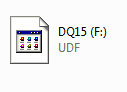
Thecyberman, i followed what you when i re-scan disks cd drive reappears but as soon as i entered a cd it again appears as a local disk with access denied. There is UDF written below the drive.dd.PNG
 

My Computer My Computer

OS
windows 7 home premium 64bit
Can you please post a screenshot of computer with the drive showing please?
 

My Computer My Computer

Computer Manufacturer/Model Number
HP Compaq 6715B
OS
Windows 7 Ultimate x64
CPU
AMD turion 64x2 TL-64 2.2Ghz
Motherboard
HC030
Memory
Sodimm DDR2 4GB
Graphics Card(s)
ATI Radeon 1250 128MB IGP
Hard Drives
Fujitsu Siemens 500GB sata 3.0 Gb/s
Post a snapshot of Disk Management:

To open Disk Management, press Windows key+r, type diskmgmt.msc and press Enter or click GO. Make it full screen.

See here: How to Use the Snipping Tool in Vista - Vista Forums (says it's for Vista but also works with Win 7).

Once you have the image saved, click on the Paperclip Icon next to the Smiley Icon.
In the Manage Attachments window, click Browse and navigate to where you saved the image and select it.
Click the Upload button.
Close the Manage Attachments window.
Click on the Paperclip Icon again and select the image you uploaded. It will be placed in your post.
 

My Computer My Computer

Computer type
PC/Desktop
Computer Manufacturer/Model Number
Lenovo IdeaCenter 450
OS
Windows 10 Pro X64
CPU
Intel Quad Core i7-4770 @ 3.4Ghz
Memory
16.0GB PC3-12800 DDR3 SDRAM 1600 MHz
Graphics Card(s)
Intel Integrated HD Graphics
Sound Card
Realtek HD Audio
Monitor(s) Displays
HP 22" LCD
Screen Resolution
1680 x 1050
Hard Drives
250GB Samsung EVO SATA-3 SSD
2TB Seagate ST2000DM001 SATA-2
1.5TB Seagate ST3150041AS SATA
Keyboard
Dell USB
Mouse
Lenovo USB
Internet Speed
Cable via Road Runner 3MB Upload, 30MB Download
Antivirus
Windows Defender, MBAM Pro, MBAE
Browser
Seamonkey
Other Info
UEFI/GPT
PLDS DVD-RW DH16AERSH
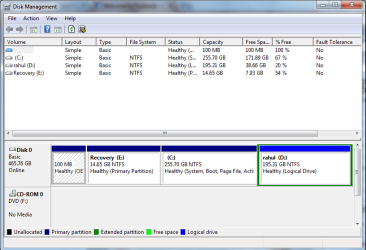
thecyberman and zturker thanks for the reply, this is the snapshot of disk management window diskmgmt.PNG
 

My Computer My Computer

OS
windows 7 home premium 64bit
and here is the snapshot of computer with drives
computer.PNG
 

My Computer My Computer

OS
windows 7 home premium 64bit
It is listing drive F as a Local Disk so is not the CD/DVD drive but another partition of your hard drive.

Have you or someone else created this drive? adjusting the user permissions should recitify this. See guide below and step 4 is the one you need to do and add your user account if a standard user account set permissions Read and Execute and List Folder Contents and Read permssions and click apply and ok and ok again.

To access the F drive right click on it choose properties>security tab then follow instructions.

Users and Permissions
 

My Computer My Computer

Computer Manufacturer/Model Number
HP Compaq 6715B
OS
Windows 7 Ultimate x64
CPU
AMD turion 64x2 TL-64 2.2Ghz
Motherboard
HC030
Memory
Sodimm DDR2 4GB
Graphics Card(s)
ATI Radeon 1250 128MB IGP
Hard Drives
Fujitsu Siemens 500GB sata 3.0 Gb/s
it is showing as a local disk on my computer but whenever i am inserting a CD this F:/ drive converts into CD drive but its access is denied and it's also not showing on disk management.
 

My Computer My Computer

OS
windows 7 home premium 64bit
Did you follow my advice in my last post?

Also can you post a screenshot of device manager with the DVD drive expanded and opened under general please?
 
Last edited:

My Computer My Computer

Computer Manufacturer/Model Number
HP Compaq 6715B
OS
Windows 7 Ultimate x64
CPU
AMD turion 64x2 TL-64 2.2Ghz
Motherboard
HC030
Memory
Sodimm DDR2 4GB
Graphics Card(s)
ATI Radeon 1250 128MB IGP
Hard Drives
Fujitsu Siemens 500GB sata 3.0 Gb/s
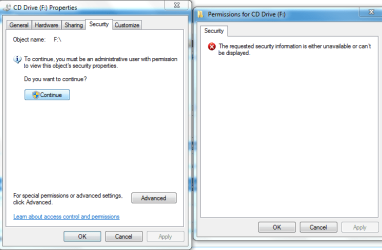
yes cyber man i followed your instructions but on clicking the security tab following windows showed up Capture.PNG

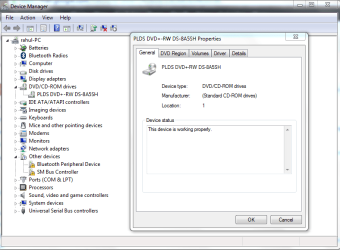
and here is the snapshot of device manager dvd drive expanded and opened under general
Capture1.PNG
 

My Computer My Computer

OS
windows 7 home premium 64bit
You will have to log on as an administrator to view the security permissions or provide credentials for the administrator if you were prompted to do so.

The DVD drive looks ok from device manager does not seem like any problems there.
 

My Computer My Computer

Computer Manufacturer/Model Number
HP Compaq 6715B
OS
Windows 7 Ultimate x64
CPU
AMD turion 64x2 TL-64 2.2Ghz
Motherboard
HC030
Memory
Sodimm DDR2 4GB
Graphics Card(s)
ATI Radeon 1250 128MB IGP
Hard Drives
Fujitsu Siemens 500GB sata 3.0 Gb/s
Back
Top