

B0bbyP
New member
- Local time
- 1:25 AM
- Messages
- 9
Hi Everyone,
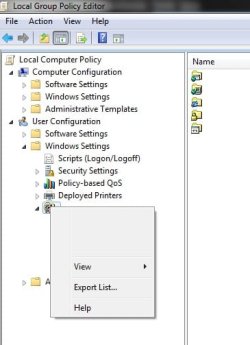
Does anyone know how to remove this orphaned Internet Explorer Maintenance Menu and its subs in Local Group Policy Editor, User Config, Windows Settings? (see screenshot attached)
I am fully aware of what this is and the fact that it's related to upgrading to IE 11.
I do not use IE or have any policies that I care about or know of and I have already tried to do a Browser Reset on it to no avail. I do have some old Dial-up and VPN RAS entries in Internet Settings but I do not use them anymore and they have been backed up anyway.
I have found some registry keys that I think may do the trick but I figured I would see if anyone has a definitive answer before I try a manual removal of them just to avoid any potential headaches.
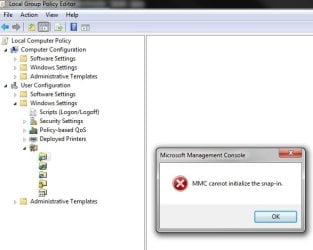
I also get an MMC Snap-in error when I try to open one of the sub-menu options (see screenshot #2)
TIA,
BP
Does anyone know how to remove this orphaned Internet Explorer Maintenance Menu and its subs in Local Group Policy Editor, User Config, Windows Settings? (see screenshot attached)
I am fully aware of what this is and the fact that it's related to upgrading to IE 11.
I do not use IE or have any policies that I care about or know of and I have already tried to do a Browser Reset on it to no avail. I do have some old Dial-up and VPN RAS entries in Internet Settings but I do not use them anymore and they have been backed up anyway.
I have found some registry keys that I think may do the trick but I figured I would see if anyone has a definitive answer before I try a manual removal of them just to avoid any potential headaches.
I also get an MMC Snap-in error when I try to open one of the sub-menu options (see screenshot #2)
TIA,
BP
Attachments
Last edited:
My Computer
At a glance
Windows 7 Ultimate x64
- Computer type
- PC/Desktop
- OS
- Windows 7 Ultimate x64

