Solved Windows 7: Lost disc space; unable to boot OS?

Kaoruko

New member
Local time
5:36 AM
Messages
20
Alright.. I have two computers that I'm dealing with here. The first is my laptop, which is obviously running fine. Recently when I was doing a system cleanup, I defragged, cleaned the registry, uninstalled unwanted programs and such.. I do this at least once a month; I'm quite compulsive about keeping my PC running at decent speed.

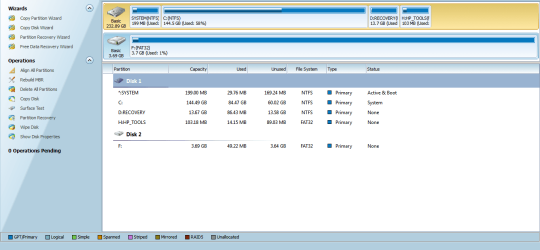
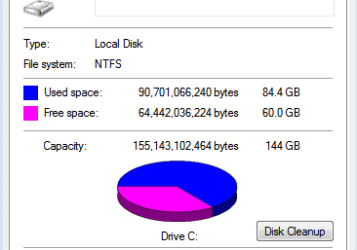
I went to compare my new disk space to the previous and noticed I have 65 GB free of 144 GB; the problem is that my drive is supposed to be a 218 gigabyte drive. I checked in the partition managing and the disk was reported to have 218, but "Computer" shows only 144.

I am also unable to create a System Repair Disk. The error I receive is "The Parameter is incorrect (0x80070057)". Any help with these are greatly appreciated.


Now, as for the other computer. It is a desktop PC, about 700 GB disk space. I recently created a partition and new volume, and upon rebooting Windows 7 is no longer booting, instead it seems to be booting under the new drive; which only has compressed data for Ubuntu 12. So all it does is freeze after the BIOS loads, showing a flashing underscore.. I have no Installation Disk, and the BIOS seems to be running quite well; (Also no hint of recovery options there as far as I can tell.)


The laptop I am using is a Compaq Presario CQ57; running Home Premuim.

The desktop is a Dell.. Unsure of the model or what Version of Windows 7 it is running however.
 

My Computer My Computer

At a glance

Windows 7 64 bit1 Ghz2 GBRadeon HD 6250
Computer Manufacturer/Model Number
Compaq Presario
OS
Windows 7 64 bit
CPU
1 Ghz
Memory
2 GB
Graphics Card(s)
Radeon HD 6250
Sound Card
RealTek HD
Mouse
Logitech Wireless
I went to compare my new disk space to the previous and noticed I have 65 GB free of 144 GB; the problem is that my drive is supposed to be a 218 gigabyte drive. I checked in the partition managing and the disk was reported to have 218, but "Computer" shows only 144.
Hello :)

Let us deal with the issues one by one. Can you post a screenshot of your full screen disk management window ?

To get the disk management window, right click on the computer icon > manage. It will open the computer management window. Click the "disk management" on the left pane. Then upload it :ar: http://www.sevenforums.com/tutorials/9733-screenshots-files-upload-post-seven-forums.html
 

My Computer My Computer

At a glance

Microsoft Windows 10 Pro Insider Preview 64-bitIntel(R) Core(TM) i3-4130 CPU @ 3.40GHzCorsair Vengence 4GB x2 (8.00GB Dual-Channel ...2047MB GeForce GTS 450 (ZOTAC International)
Computer type
PC/Desktop
Computer Manufacturer/Model Number
Self Assembled
OS
Microsoft Windows 10 Pro Insider Preview 64-bit
CPU
Intel(R) Core(TM) i3-4130 CPU @ 3.40GHz
Motherboard
Gigabyte Technology Co., Ltd. B85M-D3H
Memory
Corsair Vengence 4GB x2 (8.00GB Dual-Channel DDR3 @ 798MHz)
Graphics Card(s)
2047MB GeForce GTS 450 (ZOTAC International)
Sound Card
Onboard (Realtek High Definition Audio)
Monitor(s) Displays
LG Flatron E2040T
Screen Resolution
1600x900
Hard Drives
Western Digital 1 TB
Seagate 500 GB
PSU
Corsair VS550
Case
Cooler Master K380
Cooling
Cooler Master Seidon 120V Plus
Keyboard
Logitech MK260r
Mouse
Logitech MK260r
Internet Speed
PMPL Broadband
Antivirus
Windows Defender + MBAM
Browser
Firefox
Other Info
Dell Studio 15" Laptop
Here's the screenshot you requested; I didn;t have any need to upload it since I have a program. (If it's okay to use; otherwise I will upload directly)


Disk Management:

P8yw
 
Last edited by a moderator:

My Computer My Computer

At a glance

Windows 7 64 bit1 Ghz2 GBRadeon HD 6250
Computer Manufacturer/Model Number
Compaq Presario
OS
Windows 7 64 bit
CPU
1 Ghz
Memory
2 GB
Graphics Card(s)
Radeon HD 6250
Sound Card
RealTek HD
Mouse
Logitech Wireless
Rightclick on C drive in Start>Computer to choose Properties, post back a screenshot of your pie chart. Use Snipping Tool in Start Menu, attach file using paper clip in reply box.

Run Disk Check on C with both boxes checked.

Next boot free Partition Wizard bootable CD, post back a camera snap of the drive map and listings. This is more accurate the Disk Mgmt some times.

You may already have system corruption as evidenced by failure to generate Repair CD, and the fact that the two columns in Disk Mgmt actually add up to the size on disk could be further corruption. So run SFC -SCANNOW Command.

On the second computer, Mark Partition Active the Win7 partition or it's 100mb System Reserved partition (preferred if you have it) then run Startup Repair - Run 3 Separate Times
 
I hate snipping tool; but there you go. I'll try what you suggested as well; but I can't create a repair disk (still/yet) to work with the other PC. Capture 2.PNG

--
Capture.PNG
 
Last edited:

My Computer My Computer

At a glance

Windows 7 64 bit1 Ghz2 GBRadeon HD 6250
Computer Manufacturer/Model Number
Compaq Presario
OS
Windows 7 64 bit
CPU
1 Ghz
Memory
2 GB
Graphics Card(s)
Radeon HD 6250
Sound Card
RealTek HD
Mouse
Logitech Wireless

My Computer My Computer

At a glance

Windows 7 64 bit1 Ghz2 GBRadeon HD 6250
Computer Manufacturer/Model Number
Compaq Presario
OS
Windows 7 64 bit
CPU
1 Ghz
Memory
2 GB
Graphics Card(s)
Radeon HD 6250
Sound Card
RealTek HD
Mouse
Logitech Wireless
Yes, those are all possible.

To delete partition : How to Delete Partition

To mark a partition as active : How to Set Active/Inactive partition

But We would suggest to post a camera snap of the partition wizard drive map . before doing anything

There should be a 100 MB hidden partition , named system reserved, at the left side of C. It is to be marked as active first, and tried to boot the computer . If it fails, try to Rebuild MBR with partition wizard , and boot it again.

Let us know what happens there.
 

My Computer My Computer

At a glance

Microsoft Windows 10 Pro Insider Preview 64-bitIntel(R) Core(TM) i3-4130 CPU @ 3.40GHzCorsair Vengence 4GB x2 (8.00GB Dual-Channel ...2047MB GeForce GTS 450 (ZOTAC International)
Computer type
PC/Desktop
Computer Manufacturer/Model Number
Self Assembled
OS
Microsoft Windows 10 Pro Insider Preview 64-bit
CPU
Intel(R) Core(TM) i3-4130 CPU @ 3.40GHz
Motherboard
Gigabyte Technology Co., Ltd. B85M-D3H
Memory
Corsair Vengence 4GB x2 (8.00GB Dual-Channel DDR3 @ 798MHz)
Graphics Card(s)
2047MB GeForce GTS 450 (ZOTAC International)
Sound Card
Onboard (Realtek High Definition Audio)
Monitor(s) Displays
LG Flatron E2040T
Screen Resolution
1600x900
Hard Drives
Western Digital 1 TB
Seagate 500 GB
PSU
Corsair VS550
Case
Cooler Master K380
Cooling
Cooler Master Seidon 120V Plus
Keyboard
Logitech MK260r
Mouse
Logitech MK260r
Internet Speed
PMPL Broadband
Antivirus
Windows Defender + MBAM
Browser
Firefox
Other Info
Dell Studio 15" Laptop
I'm actually considering doing a clean reinstall of windows; and dedicate a 50 GB Partition to Ubuntu from there. I'm having all sorts of problems with my computer; (RAM is supposed to be 2 GB; but its listed as 1.6; and before that it was 1.7). I have an activated copy of windows 7; So as far as my research has led me, I should be able to use my product key to re-install.

(Please correct me on that if I am wrong; I really don't want to lose an expensive OS like this because I simply don't have the money to replace it)
 

My Computer My Computer

At a glance

Windows 7 64 bit1 Ghz2 GBRadeon HD 6250
Computer Manufacturer/Model Number
Compaq Presario
OS
Windows 7 64 bit
CPU
1 Ghz
Memory
2 GB
Graphics Card(s)
Radeon HD 6250
Sound Card
RealTek HD
Mouse
Logitech Wireless

My Computer My Computer

At a glance

Microsoft Windows 10 Pro Insider Preview 64-bitIntel(R) Core(TM) i3-4130 CPU @ 3.40GHzCorsair Vengence 4GB x2 (8.00GB Dual-Channel ...2047MB GeForce GTS 450 (ZOTAC International)
Computer type
PC/Desktop
Computer Manufacturer/Model Number
Self Assembled
OS
Microsoft Windows 10 Pro Insider Preview 64-bit
CPU
Intel(R) Core(TM) i3-4130 CPU @ 3.40GHz
Motherboard
Gigabyte Technology Co., Ltd. B85M-D3H
Memory
Corsair Vengence 4GB x2 (8.00GB Dual-Channel DDR3 @ 798MHz)
Graphics Card(s)
2047MB GeForce GTS 450 (ZOTAC International)
Sound Card
Onboard (Realtek High Definition Audio)
Monitor(s) Displays
LG Flatron E2040T
Screen Resolution
1600x900
Hard Drives
Western Digital 1 TB
Seagate 500 GB
PSU
Corsair VS550
Case
Cooler Master K380
Cooling
Cooler Master Seidon 120V Plus
Keyboard
Logitech MK260r
Mouse
Logitech MK260r
Internet Speed
PMPL Broadband
Antivirus
Windows Defender + MBAM
Browser
Firefox
Other Info
Dell Studio 15" Laptop
Brilliant.. I'll probably do this for both computers concerned here; since they both are Windows 7 H-Premium.

Thanks for the help; if it works I'll mark this as solved (naturally)

However; the location where I'm using internet is quite choppy and downloading a 2.5 GB file is a scary aspect (if the connection falters), so I was wondering where/if I could find a torrent of the image file I need? I only have internet on weekends and for the next few days off and on, and I would like to get this solved as soon as possible.

Thanks again :)
 

My Computer My Computer

At a glance

Windows 7 64 bit1 Ghz2 GBRadeon HD 6250
Computer Manufacturer/Model Number
Compaq Presario
OS
Windows 7 64 bit
CPU
1 Ghz
Memory
2 GB
Graphics Card(s)
Radeon HD 6250
Sound Card
RealTek HD
Mouse
Logitech Wireless
Thread update

Alright. I seem to have solved the problem with my dads computer; today when I get home I'm going to use a downloaded install DVD to repair BOOTMGR.

My computer has a successful dual boot with Ubuntu 12; though I
am still having reports of RAM being less than the installed hardware in my system.

I still cannot create a recovery disk from Windows on my computer.

Any ideas on the RAM issue?
 

My Computer My Computer

At a glance

Windows 7 64 bit1 Ghz2 GBRadeon HD 6250
Computer Manufacturer/Model Number
Compaq Presario
OS
Windows 7 64 bit
CPU
1 Ghz
Memory
2 GB
Graphics Card(s)
Radeon HD 6250
Sound Card
RealTek HD
Mouse
Logitech Wireless
Back
Top