Solved windows 7 magnifier will show ONLY a small rectangle and no controls

phinds

New member
Local time
5:24 AM
Messages
20
I just built a new workstation (finished the hardware build yesterday) and the magnifier worked fine up until this morning. I suspect windows "fixed" something in an automatic upgrade, but it's very strange and I wonder if anyone else has ever seen anything like it.

When activated by my intellimouse's magnifier button it opens up just as it always did, BUT ... the size and on/off control box is not present and the magnification is just in a rectangle that takes up less that a fourth of the screen and cannot be resized.

I can move the box over anything on the screen, all the way to the top/bottom and edges, but I'd really like to have the normal magnifier functionality.

Any thought?

Thanks

P.S. I DID spent some time browsing the "magnifier" answers on this wonderful forum, but did not find anything similar to my problem. I point that out because I hate it when people come to a forum and ask a question that has already been answered upteen times.
 

My Computer My Computer

At a glance

Windows 7 Pro 64 bit version 6.1 (Service Pac...Intel i716 GBi7 on-chip graphics driver
Computer type
PC/Desktop
Computer Manufacturer/Model Number
self built
OS
Windows 7 Pro 64 bit version 6.1 (Service Pack 1)
CPU
Intel i7
Motherboard
Asus Z97 with Intel chipset
Memory
16 GB
Graphics Card(s)
i7 on-chip graphics driver
Hard Drives
Samsung EVO 256Gig boot drive, Seagate 2TB hybrid data drive
Antivirus
Norton
Browser
several, ususally FireFox
The controls are there but they disappear quickly. You have to hurry to catch them.
 

My Computer My Computer

At a glance

Vista, Windows7, Mint Mate, Zorin, Windows 8from 1.6GHz Duo to i7
Computer Manufacturer/Model Number
HP, Dell, Gateway, Toshiba - 4 laptops and 2 desktops
OS
Vista, Windows7, Mint Mate, Zorin, Windows 8
CPU
from 1.6GHz Duo to i7
Monitor(s) Displays
2x HP w2207
Hard Drives
5x HDD, 7x SSD, 12x Externals
Keyboard
with trackball - no mices
Mouse
Trackball mice
Internet Speed
DSL 6000
The controls are there but they disappear quickly. You have to hurry to catch them.
No, on my system they are not. There is not even the remotest flash of anything other than the small magnified window opening.

I AM running a SSD boot drive. Is it possible that they are so fast as to be literally invisible? I checked a couple of times. Not a hit of anything happening other than the magnify window opening.

In any case, IS there an option in the controls to set the magnification box to a small size. I forget because on my laptop the magnifier died years ago and NOTHING would bring it back including updating the graphics driver and trying every suggesting I could find on the internet at the time.
 
Last edited:

My Computer My Computer

At a glance

Windows 7 Pro 64 bit version 6.1 (Service Pac...Intel i716 GBi7 on-chip graphics driver
Computer type
PC/Desktop
Computer Manufacturer/Model Number
self built
OS
Windows 7 Pro 64 bit version 6.1 (Service Pack 1)
CPU
Intel i7
Motherboard
Asus Z97 with Intel chipset
Memory
16 GB
Graphics Card(s)
i7 on-chip graphics driver
Hard Drives
Samsung EVO 256Gig boot drive, Seagate 2TB hybrid data drive
Antivirus
Norton
Browser
several, ususally FireFox
This is the size of my box. I don't think the SSD has anything to do with it.
 

Attachments

  • 2015-12-10_1848.png
    2015-12-10_1848.png
    23.1 KB · Views: 0

My Computer My Computer

At a glance

Vista, Windows7, Mint Mate, Zorin, Windows 8from 1.6GHz Duo to i7
Computer Manufacturer/Model Number
HP, Dell, Gateway, Toshiba - 4 laptops and 2 desktops
OS
Vista, Windows7, Mint Mate, Zorin, Windows 8
CPU
from 1.6GHz Duo to i7
Monitor(s) Displays
2x HP w2207
Hard Drives
5x HDD, 7x SSD, 12x Externals
Keyboard
with trackball - no mices
Mouse
Trackball mice
Internet Speed
DSL 6000
This is the size of my box. I don't think the SSD has anything to do with it.
Yeah, I didn't think the SSD should have anything to do with it, but can you change the size of that box? Do you see the control window? If your answer to both of those is no, then you have exactly the same problem I have. This is not the way magnifier is supposed to work and not the way it worked right after the build

OOPS. Never mind. I see the control magnifying glass in your screen shot. I don't get one. Also, my box is a lot bigger than what you show so I assume you made your that size on purpose, yes?
 

My Computer My Computer

At a glance

Windows 7 Pro 64 bit version 6.1 (Service Pac...Intel i716 GBi7 on-chip graphics driver
Computer type
PC/Desktop
Computer Manufacturer/Model Number
self built
OS
Windows 7 Pro 64 bit version 6.1 (Service Pack 1)
CPU
Intel i7
Motherboard
Asus Z97 with Intel chipset
Memory
16 GB
Graphics Card(s)
i7 on-chip graphics driver
Hard Drives
Samsung EVO 256Gig boot drive, Seagate 2TB hybrid data drive
Antivirus
Norton
Browser
several, ususally FireFox
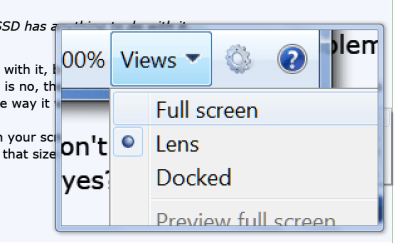
I did not resize the box. And here are the options.
 

Attachments

  • 2015-12-10_2033.png
    2015-12-10_2033.png
    21.2 KB · Views: 18

My Computer My Computer

At a glance

Vista, Windows7, Mint Mate, Zorin, Windows 8from 1.6GHz Duo to i7
Computer Manufacturer/Model Number
HP, Dell, Gateway, Toshiba - 4 laptops and 2 desktops
OS
Vista, Windows7, Mint Mate, Zorin, Windows 8
CPU
from 1.6GHz Duo to i7
Monitor(s) Displays
2x HP w2207
Hard Drives
5x HDD, 7x SSD, 12x Externals
Keyboard
with trackball - no mices
Mouse
Trackball mice
Internet Speed
DSL 6000
Ah, I guess "lens" must be the box, so maybe that's what I have but I want to choose full screen and don't have the control window the way you do.

When I first installed windows, I had full screen AND the control box. Now I just have the small box so can't change the magnification level and can't change it to full screen.
 

My Computer My Computer

At a glance

Windows 7 Pro 64 bit version 6.1 (Service Pac...Intel i716 GBi7 on-chip graphics driver
Computer type
PC/Desktop
Computer Manufacturer/Model Number
self built
OS
Windows 7 Pro 64 bit version 6.1 (Service Pack 1)
CPU
Intel i7
Motherboard
Asus Z97 with Intel chipset
Memory
16 GB
Graphics Card(s)
i7 on-chip graphics driver
Hard Drives
Samsung EVO 256Gig boot drive, Seagate 2TB hybrid data drive
Antivirus
Norton
Browser
several, ususally FireFox
Yeah, you are not the first person I have seen losing the magnifier. I really don't know how to fix that, sorry.
 

My Computer My Computer

At a glance

Vista, Windows7, Mint Mate, Zorin, Windows 8from 1.6GHz Duo to i7
Computer Manufacturer/Model Number
HP, Dell, Gateway, Toshiba - 4 laptops and 2 desktops
OS
Vista, Windows7, Mint Mate, Zorin, Windows 8
CPU
from 1.6GHz Duo to i7
Monitor(s) Displays
2x HP w2207
Hard Drives
5x HDD, 7x SSD, 12x Externals
Keyboard
with trackball - no mices
Mouse
Trackball mice
Internet Speed
DSL 6000
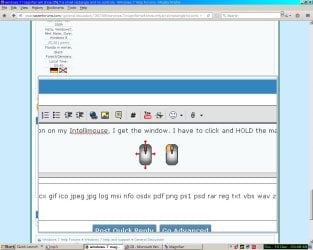
When I click the magnify button once on the side of my Intellimouse, I get the window. I have to click and HOLD the magnify button again to get the controls, hold and drag to change the window size. If you hold the button that second time and don't get the controls, then my guess is that you'd have to at least uninstall and reinstall the Intellimouse drivers. Have you checked the button assignments in Control Panel -> Mouse?
 

Attachments

  • magnify.jpg
    magnify.jpg
    101.7 KB · Views: 3

My Computer My Computer

At a glance

Win10 Pro 64-bitAMD Ryzen 7 3800X32 GB Kingston DDR4-2666MSI nVidia GT 710 (2GB)
Computer type
PC/Desktop
Computer Manufacturer/Model Number
Self-Built
OS
Win10 Pro 64-bit
CPU
AMD Ryzen 7 3800X
Motherboard
Gigabyte X570 UD
Memory
32 GB Kingston DDR4-2666
Graphics Card(s)
MSI nVidia GT 710 (2GB)
Sound Card
Creative Audigy FX 5.1
Monitor(s) Displays
ViewSonic VG2439Smh 24"
Screen Resolution
1920x1080
Hard Drives
3xWD1TB; 1xSeagate 1TB... all spinning rust
PSU
EVGA 100-W1-0500-KR (500w)
Case
SilverStone PS10 (modified)
Cooling
CPU:AMD Wraith Prism. Case:3x Noctua 120mm
Keyboard
Compaq Professional PS/2
Mouse
Microsoft Basic Optical Mouse 2.0
Internet Speed
Fiber 1Gbit/sec down/up
Antivirus
Avast Free
Browser
FF, Chrome
Other Info
2x LG GH24NSC0 DVD burners, Mackie CR3 monitor speakers
When I click the magnify button once on the side of my Intellimouse, I get the window. I have to click and HOLD the magnify button again to get the controls, hold and drag to change the window size. If you hold the button that second time and don't get the controls, then my guess is that you'd have to at least uninstall and reinstall the Intellimouse drivers. Have you checked the button assignments in Control Panel -> Mouse?
YOU GOT IT ! Thank you very much.

I don't remember ever having to hold down the button before and I doubt that I did it right after my build when the magnifier was working properly, but that sure does the trick.
 

My Computer My Computer

At a glance

Windows 7 Pro 64 bit version 6.1 (Service Pac...Intel i716 GBi7 on-chip graphics driver
Computer type
PC/Desktop
Computer Manufacturer/Model Number
self built
OS
Windows 7 Pro 64 bit version 6.1 (Service Pack 1)
CPU
Intel i7
Motherboard
Asus Z97 with Intel chipset
Memory
16 GB
Graphics Card(s)
i7 on-chip graphics driver
Hard Drives
Samsung EVO 256Gig boot drive, Seagate 2TB hybrid data drive
Antivirus
Norton
Browser
several, ususally FireFox
Glad you got it sorted! :D
 

My Computer My Computer

At a glance

Win10 Pro 64-bitAMD Ryzen 7 3800X32 GB Kingston DDR4-2666MSI nVidia GT 710 (2GB)
Computer type
PC/Desktop
Computer Manufacturer/Model Number
Self-Built
OS
Win10 Pro 64-bit
CPU
AMD Ryzen 7 3800X
Motherboard
Gigabyte X570 UD
Memory
32 GB Kingston DDR4-2666
Graphics Card(s)
MSI nVidia GT 710 (2GB)
Sound Card
Creative Audigy FX 5.1
Monitor(s) Displays
ViewSonic VG2439Smh 24"
Screen Resolution
1920x1080
Hard Drives
3xWD1TB; 1xSeagate 1TB... all spinning rust
PSU
EVGA 100-W1-0500-KR (500w)
Case
SilverStone PS10 (modified)
Cooling
CPU:AMD Wraith Prism. Case:3x Noctua 120mm
Keyboard
Compaq Professional PS/2
Mouse
Microsoft Basic Optical Mouse 2.0
Internet Speed
Fiber 1Gbit/sec down/up
Antivirus
Avast Free
Browser
FF, Chrome
Other Info
2x LG GH24NSC0 DVD burners, Mackie CR3 monitor speakers
Back
Top