Windows 7 Media Creator Tool

Rhothgar

New member
Local time
11:17 PM
Messages
61
Hi

It's been a long time since I've been on the forum.

I know that someone I have some MRIMG files with Windows 7 Professional X64 on but where I have no idea.

The Windows 7 Media Creator Tool is now unsupported it seems.

I may be digging myself a grave of stress here but is there anywhere I can find a repository which has a safe original version of the media creator with either the above version on or even all the available versions please?

I am not sure I really want to be 'downgrading' now that I am used to Windows 10 and Windows 11 is on the way but it just feels right to give Windows 7 another bash.

Can't seem to find another on the forum that is up-to-date regarding Media Creator Tool. I've had a re-read of my 2016 posts. WOW! Seems like I was really stressed trying to get Windows 7 activated.

The beauty with Windows 10 now is that it is digitally licenced and stored in my Microsoft Account.

Is the tenforum associated with this forum?

Thanks in advance and Happy New Year to you all.

I recall this as being such a great forum resource-wise.
 

My Computer

Computer type
PC/Desktop
Computer Manufacturer/Model Number
HP xw4600 Workstation
OS
Windows 7 Ultimate x64 SP1
CPU
Intel Q9550 from memory
Motherboard
HP
Memory
8192Mb
Graphics Card(s)
Matrox Millenium
Hard Drives
Western Digital WD5000-AAKS (Blue Caviar?)
Antivirus
None
Browser
Firefox 48
The Windows 7 Media Creator Tool

I am not familiar with that. Are you looking for installation media for win7? It usually comes as an .iso file
 

My Computers

System One System Two

  • Computer type
    PC/Desktop
    OS
    7 X64
    CPU
    i5 8400
    Motherboard
    gigabyte b365m ds3h
    Memory
    2x8gb 3200mhz
    Hard Drives
    various
    PSU
    pure power 11 400w cm
    Case
    Coolermaster
    Cooling
    cryorig m9i
  • Computer type
    PC/Desktop
    OS
    7x64
    CPU
    g5400
    Motherboard
    ga b365m ds3h
    Memory
    8gb ddr4 2400
    PSU
    xfx pro 450w
Is the tenforum associated with this forum?

Yes, they are both in the Design Media family of sites, as are Vista Forums, Eight Forums an Eleven Forum. Each has its own separate registration, but you'll find many members are registered on many or all of them - and you'll find the same friendly support on all. There are links to them all at the bottom of this page.

image.png


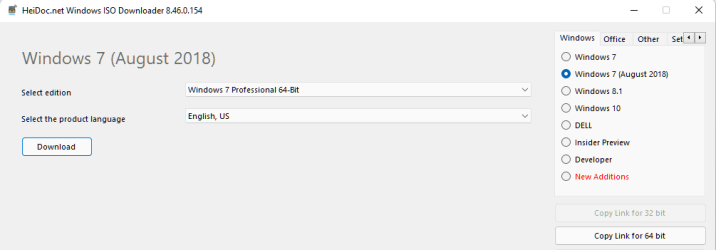
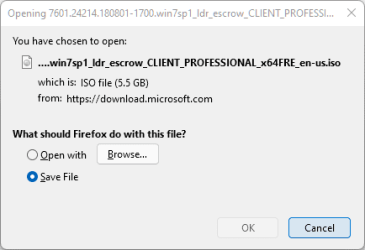
As for getting Windows 7 install media, it's getting difficult to find now. But the Heidoc 'Microsoft Windows and Office ISO Download Tool' can still get a few direct from Microsoft. Try their 'Windows 7 (August 2018)' option.

Microsoft Windows and Office ISO Download Tool
 

My Computers

System One System Two

  • Computer type
    Laptop
    Computer Manufacturer/Model Number
    Toshiba satellite C650D
    OS
    Windows 7 Home Premium x64
    CPU
    AMD V120
    Memory
    4GB
    Internet Speed
    150 Mbps
    Antivirus
    MSE
    Browser
    IE11, Edge, Firefox
    Other Info
    I also have W7 Pro on my System Two, and several W7 Hyper-V VMs. My other machines run Windows 10/11. Their specs are in my Ten Forums & Eleven Forum profiles.
  • Computer type
    Laptop
    System Manufacturer/Model Number
    Lenovo Thinkpad T430
    OS
    Windows 7 Pro x64
    CPU
    Intel i5-3320M
    Memory
    8 GB
    Hard Drives
    250GB Samsung SSD 860 EVO
    Antivirus
    MSE
Rhothgar

I have a Win7 x64 SP1 All-In-One clean if you would like to borrow it. Original download from Digital River, now defunct authorized M$ website. Let me know!
Happy New Year!

@SIW2
Media Creation Tool is a Microsoft web link that permits download and creation of Windows install media. You have the option of creating an ISO, USB. Very slow in all as M$ usually does everything. I'm not sure if the Win7 is still available, Win10 is! IMHO. Happy New Year to you!

Snick

- - - Updated - - -

Bree
The link you provided has dead download links for Win7. Went to Heidoc website and downloaded the new tool. My old one and the new one don't permit Win7 downloads. Happy New Year!
Snick
 

My Computer

Computer type
PC/Desktop
Computer Manufacturer/Model Number
HP Desktop & Compaq Laptop
OS
Win 10 x64, Linux Lite, Win 7 x64, BlackArch, & Kali
Hard Drives
Samsung 850 Pro 256Gb,
Hitachi HDD 1Tb,
Crucial MX SSD 250Gb
Segate 3Tb USB 3.0 Ext. Backup HDD
Internet Speed
150Mbps dn, 20Mbps up
Antivirus
Avast Free, Malwarebytes Anti-Exploit & Anti-Ransomware
Browser
Firefox, Chrome, Opera, & VPN
As for getting Windows 7 install media, it's getting difficult to find now. But the Heidoc 'Microsoft Windows and Office ISO Download Tool' can still get a few direct from Microsoft. Try their 'Windows 7 (August 2018)' option.

Microsoft Windows and Office ISO Download Tool

Thanks for the confirmation. I thought they all looked similar.

I did see this Heidoc website from a general internet search but I was hesistant because it isn't an official source so I discounted it as a safe site.

In the text it refers to iso being downloaded from Microsoft in which case unless Microsoft has a secret repository then I imagine Windows 7 will no longer be available via the Heidoc tool.

I also lay awake this morning wondering if I could partition a 32Gb USB and have a number of ISO's ready to load or use a 128Gb or 256Gb USB to clone two computers with backups of each and also have a base clean install of which version of Windows together with all the apps and links to OneDrive.

Perhaps I do not need backups of each computer (one's mine, one's the partner's) but in reality I am so untidy in where I place documents electronically (and in reality :rolleyes:) that it may indeed be a good idea to save separate backups.
Be interested to hear what others do. Then I suppose it depends if you're a gamer or use it for productivity and general internet use. We're the latter.

- - - Updated - - -

Rhothgar

I have a Win7 x64 SP1 All-In-One clean if you would like to borrow it. Original download from Digital River, now defunct authorized M$ website. Let me know!
Happy New Year!
Hi Snick

That would be great. I assume you have a file server I could download from as I see you are a Michigander. I once got 100% in a test on FaceBook about "Are you a Michigander?" I am UK based but have travelled extensively in the US. The UP is particularly one of my favourite places in the world especially Munising and Pictured Rocks area. Spent some time there in 2003. Also, been in main body of Michigan but only passing through Grand Rapids to Muskegon to get Lake Express to M'waukee (going was fine, coming back was rough and I'm not good on water at the best of times...)

Would appreciate your thoughts on cloning or backup as above comments to Bree

Bree
The link you provided has dead download links for Win7. Went to Heidoc website and downloaded the new tool. My old one and the new one don't permit Win7 downloads. Happy New Year!
Snick

As I suspected, our posts crossed. I've downloaded it. I shan't bother opening it if it links to the MS iso repositories anyway unless there is good reason for using that particular link? Are there any benefits over and above downloading from MS?
 
Last edited:

My Computer

Computer type
PC/Desktop
Computer Manufacturer/Model Number
HP xw4600 Workstation
OS
Windows 7 Ultimate x64 SP1
CPU
Intel Q9550 from memory
Motherboard
HP
Memory
8192Mb
Graphics Card(s)
Matrox Millenium
Hard Drives
Western Digital WD5000-AAKS (Blue Caviar?)
Antivirus
None
Browser
Firefox 48
@SIW2
Media Creation Tool is a Microsoft web link that permits download and creation of Windows install media. You have the option of creating an ISO, USB. Very slow in all as M$ usually does everything. I'm not sure if the Win7 is still available, Win10 is! IMHO. Happy New Year to you!


MCT is an executable file for creating win10/11 installation media .
It looks like this:

MCT.jpg


there used to be win7 iso files for download directly from MS, but no MCT for win7 that I have seen.
 

My Computers

System One System Two

  • Computer type
    PC/Desktop
    OS
    7 X64
    CPU
    i5 8400
    Motherboard
    gigabyte b365m ds3h
    Memory
    2x8gb 3200mhz
    Hard Drives
    various
    PSU
    pure power 11 400w cm
    Case
    Coolermaster
    Cooling
    cryorig m9i
  • Computer type
    PC/Desktop
    OS
    7x64
    CPU
    g5400
    Motherboard
    ga b365m ds3h
    Memory
    8gb ddr4 2400
    PSU
    xfx pro 450w
@Snick

SINCE ANSWERED BY SIW2

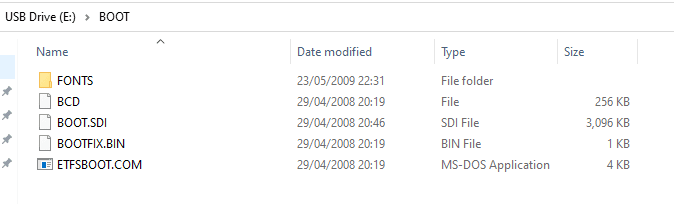
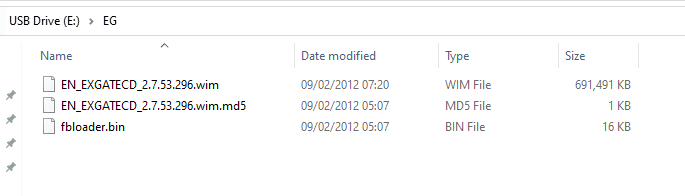
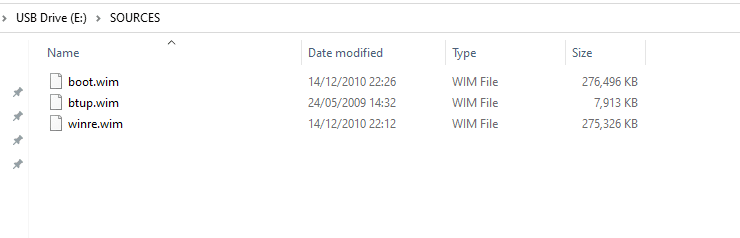
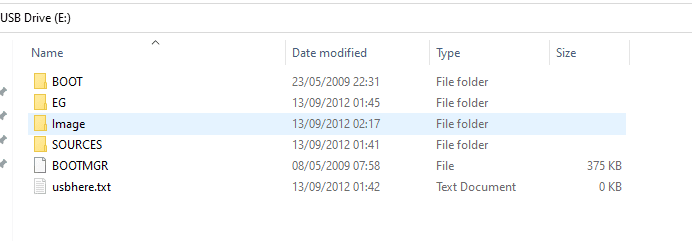
As an aside, I have found a USB stick with something on that resembles clean install but it is not one I have created. Found it in my partner's drawer though she wouldn't have created it so no idea where it is from unless I borrowed it off my brother perhaps.

The file dates pre-date Windows 7 but some of the filenames contain Win7. This leaves me wondering if it's a beta version but a year before release?

Maybe it's Windows Vista? Do you recognise any of the file structure perhaps?

Capture.PNGCapture2.PNGCapture3.PNGCapture4.PNGCapture5.PNG
 

My Computer

Computer type
PC/Desktop
Computer Manufacturer/Model Number
HP xw4600 Workstation
OS
Windows 7 Ultimate x64 SP1
CPU
Intel Q9550 from memory
Motherboard
HP
Memory
8192Mb
Graphics Card(s)
Matrox Millenium
Hard Drives
Western Digital WD5000-AAKS (Blue Caviar?)
Antivirus
None
Browser
Firefox 48

My Computers

System One System Two

  • Computer type
    PC/Desktop
    OS
    7 X64
    CPU
    i5 8400
    Motherboard
    gigabyte b365m ds3h
    Memory
    2x8gb 3200mhz
    Hard Drives
    various
    PSU
    pure power 11 400w cm
    Case
    Coolermaster
    Cooling
    cryorig m9i
  • Computer type
    PC/Desktop
    OS
    7x64
    CPU
    g5400
    Motherboard
    ga b365m ds3h
    Memory
    8gb ddr4 2400
    PSU
    xfx pro 450w
I am not familiar with that. Are you looking for installation media for win7? It usually comes as an .iso file

Yes. The AIO option because I seem to recall I had massive issues with product keys last time I installed Windows 7 and I am not sure if Microsoft themselves solved it because my install path was something like Windows XP Retail, Window Vista Upgrade, Windows 7 Home Upgrade, Windows 7 Pro or Ultimate Upgrade and I wanted a clean install. It seems I used the double install method eventually and it worked. It was a massive headache though.

As it is I cannot afford to get as stressed as I did 5 years ago.

- - - Updated - - -

Looks like oem installation/recovery media.
Oh crumbs! I dread to think which PC it would be for although, as I say, I most definitely haven't created it as I've never seen a Sandisk Cruzer Edge that is white and yellow. I have a few legacy PC's kicking around so it will no doubt be for one of them but I've always built my own. Perhaps my aging memory has faded a little.

- - - Updated - - -

Since your edit! That answers it. We did have some Asus eee laptops at some point! Thank you. Brilliant detective work!
 

My Computer

Computer type
PC/Desktop
Computer Manufacturer/Model Number
HP xw4600 Workstation
OS
Windows 7 Ultimate x64 SP1
CPU
Intel Q9550 from memory
Motherboard
HP
Memory
8192Mb
Graphics Card(s)
Matrox Millenium
Hard Drives
Western Digital WD5000-AAKS (Blue Caviar?)
Antivirus
None
Browser
Firefox 48
Hi Rhothgar,

looks like that minitower was shipped with Vista, but not Ultimate,, likely why you had activation problems
Clean install of an Upgrade version requires a slightly different setup approach
(based on your specs)
anywhere near me im in southampton
 

My Computer

Computer type
PC/Desktop
Computer Manufacturer/Model Number
medionl/Aspire 6930G/acer x55a
OS
W7 home premium 32bit/W7HP 64bit/w10 tp insider ring
CPU
E5300 dual core
Motherboard
medion MS7366
Memory
3gb
Graphics Card(s)
Nvidia Geforce 7100 Nforce 630i
Monitor(s) Displays
avixc
Internet Speed
n (isp resticted to 72)
Antivirus
mse/pands
Browser
palemoon
Other Info
Belkin Fd7050 n USB using Railink RT2870 drivers, more upto date
Hi Rhothgar,

looks like that minitower was shipped with Vista, but not Ultimate,, likely why you had activation problems
Clean install of an Upgrade version requires a slightly different setup approach
(based on your specs)
anywhere near me im in southampton

Unfortunately not, I'm 3 hours away in the East Midlands.

Hopefully, @Snick will be able to provide the link I need now that I've learned how to tag people here.

Thanks for reaching out torchwood

What I would like to do is have a copy of Windows 7 and 10 on same USB stick if possible that will install on any PC irrespective of hardware because I have started tinkering modding a HP Z420 and may need to swap drives out.

Planning on trying to be a little tidier now and keeping all content on OneDrive seeing as I pay for it! So if I have a hardward failure of any kind, I can whack a replacement piece of hardware in and get back up and running within an hour be that graphics card failure, hard drive or otherwise.
 

My Computer

Computer type
PC/Desktop
Computer Manufacturer/Model Number
HP xw4600 Workstation
OS
Windows 7 Ultimate x64 SP1
CPU
Intel Q9550 from memory
Motherboard
HP
Memory
8192Mb
Graphics Card(s)
Matrox Millenium
Hard Drives
Western Digital WD5000-AAKS (Blue Caviar?)
Antivirus
None
Browser
Firefox 48

My Computer

Computer type
PC/Desktop
Computer Manufacturer/Model Number
medionl/Aspire 6930G/acer x55a
OS
W7 home premium 32bit/W7HP 64bit/w10 tp insider ring
CPU
E5300 dual core
Motherboard
medion MS7366
Memory
3gb
Graphics Card(s)
Nvidia Geforce 7100 Nforce 630i
Monitor(s) Displays
avixc
Internet Speed
n (isp resticted to 72)
Antivirus
mse/pands
Browser
palemoon
Other Info
Belkin Fd7050 n USB using Railink RT2870 drivers, more upto date
you might want to check, your system bios setups they will likely be different
your old vista machine will most likely be MBR but your newer SFF machine could be EUFI

tip
Dual Boot Windows 10 with Windows 7 or Windows 8 | Tutorials
Maybe you have misunderstood what I am doing. I do tend to digress and that can lead to confusion.

The old Vista machine was long mothballed so I am not touching that at present and may never again other than to grab old photos off it.

All the machines will be MBR too because I have never used UEFI to date but will be looking to use that on the current machines at some point. That's possibly a whole new learning curve to me.

I am not actually looking to create a dual boot machine merely a USB stick with the relevant isos on in separate partitions so that I can choose which Windows to clean install or backup to restore. Not sure if it is even possible to do this.

Maybe Rufus plays a part somewhere.

I'll take a look at the Tutorial link you provided in the meantime.
 

My Computer

Computer type
PC/Desktop
Computer Manufacturer/Model Number
HP xw4600 Workstation
OS
Windows 7 Ultimate x64 SP1
CPU
Intel Q9550 from memory
Motherboard
HP
Memory
8192Mb
Graphics Card(s)
Matrox Millenium
Hard Drives
Western Digital WD5000-AAKS (Blue Caviar?)
Antivirus
None
Browser
Firefox 48
If you get the original ms iso files, one way is to use ventoy to create a bootable usb.

Then you just copy the iso files onto the usb stick. Windows 7 and newer will all work , but vista iso doesnt work with ventoy

ScreenShot . Ventoy
 

My Computers

System One System Two

  • Computer type
    PC/Desktop
    OS
    7 X64
    CPU
    i5 8400
    Motherboard
    gigabyte b365m ds3h
    Memory
    2x8gb 3200mhz
    Hard Drives
    various
    PSU
    pure power 11 400w cm
    Case
    Coolermaster
    Cooling
    cryorig m9i
  • Computer type
    PC/Desktop
    OS
    7x64
    CPU
    g5400
    Motherboard
    ga b365m ds3h
    Memory
    8gb ddr4 2400
    PSU
    xfx pro 450w
Bree
The link you provided has dead download links for Win7. Went to Heidoc website and downloaded the new tool. My old one and the new one don't permit Win7 downloads. Happy New Year!
Snick
Currently the only download links Heidoc has for Windows 7 ISOs from Microsoft are for 'Windows 7 (August 2018)'.

image.png

image.png

Heidoc are currently asking for donations to fund a Visual Studio subscription so that they can provide more Win7 downloads.

In order to be able to continue providing these downloads, and many more, it could be an option to generate the download links through a Visual Studio Subscription (formerly known as MSDN). The subscription for the first year costs €7707. To cover the payment fees, the funding goal is at €8000.
Fundraiser by Jan Krohn : Bring Windows 7 back to the HeiDoc ISO Downloader

- - - Updated - - -

I did see this Heidoc website from a general internet search but I was hesistant because it isn't an official source so I discounted it as a safe site.

No, it is not an official source, but it does generate links to download direct from Microsoft (or direct from Dell for their system-specific recovery ISOs).
 

My Computers

System One System Two

  • Computer type
    Laptop
    Computer Manufacturer/Model Number
    Toshiba satellite C650D
    OS
    Windows 7 Home Premium x64
    CPU
    AMD V120
    Memory
    4GB
    Internet Speed
    150 Mbps
    Antivirus
    MSE
    Browser
    IE11, Edge, Firefox
    Other Info
    I also have W7 Pro on my System Two, and several W7 Hyper-V VMs. My other machines run Windows 10/11. Their specs are in my Ten Forums & Eleven Forum profiles.
  • Computer type
    Laptop
    System Manufacturer/Model Number
    Lenovo Thinkpad T430
    OS
    Windows 7 Pro x64
    CPU
    Intel i5-3320M
    Memory
    8 GB
    Hard Drives
    250GB Samsung SSD 860 EVO
    Antivirus
    MSE
Last edited:

My Computer

Computer type
PC/Desktop
Computer Manufacturer/Model Number
HP Desktop & Compaq Laptop
OS
Win 10 x64, Linux Lite, Win 7 x64, BlackArch, & Kali
Hard Drives
Samsung 850 Pro 256Gb,
Hitachi HDD 1Tb,
Crucial MX SSD 250Gb
Segate 3Tb USB 3.0 Ext. Backup HDD
Internet Speed
150Mbps dn, 20Mbps up
Antivirus
Avast Free, Malwarebytes Anti-Exploit & Anti-Ransomware
Browser
Firefox, Chrome, Opera, & VPN
Do you have a Win 7 installation DVD or a iso file?
If you do, create your own USB win 7 installation drive.
To make a Win 7 USB boot able drive:

Open a CMD window as administrator and type:

diskpart
list disk (it will list all drives. Identify the USB drive number)
select disk n (replace n by the USB drive number obtained with list disk)
clean
convert mbr
create part primary
select part 1
format fs=fat32 quick
assign
active
exit (to exit diskpart)

If you have a Win 7 installation iso file
On Win 7 use 7Zip to extract all files and folders from the Win 7 iso file to the USB drive.
On Win 10, mount the iso file and copy all files and folders to the USB drive.

If you have a Win 7 installation DVD
On another computer that has ODD, copy all files and folders from the DVD to the USB drive

To make it UEFI boot able you must add the \efi\boot folder
419872-windows-7-laptop-users-why-my-laptop-slow-efi-boot.jpg


To make it universal (all Win 7 versions), go to \sources on the USB drive and delete \sources\ei.cfg
 
Last edited:

My Computers

System One System Two

  • Computer type
    PC/Desktop
    Computer Manufacturer/Model Number
    custom build
    OS
    Windows 7 HP 64
    CPU
    i5 6600K - 800MHz to 4200MHz
    Motherboard
    GA-Z170-HD3P
    Memory
    4+4G GSkill DDR4 3000
    Graphics Card(s)
    IG - Intel 530
    Monitor(s) Displays
    Samsung 226BW
    Screen Resolution
    1680x1050
    Hard Drives
    (1) -1 SM951 – 128GB M.2 AHCI PCIe SSD drive for Windows 7 and Lubuntu
    (2) -1 WD SATA 3 - 1T for Data
    (3) -1 WD SATA 3 - 1T for backup
    PSU
    Thermaltake 450W TR2 gold
    Keyboard
    Old and good Chicony mechanical keyboard
    Mouse
    Logitech mX performance - 9 buttons (had to disable some)
    Internet Speed
    500Mb/s
    Browser
    Firefox 64
    Other Info
    TinyWall firewall
  • Computer type
    Laptop
    System Manufacturer/Model Number
    Asus Q550LF
    OS
    Windows 7 Pro
    CPU
    i7-4500U 800MHz to 3.0GHz
    Motherboard
    Asus Q550LF
    Memory
    (4+4)G DDR3 1600
    Graphics Card(s)
    IG intel 4400 + NVIDIA GeForce GT 745M
    Sound Card
    Realtek
    Monitor(s) Displays
    LG Display LP156WF4-SPH1
    Screen Resolution
    1920 x 1080
    Hard Drives
    BX500 120G SSD for Windows and programs +
    1T HDD for data
    Internet Speed
    500 Mb/s
    Browser
    Firefox
    Other Info
    TinyWall firewall
Rhothgar

Here you go Win7x64.ISO SP2 All-In-One In a zip folder.

Snick

Oh man! I wish I'd have seen this earlier...

I've just restored a Windows Image Backup from 2016 and spent time doing updates. In fact, I've just posted in general discussion about it. Nothing wrong with trying to expand my knowledge.

I'll still be tinkering anyhow so I've give your ISO a shot. Many thanks.
 

My Computer

Computer type
PC/Desktop
Computer Manufacturer/Model Number
HP xw4600 Workstation
OS
Windows 7 Ultimate x64 SP1
CPU
Intel Q9550 from memory
Motherboard
HP
Memory
8192Mb
Graphics Card(s)
Matrox Millenium
Hard Drives
Western Digital WD5000-AAKS (Blue Caviar?)
Antivirus
None
Browser
Firefox 48

My Computers

System One System Two

  • Computer type
    PC/Desktop
    Computer Manufacturer/Model Number
    custom build
    OS
    Windows 7 HP 64
    CPU
    i5 6600K - 800MHz to 4200MHz
    Motherboard
    GA-Z170-HD3P
    Memory
    4+4G GSkill DDR4 3000
    Graphics Card(s)
    IG - Intel 530
    Monitor(s) Displays
    Samsung 226BW
    Screen Resolution
    1680x1050
    Hard Drives
    (1) -1 SM951 – 128GB M.2 AHCI PCIe SSD drive for Windows 7 and Lubuntu
    (2) -1 WD SATA 3 - 1T for Data
    (3) -1 WD SATA 3 - 1T for backup
    PSU
    Thermaltake 450W TR2 gold
    Keyboard
    Old and good Chicony mechanical keyboard
    Mouse
    Logitech mX performance - 9 buttons (had to disable some)
    Internet Speed
    500Mb/s
    Browser
    Firefox 64
    Other Info
    TinyWall firewall
  • Computer type
    Laptop
    System Manufacturer/Model Number
    Asus Q550LF
    OS
    Windows 7 Pro
    CPU
    i7-4500U 800MHz to 3.0GHz
    Motherboard
    Asus Q550LF
    Memory
    (4+4)G DDR3 1600
    Graphics Card(s)
    IG intel 4400 + NVIDIA GeForce GT 745M
    Sound Card
    Realtek
    Monitor(s) Displays
    LG Display LP156WF4-SPH1
    Screen Resolution
    1920 x 1080
    Hard Drives
    BX500 120G SSD for Windows and programs +
    1T HDD for data
    Internet Speed
    500 Mb/s
    Browser
    Firefox
    Other Info
    TinyWall firewall

My Computer

Computer type
PC/Desktop
Computer Manufacturer/Model Number
HP xw4600 Workstation
OS
Windows 7 Ultimate x64 SP1
CPU
Intel Q9550 from memory
Motherboard
HP
Memory
8192Mb
Graphics Card(s)
Matrox Millenium
Hard Drives
Western Digital WD5000-AAKS (Blue Caviar?)
Antivirus
None
Browser
Firefox 48
Back
Top