Windows 7 missing hard drive space after re-installing

Briano

New member
Local time
2:29 PM
Messages
8
Hi,

I've been struggling for days trying to find out where my missing hard drive space went. I would really appreciate any help.:)

I re-installed Windows 7 using the rescue and recovery function from Lenovo. After installing I realized that my hard drive space was now using 166GB. I knew something was setup wrong.

When I use a program called ShowSize it says my C drive is 87.65gb. When I go to my computer it shows 121gb free of 287gb. Somewhere there must be about 78gb of duplicate files.

I read that my old files might be in a folder called windows.old but I have searched for windows.old all over my computer but I can't find it. I also botted in safe mode to see if I could file the windows.old file but didn't have any luck doing that.

I also had Carbonite installed before I did the re-install so I knew I would be able to get all my files back. After I re-installed Windows 7 I then restored all my files using Carbonite. Could this have caused duplicate files somewhere?

**I originally re-installed Windows because my wireless mouse would jump/jerk across the screen occasionally. I installed new batteries and uninstalled the drivers and reinstalled them but I still had the same problem. I figured re-installing Windows would fix my problem but my mouse still behaves this way.

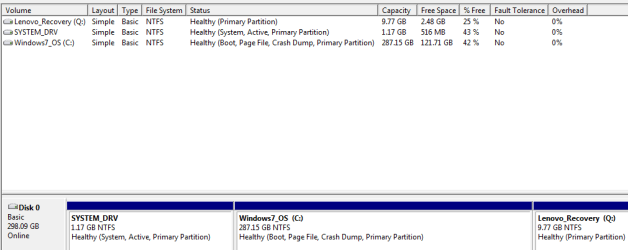
I attached a screen-shot of my Disc Management in case that might be helpful for someone to help me figure my missing hard drive space problem.

Computer info:
Lenovo T410
Windows 7 64bit
 

Attachments
  • 2012-02-23_1151.png
    2012-02-23_1151.png
    9.3 KB · Views: 59

My Computer

OS
Windows 7 64bit
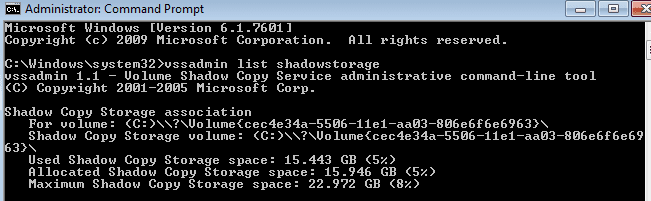
Here is a screen-shot of my shadow storage. Not sure if this will help at all.
 

Attachments

  • 2012-02-23_1342.png
    2012-02-23_1342.png
    5.1 KB · Views: 57

My Computer

OS
Windows 7 64bit
Welcome aboard, Briano :)
First of all, a 320 GB HDD will show as 298 GB in windows ( ref http://www.sevenforums.com/general-discussion/142635-where-all-my-gigs.html#post1224668 ).

Dont quite aware of lenovos rescue function, but the size seems to be windows.old..... you should have a look there

http://www.sevenforums.com/tutorials/19151-windows-old-folder-delete.html

Moreover, to ensure the maximus disk space, follow the link http://www.sevenforums.com/tutorials/129976-hard-disk-space-free-up-recover.html
 

My Computer

Computer type
PC/Desktop
Computer Manufacturer/Model Number
Self Assembled
OS
Microsoft Windows 10 Pro Insider Preview 64-bit
CPU
Intel(R) Core(TM) i3-4130 CPU @ 3.40GHz
Motherboard
Gigabyte Technology Co., Ltd. B85M-D3H
Memory
Corsair Vengence 4GB x2 (8.00GB Dual-Channel DDR3 @ 798MHz)
Graphics Card(s)
2047MB GeForce GTS 450 (ZOTAC International)
Sound Card
Onboard (Realtek High Definition Audio)
Monitor(s) Displays
LG Flatron E2040T
Screen Resolution
1600x900
Hard Drives
Western Digital 1 TB
Seagate 500 GB
PSU
Corsair VS550
Case
Cooler Master K380
Cooling
Cooler Master Seidon 120V Plus
Keyboard
Logitech MK260r
Mouse
Logitech MK260r
Internet Speed
PMPL Broadband
Antivirus
Windows Defender + MBAM
Browser
Firefox
Other Info
Dell Studio 15" Laptop
Hi Arc,

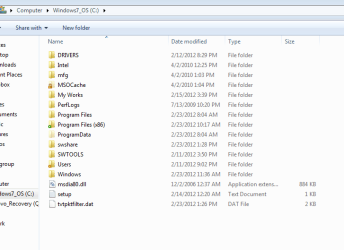
I attached an image of my C drive folder. There doesn't seem to be a windows.old folder there.
 

Attachments

  • 2012-02-23_1422.png
    2012-02-23_1422.png
    14 KB · Views: 28

My Computer

OS
Windows 7 64bit
I've never used ShowSize. If it's worth a damn, it should show you which folders are using the space.

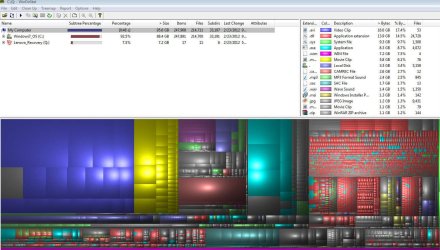
If it won't do that, download and run WinDirStat instead. Post a screen shot of what it shows.

Have you done a disk cleanup as recommended by Arc?

You have about 15 GB devoted to System Restore. That can be reduced in its configuration optons.
 

My Computer

Computer type
PC/Desktop
Computer Manufacturer/Model Number
Ignatz Special; 4 speed manual gearbox; factory air conditioning; one of one
OS
Windows 7 Home Premium SP1, 64-bit
CPU
Intel Skylake i5-6600K, not overclocked
Motherboard
AsRock Z170M Extreme 4, micro ATX
Memory
8 GB HyperX DDR4-2666 (2 x 4 GB)
Graphics Card(s)
none; graphics are integrated on CPU
Sound Card
onboard: Realtek ALC1150; external: USB Behringer UF0-202
Monitor(s) Displays
Dell S2340M 23 inch IPS
Screen Resolution
1600 x 900
Hard Drives
System: Crucial MX100 series SSD, 128 GB;
Data: Samsung Spinpoint 103SJ, 1 TB;
Backup: WD Caviar Green WD30EZRX-00D8PB0, 3 TB
PSU
Rosewill SilentNight 500 watt fanless, semi-modular
Case
Antec Solo II
Cooling
Noctua NH-U12S; Noctua F12 intake, Noctua S12A exhaust
Keyboard
Microsoft 200 6JH-00001 USB
Mouse
Dell or Microsoft optical wired; USB
Antivirus
Microsoft Security Essentials and Malwarebytes Premium
Browser
Pale Moon
Other Info
All fans PWM; speeds at idle: CPU circa 500 rpm; intake circa 600 rpm; exhaust circa 600 rpm; CPU temps 27 idle and 47 C load in a warm room (27 C/81 F) when running Intel Extreme Tuning Utility stress test.
Disc cleanup will only save me 13.6MB.

I attached a screen shot from the program Arc recommended.
 

Attachments

  • 2012-02-23_1545.jpg
    2012-02-23_1545.jpg
    149.7 KB · Views: 47

My Computer

OS
Windows 7 64bit
Do you have Explorer set to show hidden and system files?
 

My Computer

Computer type
PC/Desktop
Computer Manufacturer/Model Number
Ignatz Special; 4 speed manual gearbox; factory air conditioning; one of one
OS
Windows 7 Home Premium SP1, 64-bit
CPU
Intel Skylake i5-6600K, not overclocked
Motherboard
AsRock Z170M Extreme 4, micro ATX
Memory
8 GB HyperX DDR4-2666 (2 x 4 GB)
Graphics Card(s)
none; graphics are integrated on CPU
Sound Card
onboard: Realtek ALC1150; external: USB Behringer UF0-202
Monitor(s) Displays
Dell S2340M 23 inch IPS
Screen Resolution
1600 x 900
Hard Drives
System: Crucial MX100 series SSD, 128 GB;
Data: Samsung Spinpoint 103SJ, 1 TB;
Backup: WD Caviar Green WD30EZRX-00D8PB0, 3 TB
PSU
Rosewill SilentNight 500 watt fanless, semi-modular
Case
Antec Solo II
Cooling
Noctua NH-U12S; Noctua F12 intake, Noctua S12A exhaust
Keyboard
Microsoft 200 6JH-00001 USB
Mouse
Dell or Microsoft optical wired; USB
Antivirus
Microsoft Security Essentials and Malwarebytes Premium
Browser
Pale Moon
Other Info
All fans PWM; speeds at idle: CPU circa 500 rpm; intake circa 600 rpm; exhaust circa 600 rpm; CPU temps 27 idle and 47 C load in a warm room (27 C/81 F) when running Intel Extreme Tuning Utility stress test.
*This doesn't have to do with the major problem (my missing hard drive space) but I did figure out why my wireless mouse would occasionally be jerky. I had the Logitech unifying receiver in a port that was right under my displayport cable and it must have been causing interference.
 

My Computer

OS
Windows 7 64bit
Back
Top