Windows 7 no longer updating, code 80070002

Gixxernaut

New member
Local time
6:51 PM
Messages
15
On Aug 27, 2012 my system first indicated it had a problem because it could not install updates. The update history is completely gone even though it had installed many updates since first being activated.

I've done searches and completed all the usual steps with no success. These include

  • Microsoft automated "Fixit"
  • Clearing the update history folder.
  • Memory tests - run all weekend with no errors.
  • Chkdsk with surface scan - no errors.
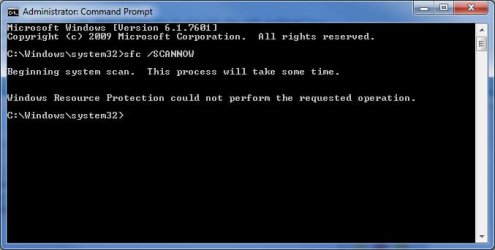
  • Admin Cmd Prompt-> SFC /SCANNOW (exits after a few seconds with "Windows Resource Protection could not perform the requested operation.")
  • Windows Repair Install (Fails with "Windows cannot copy files ... 80070241"). I've tried it using the genuine original installation DVD and also tried it using the "flat" install method with no luck.


MS Security Essentials and MalwareBytes both say there are no threats. I'm all out of spit and bailing wire. Any suggestions?
 

My Computer

Computer Manufacturer/Model Number
Homebrew
OS
Windows 7 Home Premium 64bit
CPU
Intel Core2Quad Q8200
Motherboard
Gigabyte USB3
Memory
8 Gig
Graphics Card(s)
NVidia BFG
Sound Card
Diamondmax Extreme
Monitor(s) Displays
Viewsonic / Dell
Screen Resolution
1680x1050 / 1280x1024
Hard Drives
Seagate 1.5TB / Seagate 1 TB
PSU
Antec
Case
Asus
Keyboard
Gateway PS-2 Connector
Mouse
Asus USB
Internet Speed
UVerse 15 Megabit
First try this.
Open Windows Explorer and navigate to the C:\Windows\System32 folder. find the Catroot2 folder there, and right-click on it - select Properties.

In the General tab, clear the box beside 'Read-only (Only.....' by clicking in it until it's empty (it cycles around three values)

Click Apply.
Accept any warnings that come up - if you get a 'Ignore/Ignore All/Try again' option, pick 'Ignore all'

Once complete (may be almost instantaneous),

try an SFC /SCANNOW again


My Computer

Computer type
Laptop
Computer Manufacturer/Model Number
Asus K52F or Lenovo B51-80
OS
Win 7 x64 Home Premium (and x86 VirtualBox VM)/Win10
CPU
i3 370M/i7 6500U
Motherboard
Asus/Lenovo
Memory
8GB - finally :)/8GB
Graphics Card(s)
it's an i3, dude!/dual Intel&nVidia
Sound Card
onboard
Monitor(s) Displays
15.6" built-in
Screen Resolution
1366x768/1920x1080
Hard Drives
750GB Seagate internal
Sundry external drives attached to other computers on the local network
1TB SSD on the Lenovo
PSU
n/a
Internet Speed
as much as I can get - usually on a dongle/phone, so <1MB/s
Antivirus
MSE/Defender
Browser
IE11/12/Edge/Chrome/FF(if I must)
Thanks for the quick reply. Followed the instructions you gave and still get the same result from SFC /SCANNOW.

Any other thoughts?
 

Attachments

  • ACP_SFCERR.jpg
    ACP_SFCERR.jpg
    38.2 KB · Views: 117

My Computer

Computer Manufacturer/Model Number
Homebrew
OS
Windows 7 Home Premium 64bit
CPU
Intel Core2Quad Q8200
Motherboard
Gigabyte USB3
Memory
8 Gig
Graphics Card(s)
NVidia BFG
Sound Card
Diamondmax Extreme
Monitor(s) Displays
Viewsonic / Dell
Screen Resolution
1680x1050 / 1280x1024
Hard Drives
Seagate 1.5TB / Seagate 1 TB
PSU
Antec
Case
Asus
Keyboard
Gateway PS-2 Connector
Mouse
Asus USB
Internet Speed
UVerse 15 Megabit
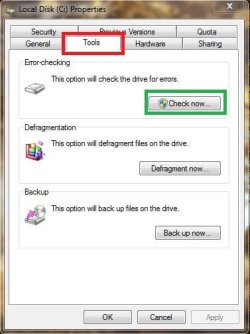
Have you attempted a hard-drive error check?

Start > Computer > Right-Click C:\ Drive > Properties > Tools tab > "Check Now" button

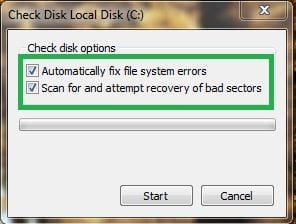
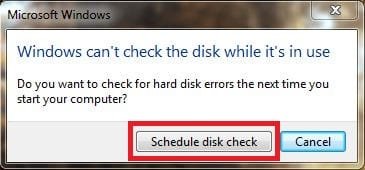
Make sure both options are checked, the error-checking may take some time, and will need to schedule a error-check for the next reboot of your computer.

Hope this helps,

Harry

Will upload screenshots in a minute.
 

Attachments

  • ECC.JPG
    ECC.JPG
    33.4 KB · Views: 12
  • ECC#2.JPG
    ECC#2.JPG
    18.8 KB · Views: 1,754
  • ECC#3.JPG
    ECC#3.JPG
    19.7 KB · Views: 11

My Computer

Computer type
Laptop
Have you attempted a hard-drive error check?

Start > Computer > Right-Click C:\ Drive > Properties > Tools tab > "Check Now" button
beat me to it :) - but it may need a more heavy-duty approach.....

Click on Start > All Programs > Accessories
Right-click on the Command Prompt entry
Select Run as Administrator and accept the UAC prompt - the Elevated Command Prompt window should pop up.

At the Command prompt, type
CHKDSK C: /R
and hit the Enter key.

You will be told that the drive is locked,
and the CHKDSK will run at he next boot - hit the Y key, and then reboot.
The chkdsk will take a few hours depending on the size of the drive, so be patient!
After the CHKDSK has run, Windows should boot normally (possibly after a second auto-reboot) - then run the SFC.
 

My Computer

Computer type
Laptop
Computer Manufacturer/Model Number
Asus K52F or Lenovo B51-80
OS
Win 7 x64 Home Premium (and x86 VirtualBox VM)/Win10
CPU
i3 370M/i7 6500U
Motherboard
Asus/Lenovo
Memory
8GB - finally :)/8GB
Graphics Card(s)
it's an i3, dude!/dual Intel&nVidia
Sound Card
onboard
Monitor(s) Displays
15.6" built-in
Screen Resolution
1366x768/1920x1080
Hard Drives
750GB Seagate internal
Sundry external drives attached to other computers on the local network
1TB SSD on the Lenovo
PSU
n/a
Internet Speed
as much as I can get - usually on a dongle/phone, so <1MB/s
Antivirus
MSE/Defender
Browser
IE11/12/Edge/Chrome/FF(if I must)
Fellas, I mentioned in the OP that I'd tried doing a CHKDSK with surface scan, but I'll give it another go later this afternoon. I'm using the computer in question at the moment for work stuff and can't shut down for the rest of the day just yet.

Thanks again for the feedback. I'd rather not have to reinstall as it will be a PITA at this point. System seems to be healthy apart from the fact that it cannot install updates.
 

My Computer

Computer Manufacturer/Model Number
Homebrew
OS
Windows 7 Home Premium 64bit
CPU
Intel Core2Quad Q8200
Motherboard
Gigabyte USB3
Memory
8 Gig
Graphics Card(s)
NVidia BFG
Sound Card
Diamondmax Extreme
Monitor(s) Displays
Viewsonic / Dell
Screen Resolution
1680x1050 / 1280x1024
Hard Drives
Seagate 1.5TB / Seagate 1 TB
PSU
Antec
Case
Asus
Keyboard
Gateway PS-2 Connector
Mouse
Asus USB
Internet Speed
UVerse 15 Megabit
good point - sorry!


This may result from mistakenly setting the System32 folder and its contents to 'Read Only' status.


To correct this:-

Open Windows Explorer (Computer)
Navigate to the C:\Windows folder
Find the System32 sub-folder and right-click on it
select Properties

Clear the 'blob' from the 'Read-only (Only applies to files in folder)' box by clicking on it until it's plain white.
Click on Apply.

Make sure that the radio button for 'Apply changes to this folder, subfolders and files' is set, and click OK.

Accept the Administrator prompt. After a couple of seconds, you'll be told there is an error - click on the 'Ignore all' button.

Wait for it to finish - it could take a couple of minutes.

OK out, and exit Windows Explorer.

Reboot twice
 

My Computer

Computer type
Laptop
Computer Manufacturer/Model Number
Asus K52F or Lenovo B51-80
OS
Win 7 x64 Home Premium (and x86 VirtualBox VM)/Win10
CPU
i3 370M/i7 6500U
Motherboard
Asus/Lenovo
Memory
8GB - finally :)/8GB
Graphics Card(s)
it's an i3, dude!/dual Intel&nVidia
Sound Card
onboard
Monitor(s) Displays
15.6" built-in
Screen Resolution
1366x768/1920x1080
Hard Drives
750GB Seagate internal
Sundry external drives attached to other computers on the local network
1TB SSD on the Lenovo
PSU
n/a
Internet Speed
as much as I can get - usually on a dongle/phone, so <1MB/s
Antivirus
MSE/Defender
Browser
IE11/12/Edge/Chrome/FF(if I must)
Have you tried to manually run SURT?
Mircosoft said:
To run the System Update Readiness Tool manually.
If you are offered the System Update Readiness Tool, but you encounter a problem using Windows Update, you can manually download and run the tool. You'll need to know the version of Windows and system type you are using.

  1. Go to the System Update Readiness Tool webpage. In the Information for advanced users section, find the version of Windows and system type of your computer, and then click the link to download the System Update Readiness Tool. If you don't know which version of Windows you have, see View your computer information.
  2. Run Windows Update again.
 

My Computer

Computer type
Laptop
Computer Manufacturer/Model Number
HP Pavilion dv6-6c10us
OS
x64 (6.3.9600) Win8.1 Pro & soon dual boot x64 (6.1.7601) Win7_SP1 HomePrem
CPU
AMD A6-3420M APU with Radeon(tm) HD Graphics
Motherboard
Hewlett-Packard 1805
Memory
6.00 GB
Graphics Card(s)
AMD Radeon(TM) HD 6520G
Sound Card
(1) AMD High Definition Audio Device (2) IDT High Definiti
Monitor(s) Displays
HP W2072a 20" LCD (1600 x 900) @ 60 Hz
Screen Resolution
1366 x 768 x 32 bits (4294967296 colors) @ 60 Hz
Hard Drives
ST640LM0 00 HM641JI SATA Disk Device
Keyboard
Logitech k520 wireless KB
Mouse
Logitech m320 wireless mouse (bundled with KB)
Internet Speed
15/5 | 54 MB Wireless 'n'
Antivirus
Realtime: Defender or Avast | On-demand: Malwarebytes, ESET
Browser
IE 11 on Win8, IE 10 on win 7
Other Info
Media: [Gimp, Audacity, VLC] || Comm: [WEmail 2012, Skype] || Productivity: [OpenOffice,| Textpad] || Utils: [Sysinternals, cCleaner, Speccy, Defraggler]
Just another suggestion to try, have you tried resetting the Windows Update service?

Start > Control Panel > Small Icons view > Administrative Tools > Services > Right-Click Windows Update Service > Start

Hope this helps,

Harry
 

My Computer

Computer type
Laptop
good point - sorry!


This may result from mistakenly setting the System32 folder and its contents to 'Read Only' status.


To correct this:-

Open Windows Explorer (Computer)
Navigate to the C:\Windows folder
Find the System32 sub-folder and right-click on it
select Properties

Clear the 'blob' from the 'Read-only (Only applies to files in folder)' box by clicking on it until it's plain white.
Click on Apply.

Make sure that the radio button for 'Apply changes to this folder, subfolders and files' is set, and click OK.

Accept the Administrator prompt. After a couple of seconds, you'll be told there is an error - click on the 'Ignore all' button.

Wait for it to finish - it could take a couple of minutes.

OK out, and exit Windows Explorer.

Reboot twice
No joy after following these instructions either.
 

My Computer

Computer Manufacturer/Model Number
Homebrew
OS
Windows 7 Home Premium 64bit
CPU
Intel Core2Quad Q8200
Motherboard
Gigabyte USB3
Memory
8 Gig
Graphics Card(s)
NVidia BFG
Sound Card
Diamondmax Extreme
Monitor(s) Displays
Viewsonic / Dell
Screen Resolution
1680x1050 / 1280x1024
Hard Drives
Seagate 1.5TB / Seagate 1 TB
PSU
Antec
Case
Asus
Keyboard
Gateway PS-2 Connector
Mouse
Asus USB
Internet Speed
UVerse 15 Megabit
Just another suggestion to try, have you tried resetting the Windows Update service?

Start > Control Panel > Small Icons view > Administrative Tools > Services > Right-Click Windows Update Service > Start

Hope this helps,

Harry
Service was running, stopped it, started it back. No change in symptoms.

Sorry, neglected to mention that I'd tried this before as well.
 

My Computer

Computer Manufacturer/Model Number
Homebrew
OS
Windows 7 Home Premium 64bit
CPU
Intel Core2Quad Q8200
Motherboard
Gigabyte USB3
Memory
8 Gig
Graphics Card(s)
NVidia BFG
Sound Card
Diamondmax Extreme
Monitor(s) Displays
Viewsonic / Dell
Screen Resolution
1680x1050 / 1280x1024
Hard Drives
Seagate 1.5TB / Seagate 1 TB
PSU
Antec
Case
Asus
Keyboard
Gateway PS-2 Connector
Mouse
Asus USB
Internet Speed
UVerse 15 Megabit
Have you tried to manually run SURT?
Mircosoft said:
To run the System Update Readiness Tool manually.
If you are offered the System Update Readiness Tool, but you encounter a problem using Windows Update, you can manually download and run the tool. You'll need to know the version of Windows and system type you are using.

  1. Go to the System Update Readiness Tool webpage. In the Information for advanced users section, find the version of Windows and system type of your computer, and then click the link to download the System Update Readiness Tool. If you don't know which version of Windows you have, see View your computer information.
  2. Run Windows Update again.
Once again I apologize, but I had tried this as well before opening this thread. Should have been included in the original list of things I've tried.
 

My Computer

Computer Manufacturer/Model Number
Homebrew
OS
Windows 7 Home Premium 64bit
CPU
Intel Core2Quad Q8200
Motherboard
Gigabyte USB3
Memory
8 Gig
Graphics Card(s)
NVidia BFG
Sound Card
Diamondmax Extreme
Monitor(s) Displays
Viewsonic / Dell
Screen Resolution
1680x1050 / 1280x1024
Hard Drives
Seagate 1.5TB / Seagate 1 TB
PSU
Antec
Case
Asus
Keyboard
Gateway PS-2 Connector
Mouse
Asus USB
Internet Speed
UVerse 15 Megabit
Did you try this ??

Windows Update error 80070002

If you mentioned, and I missed it, my appologies.
No problem, I did do that, which I listed in the OP as "Clearing the update history folder."

Okay folks, I'm back from a quite lengthy check disk with surface scan. No errors, not even so much as a single repair made. It's as if everything is just peachy except Windows cannot run sfc /SCANNOW or install any updates.
 

My Computer

Computer Manufacturer/Model Number
Homebrew
OS
Windows 7 Home Premium 64bit
CPU
Intel Core2Quad Q8200
Motherboard
Gigabyte USB3
Memory
8 Gig
Graphics Card(s)
NVidia BFG
Sound Card
Diamondmax Extreme
Monitor(s) Displays
Viewsonic / Dell
Screen Resolution
1680x1050 / 1280x1024
Hard Drives
Seagate 1.5TB / Seagate 1 TB
PSU
Antec
Case
Asus
Keyboard
Gateway PS-2 Connector
Mouse
Asus USB
Internet Speed
UVerse 15 Megabit
Please open Event Viewer
Export both the Windows Application and System logs to your desktop, then zip them up and attach them to your reply (it they are too big, upload them to SkyDrive or other favoured fileshare site, and post a link)
 

My Computer

Computer type
Laptop
Computer Manufacturer/Model Number
Asus K52F or Lenovo B51-80
OS
Win 7 x64 Home Premium (and x86 VirtualBox VM)/Win10
CPU
i3 370M/i7 6500U
Motherboard
Asus/Lenovo
Memory
8GB - finally :)/8GB
Graphics Card(s)
it's an i3, dude!/dual Intel&nVidia
Sound Card
onboard
Monitor(s) Displays
15.6" built-in
Screen Resolution
1366x768/1920x1080
Hard Drives
750GB Seagate internal
Sundry external drives attached to other computers on the local network
1TB SSD on the Lenovo
PSU
n/a
Internet Speed
as much as I can get - usually on a dongle/phone, so <1MB/s
Antivirus
MSE/Defender
Browser
IE11/12/Edge/Chrome/FF(if I must)
I've exported them as text files. The application log sure packed down nicely. Original is 12 megs and zipped down to 500K. TIA for taking a look.
 

Attachments

My Computer

Computer Manufacturer/Model Number
Homebrew
OS
Windows 7 Home Premium 64bit
CPU
Intel Core2Quad Q8200
Motherboard
Gigabyte USB3
Memory
8 Gig
Graphics Card(s)
NVidia BFG
Sound Card
Diamondmax Extreme
Monitor(s) Displays
Viewsonic / Dell
Screen Resolution
1680x1050 / 1280x1024
Hard Drives
Seagate 1.5TB / Seagate 1 TB
PSU
Antec
Case
Asus
Keyboard
Gateway PS-2 Connector
Mouse
Asus USB
Internet Speed
UVerse 15 Megabit
From some of your Event Logs, I've noticed it mentions your NTFS file system is corrupt and unusable.

Maybe a clean install and reformat will be needed to solve the problem?

Anyone agree?

Error 9/12/2012 3:24:24 AM Ntfs 55 (2) The file system structure on the disk is corrupt and unusable. Please run the chkdsk utility on the volume GTeraDisc.
Warning 9/12/2012 3:24:24 AM Ntfs 130 None The file system structure on volume E: has now been repaired.
Error 9/12/2012 3:24:24 AM Ntfs 55 (2) The file system structure on the disk is corrupt and unusable. Please run the chkdsk utility on the volume GTeraDisc.
Warning 9/12/2012 3:24:24 AM Ntfs 130 None The file system structure on volume E: has now been repaired.
 

My Computer

Computer type
Laptop
GTeraDisk (the one with the errors) is a secondary 1 TB disk on my system. I have unplugged it to eliminate it from being a factor. Removing it from my system doesn't change any of the behavior though.

EDIT: For that reason I don't think that errors on that drive should mandate a complete reinstall on the primary system drive.
 
Last edited:

My Computer

Computer Manufacturer/Model Number
Homebrew
OS
Windows 7 Home Premium 64bit
CPU
Intel Core2Quad Q8200
Motherboard
Gigabyte USB3
Memory
8 Gig
Graphics Card(s)
NVidia BFG
Sound Card
Diamondmax Extreme
Monitor(s) Displays
Viewsonic / Dell
Screen Resolution
1680x1050 / 1280x1024
Hard Drives
Seagate 1.5TB / Seagate 1 TB
PSU
Antec
Case
Asus
Keyboard
Gateway PS-2 Connector
Mouse
Asus USB
Internet Speed
UVerse 15 Megabit
Something went wrong with your Automatic Updates connection though:

Warning 9/11/2012 11:40:50 PM Microsoft-Windows-WindowsUpdateClient 16 Automatic Updates Unable to Connect: Windows is unable to connect to the automatic updates service and therefore cannot download and install updates according to the set schedule. Windows will continue to try to establish a connection.

I've also noticed a few errors associated with the Registry.
 

My Computer

Computer type
Laptop
I have a suggestion for the Windows Update services, is your firewall and anti-virus program allowing you to connect to the Windows Update site?
 

My Computer

Computer type
Laptop
Back
Top