
I have long set my Windows Update policy to be "Check for updates but let me choose whether to download and install them".
See the first attachment for a screen shot of my settings for precise details.
It used to be that whenever M$ had updates available, they would pop up a notice dialog telling me to look into this.
But I noticed a couple of months ago that that notice dialog no longer appears. Instead, I have to manually open the Windows Update control panel and see if anything is available.
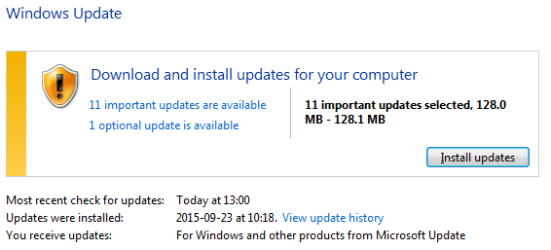
For example, doing that just now revealed a bunch of updates; see the second attachment for what it found.
Have you guys seen this too?
Is there any setting I can do to get the old notification back?
Or is this a sneaky plot to force us into choosing auto updating (which I detest).
See the first attachment for a screen shot of my settings for precise details.
It used to be that whenever M$ had updates available, they would pop up a notice dialog telling me to look into this.
But I noticed a couple of months ago that that notice dialog no longer appears. Instead, I have to manually open the Windows Update control panel and see if anything is available.
For example, doing that just now revealed a bunch of updates; see the second attachment for what it found.
Have you guys seen this too?
Is there any setting I can do to get the old notification back?
Or is this a sneaky plot to force us into choosing auto updating (which I detest).
Attachments

My Computer
At a glance
Windows 7 ProXeon E3-1245 v3
- Computer type
- PC/Desktop
- Computer Manufacturer/Model Number
- Dell
- OS
- Windows 7 Pro
- CPU
- Xeon E3-1245 v3
- Browser
- Firefox


